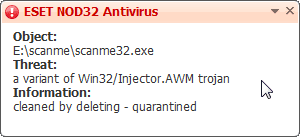
My apologies if this is in the wrong thread, but I'm not sure which category this would really fall under... I figured 'general discussion' would be the safest.
Since getting Windows 7, I've had some interesting experiences with my flash drive... I've never used ReadyBoost on it, I'm always very careful with keeping antivirus definitions up to date, etc etc. But something very strange has cropped up on my flash drive. Just in case is matters; I'm using a 4gb MicroSD inside a tiny USB adapter (makes it nice and small).
When I bring my flash to work and plug it into my XP Pro machine, the autorun doesn't come up anymore, and trying to open it through My Computer shows in a completely new Explorer window, which it never used to do.
Looking on the drive, I see a hidden (i.e., it's grey because I show hidden files) icon of the recycle bin labelled as 'scanme', and my autorun.inf contains the following:
(rest of code removed as my NOD32 keeps closing this page now with a warning)
I somehow doubt this is normal for flash drives, and Windows 7 shouldn't affect it in this way, should it? I could backup my data and format, but is this really something I should be worried about? AVG (at home) and NOD32 v4 (at work) both say it's clean, and autorun still works on my Windows 7 PC... But it's a bit frustrating and confusing to say the least.
Also, I must note that a Google search for "scanme32.exe" as referenced in the autorun doesn't return anything, the closest is "scan32.exe" as part of the McAfee AV suite, but I don't use any computers with that on anyway..
Any ideas?
PS: If I try delete either file, I get no errors, but they are back again when I remove and reconnect my flash drive to my XP machine.
Since getting Windows 7, I've had some interesting experiences with my flash drive... I've never used ReadyBoost on it, I'm always very careful with keeping antivirus definitions up to date, etc etc. But something very strange has cropped up on my flash drive. Just in case is matters; I'm using a 4gb MicroSD inside a tiny USB adapter (makes it nice and small).
When I bring my flash to work and plug it into my XP Pro machine, the autorun doesn't come up anymore, and trying to open it through My Computer shows in a completely new Explorer window, which it never used to do.
Looking on the drive, I see a hidden (i.e., it's grey because I show hidden files) icon of the recycle bin labelled as 'scanme', and my autorun.inf contains the following:
Code:
;é?????ämü??Í??à?s?ìõl???Q?I?O
[autorun
;fw?ALÊ???s&ÖOðsb?îvýðÞ
open=scanme/scanme32.exeI somehow doubt this is normal for flash drives, and Windows 7 shouldn't affect it in this way, should it? I could backup my data and format, but is this really something I should be worried about? AVG (at home) and NOD32 v4 (at work) both say it's clean, and autorun still works on my Windows 7 PC... But it's a bit frustrating and confusing to say the least.
Also, I must note that a Google search for "scanme32.exe" as referenced in the autorun doesn't return anything, the closest is "scan32.exe" as part of the McAfee AV suite, but I don't use any computers with that on anyway..
Any ideas?
PS: If I try delete either file, I get no errors, but they are back again when I remove and reconnect my flash drive to my XP machine.
Last edited:
My Computer
- Computer type
- PC/Desktop
- OS
- Win 10 x64 Pro x64 / Ubuntu 15.10 x64
- CPU
- Intel i7-4960X
- Motherboard
- Asus Rampage IV Black Edition
- Memory
- 4x8GB Corsair Dominator Platinum @2400MHz 10-12-12-31
- Graphics Card(s)
- 2x MSI GTX780Ti 3GB (SLI)
- Sound Card
- Onboard SupremeFX (Cirrus Logic CS4398)
- Monitor(s) Displays
- 3x LG Cinema 27" IPS LED (27MP65)
- Screen Resolution
- [1920x1080]x3
- Hard Drives
- Crucial M500 120GB, Crucial M500 480GB, Toshiba DT01ACA200 2TB
- PSU
- CoolerMaster V1000
- Case
- Corsair Obsidian 750D
- Cooling
- ThermalTake Water 3.0 Extreme, 4xSP120, 3xAF120
- Keyboard
- Moshi Luna
- Mouse
- Logitech G700s / Roccat Tyon
- Internet Speed
- 4Mb uncapped ADSL (Afrihost)
- Antivirus
- MS Security Essentials
- Browser
- Chrome... Duh. (:


 But yeah, virus scan would be good... Lol.