USB Flash Drive

enigma1944

New member
Member
VIP
Local time
10:04 PM
Messages
220
Location
Pittsburgh Pa USA Dresden German
Anyone know of a tutorial that explains how to load/unload a flash drive with W7.

Thanks
 

My Computer

Computer Manufacturer/Model Number
HP dv7-1247cl
OS
Windows 7 Home Premium x64
CPU
AMD TURION X2 DUAL CORE RM-72 ( 2 -CPU's ) 201 GHZ
Memory
3836 MB
Graphics Card(s)
ATI RADEON HD 3200
Sound Card
IDT HIGH DEFINITION AUDIO CODEC
Other Info
Pittsburgh, Pa
What are you trying to do?
Copy & Paste Data.
 

My Computer

OS
ME/XP/Vista/Win7
Do you mean how to insert and remove the flash drive?
 

My Computer

OS
Windows 7 Ultimate x64 SP1
CPU
Intel Core i7-2600
Motherboard
Gigabyte GA-P67A-UD3P-B3
Memory
12 GB Patriot Extreme DDR3-1333
Graphics Card(s)
Nvidia GTX 470
Monitor(s) Displays
Dell UltraSharp 2209WA
Hard Drives
OCZ Agility3 240 GB, WD5001AALS, WD7501AALS
PSU
OCZ ModStream 700W
Case
CoolerMaster HAF 912 Advanced
Cooling
CoolerMaster Hyper 212 Plus
Plug the flashdrive into desired usb port and wait for autoplay or access it directly from "My computer"

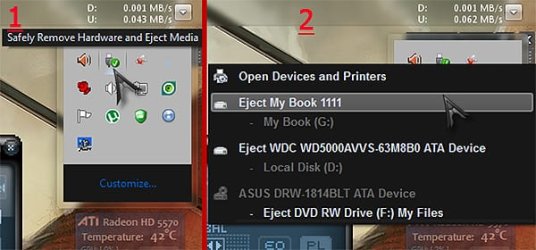
When you finish your work the safe way for removing is this.

usbrm.jpg

1. click оncе the usb devices icon in the tray and wait for the device panel
2. point chosen for removing device and click it again just оncе.
3. wait for message "the devise is ready for remove"

Thats it :)


==
Sometimes you can see message "the device is not ready for eject" That is because explorer, some antivirus program or other one has locked the device for something. In these moments you should wait and try again.
Sometimes microsoft office products play such tricks as they complete saving some file that have been used. :)
 

My Computer

Computer type
PC/Desktop
OS
Windows 7 Professional x64 sp1
CPU
Intel® Core™ i7-4790К@4600MHz/1.26V
Motherboard
ASRock Z97 PRO 4
Memory
16GB ADATA@1800Mhz
Graphics Card(s)
Gigabyte GTX 660 WF OC
Sound Card
Realtek ALC892
Monitor(s) Displays
Toshiba 32HL833 [32" S-IPS FULL LED]
Screen Resolution
1920x1080
Hard Drives
Samsung 840 Pro 128GB; 0,5TB WD + 2TB WD; 3TB SG|
PSU
Seasonic X-650 SS-650KM3 Gold
Case
Fractal Design 3000 USB3
Cooling
Noctua NH-D14
Keyboard
CM Storm QuickFire Ultimate
Mouse
Mionix Naos 7000
Internet Speed
100Mbps
Antivirus
Eset NOD32
Browser
Firefox
Other Info
+ ASUS DRW-1814BLT
+ Trust Dual Stick Gamepad (GM-1520)
+ Repotec 1000VA Line interactive UPS
What are you trying to do?
Copy & Paste Data.

No I want to remove all data and reuse it again for something else
 

My Computer

Computer Manufacturer/Model Number
HP dv7-1247cl
OS
Windows 7 Home Premium x64
CPU
AMD TURION X2 DUAL CORE RM-72 ( 2 -CPU's ) 201 GHZ
Memory
3836 MB
Graphics Card(s)
ATI RADEON HD 3200
Sound Card
IDT HIGH DEFINITION AUDIO CODEC
Other Info
Pittsburgh, Pa
Plug the flashdrive into desired usb port and wait for autoplay or access it directly from "My computer"

When you finish your work the safe way for removing is this.

View attachment 170402

1. click оncе the usb devices icon in the tray and wait for the device panel
2. point chosen for removing device and click it again just оncе.
3. wait for message "the devise is ready for remove"

Thats it :)


==
Sometimes you can see message "the device is not ready for eject" That is because explorer, some antivirus program or other one has locked the device for something. In these moments you should wait and try again.
Sometimes microsoft office products play such tricks as they complete saving some file that have been used. :)

OK thanks that is what I needed
 

My Computer

Computer Manufacturer/Model Number
HP dv7-1247cl
OS
Windows 7 Home Premium x64
CPU
AMD TURION X2 DUAL CORE RM-72 ( 2 -CPU's ) 201 GHZ
Memory
3836 MB
Graphics Card(s)
ATI RADEON HD 3200
Sound Card
IDT HIGH DEFINITION AUDIO CODEC
Other Info
Pittsburgh, Pa
Back
Top