
Hi,
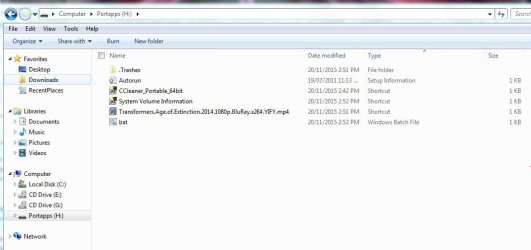
A few minutes ago I copied a movie from my in-laws laptop into my USB flash containing portableapps launcher and other folders and files, but when I immediately opened the usb flash in windows explorer, I noticed that all my files and folders were not there except what can be seen in the attached image. So I immediately closed the windows explorer and scanned the usb flash first with AVG Internet Security and because nothing was detected, I then scanned it again with Malwarebytes Antimalware but it found nothing too. During the scanning of both security tools, I could see that all my files and folders were put into .Trashes folder.
Anyone with and idea or opinion or advice, please do help me out.
Best and God bless,
z.
A few minutes ago I copied a movie from my in-laws laptop into my USB flash containing portableapps launcher and other folders and files, but when I immediately opened the usb flash in windows explorer, I noticed that all my files and folders were not there except what can be seen in the attached image. So I immediately closed the windows explorer and scanned the usb flash first with AVG Internet Security and because nothing was detected, I then scanned it again with Malwarebytes Antimalware but it found nothing too. During the scanning of both security tools, I could see that all my files and folders were put into .Trashes folder.
Anyone with and idea or opinion or advice, please do help me out.
Best and God bless,
z.
Attachments
Last edited:
My Computer
At a glance
Windows 7 Ultimate x64 SP1Intel Core i3-3110M CPU @ 2.4GHz, 2 Core (s),...4.0GB RAMIntel HD Graphics 4000
- Computer type
- Laptop
- Computer Manufacturer/Model Number
- Toshiba Satellite C875
- OS
- Windows 7 Ultimate x64 SP1
- CPU
- Intel Core i3-3110M CPU @ 2.4GHz, 2 Core (s), 4 Logical Proc
- Memory
- 4.0GB RAM
- Graphics Card(s)
- Intel HD Graphics 4000
