USB hard drive ejection killing keyboard

gabor

New member
Local time
6:38 PM
Messages
3
Hi. I have problem when trying to remove a USB connected disk drive; whenever I click on the icon in the bottom right of the task bar and choose the device to eject, once it's removed I also lose my USB keyboard - I have to manually unplug it then replug it to get it working again.

I only seem to have this problem with this particular drive, my USB stick doesn't provoke this problem.

The hard drive is a rather old Maxtor 60G, NTFS.

Weirdly, the mouse, which is connected by USB through a port on the keyboard, continues to function normally... The keyboard is from Apple, the aluminium Apple model. I never had this problem with Vista.

Any Ideas?
 

My Computer

OS
windows 7
Hi gabor, that's a really weird problem!.....
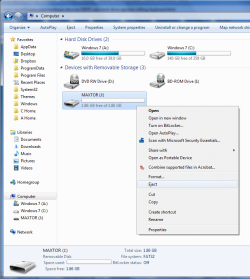
Have you tried to eject it from Explorer??

hjhj.png
 

My Computer

Computer Manufacturer/Model Number
HP Touchsmart IQ771.uk
OS
Windows 7 Ultimate x64
CPU
AMD Turion(tm) 64 X2 Mobile Technology TL-56
Motherboard
ASUS Pheonix
Memory
3GB Nanya PC2-6400 DDR2-SDRAM SO-DIM (400MHz)
Graphics Card(s)
NVIDIA GeForce Go 7600 256MB GDDR3 SDRAM
Sound Card
High Definition Intergrated NVIDIA MCP51
Monitor(s) Displays
46" Sony Bravia HDTV
Screen Resolution
1600x1200
Hard Drives
1.5TB Samsug
320GB Seagate ST3320820AS - SATA 3Gb/s 8MB
500GB Maxtor Basics STM305003EHD301-RK
Internet Speed
↓6.32 Mb/s ↑0.35 Mb/s ↔26ms
Other Info
BIOS - American Megatrends Inc. 5.07
Ethernet Port - NVIDIA nForce 10/100/1000 Mbps
DVD Drive - TSSTcorp DVDR/RW TS-T632L
Hi,

Yeah, I have tried that, but the eject option isn't available with this drive... It seems to be a problem with the hard drive itself, which works fine, but doesn't seem to be recognised properly by Win 7.
 

My Computer

OS
windows 7
Hi,

Yeah, I have tried that, but the eject option isn't available with this drive... It seems to be a problem with the hard drive itself, which works fine, but doesn't seem to be recognised properly by Win 7.

Why do you think it's your HDD?
It sounds to me like it's maybe a problem with your MB (I'm no hardware expert, just speculating here). If all of the other USB ports work fine but the one you have your keyboard & mouse connect to then surely this is the tree we need to be barking up?
Thinking about it, if the mouse is connected via a port on the keyboard then it should still work as normal as it's not depending on the keyboard actually functioning, but relying on the keyboard's power supply.

Anyway, have you looked at the event viewer and the device manager to see if any issues are present?
 

My Computer

Computer Manufacturer/Model Number
HP Touchsmart IQ771.uk
OS
Windows 7 Ultimate x64
CPU
AMD Turion(tm) 64 X2 Mobile Technology TL-56
Motherboard
ASUS Pheonix
Memory
3GB Nanya PC2-6400 DDR2-SDRAM SO-DIM (400MHz)
Graphics Card(s)
NVIDIA GeForce Go 7600 256MB GDDR3 SDRAM
Sound Card
High Definition Intergrated NVIDIA MCP51
Monitor(s) Displays
46" Sony Bravia HDTV
Screen Resolution
1600x1200
Hard Drives
1.5TB Samsug
320GB Seagate ST3320820AS - SATA 3Gb/s 8MB
500GB Maxtor Basics STM305003EHD301-RK
Internet Speed
↓6.32 Mb/s ↑0.35 Mb/s ↔26ms
Other Info
BIOS - American Megatrends Inc. 5.07
Ethernet Port - NVIDIA nForce 10/100/1000 Mbps
DVD Drive - TSSTcorp DVDR/RW TS-T632L
Thanks rsvr85, the device manager doesn't show anything unusual. My MB has the most up to date bios, and I've tried other available usb ports for the keyboard but the same thing happens.

In fact, there's another anomoly: I just tried again to eject the HD, and it ejected fine and did not cause the keyboard to freeze, but as soon as I turn the power switch on the external hard drive box to off (after HD ejection), I lose the keyboard and the mouse. The computer itself doesn't freeze, I can see activity running, it just breaks the connection for the keyboard and mouse.

EDIT to add: I changed the external HD usb port, tried again, and this time it worked fine, keyboard and mouse still running ok after ejection and powering down of HD. I can only presume one of the usb ports is faulty, I'll avoid using it unless I have to.
 

My Computer

OS
windows 7
Back
Top