USB Hard Drive will not initialize

azskycop

New member
Local time
9:54 PM
Messages
6
I have a problem with an external 3tb drive that was working fine. This morning the computer locked up and after a re-boot the drive was could not be seen at all listed in "computer"

In "disk management" it shows "drive 2" but will not initialize, now it will not even give the option to try to initialize. A right click only says "offline, Properties, and help". Properties does say the device is working correctly.

"diskpart" "list" command only shows disk 0 and disk1. However if I use "select disk 2" it will say "disk 2 is now the selected disk". Anything after that I get an error message.

I have tried plugging into other computers, no luck. Tried several recovery programs, none of them can "see" the disk.

I am guessing the file system is corrupt. Is there a way to recover this without deleting all info on the disk????

Please help.

Thanks!!!
 

My Computer

OS
Windows7 Home Premium 64 bit
Hi,

Try this from Partition Wizard - note it will take several hours to perform an in-depth scan.

Good luck,
Golden
 

My Computer

Computer type
PC/Desktop
Computer Manufacturer/Model Number
Golden Mk. I.4
OS
Windows 10 Pro x64 ; Xubuntu x64
CPU
Intel i7 860 @ 2.80 GHz O/C'ed to 4.0GHz
Motherboard
Gigabyte P55A-UD3R Rev.1. Award BIOS F13
Memory
16GB Corsair Vengance DDR3 @ 661 MHz Dual Channel (9-9-9-24)
Graphics Card(s)
EVGA NVidia GTX 560 1024MB
Sound Card
Realtek Integrated
Monitor(s) Displays
Dual Samsung SyncMaster 2494HS
Screen Resolution
1920*1080 and 1920*1080
Hard Drives
1*Samsung 840 EVO 120GB SSD;
1*OCZ Vertex 2 60GB SSD;
2*Samsung F3 SpinPoint 1TB in RAID0;
1*Samsung F1 SpinPoint 1TB;
2*Western Digital 1TB External USB 3.0
1*Western Digital 500GB External USB 3.0
1*Seagate 500GB External USB 2.0
PSU
Thermaltake ToughPower QFan 750W
Case
Thermaltake Element S VK60001W2Z
Cooling
Corsair H60 Water Cooling, 2*230mm and 2*80mm case fans
Keyboard
Logitech G110
Mouse
Logitech MX518
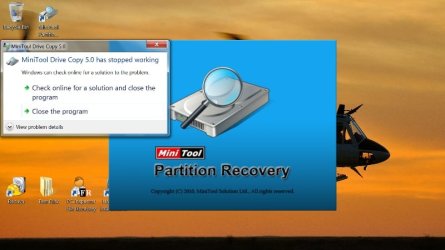
Ok so now this is interesting. I downloaded and installed that software. It will run just fine if the USB drive is disconnected. However if I plug the drive in after the software is run it does not see the drive.

If the USB drive is connected the software fails to run up and I get the following error message: "Mini tool 5 has stopped working"

This happens as soon as I try to start the program.

Any suggestions?????
 

Attachments

  • Desktop (2).jpg
    Desktop (2).jpg
    62.6 KB · Views: 42

My Computer

OS
Windows7 Home Premium 64 bit
Try plugging in the drive after starting the program - will it refresh to show the drive?
 

My Computer

Computer type
PC/Desktop
Computer Manufacturer/Model Number
Golden Mk. I.4
OS
Windows 10 Pro x64 ; Xubuntu x64
CPU
Intel i7 860 @ 2.80 GHz O/C'ed to 4.0GHz
Motherboard
Gigabyte P55A-UD3R Rev.1. Award BIOS F13
Memory
16GB Corsair Vengance DDR3 @ 661 MHz Dual Channel (9-9-9-24)
Graphics Card(s)
EVGA NVidia GTX 560 1024MB
Sound Card
Realtek Integrated
Monitor(s) Displays
Dual Samsung SyncMaster 2494HS
Screen Resolution
1920*1080 and 1920*1080
Hard Drives
1*Samsung 840 EVO 120GB SSD;
1*OCZ Vertex 2 60GB SSD;
2*Samsung F3 SpinPoint 1TB in RAID0;
1*Samsung F1 SpinPoint 1TB;
2*Western Digital 1TB External USB 3.0
1*Western Digital 500GB External USB 3.0
1*Seagate 500GB External USB 2.0
PSU
Thermaltake ToughPower QFan 750W
Case
Thermaltake Element S VK60001W2Z
Cooling
Corsair H60 Water Cooling, 2*230mm and 2*80mm case fans
Keyboard
Logitech G110
Mouse
Logitech MX518
I tried that and the program only gives options for "back" and "next". It does not show the drive at all. I would like to keep the data on the drive but there is nothing that critical. I guess I could format it if all else fails, don't know if that would even work at this point though.

Let me know if you have any other ideas.....thanks for the help.
 

My Computer

OS
Windows7 Home Premium 64 bit
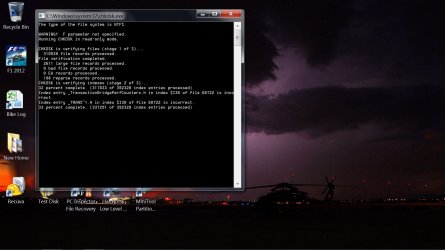
Don't know if it helps but when I run "chkdsk" I get this: (sorry about the resolution but it had to be big to read)......also the drive in question was labeled "F" if that matters.
 

Attachments

  • Desktop.jpg
    Desktop.jpg
    150.1 KB · Views: 201

My Computer

OS
Windows7 Home Premium 64 bit
Back
Top