USB-IF posts first photos of new reversible Type-C connector

   Warning
Let's keep this discussion friendly shall we. :sarc:


My Computer My Computer

At a glance

64-bit Windows 11 Pro for WorkstationsIntel i7-8700K OC'd to 5 GHz64 GB (4x16GB) G.SKILL TridentZ RGB DDR4 3600...ASUS ROG-STRIX-GTX1080TI-O11G-GAMING
Computer type
PC/Desktop
Computer Manufacturer/Model Number
Self built custom
OS
64-bit Windows 11 Pro for Workstations
CPU
Intel i7-8700K OC'd to 5 GHz
Motherboard
ASUS ROG Maximus XI Formula Z390
Memory
64 GB (4x16GB) G.SKILL TridentZ RGB DDR4 3600 MHz
Graphics Card(s)
ASUS ROG-STRIX-GTX1080TI-O11G-GAMING
Sound Card
Integrated
Monitor(s) Displays
2 x Samsung Odyssey G7 27"
Screen Resolution
2560x1440
Hard Drives
1TB Samsung 990 PRO M.2,
4TB Samsung 990 PRO PRO M.2,
TerraMaster F8 SSD Plus NAS
PSU
Seasonic Prime Titanium 850W
Case
Thermaltake Core P3
Cooling
Corsair Hydro H115i
Keyboard
Logitech wireless K800
Mouse
Logitech MX Master 4
Internet Speed
2 Gb/s Download and 100 Mb/s Upload
Antivirus
Malwarebyte Anti-Malware Premium
Browser
Google Chrome
Other Info
Logitech Z625 speaker system,
Logitech BRIO 4K Pro webcam,
HP Color LaserJet Pro MFP M477fdn,
APC SMART-UPS RT 1000 XL - SURT1000XLI,
Galaxy S23 Plus phone
The new C type USB connector is a great idea and eventually will allow consolidating cable types into fewer cables but will not be without disadvantages, such as being another type of cable we will have to keep knocking about until our hardware is C type compliant, more adapters and/or adaptor cables to mate old hardware to newer hardware, obsolescence due to new standards being adopted, etc.
That will work until the corrupt and/or stupid tech corporations get involved (Apple, Google, MS, etc.).
I have little doubt that one (if not all) of them will bring out their own "specially enhanced" versions.

One thing I wish manufacturers would start doing is to quit permanently attaching USB cables to peripherals, such as keyboards, mice, hubs, external drives, etc. (the cheap *&^%$#@!s that put a useless 6-12" stub on some things should be shot). The cables are pretty much always too long or too short. Instead, just put a port on the peripheral and let us buy the correct cable for our needs so we don't have to find a place for extra cable length or hunt up extension cables. Also, if a permanently attached cable gets damaged, the peripheral is generally lunched whereas a separate cable can be easily replaced. If the peripheral died, a separate cable would probably be reusable. And including even separate cables is a bad idea since, again, they are highly unlikely to be the correct length. Because of that, I have a huge collection of USB cables yet rarely have the one I need.
I can't see that happening.
The reasons that you highlight as issues, are the very reasons they won't do it. :mad:
 

My Computer My Computer

At a glance

W7 Ultimate SP1, LM19.2 MATE, W10 Home 1703, ...AMD Phenom II x6 1100T, 3.3 GHz12GB DDR3 1333 G-Skill (4GB x 2), G-Skill (2G...NVIDIA GeForce GTX 660
Computer type
PC/Desktop
Computer Manufacturer/Model Number
n/a
OS
W7 Ultimate SP1, LM19.2 MATE, W10 Home 1703, W10 Pro 1703 VM, #All 64 bit
CPU
AMD Phenom II x6 1100T, 3.3 GHz
Motherboard
ASUS M4A88T-M/USB3 (AM3)
Memory
12GB DDR3 1333 G-Skill (4GB x 2), G-Skill (2GB x 2)
Graphics Card(s)
NVIDIA GeForce GTX 660
Sound Card
Realtek?
Monitor(s) Displays
Samsung S23B350
Screen Resolution
1920x1080
Hard Drives
WD Green 2TB (SATA), WD Green 3TB (SATA), WD Blue 4TB (SATA), WD Blue 6TB (SATA)
PSU
Cooler Master
Case
Antec GX300 Tower
Cooling
3x Antec TRICOOL 120mm Fans
Mouse
Wired Optical
Internet Speed
DSL
Antivirus
Avast
Browser
Pale Moon (64 bit)
Other Info
2018-12-27 Upgraded HDDs
2015-12-10 Upgraded case, graphics card, storage
2015-08-15 Upgraded motherboard & RAM
2015-07-15 Upgraded LM17.1 to LM17.2
The new C type USB connector is a great idea and eventually will allow consolidating cable types into fewer cables but will not be without disadvantages, such as being another type of cable we will have to keep knocking about until our hardware is C type compliant, more adapters and/or adaptor cables to mate old hardware to newer hardware, obsolescence due to new standards being adopted, etc.
That will work until the corrupt and/or stupid tech corporations get involved (Apple, Google, MS, etc.).
I have little doubt that one (if not all) of them will bring out their own "specially enhanced" versions.

One thing I wish manufacturers would start doing is to quit permanently attaching USB cables to peripherals, such as keyboards, mice, hubs, external drives, etc. (the cheap *&^%$#@!s that put a useless 6-12" stub on some things should be shot). The cables are pretty much always too long or too short. Instead, just put a port on the peripheral and let us buy the correct cable for our needs so we don't have to find a place for extra cable length or hunt up extension cables. Also, if a permanently attached cable gets damaged, the peripheral is generally lunched whereas a separate cable can be easily replaced. If the peripheral died, a separate cable would probably be reusable. And including even separate cables is a bad idea since, again, they are highly unlikely to be the correct length. Because of that, I have a huge collection of USB cables yet rarely have the one I need.
I can't see that happening.
The reasons that you highlight as issues, are the very reasons they won't do it. :mad:

Sadly, you are probably correct.
 

My Computer My Computer

At a glance

Win 7 Ultimate 64 bitIntel i7-3930KKingston HyperX Genesis 32GB Kit (8x4GB Modul...MSI R7850 Twin Frozr 2GD5/OC Radeon HD 7850 2...
Computer type
PC/Desktop
Computer Manufacturer/Model Number
Custom Build
OS
Win 7 Ultimate 64 bit
CPU
Intel i7-3930K
Motherboard
ASUS P9X79 WS
Memory
Kingston HyperX Genesis 32GB Kit (8x4GB Modules) 1600MHz DDR
Graphics Card(s)
MSI R7850 Twin Frozr 2GD5/OC Radeon HD 7850 2GB 256-bit GDDR
Sound Card
Asus Xonar Essence STX
Monitor(s) Displays
3x Asus VG248QE 24", Vizio 32" TV
Screen Resolution
1920 x 1080, ?
Hard Drives
Samsung 128GB 840 Pro SSD (1),
Samsung 4TB 850 EVO SSDs (4)
Samsung 4TB 850 EVO SSDs (16) external backup drives used in 2.5" hot swap bays in the computer.
PSU
Corsair HX750w
Case
Antec Two Hundred v2 (modified)
Cooling
Cooler Master GeminII S524 120mm (fan replaced with a 140mm)
Keyboard
Logitech G510s
Mouse
Logitech M525 (two in use)
Internet Speed
=< 32Mbps down, 8Mbps up
Antivirus
AVAST!, MBAM, SAS, Spybot S&D (all but MBAM free) Glary Util
Browser
IE11
Other Info
LSI 9211-8i HBA card (8 SATA III ports), 2.5" & 3.5" Hot Swap Bays, HooToo HT-CR001 PCI-E to USB 3.0 Internal Hub + 6 Slot Card Reader, and LG Model CH12LS28 BD-ROM Optical Drive. Also, ScanSnap S1500 ADF duplexing scanner, Canon 9000F flat bed scanner, Corsair SP2500 2.1 speakers, Samsung CLP 415nw laser color printer, Cyberpower PP2200SW UPS
My keyboards and mice/trackballs are all wireless and cordless anyway. So is my printer. Speaking of printers, I've noticed some manufactures have stopped including the USB cable, and I'm not talking about wireless printers. Be careful what you wish for as you could end up buying a keyboard with "cable not included" written on the box. I don't see it happening. On a mouse, you'd have the possibility of the cable coming unplugged at the mouse end. That means an extra clip or something to make sure it stays plugged in. That's just more expense in manufacturing. Same with your keyboard, it just adds to the price with no real benefit. I wear the keys out long before I ever break a cord.
 

My Computer My Computer

At a glance

Windows 10 Education 64 bitAMD Phenom II X4 980 Black Edition Deneb 3.7GHz8GB 4GBx2 Kingston PC10600 DDR3 1333 MemoryZotac NVIDIA Geforce GT640 2 Gig DDR3 PCIe
Computer type
PC/Desktop
Computer Manufacturer/Model Number
Home Built
OS
Windows 10 Education 64 bit
CPU
AMD Phenom II X4 980 Black Edition Deneb 3.7GHz
Motherboard
Asus M4N68T-M V2 µATX Motherboard
Memory
8GB 4GBx2 Kingston PC10600 DDR3 1333 Memory
Graphics Card(s)
Zotac NVIDIA Geforce GT640 2 Gig DDR3 PCIe
Sound Card
VIA VT1708s High Definition Audio 8-channel Onboard
Monitor(s) Displays
22" LG E2242 1080p and 2 19" I-INC AG191D
Screen Resolution
1280x1024 - 1920x1080 - 1280x1024
Hard Drives
Crucial M100 256 GB SSD and 500 GB WD Blue SATA
PSU
Thermaltake TR 620
Case
Power Up Black ATX Mid-Tower Case
Cooling
Stock heatsink and fan
Keyboard
Logitech Wireless K350 Wave
Mouse
Logitech Wireless M570 Trackman Wheel
Internet Speed
80 Mbps Down 30 Mbps Up
Antivirus
Windows Defender
Browser
Internet Explorer 11
Other Info
HP DVD1040e Lightscribe - External USB2
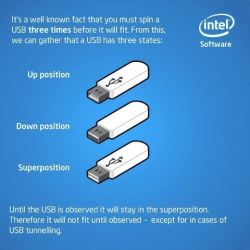
I've always wondered why it takes more than one flip of a usb connector to get it right:

usb-superposition-explained-by-intel.png
 

My Computer My Computer

At a glance

Windows 7 Ultimate x86 and x64
Computer type
PC/Desktop
Computer Manufacturer/Model Number
Dell, HP, Toshiba, Compaq
OS
Windows 7 Ultimate x86 and x64
My keyboards and mice/trackballs are all wireless and cordless anyway. So is my printer. Speaking of printers, I've noticed some manufactures have stopped including the USB cable, and I'm not talking about wireless printers. Be careful what you wish for as you could end up buying a keyboard with "cable not included" written on the box. I don't see it happening. On a mouse, you'd have the possibility of the cable coming unplugged at the mouse end. That means an extra clip or something to make sure it stays plugged in. That's just more expense in manufacturing. Same with your keyboard, it just adds to the price with no real benefit. I wear the keys out long before I ever break a cord.

My mice and printer are wireless. I use a wired USB keyboard because I prefer ones that have backlit keys mostly so the characters on the keys won't wear off in a few months (because of my ADHD, I can't learn to touch type—believe me, I tried— and need those characters on the keys) but also because I can't get good wireless keyboards that have decent macro keys. Every wireless backlit keyboard I saw had permanently installed batteries that had to be charged with a USB cable; rather than horse around digging out a cable, routing it, then putting it away again, I just opted to use a wired keyboard. They cost less and the selection is better anyway. The keyboard I have now and the two before all had 6' cables which are a bit shorter than I like. 7' or 8' would have been better. I opted out of using an extension on that cable since I can get by without one but also because if I have to pull out the cable, it would be my luck it would pull out of the extension before it complete cleared behind my desk. I'm old, handicapped, and having problems with my right hip and just don't feel like digging around behind my desk if I don't have to. It would be a heck of a lot handier to be able to both be able to get the correct length of cable separately and to be able to just unplug the cable from the back of the keyboard than to have to route the entire cable when changing keyboards, not to mention not having to pay for the attached lengths of cables on every keyboard when one cable can be reused.

My scanners came with USB cables but I didn't use them. I used a longer cable with my ADF scanner on the left side of my desk and a shorter one for the flatbed scanner on the night stand on the right side of my desk immediately to the left of the computer itself. The two USB cables that came with the scanners were the same length and were the wrong length for what I needed. I had to pay for those unused cables and would have been better off not getting them.

The little two port USB 3.0 hub on my desk (one port would have been better but I didn't like the few one port hubs I saw) came with a lousy two foot stub of a USB cable attached to it, a hopelessly too short length. I was forced to get an extension for that one. I needed the hub because my computer is located close to where I have to walk when leaving the room (don't suggest moving it; there is no other place to put it) and a USB stick would be in danger of getting knocked off every time I left the room.

I can see the issue of a cable coming unplugged from a mouse when in use and don't disagree with you there. But, for pretty much everything else, I definitely wish manufacturers would stop attaching USB cables to their devices. Besides the length issue, I would have had to throw out a perfectly good HDD dock if I hadn't been able to replace the cable that came with it when it went bad.
 

My Computer My Computer

At a glance

Win 7 Ultimate 64 bitIntel i7-3930KKingston HyperX Genesis 32GB Kit (8x4GB Modul...MSI R7850 Twin Frozr 2GD5/OC Radeon HD 7850 2...
Computer type
PC/Desktop
Computer Manufacturer/Model Number
Custom Build
OS
Win 7 Ultimate 64 bit
CPU
Intel i7-3930K
Motherboard
ASUS P9X79 WS
Memory
Kingston HyperX Genesis 32GB Kit (8x4GB Modules) 1600MHz DDR
Graphics Card(s)
MSI R7850 Twin Frozr 2GD5/OC Radeon HD 7850 2GB 256-bit GDDR
Sound Card
Asus Xonar Essence STX
Monitor(s) Displays
3x Asus VG248QE 24", Vizio 32" TV
Screen Resolution
1920 x 1080, ?
Hard Drives
Samsung 128GB 840 Pro SSD (1),
Samsung 4TB 850 EVO SSDs (4)
Samsung 4TB 850 EVO SSDs (16) external backup drives used in 2.5" hot swap bays in the computer.
PSU
Corsair HX750w
Case
Antec Two Hundred v2 (modified)
Cooling
Cooler Master GeminII S524 120mm (fan replaced with a 140mm)
Keyboard
Logitech G510s
Mouse
Logitech M525 (two in use)
Internet Speed
=< 32Mbps down, 8Mbps up
Antivirus
AVAST!, MBAM, SAS, Spybot S&D (all but MBAM free) Glary Util
Browser
IE11
Other Info
LSI 9211-8i HBA card (8 SATA III ports), 2.5" & 3.5" Hot Swap Bays, HooToo HT-CR001 PCI-E to USB 3.0 Internal Hub + 6 Slot Card Reader, and LG Model CH12LS28 BD-ROM Optical Drive. Also, ScanSnap S1500 ADF duplexing scanner, Canon 9000F flat bed scanner, Corsair SP2500 2.1 speakers, Samsung CLP 415nw laser color printer, Cyberpower PP2200SW UPS
I've always wondered why it takes more than one flip of a usb connector to get it right:

View attachment 313671

LOL! Good one! However, I still fail to see how which way to insert a USB connector is such a huge issue. All but rear ports on a computer can be seen and it only takes a quick glance to see which way to turn the connector. If one has to frequently plug and unplug a USB cable from a rear port and is having a problem doing so for whatever reason, one could always run an extension cable to where one can see it (I actually considered that instead of using a hub on my desk). My UPS usually has to have the USB cable disconnected and reconnected every time I reboot before the computer can "see" the UPS (I occasionally get lucky). I could disconnect and reconnect the cable at the UPS but the UPS is on the floor and my old back has serious objections to me bending over. It's actually easier for me to reach behind the computer, pull the USB connector there, then plug it back in. I can't see what it is I'm doing yet it isn't a problem.
 

My Computer My Computer

At a glance

Win 7 Ultimate 64 bitIntel i7-3930KKingston HyperX Genesis 32GB Kit (8x4GB Modul...MSI R7850 Twin Frozr 2GD5/OC Radeon HD 7850 2...
Computer type
PC/Desktop
Computer Manufacturer/Model Number
Custom Build
OS
Win 7 Ultimate 64 bit
CPU
Intel i7-3930K
Motherboard
ASUS P9X79 WS
Memory
Kingston HyperX Genesis 32GB Kit (8x4GB Modules) 1600MHz DDR
Graphics Card(s)
MSI R7850 Twin Frozr 2GD5/OC Radeon HD 7850 2GB 256-bit GDDR
Sound Card
Asus Xonar Essence STX
Monitor(s) Displays
3x Asus VG248QE 24", Vizio 32" TV
Screen Resolution
1920 x 1080, ?
Hard Drives
Samsung 128GB 840 Pro SSD (1),
Samsung 4TB 850 EVO SSDs (4)
Samsung 4TB 850 EVO SSDs (16) external backup drives used in 2.5" hot swap bays in the computer.
PSU
Corsair HX750w
Case
Antec Two Hundred v2 (modified)
Cooling
Cooler Master GeminII S524 120mm (fan replaced with a 140mm)
Keyboard
Logitech G510s
Mouse
Logitech M525 (two in use)
Internet Speed
=< 32Mbps down, 8Mbps up
Antivirus
AVAST!, MBAM, SAS, Spybot S&D (all but MBAM free) Glary Util
Browser
IE11
Other Info
LSI 9211-8i HBA card (8 SATA III ports), 2.5" & 3.5" Hot Swap Bays, HooToo HT-CR001 PCI-E to USB 3.0 Internal Hub + 6 Slot Card Reader, and LG Model CH12LS28 BD-ROM Optical Drive. Also, ScanSnap S1500 ADF duplexing scanner, Canon 9000F flat bed scanner, Corsair SP2500 2.1 speakers, Samsung CLP 415nw laser color printer, Cyberpower PP2200SW UPS
@ Lady Fitzgerald, I have a box full of various USB cables. When one of my devices finally dies I save the cable. My wireless laser printer came with a USB cable. Its really only good for doing the setup as its only about 2 feet long. My all in one didn't come with any cable but I already had an extra long USB cable that I used with its predecessor. It's on the opposite side of my desk from my tower. Other than a keyboard or mouse the only thing I have here with a permanently attached cable is my USB floppy drive. All my external drive enclosures have a detachable cable. Mine are all add your own drive versions so no surprise there. I have had a cable fail on a mouse many years ago, I think it was a PS2 mouse though. A wire broke right where the cable entered the mouse. There's a good and bad side to just about everything so there you go.
 

My Computer My Computer

At a glance

Windows 10 Education 64 bitAMD Phenom II X4 980 Black Edition Deneb 3.7GHz8GB 4GBx2 Kingston PC10600 DDR3 1333 MemoryZotac NVIDIA Geforce GT640 2 Gig DDR3 PCIe
Computer type
PC/Desktop
Computer Manufacturer/Model Number
Home Built
OS
Windows 10 Education 64 bit
CPU
AMD Phenom II X4 980 Black Edition Deneb 3.7GHz
Motherboard
Asus M4N68T-M V2 µATX Motherboard
Memory
8GB 4GBx2 Kingston PC10600 DDR3 1333 Memory
Graphics Card(s)
Zotac NVIDIA Geforce GT640 2 Gig DDR3 PCIe
Sound Card
VIA VT1708s High Definition Audio 8-channel Onboard
Monitor(s) Displays
22" LG E2242 1080p and 2 19" I-INC AG191D
Screen Resolution
1280x1024 - 1920x1080 - 1280x1024
Hard Drives
Crucial M100 256 GB SSD and 500 GB WD Blue SATA
PSU
Thermaltake TR 620
Case
Power Up Black ATX Mid-Tower Case
Cooling
Stock heatsink and fan
Keyboard
Logitech Wireless K350 Wave
Mouse
Logitech Wireless M570 Trackman Wheel
Internet Speed
80 Mbps Down 30 Mbps Up
Antivirus
Windows Defender
Browser
Internet Explorer 11
Other Info
HP DVD1040e Lightscribe - External USB2
I find myself working on lots of older computers. Many, if not most, are on the floor in a room with insufficient light. The older Dells, with the usb ports behind a flip-up door and angled downward are the worst! I can NEVER get a plug inserted without getting down on the floor, usually with a flashlight. Almost as bad are the ones in a recess at the bottom of the case. Again, I can't actually see the port without getting down on the floor. My sense of touch is also not a lot of help, a firewire port feels the same as a usb. I can usually get connected to the rear mounted ports by feel. Now that the front ports are being mounted higher up on the case, I don't have nearly as much trouble.

I, for one, am very pleased with the prospect of a reversible plug.
 

My Computer My Computer

At a glance

Windows 7 Ultimate x86 and x64
Computer type
PC/Desktop
Computer Manufacturer/Model Number
Dell, HP, Toshiba, Compaq
OS
Windows 7 Ultimate x86 and x64
I find myself working on lots of older computers. Many, if not most, are on the floor in a room with insufficient light. The older Dells, with the usb ports behind a flip-up door and angled downward are the worst! I can NEVER get a plug inserted without getting down on the floor, usually with a flashlight. Almost as bad are the ones in a recess at the bottom of the case. Again, I can't actually see the port without getting down on the floor. My sense of touch is also not a lot of help, a firewire port feels the same as a usb. I can usually get connected to the rear mounted ports by feel. Now that the front ports are being mounted higher up on the case, I don't have nearly as much trouble.

I, for one, am very pleased with the prospect of a reversible plug.

I never said that a reversible USB plug wasn't a good idea. I just said that I feel the problems with non-reversible USB plugs is blown out of proportion. All the complaints I've seen so far will also apply to video cables, PS/2 cables, etc.
 

My Computer My Computer

At a glance

Win 7 Ultimate 64 bitIntel i7-3930KKingston HyperX Genesis 32GB Kit (8x4GB Modul...MSI R7850 Twin Frozr 2GD5/OC Radeon HD 7850 2...
Computer type
PC/Desktop
Computer Manufacturer/Model Number
Custom Build
OS
Win 7 Ultimate 64 bit
CPU
Intel i7-3930K
Motherboard
ASUS P9X79 WS
Memory
Kingston HyperX Genesis 32GB Kit (8x4GB Modules) 1600MHz DDR
Graphics Card(s)
MSI R7850 Twin Frozr 2GD5/OC Radeon HD 7850 2GB 256-bit GDDR
Sound Card
Asus Xonar Essence STX
Monitor(s) Displays
3x Asus VG248QE 24", Vizio 32" TV
Screen Resolution
1920 x 1080, ?
Hard Drives
Samsung 128GB 840 Pro SSD (1),
Samsung 4TB 850 EVO SSDs (4)
Samsung 4TB 850 EVO SSDs (16) external backup drives used in 2.5" hot swap bays in the computer.
PSU
Corsair HX750w
Case
Antec Two Hundred v2 (modified)
Cooling
Cooler Master GeminII S524 120mm (fan replaced with a 140mm)
Keyboard
Logitech G510s
Mouse
Logitech M525 (two in use)
Internet Speed
=< 32Mbps down, 8Mbps up
Antivirus
AVAST!, MBAM, SAS, Spybot S&D (all but MBAM free) Glary Util
Browser
IE11
Other Info
LSI 9211-8i HBA card (8 SATA III ports), 2.5" & 3.5" Hot Swap Bays, HooToo HT-CR001 PCI-E to USB 3.0 Internal Hub + 6 Slot Card Reader, and LG Model CH12LS28 BD-ROM Optical Drive. Also, ScanSnap S1500 ADF duplexing scanner, Canon 9000F flat bed scanner, Corsair SP2500 2.1 speakers, Samsung CLP 415nw laser color printer, Cyberpower PP2200SW UPS
It's always fun when I have to take my tower out from under my desk for maintenance. Actually that's the easy part, the fun starts when I have to plug everything back in. Power cord, two DVI cables, an HDMI cable, two audio cables, network cable and umpteen USB cables. Don't want to mix those up either or you get umpteen new hardware found messages and loading driver messages. All while laying on my back with a flashlight in one hand.
 

My Computer My Computer

At a glance

Windows 10 Education 64 bitAMD Phenom II X4 980 Black Edition Deneb 3.7GHz8GB 4GBx2 Kingston PC10600 DDR3 1333 MemoryZotac NVIDIA Geforce GT640 2 Gig DDR3 PCIe
Computer type
PC/Desktop
Computer Manufacturer/Model Number
Home Built
OS
Windows 10 Education 64 bit
CPU
AMD Phenom II X4 980 Black Edition Deneb 3.7GHz
Motherboard
Asus M4N68T-M V2 µATX Motherboard
Memory
8GB 4GBx2 Kingston PC10600 DDR3 1333 Memory
Graphics Card(s)
Zotac NVIDIA Geforce GT640 2 Gig DDR3 PCIe
Sound Card
VIA VT1708s High Definition Audio 8-channel Onboard
Monitor(s) Displays
22" LG E2242 1080p and 2 19" I-INC AG191D
Screen Resolution
1280x1024 - 1920x1080 - 1280x1024
Hard Drives
Crucial M100 256 GB SSD and 500 GB WD Blue SATA
PSU
Thermaltake TR 620
Case
Power Up Black ATX Mid-Tower Case
Cooling
Stock heatsink and fan
Keyboard
Logitech Wireless K350 Wave
Mouse
Logitech Wireless M570 Trackman Wheel
Internet Speed
80 Mbps Down 30 Mbps Up
Antivirus
Windows Defender
Browser
Internet Explorer 11
Other Info
HP DVD1040e Lightscribe - External USB2
I never said that a reversible USB plug wasn't a good idea. I just said that I feel the problems with non-reversible USB plugs is blown out of proportion. All the complaints I've seen so far will also apply to video cables, PS/2 cables, etc.

You are absolutely correct, I really wasn't pointing at you. The only difference (for me) is that I'm already resigned to being down on the floor if I'm dealing with video, ps/2, etc. It's when I'm just trying to plug in a flash drive from my chair that it irritates me. My latest irritation is a new all metal Cruzer that fits so tight it has scratched the metal. Today I nearly had to drive it into the port (once I was sure I had the orientation right).
 

My Computer My Computer

At a glance

Windows 7 Ultimate x86 and x64
Computer type
PC/Desktop
Computer Manufacturer/Model Number
Dell, HP, Toshiba, Compaq
OS
Windows 7 Ultimate x86 and x64
I never said that a reversible USB plug wasn't a good idea. I just said that I feel the problems with non-reversible USB plugs is blown out of proportion. All the complaints I've seen so far will also apply to video cables, PS/2 cables, etc.

You are absolutely correct, I really wasn't pointing at you. The only difference (for me) is that I'm already resigned to being down on the floor if I'm dealing with video, ps/2, etc. It's when I'm just trying to plug in a flash drive from my chair that it irritates me. My latest irritation is a new all metal Cruzer that fits so tight it has scratched the metal. Today I nearly had to drive it into the port (once I was sure I had the orientation right).

Well, they are Made In China for a reason. ;)
 

My Computer My Computer

At a glance

Windows 7 Ultimate x64 SP1Intel Core i7 2700K @ 3.5GHz (TurboBoost disa...16GB (4x4GB) Kingston HyperX DDR3 1600MHz @ 1...Nvidia EVGA GeForce GTX 1060 6GB
Computer type
PC/Desktop
Computer Manufacturer/Model Number
N/A (custom-built)
OS
Windows 7 Ultimate x64 SP1
CPU
Intel Core i7 2700K @ 3.5GHz (TurboBoost disabled)
Motherboard
ASUS P8Z68-V/GEN3
Memory
16GB (4x4GB) Kingston HyperX DDR3 1600MHz @ 1333MHz
Graphics Card(s)
Nvidia EVGA GeForce GTX 1060 6GB
Sound Card
Realtek High Definition Audio (motherboard integrated)
Monitor(s) Displays
NEC Multisync EX231W
Screen Resolution
1920x1080 @ 60Hz via DVI-D
Hard Drives
2x Western Digital 1TB SATA3 Caviar Black Internal HDD // 1x WD 500GB USB 3.0 "My Passport Essential" External HDD // 1x WD 1TB USB 3.0 "My Passport Essential" External HDD // 2x WD 2TB USB 3.0 "My Passport Essential" External HDD
PSU
Corsair Professional Series Gold AX850
Case
Antec 300
Cooling
Air-cooling
Keyboard
Steelseries 6Gv2
Mouse
Steelseries Sensei RAW Glossy, Logitech M500
Internet Speed
DSL (AT&T)
Antivirus
Microsoft Security Essentials
Browser
Pale Moon, Mozilla Firefox 12, Opera 12, Chromium, IE9
Other Info
Virtual Machines (VirtualBox):
* Japanese Windows XP Professional SP3
* Japanese Windows 7 Professional SP1
I think the purpose of this new cable design can be summed up with "work smarter, not harder". Is there anything wrong with the old design? Not at all. Is there anything wrong with the new design? Not that we know of yet. Does the new design appear easier to use? For the love of all that is holy... yes.

So if people are interested in buying the product, then a company would be foolish not to produce it. Done deal.
 

My Computer My Computer

At a glance

Windows 7 Ultimate 64 bitAMD Phenom II x4 945 3.0Ghz8GB Gskill DDR3 1600GeForce GTS 450
Computer Manufacturer/Model Number
Custom built
OS
Windows 7 Ultimate 64 bit
CPU
AMD Phenom II x4 945 3.0Ghz
Motherboard
Asus M4A785TD-V EVO
Memory
8GB Gskill DDR3 1600
Graphics Card(s)
GeForce GTS 450
Sound Card
Onboard for now
Monitor(s) Displays
Asus 21.5" widescreen
Screen Resolution
1920x1080
Hard Drives
Seagate 1TB
PSU
OCZ 700w
Case
Thermaltake
Cooling
Corsair H50 CPU water cooler
Keyboard
Logitech wireless
Mouse
Logitech wireless
Hi there

Pity Blue tooth transfer is as slow as molasses -- even playing a FLAC uncompressed audio file on blue tooth speakers can suffer from slow transmission.

However irrespective of the past - having a new single standard multi-purpose connector does make sense -- but what invariably happens is some new technology comes out where the existing connectors are not fit for purpose any more so a "new connector" has to be enabled.

My question is this -- can the USB 3 connector be upgraded -- the USB3 connector on the computer is backward compatible with USB2 (in that a USB2 device can be plugged into a USB 3 port) - if so then we don't really need a new connector at this time.

Cheers
jimbo
 

My Computer My Computer

At a glance

Linux CENTOS 7 / various Windows OS'es and se...Intel i7 Intel i58GB, 16GBOn Motherboard
Computer type
PC/Desktop
Computer Manufacturer/Model Number
Custom built, several laptops HP/ASUS
OS
Linux CENTOS 7 / various Windows OS'es and servers
CPU
Intel i7 Intel i5
Memory
8GB, 16GB
Graphics Card(s)
On Motherboard
Sound Card
Realtek HD audio
Monitor(s) Displays
Apple Cinema display, Samsung LCD
Screen Resolution
1920 X 1080
Hard Drives
4 X 1TB SATA
Mouse
Toshiba wireless laser
Internet Speed
> 20MB up
Back
Top