Solved USB issue - Windows 7

sunnys082

New member
Local time
7:25 AM
Messages
10
USB devices are not getting detected in any of the ports on my system.

MB is Intel DG35EC

I had a SMPS issue and got it replaced and since then the USB devices are not detected.

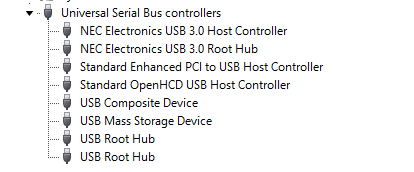
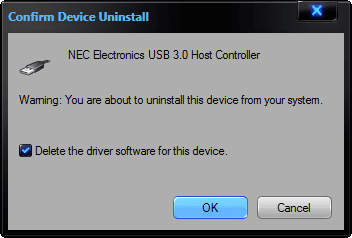
I uninstalled the USB from device manager and scanned for hardware changes, the USB were successfully installed with all drivers and shows no error.

Also check in the BIOS and the USB is enabled...

What cud be the issue? plz help....

Thank You.
 

My Computer

OS
Windows 7 Ultimate - x64
Reinstall the Intel motherboard chipset drivers and see if this helps.
What is a "SMPS" issue?
 

My Computer

Computer type
PC/Desktop
Computer Manufacturer/Model Number
My Own Build
OS
Windows 10 64 bit
CPU
Intel i7 6700K
Motherboard
ASUS ROG Maximus VIII Hero
Memory
16GB Corsair Dominator
Graphics Card(s)
Intel CPU Graphics
Sound Card
RealTek
Monitor(s) Displays
27" Dell S2719dgf
Screen Resolution
2560X1440
Hard Drives
1 TB Samsung 850 EVO SSD for Win 10 Pro
500GB Samsung 850 EVO SSD for Win 10 Insider
2 TB drive for backup
PSU
EVGA Supernova 750G2
Case
BeQuiet Silent Base 600
Cooling
Deepcool Captain 120EX
Keyboard
Microsoft Wireless 2000
Mouse
Microsoft wireless
Internet Speed
100 MB/sec (Cable)
Antivirus
Microsoft Defender and Malwarebytes
Browser
Edge/Firefox
Other Info
Cakewalk (Sonar) by BandLab and Studio One 4.1 Pro recording studio software. MOTU 896Mk3 Hybrid recording interface, Frontier Tranzport wireless control unit, Behringer X-Touch Control Surface.
Five USB connected optical drives for CD Audio production using Nero BurningROM
Thanks for ur reply...i will try that..

The SMPS stopped working, there was a burning smell from it:p.. so had to get a new one...

One more thing, I have a Samsung Galaxy S phone, When i plug in the phone with the USB cord to the system, it starts to charge the phone but does not detect on the system. Earlier when i connected it used to show the mass storage of the phone...im confused wht cud be the issue:confused:

Plz help...thank u
 

My Computer

OS
Windows 7 Ultimate - x64
When you plug the phone in does it show in device manager at all? The device drivers for each device sound like they are not being detected automatically. Like my usb drives there always detected the first time I plug them in an a new system and install the device drivers automatically. Your system is probably not new but you should have some kind of sound or visual that a device has been plugged in to the usb port and it obviously has power.

Also this could be whats happening with your phone not the same model but same manufacturer have a look here:

http://android.stackexchange.com/qu...-not-being-detected-in-my-pc-what-should-i-do

There are five answers all related to usb issues with various types of Samsung products...


  1. Make sure your device is not connected to your PC.
  2. Uninstall any drivers you currently have installed for it.
  3. Reboot your computer.
  4. Install the appropriate drivers from this XDA post (supports more than Galaxy S) http://forum.xda-developers.com/showpost.php?p=7238660&postcount=1
  5. Install Kies from Samsung.com's Galaxy 3 page http://www.samsung.com/uk/support/d...d_mdl_cd=GT-I5800DKAXEU&prd_mdl_name=GT-I5800
  6. Connect your device to your PC.
 

My Computer

Computer Manufacturer/Model Number
Alienware
OS
Windows 7 Ultimate x64
CPU
I7
Motherboard
GA-X58-USB3
Memory
6 x 1.5V DDR3 DIMM sockets supporting up to 24 GB of system
Graphics Card(s)
GeForce GTX 580
Sound Card
Realtek ALC892 codec 2/4/5.1/7.1-channel
Monitor(s) Displays
NEC Display Solutions E321 Black 32"
Screen Resolution
1366 x 768
Hard Drives
OCZ Colossus LT Series OCZSSD2-1CLSLT1T 3.5" 1TB SATA II MLC Internal Solid State Drive
PSU
XFX Black Edition XPS-850W-BES 850W ATX12V
Case
Antec
Cooling
Zalman
Keyboard
Microsoft
Mouse
Microsoft
When I plug in the phone it does not show in the device manager at all. Earlier when I plugged in the phone the system detected it and I also got options on the phone to connect the mass storage, samsung kies or media player but now I get no option and the phone just keeps charging. It charges the phone that means the USB ports are ok..am i right? My system is not new and earlier whenever I plugged in USB pen drives or any other USB device I used to get a visual indication and also a sound but now there is nothing. I'm gonna try and re-install the Intel motherboard chipset drivers when I get home and hope it solves the problem.
 

My Computer

OS
Windows 7 Ultimate - x64
When you plug the phone in does it show in device manager at all? The device drivers for each device sound like they are not being detected automatically. Like my usb drives there always detected the first time I plug them in an a new system and install the device drivers automatically. Your system is probably not new but you should have some kind of sound or visual that a device has been plugged in to the usb port and it obviously has power.

Also this could be whats happening with your phone not the same model but same manufacturer have a look here:

usb connection mode - My Samsung Galaxy 3 (GT-i5801) is not being detected in my PC -- What should I do? - Android - Stack Exchange

There are five answers all related to usb issues with various types of Samsung products...


  1. Make sure your device is not connected to your PC.
  2. Uninstall any drivers you currently have installed for it.
  3. Reboot your computer.
  4. Install the appropriate drivers from this XDA post (supports more than Galaxy S) xda-developers - View Single Post - [Drivers] MS Windows x86 and x64 USB Drivers for Samsung Galaxy S
  5. Install Kies from Samsung.com's Galaxy 3 page Samsung page not found
  6. Connect your device to your PC.


This issue is not just for the samsung phone but all the USB devices, even the pen drives are not detected..tried in all ports...
 

My Computer

OS
Windows 7 Ultimate - x64
I hope it helps. You could also uninstall the usb devices all at once and delete the software that is combined with them and reboot and windows would automatically detect them again and or reinstall the correct software like you said after an uninstall first.
 

Attachments

  • 8-19-2011 7-08-15 AM.png
    8-19-2011 7-08-15 AM.png
    3.2 KB · Views: 5
  • 8-19-2011 7-11-06 AM.png
    8-19-2011 7-11-06 AM.png
    6 KB · Views: 6

My Computer

Computer Manufacturer/Model Number
Alienware
OS
Windows 7 Ultimate x64
CPU
I7
Motherboard
GA-X58-USB3
Memory
6 x 1.5V DDR3 DIMM sockets supporting up to 24 GB of system
Graphics Card(s)
GeForce GTX 580
Sound Card
Realtek ALC892 codec 2/4/5.1/7.1-channel
Monitor(s) Displays
NEC Display Solutions E321 Black 32"
Screen Resolution
1366 x 768
Hard Drives
OCZ Colossus LT Series OCZSSD2-1CLSLT1T 3.5" 1TB SATA II MLC Internal Solid State Drive
PSU
XFX Black Edition XPS-850W-BES 850W ATX12V
Case
Antec
Cooling
Zalman
Keyboard
Microsoft
Mouse
Microsoft
I hope it helps. You could also uninstall the usb devices all at once and delete the software that is combined with them and reboot and windows would automatically detect them again and or reinstall the correct software like you said after an uninstall first.


I will try this too...thanks buddy..
 

My Computer

OS
Windows 7 Ultimate - x64
I have a Samsung Fascinate Galaxy phone. I didn't have to install any drivers in Windows 7. I connected it and Windows found whatever driver it needed and installed.

However, there can be problems with USB devices if the Eject devices is not used. The status gets corrupted in Windows and when you connect a device it's either not detected or does not connect. In these cases, when you connect the device, an "unknown device" entry will appear in the USB listing in the Device Manager. In these cases leave the device connected and then "uninstall" the unknown device in the Device Manager (do not check the box to uninstall drivers). Then disconnect the device, restart the PC and after Windows starts, connect the device and a new device will be detected and installed.
 

My Computer

Computer type
PC/Desktop
Computer Manufacturer/Model Number
My Own Build
OS
Windows 10 64 bit
CPU
Intel i7 6700K
Motherboard
ASUS ROG Maximus VIII Hero
Memory
16GB Corsair Dominator
Graphics Card(s)
Intel CPU Graphics
Sound Card
RealTek
Monitor(s) Displays
27" Dell S2719dgf
Screen Resolution
2560X1440
Hard Drives
1 TB Samsung 850 EVO SSD for Win 10 Pro
500GB Samsung 850 EVO SSD for Win 10 Insider
2 TB drive for backup
PSU
EVGA Supernova 750G2
Case
BeQuiet Silent Base 600
Cooling
Deepcool Captain 120EX
Keyboard
Microsoft Wireless 2000
Mouse
Microsoft wireless
Internet Speed
100 MB/sec (Cable)
Antivirus
Microsoft Defender and Malwarebytes
Browser
Edge/Firefox
Other Info
Cakewalk (Sonar) by BandLab and Studio One 4.1 Pro recording studio software. MOTU 896Mk3 Hybrid recording interface, Frontier Tranzport wireless control unit, Behringer X-Touch Control Surface.
Five USB connected optical drives for CD Audio production using Nero BurningROM
I didn't have to install a driver for my phone when i plugged it in earlier, windows did it all. I've always used eject devices whenever im unplugging any USB device from the system. Now, it does not even show "unknown device" in the USB listing. Nothing happens on the screen when an USB device is attached.
 

My Computer

OS
Windows 7 Ultimate - x64
Is the same problem happening when you plug the USB into the back of the computer or just when you plug them into the front?

If so... It sounds like they possibly flipped the jumpers when they plugged in the USB riser. Or the new motherboard is defective also. As mentioned earlier, reinstall the Chipset drivers then verify you have ran all the Windows updates. Then reboot and try again.

FYI: The USB ports can charge even if something is defective... as long as it isn't the main USB power. One of my past computers had the same problem you are having.
 

My Computer

Computer Manufacturer/Model Number
Multiple Dell and HP
OS
Windows 7 Pro and Enterprise x86 and x64
CPU
Multiple 1.2 to 3.0
Motherboard
Multiple
Memory
Multiple 2gb to 8gb
Graphics Card(s)
Multiple
Sound Card
Multiple
Monitor(s) Displays
Multiple
Hard Drives
Multiple 80gb to 1 tb
PSU
Multiple
Case
Tower
Cooling
Multiple fans
The problem is for all the ports front and back, no port detects the USB device. All was ok before the SMPS went off... I will try the solutions given and update soon..Thanks for the suggestions...I appreciate it.
 

My Computer

OS
Windows 7 Ultimate - x64
My phone always asks about connecting and I have to allow it to connect.
 

My Computer

Computer type
PC/Desktop
Computer Manufacturer/Model Number
My Own Build
OS
Windows 10 64 bit
CPU
Intel i7 6700K
Motherboard
ASUS ROG Maximus VIII Hero
Memory
16GB Corsair Dominator
Graphics Card(s)
Intel CPU Graphics
Sound Card
RealTek
Monitor(s) Displays
27" Dell S2719dgf
Screen Resolution
2560X1440
Hard Drives
1 TB Samsung 850 EVO SSD for Win 10 Pro
500GB Samsung 850 EVO SSD for Win 10 Insider
2 TB drive for backup
PSU
EVGA Supernova 750G2
Case
BeQuiet Silent Base 600
Cooling
Deepcool Captain 120EX
Keyboard
Microsoft Wireless 2000
Mouse
Microsoft wireless
Internet Speed
100 MB/sec (Cable)
Antivirus
Microsoft Defender and Malwarebytes
Browser
Edge/Firefox
Other Info
Cakewalk (Sonar) by BandLab and Studio One 4.1 Pro recording studio software. MOTU 896Mk3 Hybrid recording interface, Frontier Tranzport wireless control unit, Behringer X-Touch Control Surface.
Five USB connected optical drives for CD Audio production using Nero BurningROM
Ok, I have done all things mentioned earlier. Re-installed the chipset drivers - Did not work, Uninstalled the USB devices and restarted the system- The devices are successfully installed upon reboot but when i plug in the USB it does not work. Installed all the windows updates with sp1- still not working.

Then, I kept the USB pen drive plugged in the port and rebooted the system, and it detects the USB and i am also able to browse the files in it..works fine, BUT when i safely remove the hardware and re-plug in the USB pen drive, it does not detect again. It only detects when the device is already plugged when the system is rebooted. Any idea why this happens? Do i need a complete re-install of the OS?
 

My Computer

OS
Windows 7 Ultimate - x64
Any suggestions guys? shud i go for a re-install?:confused:
 

My Computer

OS
Windows 7 Ultimate - x64
Sorry for the late update....it was a motherboard issue...got it replaced... :)
 

My Computer

OS
Windows 7 Ultimate - x64
Back
Top