USB memory won't open i windows

Shadout

New member
Local time
7:33 PM
Messages
9
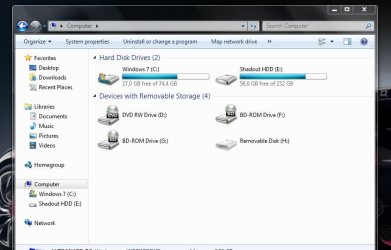
It's a 2GB flash drive. When I plugit in my laptop, says "Installing drivers" then installation succesfull then nothing, not showin it in computer no autoplay no nothin. Only way to locate it is to turn off hidden files and folders. Can't start any check for errors neither formatting, it says "Windows cannot access the disk" Here's a picture so if someone have any idea about the problem please hepl me. :confused:
 

Attachments

  • Capture.JPG
    Capture.JPG
    50 KB · Views: 21

My Computer My Computer

At a glance

Windows 7Intel Celeron 2.0GHz3GBIntel GMA X3100
Computer Manufacturer/Model Number
Acer
OS
Windows 7
CPU
Intel Celeron 2.0GHz
Memory
3GB
Graphics Card(s)
Intel GMA X3100
Hard Drives
WD 80GB, Transcend 250GB
Try different USB ports.
 

My Computer My Computer

At a glance

Windows® 8 Pro (64-bit)Intel® Core™ i5 Processor 2467M (1.60GHz, 3MB...6GB DDR3 System Memory at 1,333MHz (on BD 4GB...AMD Radeon™ HD7550M 1GB DDR3 (Ext. Graphic)
Computer Manufacturer/Model Number
Samsung NP530U4B-S02IN
OS
Windows® 8 Pro (64-bit)
CPU
Intel® Core™ i5 Processor 2467M (1.60GHz, 3MB L3 Cache)
Motherboard
Samsung Electronics
Memory
6GB DDR3 System Memory at 1,333MHz (on BD 4GB + 2GB x 1)
Graphics Card(s)
AMD Radeon™ HD7550M 1GB DDR3 (Ext. Graphic)
Sound Card
Realtek High Definition Audio
Monitor(s) Displays
35.56cm (14.0) SuperBright 300nit HD LED Display
Screen Resolution
1366x768
Hard Drives
1TB S-ATA II Hard Drive (5400RPM) with ExpressCache 16GB SSD
Internet Speed
sucks
Antivirus
Microsoft Security Essentials
Browser
Google Chrome (Sync enabled)
Tried in every port, wont work on any computer
 

My Computer My Computer

At a glance

Windows 7Intel Celeron 2.0GHz3GBIntel GMA X3100
Computer Manufacturer/Model Number
Acer
OS
Windows 7
CPU
Intel Celeron 2.0GHz
Memory
3GB
Graphics Card(s)
Intel GMA X3100
Hard Drives
WD 80GB, Transcend 250GB
Then the usb stick is corrupt. If its under warranty ask for a replacement. Or elase you'll need to get a new one.
 

My Computer My Computer

At a glance

Windows® 8 Pro (64-bit)Intel® Core™ i5 Processor 2467M (1.60GHz, 3MB...6GB DDR3 System Memory at 1,333MHz (on BD 4GB...AMD Radeon™ HD7550M 1GB DDR3 (Ext. Graphic)
Computer Manufacturer/Model Number
Samsung NP530U4B-S02IN
OS
Windows® 8 Pro (64-bit)
CPU
Intel® Core™ i5 Processor 2467M (1.60GHz, 3MB L3 Cache)
Motherboard
Samsung Electronics
Memory
6GB DDR3 System Memory at 1,333MHz (on BD 4GB + 2GB x 1)
Graphics Card(s)
AMD Radeon™ HD7550M 1GB DDR3 (Ext. Graphic)
Sound Card
Realtek High Definition Audio
Monitor(s) Displays
35.56cm (14.0) SuperBright 300nit HD LED Display
Screen Resolution
1366x768
Hard Drives
1TB S-ATA II Hard Drive (5400RPM) with ExpressCache 16GB SSD
Internet Speed
sucks
Antivirus
Microsoft Security Essentials
Browser
Google Chrome (Sync enabled)
I heard there is a possible repair of that stuff with command prompt but couldn't find any specific information...any ideas of how is it done?
 

My Computer My Computer

At a glance

Windows 7Intel Celeron 2.0GHz3GBIntel GMA X3100
Computer Manufacturer/Model Number
Acer
OS
Windows 7
CPU
Intel Celeron 2.0GHz
Memory
3GB
Graphics Card(s)
Intel GMA X3100
Hard Drives
WD 80GB, Transcend 250GB
What you can try is following:
Go to an elevated command prompt.
http://www.sevenforums.com/tutorials/783-elevated-command-prompt.html

Type DISKPART and hit ENTER key.

Now you will enter some commands for DISKPART.

List disk
That will show a list of disks on your system.

Look at that list and decide which one is your usb stick.
Let's assume that the USB stick is number 1.

Select Disk 1
This will select disk 1.

Now to make sure you didn't goof.
Detail Disk
This additional info should help you be sure of your choice.

CLEAN ALL
This is going to write zeroes to each and every byte of the USB stick.
Wait, wait, wait and wait for this command to finish.
Do not proceed until you see the Diskpart prompt again.

After the Diskpart prompt appears again, then
Exit
This will exit you from DiskPart.

type EXIT once again.
this will exit you from the command shell and return you to the Win 7 screen.

Now see if you can use that flash drive.
 

My Computer My Computer

At a glance

MS Windows 7 Ultimate SP1 64-bitAMD A10-4600M6.00 GB Dual-Channel DDR3 @ 798MHz (11-11-12-28)AMD Radeon HD 7660G
Computer Manufacturer/Model Number
Toshiba Satellite S875D-S7239 laptop
OS
MS Windows 7 Ultimate SP1 64-bit
CPU
AMD A10-4600M
Motherboard
AMD Pumori (Socket FT1)
Memory
6.00 GB Dual-Channel DDR3 @ 798MHz (11-11-12-28)
Graphics Card(s)
AMD Radeon HD 7660G
Sound Card
High Definition Audio Device
Monitor(s) Displays
Generic PnP Monitor (1600x900@60Hz)
Screen Resolution
1600x900@60Hz
Hard Drives
SSD 119GB Corsair CSSD-V128GB2 ATA Device
Keyboard
Standard PS/2 Keyboard
Mouse
HP Wireless Optical Mobile Mouse Model FHA-3410
Internet Speed
What the local pub, local coffee shop offers.
Other Info
Optical Drive:MATSHITA BD-CMB UJ160B ATA Device


Also have an Asus ha1002xp netbook with Win 7 Ultimate installed.
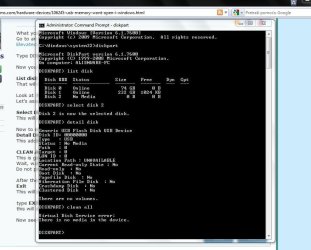
Thank you for trying but no luck, guess ill just throw it away and buy another one :(
 

Attachments

  • Capture.JPG
    Capture.JPG
    80.3 KB · Views: 35

My Computer My Computer

At a glance

Windows 7Intel Celeron 2.0GHz3GBIntel GMA X3100
Computer Manufacturer/Model Number
Acer
OS
Windows 7
CPU
Intel Celeron 2.0GHz
Memory
3GB
Graphics Card(s)
Intel GMA X3100
Hard Drives
WD 80GB, Transcend 250GB
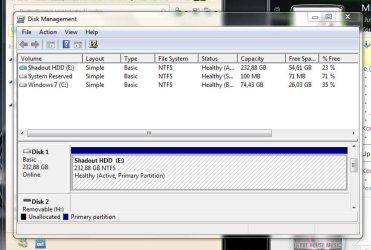
Does appear that the stick is bad, but humor me and using the snipping tool to make a snapshot of the maximized output of DISKMGMT.MSC.

Win | type SNIP | Enter
to use the snipping tool.
 

My Computer My Computer

At a glance

MS Windows 7 Ultimate SP1 64-bitAMD A10-4600M6.00 GB Dual-Channel DDR3 @ 798MHz (11-11-12-28)AMD Radeon HD 7660G
Computer Manufacturer/Model Number
Toshiba Satellite S875D-S7239 laptop
OS
MS Windows 7 Ultimate SP1 64-bit
CPU
AMD A10-4600M
Motherboard
AMD Pumori (Socket FT1)
Memory
6.00 GB Dual-Channel DDR3 @ 798MHz (11-11-12-28)
Graphics Card(s)
AMD Radeon HD 7660G
Sound Card
High Definition Audio Device
Monitor(s) Displays
Generic PnP Monitor (1600x900@60Hz)
Screen Resolution
1600x900@60Hz
Hard Drives
SSD 119GB Corsair CSSD-V128GB2 ATA Device
Keyboard
Standard PS/2 Keyboard
Mouse
HP Wireless Optical Mobile Mouse Model FHA-3410
Internet Speed
What the local pub, local coffee shop offers.
Other Info
Optical Drive:MATSHITA BD-CMB UJ160B ATA Device


Also have an Asus ha1002xp netbook with Win 7 Ultimate installed.
Not even shown in the list :huh:
 

Attachments

  • Capture.JPG
    Capture.JPG
    63.6 KB · Views: 18

My Computer My Computer

At a glance

Windows 7Intel Celeron 2.0GHz3GBIntel GMA X3100
Computer Manufacturer/Model Number
Acer
OS
Windows 7
CPU
Intel Celeron 2.0GHz
Memory
3GB
Graphics Card(s)
Intel GMA X3100
Hard Drives
WD 80GB, Transcend 250GB
Back
Top