USB Mouse Freezes

NeedHelpPlease

New member
Local time
5:44 AM
Messages
7
http://social.answers.microsoft.com...e/thread/22fe210f-c27e-4a8d-89fe-b3f74165dc23

I have the exact same problem like the user in that thread is having. I do not know why; I have tried to do a system restore before the problem started, but it is still continuing. If at all possible, the last action I want to take is a complete reformat.

Nonetheless, could someone assist me with this problem please? I am a gamer, and this problem just makes it difficult to play anything!

Synopsis of problem:
At times when I move my mouse, it would just freeze for a second or so; then it unfreezes, which is also accompanied by a "windows event sound" pretty much all of the time. My mouse is a Microsoft Intellimouse Optical 1.1a.

Thanks!
 

My Computer

OS
Windows 7
Change USB port. Move from front to back or vice versa.
tests port

or

Change mouse.
tests mouse
 

My Computer

Computer Manufacturer/Model Number
Asus P5B
OS
Windows 7 Ultimate
CPU
Intel Q9550
Motherboard
Asus P5B
Memory
4x2GB HyperX
Graphics Card(s)
ATI HD3850 512
Sound Card
Creative X-Fi Platinum
Monitor(s) Displays
Samsung 50 / Samsung 24
Screen Resolution
1920*1080 / 1920*1200
Hard Drives
Multiple RAID volumes
PSU
ThermalTake ToughPower
Case
Armor
Cooling
Liquid
Keyboard
$6 2.4 gHz desktop
Internet Speed
Just this side of fast enough.
Even when I used a different port, the problem persists. As for mouse change, I used another Microsoft Intellimouse I have, and the problem still continues.

On a side note, I tried both mice on my old computer and the problem is not occurring.

Could this be a driver conflict? :s I have tried uninstalling my mouse's drivers and it did not fix anything. The more I think about it, the less hopeful I am of regaining control of this computer. :(
 

My Computer

OS
Windows 7
Open Task Manager.
Sort by CPU Usage (twice, high on top).

Move the mouse.

Does CPU usage spike, and if yes, what process?
 

My Computer

Computer Manufacturer/Model Number
Asus P5B
OS
Windows 7 Ultimate
CPU
Intel Q9550
Motherboard
Asus P5B
Memory
4x2GB HyperX
Graphics Card(s)
ATI HD3850 512
Sound Card
Creative X-Fi Platinum
Monitor(s) Displays
Samsung 50 / Samsung 24
Screen Resolution
1920*1080 / 1920*1200
Hard Drives
Multiple RAID volumes
PSU
ThermalTake ToughPower
Case
Armor
Cooling
Liquid
Keyboard
$6 2.4 gHz desktop
Internet Speed
Just this side of fast enough.
The CPU usage does not spike.

BTW, I very much appreciate your assistance Casca. =)
 

My Computer

OS
Windows 7

My Computer

Computer Manufacturer/Model Number
Asus P5B
OS
Windows 7 Ultimate
CPU
Intel Q9550
Motherboard
Asus P5B
Memory
4x2GB HyperX
Graphics Card(s)
ATI HD3850 512
Sound Card
Creative X-Fi Platinum
Monitor(s) Displays
Samsung 50 / Samsung 24
Screen Resolution
1920*1080 / 1920*1200
Hard Drives
Multiple RAID volumes
PSU
ThermalTake ToughPower
Case
Armor
Cooling
Liquid
Keyboard
$6 2.4 gHz desktop
Internet Speed
Just this side of fast enough.
No, it did not. It happens at some of the most inconvenient times, the little bugger...
 

My Computer

OS
Windows 7
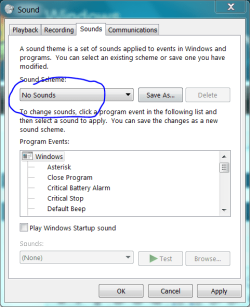
And, just to rule out the absurd - Disable ALL Windows system sounds.
.
 

Attachments

  • Capture.PNG
    Capture.PNG
    21.5 KB · Views: 15

My Computer

Computer Manufacturer/Model Number
Asus P5B
OS
Windows 7 Ultimate
CPU
Intel Q9550
Motherboard
Asus P5B
Memory
4x2GB HyperX
Graphics Card(s)
ATI HD3850 512
Sound Card
Creative X-Fi Platinum
Monitor(s) Displays
Samsung 50 / Samsung 24
Screen Resolution
1920*1080 / 1920*1200
Hard Drives
Multiple RAID volumes
PSU
ThermalTake ToughPower
Case
Armor
Cooling
Liquid
Keyboard
$6 2.4 gHz desktop
Internet Speed
Just this side of fast enough.
How would I do that, Casca?

EDIT: I just saw your thumbnail.

Okay, I will post back later in the topic if the problem occurs again.

Once more, thank you Casca.
 

My Computer

OS
Windows 7
Right click volume icon, select Sounds, No Sounds.
 

My Computer

Computer Manufacturer/Model Number
Asus P5B
OS
Windows 7 Ultimate
CPU
Intel Q9550
Motherboard
Asus P5B
Memory
4x2GB HyperX
Graphics Card(s)
ATI HD3850 512
Sound Card
Creative X-Fi Platinum
Monitor(s) Displays
Samsung 50 / Samsung 24
Screen Resolution
1920*1080 / 1920*1200
Hard Drives
Multiple RAID volumes
PSU
ThermalTake ToughPower
Case
Armor
Cooling
Liquid
Keyboard
$6 2.4 gHz desktop
Internet Speed
Just this side of fast enough.
Well, unfortunately, the problem still continues. *sigh* I fear that even with a reformat, it might not correct the problem.
 

My Computer

OS
Windows 7
If CPU usage spikes, USB mouse will freeze. Not necessarily a mouse problem per se. The odd thing is the event sound.

Try: set your sound for device dis/connect to something easily recognized. If that sound is the one that plays, we may have a mouse/port issue.

Use this sound test to try and ID what the event is. Lots of trial and error, perhaps.
 

My Computer

Computer Manufacturer/Model Number
Asus P5B
OS
Windows 7 Ultimate
CPU
Intel Q9550
Motherboard
Asus P5B
Memory
4x2GB HyperX
Graphics Card(s)
ATI HD3850 512
Sound Card
Creative X-Fi Platinum
Monitor(s) Displays
Samsung 50 / Samsung 24
Screen Resolution
1920*1080 / 1920*1200
Hard Drives
Multiple RAID volumes
PSU
ThermalTake ToughPower
Case
Armor
Cooling
Liquid
Keyboard
$6 2.4 gHz desktop
Internet Speed
Just this side of fast enough.
Hey man, im having the same issue.... and ive formatted and it does not go away... dont know what to do i was about to go buy a new mouse but now i dont know if that will fix it...

By the way i am running Windows 7 x64 and this begun about a month ago... ive just kinda dealt with it because i figured it was the mouse going bad...
 

My Computer

Computer Manufacturer/Model Number
Dell Xps 420
OS
Windows 7
Back
Top