USB mouse unresponsive after hibernate mode

WhatGives

New member
Local time
10:02 AM
Messages
4
Hello everybody!

The title pretty much sums it up. I run Win 7 Premium 32 on a compaq 615, and use an intellimouse explorer 3.0 in one of the USB ports. Whenever the computer wakes up from hibernation the mouse fails to respond, and all i can do is unplugging the mouse and then put it back in to make it work again... Im using the latest mouse drivers. Any ideas on how to fix this?
 

My Computer My Computer

Computer Manufacturer/Model Number
Compaq 615
OS
Win 7 premium 32 bit
CPU
Athlon X2 DualCore QL-66 2,20 GHz
Graphics Card(s)
ATI Radeon 3200 HD
Hello everybody!

The title pretty much sums it up. I run Win 7 Premium 32 on a compaq 615, and use an intellimouse explorer 3.0 in one of the USB ports. Whenever the computer wakes up from hibernation the mouse fails to respond, and all i can do is unplugging the mouse and then put it back in to make it work again... Im using the latest mouse drivers. Any ideas on how to fix this?
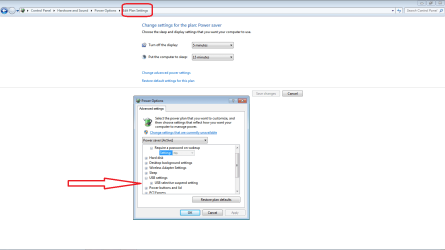
I suggest that you check your power saver configuration and see how you wake up your USB ports.
 

Attachments

  • power.png
    power.png
    24.6 KB · Views: 398

My Computer My Computer

Computer Manufacturer/Model Number
Custom Build
OS
Windows 7 7600 1 X64
CPU
AMD PHENOM II X 550 PROCESSOR 3.1 ghz
Motherboard
ASUS M4A78-TE
Memory
Corsair 4 gig ddr 3
Graphics Card(s)
ati radeon 3300
Sound Card
ati hd
Monitor(s) Displays
syncmaster 2033sw
Screen Resolution
1600X900 60 hz refresh
Hard Drives
twin_seagates SATA's 1 TB & 500 Gig, hitachi_slimline 160 gig
PSU
antec_550 watt
Case
cooler master GLite
Cooling
stock_heat sink
Internet Speed
20mbs up/ 1.5mbs down
Other Info
favorite child "stewie"
favorite dog "brian"
Thanks for a quick reply. I tried changing the configuration, but no luck. I'll try a reboot after changing them to see if that will make them stick.
 

My Computer My Computer

Computer Manufacturer/Model Number
Compaq 615
OS
Win 7 premium 32 bit
CPU
Athlon X2 DualCore QL-66 2,20 GHz
Graphics Card(s)
ATI Radeon 3200 HD
I know this is an old thread, but in case somebody runs into it, here's what seems to be working on my Win7 Enterprise x64 installation:

1. Create this key with regedit.exe (as Admin): HKEY_LOCAL_MACHINE\SYSTEM\CurrentControlSet\services\USB

2. Create a DWORD 32-bit entry named "DisableSelectiveSuspend" and give it a value of 1

3. Close regedit and reboot. Hibernate and bring it up again. Mouse shoul work now..

Hope it helps...

--jlb
 

My Computer My Computer

OS
Windows 7 Enterprise N x64
Back
Top