USB MultiCard Reader Woes...

AstaLaVista

Lost in Cyberspace
Guru
Local time
10:08 PM
Messages
1,962
Location
Miami, Florida
I have one of those USB multicard reader that even brings two cord for more power to the ports. Well, it works very well with XP or Vista but it bogs down with Windows 7 and I wanted to see if you guys could hint as to what it could be and a way to fix it.

If I use Explore on Windows 7, I don't see the multicard reader as a drive but, if I go to Device Manager, I can find it under USB devices. Hopefully, this can tell you guys something.

Again, I have no problems using this with XP and/or Vista so I know the fault doesn't lie with the Device but with 7.
 

My Computer

Computer type
PC/Desktop
Computer Manufacturer/Model Number
Custom Built... Intel/Nvidia/ASRock
OS
Windows 7 x64 (Ultimate)
CPU
Intel i5-4670K
Motherboard
ASRock Z87 Extreme 6
Memory
8GBs Ripjaws 2133Mhz
Graphics Card(s)
Asus GTX660 (2GBs)
Sound Card
Onboard Realtek HD
Monitor(s) Displays
Acer AL2216W
Screen Resolution
1680 x 1050
Hard Drives
Samsung 840 SSD 120GBs
Samsung 750GB 32MB cache
1.5 TB
PSU
PC Cooling 750w Silencer
Case
Thermaltake Spedo Advance
Cooling
Std Cooler
Keyboard
Logitech G15
Mouse
Logitech G9
Internet Speed
Comcast 20Mbit
Antivirus
Avast
Browser
Firefox
I have one of those USB multicard reader that even brings two cord for more power to the ports. Well, it works very well with XP or Vista but it bogs down with Windows 7 and I wanted to see if you guys could hint as to what it could be and a way to fix it.

If I use Explore on Windows 7, I don't see the multicard reader as a drive but, if I go to Device Manager, I can find it under USB devices. Hopefully, this can tell you guys something.

Again, I have no problems using this with XP and/or Vista so I know the fault doesn't lie with the Device but with 7.
AstaLaVista
In device manager, go to the entry for it and right-click it choose properties. What does it have listed as a driver? Is the device under usb or unknown. Does it have a yellow triangle on it?
BTW nice rig specs:)

K
 

My Computer

Computer Manufacturer/Model Number
HP Pavillion dv-7 1005 Tx
OS
Win 8 Release candidate 8400
CPU
[email protected]
Memory
4 gigs
Graphics Card(s)
Nvidia 9600M
Sound Card
HD built-in
Monitor(s) Displays
17" Wxga
Screen Resolution
1440x900
Cooling
none
Internet Speed
45Mb down 5Mb up
Windows 7 has a feature to hide empty drives (no media). In the explorer window, select Organize, then Folder and search options, then View, the go down the list and uncheck "Hide empty drives in Computer folder"
 

My Computer

Computer type
PC/Desktop
Computer Manufacturer/Model Number
Custom Built
OS
Windows 10 Pro x64, Windows 8.1 Pro x64, Windows 7 Ultimate x64 SP1,
CPU
INTEL i9-7920X LGA 2066
Motherboard
Gigabyte X299-WU8 F3
Memory
64 GB (4 X 16 GB) G-Skill V Series DDR4 3200 Quad Channel
Graphics Card(s)
EVGA GTX 1060 SC 3 GB
Sound Card
Realtek Onboard ALC1220
Monitor(s) Displays
2 x Samsung S27E310
Screen Resolution
1920x1080
Hard Drives
Samsung 2 x 970 EVO Plus 500 GB NVMe
1 x 6TB WD 6003FZBX SATA
1 x 6TB WD 60EFRX SATA
12 x 3TB WD 30EFRX SATA
PSU
Seasonic X-1050
Case
Thermaltake Armor+
Cooling
Corsair H80i V2 Liquid AOI Cooler
Keyboard
Logitech G510s
Mouse
Logitech MX Master 2S
Internet Speed
200 Mb/s
Antivirus
ESET NOD32 13.1
Browser
EDGE (Dev, Canary, Beta), Chrome
Other Info
ASUS RT-AC68U router
Malwarebytes 4.0.4
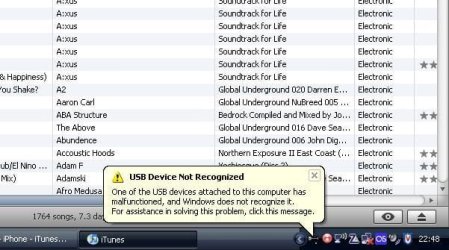
As zigzag3143 already told you, the device may not be recognized if there is a yellow warning sign next to it's icon, also, when you click the Device Manager, does the USB devices list automatically expand? If yes, that may indicate a problem with your device, the automatic expantion of the USB devices means that windows wants you to pay attention to them. When you plug in the reader, do you see something like this:
39764152bv3.jpg
Lastly, did you try actually plugging in a card? What does it say? Does it even notice the thing?
DW96
 
Last edited:

My Computer

Computer type
PC/Desktop
Computer Manufacturer/Model Number
Multirama PC Expert [Bulgaria]
OS
Windows 7 Home Premium [64-Bit]
CPU
Intel Core 2 Quad CPU Q8200 @ 2.33 GHz
Motherboard
GIGABYTE GA-G31M-S2C
Memory
4094 MB DDR2
Graphics Card(s)
SAPPHIRE Radeon HD 6970 (2 GB VRAM)
Sound Card
Realtek ALC883 @ Intel 82801GB ICH7 - High Definition Audio
Monitor(s) Displays
Samsung SyncMaster BX2235 [21.5" LCD with LED Backlight]
Screen Resolution
1920x1080
Hard Drives
Hitachi HDT721075SLA360 - 750 GB
PSU
Cooler Master GX750 - 750W
Case
Multirama (Black / 2010 Revision)
Cooling
Stock + Cooler Master
Keyboard
Logitech G510 (Gaming Keyboard)
Mouse
Razer Lachesis (4000 DPI, Blue Version)
Internet Speed
Vivacom Optical [100 Mbps]
Browser
Chrome [Windows]
I have one of those USB multicard reader that even brings two cord for more power to the ports. Well, it works very well with XP or Vista but it bogs down with Windows 7 and I wanted to see if you guys could hint as to what it could be and a way to fix it.

If I use Explore on Windows 7, I don't see the multicard reader as a drive but, if I go to Device Manager, I can find it under USB devices. Hopefully, this can tell you guys something.

Again, I have no problems using this with XP and/or Vista so I know the fault doesn't lie with the Device but with 7.
astalavista
here are some things I assume. The card reader is USB 2.0, the cable seats well, that in device manager you have all the usb host controllers, storage devices, and hubs set. See pic. When you right click remove safely in the sys tray does it show and is it greyed out? see pic
Im groping in the dark.

Ken
 
Last edited:

My Computer

Computer Manufacturer/Model Number
HP Pavillion dv-7 1005 Tx
OS
Win 8 Release candidate 8400
CPU
[email protected]
Memory
4 gigs
Graphics Card(s)
Nvidia 9600M
Sound Card
HD built-in
Monitor(s) Displays
17" Wxga
Screen Resolution
1440x900
Cooling
none
Internet Speed
45Mb down 5Mb up
Thanks for the advice guys, I think pbcopter has it nailed though so, once I get home, I will try that and if that doesn't work, I'll start attacking the other suggestions.

I do appreciate all the help... I love these Forums!!! :)

@zigzag... thanks for the compliment, I am happy with it ;).
 

My Computer

Computer type
PC/Desktop
Computer Manufacturer/Model Number
Custom Built... Intel/Nvidia/ASRock
OS
Windows 7 x64 (Ultimate)
CPU
Intel i5-4670K
Motherboard
ASRock Z87 Extreme 6
Memory
8GBs Ripjaws 2133Mhz
Graphics Card(s)
Asus GTX660 (2GBs)
Sound Card
Onboard Realtek HD
Monitor(s) Displays
Acer AL2216W
Screen Resolution
1680 x 1050
Hard Drives
Samsung 840 SSD 120GBs
Samsung 750GB 32MB cache
1.5 TB
PSU
PC Cooling 750w Silencer
Case
Thermaltake Spedo Advance
Cooling
Std Cooler
Keyboard
Logitech G15
Mouse
Logitech G9
Internet Speed
Comcast 20Mbit
Antivirus
Avast
Browser
Firefox
AstaLaVista
In device manager, go to the entry for it and right-click it choose properties. What does it have listed as a driver? Is the device under usb or unknown. Does it have a yellow triangle on it?
BTW nice rig specs:)

K
The driver is a Realtek Semiconductor Corp. Driver Date 06/23/2008. Driver Version 6.06000.20099.
The device is under Realtek USB 2.0 Card Reader
It does not have a yellow triangle. Inside the properties it says... this device is working properly.

Windows 7 has a feature to hide empty drives (no media). In the explorer window, select Organize, then Folder and search options, then View, the go down the list and uncheck "Hide empty drives in Computer folder"
Well, as stated on my previous post, I thought you had nailed in the head but, all of the HIDE options are Unticked so the problem continues. :(

As zigzag3143 already told you, the device may not be recognized if there is a yellow warning sign next to it's icon, also, when you click the Device Manager, does the USB devices list automatically expand? If yes, that may indicate a problem with your device, the automatic expantion of the USB devices means that windows wants you to pay attention to them. When you plug in the reader, do you see something like this:
View attachment 13680
Lastly, did you try actually plugging in a card? What does it say? Does it even notic the thing?
DW96
There is no expanding options when I open the Device Manager nor Yellow Warning Signs.
The reader is installed correctly according to the tell tale signs as I don't get the warning on your attachment.
After I plug a 2GB SD Card, the lights on the reader come on but yet, nothing happens, no hdd movement whatsoever. I wait a while (minute or two) hoping to get that little window that pops up but to no avail. I guess it doesn't even notice that the thing is inserted.

astalavista
here are some things I assume. The card reader is USB 2.0, the cable seats well, that in device manager you have all the usb host controllers, storage devices, and hubs set. See pic. When you right click remove safely in the sys tray does it show and is it greyed out? see pic
Im groping in the dark.

Ken

Again, everything seems to be ok in the Device Manager, no Warning signs, no bad Codes, etc, etc.
Now, there is no remove safely icon on the system tray (I know exactly which Icon you are referring to as I use my 320GB passport on a daily basis and I use that icon to unplug it safely) but again, I don't see it.

Well, I am out of ideas myself
 

My Computer

Computer type
PC/Desktop
Computer Manufacturer/Model Number
Custom Built... Intel/Nvidia/ASRock
OS
Windows 7 x64 (Ultimate)
CPU
Intel i5-4670K
Motherboard
ASRock Z87 Extreme 6
Memory
8GBs Ripjaws 2133Mhz
Graphics Card(s)
Asus GTX660 (2GBs)
Sound Card
Onboard Realtek HD
Monitor(s) Displays
Acer AL2216W
Screen Resolution
1680 x 1050
Hard Drives
Samsung 840 SSD 120GBs
Samsung 750GB 32MB cache
1.5 TB
PSU
PC Cooling 750w Silencer
Case
Thermaltake Spedo Advance
Cooling
Std Cooler
Keyboard
Logitech G15
Mouse
Logitech G9
Internet Speed
Comcast 20Mbit
Antivirus
Avast
Browser
Firefox
card reader woes

alstlavista

The only time I have ever seen this is an external HD enclosure that had a funky cable. Device manager says fine (driver wa ok and installed) Drive put anywhere else worked fine and USB ports worked fine with anything else. Finally after pulling hair out I started jiggling cables and the drive goes on and is recognised. Drop the cable and it goes back off. Not your problem but Im out of idea's. Have you googled the problem? searched on the readers support site?

Sorry I couldn't help but I will keep this in mind. Hope someone else has the solution. Let me know how it goes

Ken
 

My Computer

Computer Manufacturer/Model Number
HP Pavillion dv-7 1005 Tx
OS
Win 8 Release candidate 8400
CPU
[email protected]
Memory
4 gigs
Graphics Card(s)
Nvidia 9600M
Sound Card
HD built-in
Monitor(s) Displays
17" Wxga
Screen Resolution
1440x900
Cooling
none
Internet Speed
45Mb down 5Mb up
My last idea is to try plugging the thing with an already inserted memcard into all available usb ports, just keep trying, every time you plug it into a different port the drivers have to bre reinstalled, so that might work. Had similar problems with a tablet. All seems fine, but no input. After trying a different USB, all went well. You might have already tried this, I suppose... But that's all I can think of, sry...

DW96
 

My Computer

Computer type
PC/Desktop
Computer Manufacturer/Model Number
Multirama PC Expert [Bulgaria]
OS
Windows 7 Home Premium [64-Bit]
CPU
Intel Core 2 Quad CPU Q8200 @ 2.33 GHz
Motherboard
GIGABYTE GA-G31M-S2C
Memory
4094 MB DDR2
Graphics Card(s)
SAPPHIRE Radeon HD 6970 (2 GB VRAM)
Sound Card
Realtek ALC883 @ Intel 82801GB ICH7 - High Definition Audio
Monitor(s) Displays
Samsung SyncMaster BX2235 [21.5" LCD with LED Backlight]
Screen Resolution
1920x1080
Hard Drives
Hitachi HDT721075SLA360 - 750 GB
PSU
Cooler Master GX750 - 750W
Case
Multirama (Black / 2010 Revision)
Cooling
Stock + Cooler Master
Keyboard
Logitech G510 (Gaming Keyboard)
Mouse
Razer Lachesis (4000 DPI, Blue Version)
Internet Speed
Vivacom Optical [100 Mbps]
Browser
Chrome [Windows]
I have the same problem, but the most curious is that if I run a Windows XP with a VMWare virtual machine (not works with Windows Virtual PC) the reader works perfect on the XP and when I close the virtual machine the reader works fine on Windows 7.
 

My Computer

OS
Windows 7 64 RC
Back
Top