After I tried inserting my media card from my camera it has been giving me the error that the usb is not recognized by Windows. It said Windows has stopped device problem (code 43). I troubleshooted it and it didn't fix anything. I also tried using a media card reader and it wouldn't recognize that either. The only way I could get pics off my camera was by plugging it into the camera and then the comptuer. Any ideas?
I do have a wired mouse and wired keyboard.
I tried what you said and could only get so far. I had no grayed out USB's. No INFACHI.1, and none in the windows explorer. So I couldn't go any further.
If this is true and having a look at your previous posts to the forum and having seen all of the troubles you are having I think you should seriously consider re-installing windows 7 or the original Vista
My Computer
Computer Manufacturer/Model Number
Something I threw together
OS
Windows 7 Ultimate x64
CPU
Intel Core i7-2600K
Motherboard
Asus P8P67
Memory
16 GB G Skill F3-10666 CL9D-4GBRL
Graphics Card(s)
ATI Radeon HD 6870
Sound Card
ATI Radeon HDMI / Realtek ALC892
Monitor(s) Displays
2 x 22" standard monitors / LG32LC56v TV to watch films
Screen Resolution
1920 x1080
Hard Drives
2 x OCZ Vertex2 111.79GB
3 x Samsung103SJ
1 x Samsung103UJ
1 x WD3200BEVT
1 x Hitachi5K320-160
PSU
Thermaltake Toughpower Cable Management 750W
Case
Antec 300
Cooling
Noctua NH-U12P SE2 and 5 120mm Case fans
Keyboard
Microsoft Comfort Curve Keyboard 2000
Mouse
Hama M3110 / Logitech M305
Internet Speed
16000
Other Info
I have also used Fedora, Suse, Ubuntu Linux
And all other Windows from 95 to date except ME
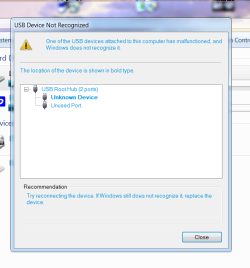
Here is a screenshot of the error I get on usb. There is no way I could do a clean install of windows 7, I am still trying to figure out the different settings just when i did a repair install.
I am sorry but if your OS really does not have an INFCACHE.1 then no USB device should work and I really do not know where to start to help you You also mention a repair install, did it complete successfully? because if that is the case you cannot have followed the USB tutorial through word for word as it should be done.
If you have not successfully completed a repair install then you need to do that before anything else.
See this link for a repair install; http://www.sevenforums.com/tutorials/3413-repair-install.html?ltr=R
My Computer
Computer Manufacturer/Model Number
Something I threw together
OS
Windows 7 Ultimate x64
CPU
Intel Core i7-2600K
Motherboard
Asus P8P67
Memory
16 GB G Skill F3-10666 CL9D-4GBRL
Graphics Card(s)
ATI Radeon HD 6870
Sound Card
ATI Radeon HDMI / Realtek ALC892
Monitor(s) Displays
2 x 22" standard monitors / LG32LC56v TV to watch films
Screen Resolution
1920 x1080
Hard Drives
2 x OCZ Vertex2 111.79GB
3 x Samsung103SJ
1 x Samsung103UJ
1 x WD3200BEVT
1 x Hitachi5K320-160
PSU
Thermaltake Toughpower Cable Management 750W
Case
Antec 300
Cooling
Noctua NH-U12P SE2 and 5 120mm Case fans
Keyboard
Microsoft Comfort Curve Keyboard 2000
Mouse
Hama M3110 / Logitech M305
Internet Speed
16000
Other Info
I have also used Fedora, Suse, Ubuntu Linux
And all other Windows from 95 to date except ME



 You also mention a repair install, did it complete successfully? because if that is the case you cannot have followed the USB tutorial through word for word as it should be done.