USB Port on Laptop is Unresponsive

Mohanned Aladin

New member
Local time
8:13 PM
Messages
39
USB Port Unresponsive on Laptop

Hello,

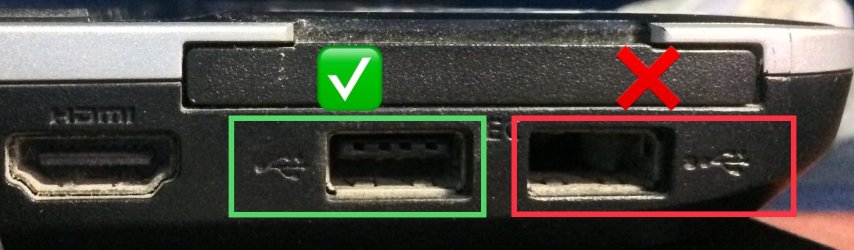
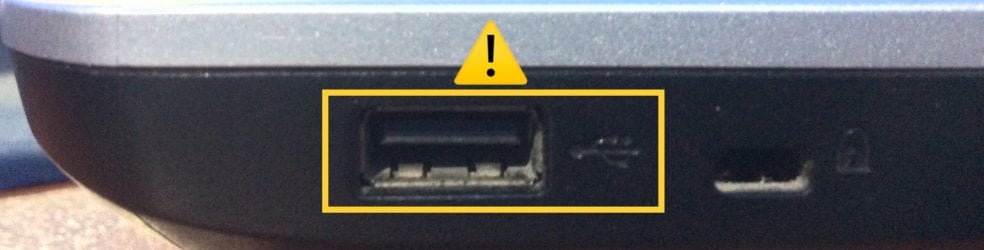
I have Fujitsu laptop and I have 3 USB ports (2 on the left side & 1 on the right side). I broke one of them (Left Side) and the other two ports, one of them is work properly (Left Side), the other one (Right Side) doesn't pick up any devices I plug into it.

It won't open the devices and they work properly in the other USB port. I made a video about that to make sure everything is clear for you ;)

I am thinking it's some kind of software issue. is there a way I can fix this without buying any expensive software?

Thank You Very Much,

MohaNNed
USB Port on Laptop is Unresponsive - YouTube

Video

405854d1541775130-usb-port-laptop-unresponsive-left-side.jpg


Left Side Ports

405855d1541775130-usb-port-laptop-unresponsive-right-side.jpg


Right Side Port

.
 

Attachments

  • Left Side.JPG
    Left Side.JPG
    121.7 KB · Views: 38
  • Right Side.JPG
    Right Side.JPG
    150.9 KB · Views: 38
Last edited:

My Computer My Computer

At a glance

Windows Home Premium
OS
Windows Home Premium
This is more likely to be a hardware issue. If you broke a USB port then it may have short circuited some connections & this has caused the problem. The USB port are connected to the motherboard so damage to one of them may have ruined the motherboard.

It may be able to be repaired by a technician but it will very likely be expensive.
 

My Computer My Computer

At a glance

Windows 7 Home Premium 64 bit sp1Intel i5 3570 3.4Ghz Ivy Bridge SKT 1155 quad...G-Skill Rip Jaws 16Gb (8x2) DDR3 -1600 PC3 12...Gigabyte NVIDIA GT610 1Gb DDR3 810/1200 PCI-E...
Computer type
PC/Desktop
Computer Manufacturer/Model Number
Self built using existing case
OS
Windows 7 Home Premium 64 bit sp1
CPU
Intel i5 3570 3.4Ghz Ivy Bridge SKT 1155 quad core
Motherboard
Gigabyte Z77-HD3 SKT 1155 2xSata 3, 4x USB 3.0
Memory
G-Skill Rip Jaws 16Gb (8x2) DDR3 -1600 PC3 12800 CL 10 red
Graphics Card(s)
Gigabyte NVIDIA GT610 1Gb DDR3 810/1200 PCI-E 2.0 Silent
Sound Card
NVIDIA High Definition & Realtech High Definition Audio
Monitor(s) Displays
2 x Philips 226V4L 16:9 aspect ratio
Screen Resolution
1920 x 1080 HD
Hard Drives
Samsung 840 Pro 256gb SSD, SATA 3.
Hitachi Touro Portable 1tb, USB 3.0 HDD used for image b/ups.
PSU
Corsair VS450
Case
Codeng
Cooling
PSU fan & CPU fan
Keyboard
Logitech
Mouse
Logitech Wireless trackball M570
Internet Speed
Wireless 3G. 3mg down & 550kb up.
Antivirus
Bitdefender Internet Security 2020
Browser
Opera (Current Version) & Firefox
Other Info
MS Office 2013 Pro. Davis weather station software. MGE Nova 600 avr UPS.
Hi Mohanned Aladin,

Just a suggestion. You can buy a 4-Port USB HUB very cheaply that you can plug into the good port of your laptop which will allow you to attach 4 USB devices to it!

I hope this helps!
 

My Computer My Computer

At a glance

Win 7 HP SP1 64-bit Vista HB SP2 32-bit Linux...Intel(R) Pentium(R) CPU P6200 @ 2.13GHz4.00 GBIntel(R) Graphics Media Accelerator HD
Computer type
Laptop
Computer Manufacturer/Model Number
Fujitsu LIFEBOOK
OS
Win 7 HP SP1 64-bit Vista HB SP2 32-bit Linux Mint 18.3
CPU
Intel(R) Pentium(R) CPU P6200 @ 2.13GHz
Motherboard
FUJITSU FJNBB06
Memory
4.00 GB
Graphics Card(s)
Intel(R) Graphics Media Accelerator HD
Sound Card
[1] Realtek High Definition Audio [2] Intel(R) Display Audio
Screen Resolution
1366 x 768 x 32 bits (4294967296 colors) @ 59 Hz
Hard Drives
TOSHIBA MK5076GSX
Antivirus
AVG FREE
If you go to Control Panel, Device Manager, USB Serial Bus Controllers is there an error associated with the right side USB port? If so, right click on it and select Update Driver Software.

Does that help?
 

My Computer My Computer

At a glance

Windows 7 Pro SP1 64 bit8 GB
Computer type
Laptop
Computer Manufacturer/Model Number
Dell M6500 Precision Work Station
OS
Windows 7 Pro SP1 64 bit
Memory
8 GB
Screen Resolution
1920x
Internet Speed
30 Mbps
Antivirus
Norton Security
Browser
IE 11
If you go to Control Panel, Device Manager, USB Serial Bus Controllers is there an error associated with the right side USB port? If so, right click on it and select Update Driver Software.

Does that help?

Well, it might produce a message saying that the driver is already up to date. In such an eventuality, the best procedure would be to use Device Manager to delete the USB Serial Controller. Windows will then re-install the USB Serial Controller driver software.

See if that fixes the issue.
 

My Computer My Computer

At a glance

Windows 7 x64, Vista x64, 8.1 smartphoneIntel E8400 65W 64-bitDDR2 2 x 2GB, 1GB x 2XFX Radeon HD5750
Computer type
PC/Desktop
OS
Windows 7 x64, Vista x64, 8.1 smartphone
CPU
Intel E8400 65W 64-bit
Motherboard
Gigabyte EP45-UD3LR
Memory
DDR2 2 x 2GB, 1GB x 2
Graphics Card(s)
XFX Radeon HD5750
Sound Card
AMD High Definition Audio; Realtek High Definition Audio
Monitor(s) Displays
iiyama prolite X2377HDS
Screen Resolution
1920 x 1080
Hard Drives
500GB 7200 rpm Seagate ST3500413AS 16MB, 500GB 5400 rpm Toshiba MQ02ABF050H 32MB, 200GB 7200 rpm Seagate ST3200820AS 8MB, 2TB 7200 rpm Western Digital WD20EZRX 64MB
PSU
Enermax Liberty Modular
Case
Antec P193 Midi Tower
Keyboard
Mionix ZIBAL 60
Mouse
Razer USB 2.0 Diamondback Mouse or Huion Graphics Tablet
Browser
Internet Explorer, Lunascape, Firefox, Opera, Avast Safezone
This is more likely to be a hardware issue. If you broke a USB port then it may have short circuited some connections & this has caused the problem. The USB port are connected to the motherboard so damage to one of them may have ruined the motherboard.

It may be able to be repaired by a technician but it will very likely be expensive.

I broke it (years ago) and the right port was working properly (months ago) until i noticed (weeks ago) that it stopped working. I think it's software issue and the broken port didn't have any effect on the right port.
 

My Computer My Computer

At a glance

Windows Home Premium
OS
Windows Home Premium
Hi Mohanned Aladin,

Just a suggestion. You can buy a 4-Port USB HUB very cheaply that you can plug into the good port of your laptop which will allow you to attach 4 USB devices to it!

I hope this helps!

I already have one. But sometimes it will be easy to plug my mouse into the right port rather than i pull all the mouse cable up into the left port USB hub every time.

Thanks, appropriate your support :-)
 

My Computer My Computer

At a glance

Windows Home Premium
OS
Windows Home Premium
If you go to Control Panel, Device Manager, USB Serial Bus Controllers is there an error associated with the right side USB port? If so, right click on it and select Update Driver Software.

Does that help?

Nope, there isn't. The device is already plug in but it didn't appear.
 

Attachments

  • Device Manager.png
    Device Manager.png
    6.7 KB · Views: 3
Last edited:

My Computer My Computer

At a glance

Windows Home Premium
OS
Windows Home Premium
Well, it might produce a message saying that the driver is already up to date. In such an eventuality, the best procedure would be to use Device Manager to delete the USB Serial Controller. Windows will then re-install the USB Serial Controller driver software.

See if that fixes the issue.

I afraid if i do that and didn't fix the issue, all my devices aren't going to work properly on the left port like before, are they?

I wish i can fix it because if i lost the other left port for any reason that means i can't plug any device into my laptop.
 

My Computer My Computer

At a glance

Windows Home Premium
OS
Windows Home Premium
1. It will be okay, as the device driver is automatically re-installed on next PC boot. If doubts remain, then create a manual restore point BEFORE uninstalling the driver. That way you can always rollback the system, in the event something went wrong.

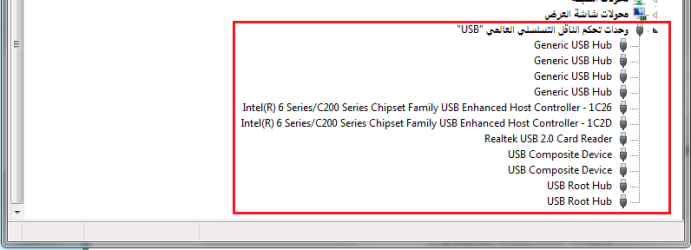
2. You have two Host Controllers (1C26, 1C2D) in Device Manager. Only delete one of them. You will need to find out which host controller corresponds to the left side, and which host controller corresponds to the right side. Unfortunately, device manager only gives logical location, and not physical location. So, you would need guess at which of the two device driver to uninstall. If your guess were wrong, reboot the computer, and delete the other device driver.

In all circumstances, reboot the computer to re-install the device driver.​
 

My Computer My Computer

At a glance

Windows 7 x64, Vista x64, 8.1 smartphoneIntel E8400 65W 64-bitDDR2 2 x 2GB, 1GB x 2XFX Radeon HD5750
Computer type
PC/Desktop
OS
Windows 7 x64, Vista x64, 8.1 smartphone
CPU
Intel E8400 65W 64-bit
Motherboard
Gigabyte EP45-UD3LR
Memory
DDR2 2 x 2GB, 1GB x 2
Graphics Card(s)
XFX Radeon HD5750
Sound Card
AMD High Definition Audio; Realtek High Definition Audio
Monitor(s) Displays
iiyama prolite X2377HDS
Screen Resolution
1920 x 1080
Hard Drives
500GB 7200 rpm Seagate ST3500413AS 16MB, 500GB 5400 rpm Toshiba MQ02ABF050H 32MB, 200GB 7200 rpm Seagate ST3200820AS 8MB, 2TB 7200 rpm Western Digital WD20EZRX 64MB
PSU
Enermax Liberty Modular
Case
Antec P193 Midi Tower
Keyboard
Mionix ZIBAL 60
Mouse
Razer USB 2.0 Diamondback Mouse or Huion Graphics Tablet
Browser
Internet Explorer, Lunascape, Firefox, Opera, Avast Safezone
1. It will be okay, as the device driver is automatically re-installed on next PC boot. If doubts remain, then create a manual restore point BEFORE uninstalling the driver. That way you can always rollback the system, in the event something went wrong.

2. You have two Host Controllers (1C26, 1C2D) in Device Manager. Only delete one of them. You will need to find out which host controller corresponds to the left side, and which host controller corresponds to the right side. Unfortunately, device manager only gives logical location, and not physical location. So, you would need guess at which of the two device driver to uninstall. If your guess were wrong, reboot the computer, and delete the other device driver.

In all circumstances, reboot the computer to re-install the device driver.​

I made 2 tries! first one i deleted "1C2D" controller, reboot my computer and windows reinstall the controller. The result is all my devices works fine on the left port again and the right port still not fixed.

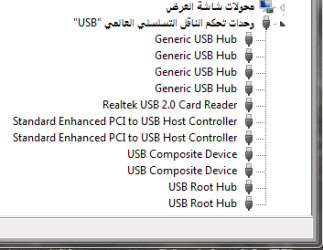
Second one i deleted "1C2D" and "1C26" controllers and did the same thing as first try, but did not make any difference and the USB Serial Bus Controllers changed to be like that.
 

Attachments

  • USB Serial Bus Controllers.png
    USB Serial Bus Controllers.png
    4.9 KB · Views: 29

My Computer My Computer

At a glance

Windows Home Premium
OS
Windows Home Premium
Hello Mohanned Aladin,

So you have tried deleting each Host Controller, this did not fix the issue plus the computer is now stuck with the Standard Host Controller?

As you have tried deleting both Host Controllers, and the issue was not resolved, then it is unlikely a Software Issue.

But now the computer has installed only the standard host controller? This may be because the Intel 6 Series / C200 is not compatible with your operating system.

- Try updating each Standard Enhanced PCI to USB Host Controller, from within device manager.
- Or try downloading Intel 6 Series / C200 Series Chipset Family USB Enhanced Host Controller from the Intel download site.
- Or use System Restore to restore your computer to an earlier date.
 

My Computer My Computer

At a glance

Windows 7 x64, Vista x64, 8.1 smartphoneIntel E8400 65W 64-bitDDR2 2 x 2GB, 1GB x 2XFX Radeon HD5750
Computer type
PC/Desktop
OS
Windows 7 x64, Vista x64, 8.1 smartphone
CPU
Intel E8400 65W 64-bit
Motherboard
Gigabyte EP45-UD3LR
Memory
DDR2 2 x 2GB, 1GB x 2
Graphics Card(s)
XFX Radeon HD5750
Sound Card
AMD High Definition Audio; Realtek High Definition Audio
Monitor(s) Displays
iiyama prolite X2377HDS
Screen Resolution
1920 x 1080
Hard Drives
500GB 7200 rpm Seagate ST3500413AS 16MB, 500GB 5400 rpm Toshiba MQ02ABF050H 32MB, 200GB 7200 rpm Seagate ST3200820AS 8MB, 2TB 7200 rpm Western Digital WD20EZRX 64MB
PSU
Enermax Liberty Modular
Case
Antec P193 Midi Tower
Keyboard
Mionix ZIBAL 60
Mouse
Razer USB 2.0 Diamondback Mouse or Huion Graphics Tablet
Browser
Internet Explorer, Lunascape, Firefox, Opera, Avast Safezone
I was hunting around the web on this problem and found two possible fixes and I thought of one additonal possibility-

1. Go to Control Panel, Power Options. For the your power plan, select Edit plan settings and then select Change Advanced Power Settings. In the box shown, scroll down to USB. Double click on it and then double click on USB Selective Suspend Settings. For Battery, change it to Disabled. Reboot. Try the port.

2. Unplug the power adapter from your system and reboot. Insert a device into the port. Does it work.

3. Connect a device to the problem port. In Control Panel, select Troubleshooting. Double click on Hardware and Devices. Run the troubleshooter. Does it see the device?
 

My Computer My Computer

At a glance

Windows 7 Pro SP1 64 bit8 GB
Computer type
Laptop
Computer Manufacturer/Model Number
Dell M6500 Precision Work Station
OS
Windows 7 Pro SP1 64 bit
Memory
8 GB
Screen Resolution
1920x
Internet Speed
30 Mbps
Antivirus
Norton Security
Browser
IE 11
Hello Mohanned Aladin,

So you have tried deleting each Host Controller, this did not fix the issue plus the computer is now stuck with the Standard Host Controller?

As you have tried deleting both Host Controllers, and the issue was not resolved, then it is unlikely a Software Issue.

But now the computer has installed only the standard host controller? This may be because the Intel 6 Series / C200 is not compatible with your operating system.

- Try updating each Standard Enhanced PCI to USB Host Controller, from within device manager.
- Or try downloading Intel 6 Series / C200 Series Chipset Family USB Enhanced Host Controller from the Intel download site.
- Or use System Restore to restore your computer to an earlier date.
I used system restore, because i did not find them in Intel download site and device manager kept telling me your drivers are up to date. Thank you for reminding me about creating a manual restore point before deleting them.
 
Last edited:

My Computer My Computer

At a glance

Windows Home Premium
OS
Windows Home Premium
I was hunting around the web on this problem and found two possible fixes and I thought of one additonal possibility-

1. Go to Control Panel, Power Options. For the your power plan, select Edit plan settings and then select Change Advanced Power Settings. In the box shown, scroll down to USB. Double click on it and then double click on USB Selective Suspend Settings. For Battery, change it to Disabled. Reboot. Try the port.

2. Unplug the power adapter from your system and reboot. Insert a device into the port. Does it work.

3. Connect a device to the problem port. In Control Panel, select Troubleshooting. Double click on Hardware and Devices. Run the troubleshooter. Does it see the device?

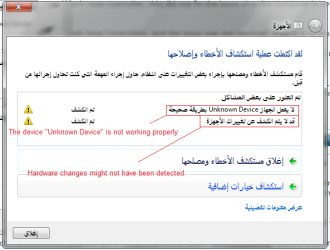
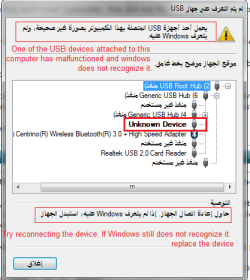
I change the battery to disabled and unpluged the power adapter from my laptop and reboot, Still not fixed. Then i ran the troubleshooter and yes it does see the device!

NOTE: It is not one of my devices. All my devices are not going to work.
 

Attachments

  • 1.png
    1.png
    22.1 KB · Views: 20
  • 3.png
    3.png
    17.5 KB · Views: 20
  • 2.png
    2.png
    12.6 KB · Views: 20
Last edited:

My Computer My Computer

At a glance

Windows Home Premium
OS
Windows Home Premium
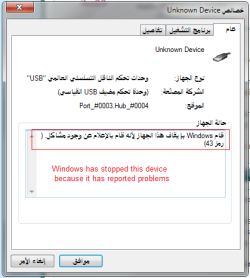
The last picture - the one that shows "Unknown Device Properties" window - shows the problem port to be Logical Port #0003 connected to Hub #0004.

The thing is, that piece of information does not tell you whether this problem port is the damaged port located on the left side, or the unresponsive port that is located on the right side of the laptop.

So now you have got to try and figure out which logical port number corresponds to which physical port.

You can download and run USB Device Tree Viewer. There is no installation required, USB Device Tree Viewer might show more clearly what the problem is, if indeed the problem is software.
 
Last edited:

My Computer My Computer

At a glance

Windows 7 x64, Vista x64, 8.1 smartphoneIntel E8400 65W 64-bitDDR2 2 x 2GB, 1GB x 2XFX Radeon HD5750
Computer type
PC/Desktop
OS
Windows 7 x64, Vista x64, 8.1 smartphone
CPU
Intel E8400 65W 64-bit
Motherboard
Gigabyte EP45-UD3LR
Memory
DDR2 2 x 2GB, 1GB x 2
Graphics Card(s)
XFX Radeon HD5750
Sound Card
AMD High Definition Audio; Realtek High Definition Audio
Monitor(s) Displays
iiyama prolite X2377HDS
Screen Resolution
1920 x 1080
Hard Drives
500GB 7200 rpm Seagate ST3500413AS 16MB, 500GB 5400 rpm Toshiba MQ02ABF050H 32MB, 200GB 7200 rpm Seagate ST3200820AS 8MB, 2TB 7200 rpm Western Digital WD20EZRX 64MB
PSU
Enermax Liberty Modular
Case
Antec P193 Midi Tower
Keyboard
Mionix ZIBAL 60
Mouse
Razer USB 2.0 Diamondback Mouse or Huion Graphics Tablet
Browser
Internet Explorer, Lunascape, Firefox, Opera, Avast Safezone
If the device he plugged into the right port works in the left port then, I think the problem port is identified. However, it's the device that's the problem. I would reboot again with the device plugged into the right port to see if Windows will install the device driver. Does this make sense?
 

My Computer My Computer

At a glance

Windows 7 Pro SP1 64 bit8 GB
Computer type
Laptop
Computer Manufacturer/Model Number
Dell M6500 Precision Work Station
OS
Windows 7 Pro SP1 64 bit
Memory
8 GB
Screen Resolution
1920x
Internet Speed
30 Mbps
Antivirus
Norton Security
Browser
IE 11

My Computer My Computer

At a glance

Linux Mint 18.2 xfce 64-bit (VMWare host) / W...Haswell4 GB
Computer type
PC/Desktop
Computer Manufacturer/Model Number
Dell
OS
Linux Mint 18.2 xfce 64-bit (VMWare host) / Windows 8.1 Pro 32-bit (VMWare guest)
CPU
Haswell
Memory
4 GB
Monitor(s) Displays
Acer 23"
Screen Resolution
1920 x 1080
Hard Drives
Two hard drives, 1TB each: One for Linux, one for my data.
Keyboard
IBM Model M
Antivirus
Sophos (Linux), Trend Micro (Windows)
Browser
Firefox, Opera
Other Info
I use Samba to share my data drive with the other computers at my house and with my guest session in VMWare Workstation Player.
It looks like you have a Firewire jack on the side of your computer. If true, then you could get a Firewire to USB adapter wire:

Amazon.com: 1.2m USB 2.0 to iEEE-1394 Cable, USB 2.0 Male to Firewire iEEE 1394 4 Pin Male iLink Adapter Cable Male to Male Cable Light White Flexible Cable: Computers & Accessories

...along with a USB to USB adapter:

Amazon.com: Generic SANOXYA USB Female to Female Gender Changer (USB_F-USB_F): Computers & Accessories

This would give you one additional USB port.
No, my laptop does not have a firewire port. Thank you, appropriate your reply ;)
 

My Computer My Computer

At a glance

Windows Home Premium
OS
Windows Home Premium
If the device he plugged into the right port works in the left port then, I think the problem port is identified. However, it's the device that's the problem. I would reboot again with the device plugged into the right port to see if Windows will install the device driver. Does this make sense?
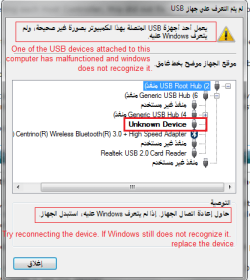
The Device Kept disconnecting and reconnecting and also it made windows usb unplug/plug sounds, this window appeared again.
 

Attachments

  • 2.png
    2.png
    17.5 KB · Views: 14

My Computer My Computer

At a glance

Windows Home Premium
OS
Windows Home Premium
Back
Top