USB Port on Laptop is Unresponsive

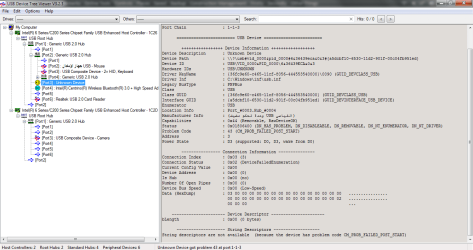
The last picture - the one that shows "Unknown Device Properties" window - shows the problem port to be Logical Port #0003 connected to Hub #0004.

The thing is, that piece of information does not tell you whether this problem port is the damaged port located on the left side, or the unresponsive port that is located on the right side of the laptop.

So now you have got to try and figure out which logical port number corresponds to which physical port.

You can download and run USB Device Tree Viewer. There is no installation required, USB Device Tree Viewer might show more clearly what the problem is, if indeed the problem is software.

I Unplugged All My Devices

Then


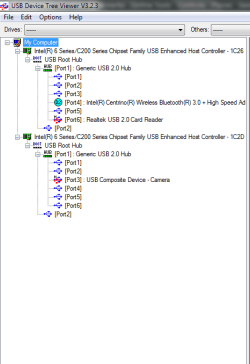
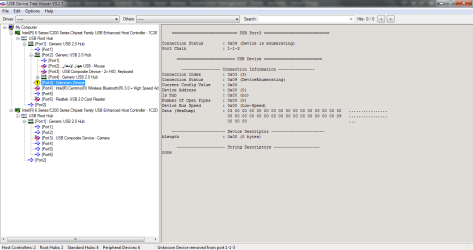
1. I opened USB Device Tree Viewer.

405961d1542399577-usb-port-laptop-unresponsive-1.png


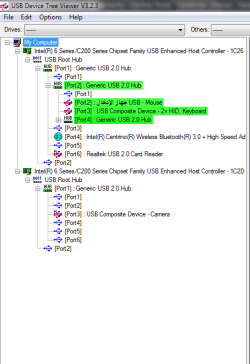
2. I plugged my devices into the left port (Good Port).

405962d1542399628-usb-port-laptop-unresponsive-2.png


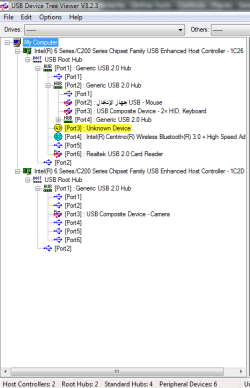
3. I plugged USB Flash Drive into the right port (Unresponsive Port) and it kept disconnecting and reconnecting.

405963d1542401843-usb-port-laptop-unresponsive-3.png


When it is connecting:

Page 1 of 2

405964d1542399731-usb-port-laptop-unresponsive-4.png


Page 2 of 2

405968d1542399928-usb-port-laptop-unresponsive-5.png


When it is disconnecting:

405969d1542399928-usb-port-laptop-unresponsive-6.png


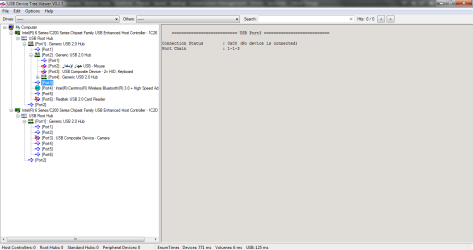
4. I unplugged USB Flash Drive.

405970d1542399928-usb-port-laptop-unresponsive-7.png
 

Attachments

  • 1.png
    1.png
    11.5 KB · Views: 72
  • 2.png
    2.png
    14.2 KB · Views: 72
  • 3.png
    3.png
    14.9 KB · Views: 69
  • 4.png
    4.png
    42.1 KB · Views: 38
  • 5.png
    5.png
    43.5 KB · Views: 36
  • 6.png
    6.png
    29.9 KB · Views: 36
  • 7.png
    7.png
    24.9 KB · Views: 36
Last edited:

My Computer My Computer

At a glance

Windows Home Premium
OS
Windows Home Premium
Although, it's clearly pointing to a problem with the device, if the device is connecting/reconnecting randomly, it may be that the USB port has come loose. If the same behavior happens when you use different USB devices, then I'd say it's a problem with the port.
 

My Computer My Computer

At a glance

Windows 7 Pro SP1 64 bit8 GB
Computer type
Laptop
Computer Manufacturer/Model Number
Dell M6500 Precision Work Station
OS
Windows 7 Pro SP1 64 bit
Memory
8 GB
Screen Resolution
1920x
Internet Speed
30 Mbps
Antivirus
Norton Security
Browser
IE 11
Okay, the unresponsive physical USB port is logical USB Port #0003, Hub #0004. So, what can we make of the results from USB Tree Viewer?

When it is disconnecting
Connection Status 0x09 (Device is enumerating) means that the Root Hub has detected a device connected to the port, and is currently being enummerated. This seems to suggest that the Root Hub device driver is working satisfactorily.

Page 1 of 2
Connection Status 0x02 (Device failed enumeration) / Status 0x01806400 / Problem Code 43 Indicates that an attempt was made to connect a device to the port, but the enumeration of the device failed. Windows has stopped this device because it has reported a problem.

Here is someone else with a similar issue Most of my USB Ports Don't Work - Bleeping Computer. Poster also reported Status 0x01806400. There was no fix, other than to replace the USB hardware.

You can try obtaining a Live Linux CD, see if you can access the USB ports from within the Linux Operating System.

I suspect it will confirm to you that there is a hardware fault with the USB Port. In your case, it could mean that, because one port is physically broken, then that affects other ports further down in the USB hierarchic tree.
 

My Computer My Computer

At a glance

Windows 7 x64, Vista x64, 8.1 smartphoneIntel E8400 65W 64-bitDDR2 2 x 2GB, 1GB x 2XFX Radeon HD5750
Computer type
PC/Desktop
OS
Windows 7 x64, Vista x64, 8.1 smartphone
CPU
Intel E8400 65W 64-bit
Motherboard
Gigabyte EP45-UD3LR
Memory
DDR2 2 x 2GB, 1GB x 2
Graphics Card(s)
XFX Radeon HD5750
Sound Card
AMD High Definition Audio; Realtek High Definition Audio
Monitor(s) Displays
iiyama prolite X2377HDS
Screen Resolution
1920 x 1080
Hard Drives
500GB 7200 rpm Seagate ST3500413AS 16MB, 500GB 5400 rpm Toshiba MQ02ABF050H 32MB, 200GB 7200 rpm Seagate ST3200820AS 8MB, 2TB 7200 rpm Western Digital WD20EZRX 64MB
PSU
Enermax Liberty Modular
Case
Antec P193 Midi Tower
Keyboard
Mionix ZIBAL 60
Mouse
Razer USB 2.0 Diamondback Mouse or Huion Graphics Tablet
Browser
Internet Explorer, Lunascape, Firefox, Opera, Avast Safezone
Hi Mohanned Aladin,

You can try obtaining a Live Linux CD, see if you can access the USB ports from within the Linux Operating System.

I suspect it will confirm to you that there is a hardware fault with the USB Port. In your case, it could mean that, because one port is physically broken, then that affects other ports further down in the USB hierarchic tree.

Further to iko22's suggestion:

Linux LIVE DVD Or USB

You can create a Linux Live DVD or USB [this means that the Linux OS runs directly from the DVD or USB and not the HDD because it doesn't need installation]. This will read the HDD information which is inaccessible through Windows directly from the controller and is often a better solution in these types of situations. Another advantage of this is that you will have less activity on your HDD while you are trying to access it and retrieve [look at] the contents.

Download the Linux ISO [I have used Linux Mint for this example] from here => Linux Mint.

Now burn the ISO [you can't just copy and paste it because it won't work] to a DVD or USB.

To burn the ISO to a DVD, you can use the Windows 7 built in ISO burner.
To burn the ISO to a USB, you can either use Rufus 3.3 or Rufus 3.3 Portable.

Using Rufus will ERASE ALL THE DATA on the USB, so make sure that you backup any data that you need FIRST. The USB MUST be bigger than the ISO file that you are burning.

Now boot into the DVD or USB.

Nothing will be installed to your HDD unless you specifically tell it to. You can now retrieve [look at] the contents of the HDD from within Linux. When you have finished and want to go back into Windows, just remove the DVD or USB, then Shutdown and Restart the computer.

NOTE: I have used Linux Mint as an example. There are several other versions available which work in exactly the same way.

When creating a Linux Live Bootable USB using Rufus, you can pretty much leave the default settings as they are. However, you may be confronted with some ERRORS. Here are the errors and the ways to overcome them:

[1] If the message This image uses Syslinux x.xx/xxxxxxxx but this application only includes the installation files for Syslinux x.xx/xxxx-xx-xx appears, this is because the version of Linux that is being installed is newer that what Rufus is supporting by default. Click Yes to download the new files.
[2] If the message ISOHybrid image detected appears, click OK.
[3] If the message WARNING: ALL DATA ON DEVICE WILL BE DESTROYED appears, click OK.
[4] If the message IMPORTANT: THIS DRIVE CONTAINS MULTIPLE PARTITIONS!! appears, click OK.
[5] If the message Error: Could not open media. It may be in use by another process. Please re=plug the media and try again appears, click Close. You simply un-plug the USB and re-plug it back in and start again. This time it will work!

Linux LIVE DVD Or USB Alternative [Thanks to SIW2]

This alternative is an easier way to create a Linux Live Bootable USB.

To watch the full process click the YouTube link here => Embracing Linux: Bootable USB Drive.

The Universal USB Installer can be downloaded from here => Universal-USB-Installer-1.9.8.3.

I hope this helps!
 

My Computer My Computer

At a glance

Win 7 HP SP1 64-bit Vista HB SP2 32-bit Linux...Intel(R) Pentium(R) CPU P6200 @ 2.13GHz4.00 GBIntel(R) Graphics Media Accelerator HD
Computer type
Laptop
Computer Manufacturer/Model Number
Fujitsu LIFEBOOK
OS
Win 7 HP SP1 64-bit Vista HB SP2 32-bit Linux Mint 18.3
CPU
Intel(R) Pentium(R) CPU P6200 @ 2.13GHz
Motherboard
FUJITSU FJNBB06
Memory
4.00 GB
Graphics Card(s)
Intel(R) Graphics Media Accelerator HD
Sound Card
[1] Realtek High Definition Audio [2] Intel(R) Display Audio
Screen Resolution
1366 x 768 x 32 bits (4294967296 colors) @ 59 Hz
Hard Drives
TOSHIBA MK5076GSX
Antivirus
AVG FREE
Although, it's clearly pointing to a problem with the device, if the device is connecting/reconnecting randomly, it may be that the USB port has come loose. If the same behavior happens when you use different USB devices, then I'd say it's a problem with the port.

I think the port is fit all my devices. I tried move them when they are plugged in but did not hear windows usb unplug/plug sounds, that's means the USB has not come loose :-)

Thanks for the reply, wither ;)
 
Last edited:

My Computer My Computer

At a glance

Windows Home Premium
OS
Windows Home Premium
Okay, the unresponsive physical USB port is logical USB Port #0003, Hub #0004. So, what can we make of the results from USB Tree Viewer?

When it is disconnecting
Connection Status 0x09 (Device is enumerating) means that the Root Hub has detected a device connected to the port, and is currently being enummerated. This seems to suggest that the Root Hub device driver is working satisfactorily.

Page 1 of 2
Connection Status 0x02 (Device failed enumeration) / Status 0x01806400 / Problem Code 43 Indicates that an attempt was made to connect a device to the port, but the enumeration of the device failed. Windows has stopped this device because it has reported a problem.

Here is someone else with a similar issue Most of my USB Ports Don't Work - Bleeping Computer. Poster also reported Status 0x01806400. There was no fix, other than to replace the USB hardware.

You can try obtaining a Live Linux CD, see if you can access the USB ports from within the Linux Operating System.

I suspect it will confirm to you that there is a hardware fault with the USB Port. In your case, it could mean that, because one port is physically broken, then that affects other ports further down in the USB hierarchic tree.

I think if you suspect Linux will confirm to me that there is a hardware fault with the USB Port and you are not the only one suspect that then it seems it is not some kind of software issue as i thought. But i did not use Linux before so i will try it as soon as i can, because i do not have much of time these days.

But i keep asking my self, why it was working fine all those years ago until months ago? i think i broke the left port before two or three years and the right port was working fine until i noticed weeks ago that it stopped working!

What about cleaning the log that records the USB plug in equipment used in my laptop, do you think it is going to make any difference?
 
Last edited:

My Computer My Computer

At a glance

Windows Home Premium
OS
Windows Home Premium
Hi Mohanned Aladin,


Further to iko22's suggestion:

Linux LIVE DVD Or USB

You can create a Linux Live DVD or USB [this means that the Linux OS runs directly from the DVD or USB and not the HDD because it doesn't need installation]. This will read the HDD information which is inaccessible through Windows directly from the controller and is often a better solution in these types of situations. Another advantage of this is that you will have less activity on your HDD while you are trying to access it and retrieve [look at] the contents.

Download the Linux ISO [I have used Linux Mint for this example] from here => Linux Mint.

Now burn the ISO [you can't just copy and paste it because it won't work] to a DVD or USB.

To burn the ISO to a DVD, you can use the Windows 7 built in ISO burner.
To burn the ISO to a USB, you can either use Rufus 3.3 or Rufus 3.3 Portable.

Using Rufus will ERASE ALL THE DATA on the USB, so make sure that you backup any data that you need FIRST. The USB MUST be bigger than the ISO file that you are burning.

Now boot into the DVD or USB.

Nothing will be installed to your HDD unless you specifically tell it to. You can now retrieve [look at] the contents of the HDD from within Linux. When you have finished and want to go back into Windows, just remove the DVD or USB, then Shutdown and Restart the computer.

NOTE: I have used Linux Mint as an example. There are several other versions available which work in exactly the same way.

When creating a Linux Live Bootable USB using Rufus, you can pretty much leave the default settings as they are. However, you may be confronted with some ERRORS. Here are the errors and the ways to overcome them:

[1] If the message This image uses Syslinux x.xx/xxxxxxxx but this application only includes the installation files for Syslinux x.xx/xxxx-xx-xx appears, this is because the version of Linux that is being installed is newer that what Rufus is supporting by default. Click Yes to download the new files.
[2] If the message ISOHybrid image detected appears, click OK.
[3] If the message WARNING: ALL DATA ON DEVICE WILL BE DESTROYED appears, click OK.
[4] If the message IMPORTANT: THIS DRIVE CONTAINS MULTIPLE PARTITIONS!! appears, click OK.
[5] If the message Error: Could not open media. It may be in use by another process. Please re=plug the media and try again appears, click Close. You simply un-plug the USB and re-plug it back in and start again. This time it will work!

Linux LIVE DVD Or USB Alternative [Thanks to SIW2]

This alternative is an easier way to create a Linux Live Bootable USB.

To watch the full process click the YouTube link here => Embracing Linux: Bootable USB Drive.

The Universal USB Installer can be downloaded from here => Universal-USB-Installer-1.9.8.3.

I hope this helps!

Thank you so much i am definitely going back to your reply when i have time to try it :-)

Appropriate your support ;)
 

My Computer My Computer

At a glance

Windows Home Premium
OS
Windows Home Premium
Back
Top