USB Ports dead?

EmanModnar

New member
Local time
10:07 PM
Messages
5
My USB Ports seem to be dead as whenever I plug any USB device in my ports, they don't do anything.
Heres what I tried (and failed):
-Disable Selective Suspending
-Restart
-Scan for Hardware changes
-Uninstall the USB Ports
-System Restore
-Yank out the power cord (only made it worse).
Anyone gonna help?:cry:

Specs:
Manufactorer: Hewlett Packard
Model: HP Pavilion g7 Notebook PC
Processor: Intel core i3-2350M CPU @2.30GHz 2.30 GHz
RAM: 4,00 GB
64 Bit OS
 
Last edited:

My Computer

Computer type
PC/Desktop
OS
Windows 7 Home Premium 64
Hello EmanModnar. Welcome to the forum

Are these the USB ports in the rear on the motherboard, the ports on the case, or both?
 

My Computer

Computer type
PC/Desktop
Computer Manufacturer/Model Number
Home Built - Jan 2013
OS
Windows 7 64 Bit Home Premium SP1
CPU
i7-3820
Motherboard
Asus P9X79-PRO - Bios 4608
Memory
GSkill F3-14900CL9Q - 16GB
Graphics Card(s)
EVGA GeForce GTX660 - Driver 352.86
Sound Card
On board Realtek ALC898
Monitor(s) Displays
Acer S271HL
Screen Resolution
1920 x 1080
Hard Drives
#1- Samsung 840 Pro Series
#2- Western Digital WD1002FAEX Sata3 Black
#3- Western Digital WD1002FAEX Sata3 Black
PSU
Corsair CMPSU-850TX-V2 - 850 watt (by Seasonic)
Case
Corsair Obsidian 550D
Cooling
Standard 3 120mm case fans, Cooler Master Hyper 212 EVO
Keyboard
MS KC-0405
Mouse
Intellimouse 5-button
Internet Speed
56 Mbits/Sec (on a good day)
Antivirus
Avast & Malwarebytes
Browser
Firefox
Other Info
Asus DVD - DRW-24B1ST 24X
Hello EmanModnar. Welcome to the forum

Are these the USB ports in the rear on the motherboard, the ports on the case, or both?
Their on the sides, 2 on the left, 1 on the right, so I believe their attached to the Motherboard
 

My Computer

Computer type
PC/Desktop
OS
Windows 7 Home Premium 64
Negative. The ones attached to the motherboard are universally in the rear within the cluster of input ports including the sound ports. Any ports you have that are in the case - side, top, whatever, are case ports. These ports will be connected to the motherboard by a cable(s). That cable could come loose, so you want to check for anything obvious.

But you want to test those rear USB ports first. If the rear ports (connected to the motherboard) work but the case ports do not then that will narrow it down a lot.

Many BIOS have a setting to enable or disable the USB ports also. But before you go there do that test first.
 

My Computer

Computer type
PC/Desktop
Computer Manufacturer/Model Number
Home Built - Jan 2013
OS
Windows 7 64 Bit Home Premium SP1
CPU
i7-3820
Motherboard
Asus P9X79-PRO - Bios 4608
Memory
GSkill F3-14900CL9Q - 16GB
Graphics Card(s)
EVGA GeForce GTX660 - Driver 352.86
Sound Card
On board Realtek ALC898
Monitor(s) Displays
Acer S271HL
Screen Resolution
1920 x 1080
Hard Drives
#1- Samsung 840 Pro Series
#2- Western Digital WD1002FAEX Sata3 Black
#3- Western Digital WD1002FAEX Sata3 Black
PSU
Corsair CMPSU-850TX-V2 - 850 watt (by Seasonic)
Case
Corsair Obsidian 550D
Cooling
Standard 3 120mm case fans, Cooler Master Hyper 212 EVO
Keyboard
MS KC-0405
Mouse
Intellimouse 5-button
Internet Speed
56 Mbits/Sec (on a good day)
Antivirus
Avast & Malwarebytes
Browser
Firefox
Other Info
Asus DVD - DRW-24B1ST 24X
Negative. The ones attached to the motherboard are universally in the rear within the cluster of input ports including the sound ports. Any ports you have that are in the case - side, top, whatever, are case ports. These ports will be connected to the motherboard by a cable(s). That cable could come loose, so you want to check for anything obvious.

But you want to test those rear USB ports first. If the rear ports (connected to the motherboard) work but the case ports do not then that will narrow it down a lot.

Many BIOS have a setting to enable or disable the USB ports also. But before you go there do that test first.

What do you mean by rear? Do you mean at the back of the laptop when the screen is facing me? if so then I don't have any USB ports other than those 3 I mentioned
 

My Computer

Computer type
PC/Desktop
OS
Windows 7 Home Premium 64
Argghh.
In your "My System Specs" you have listed your PC as a desktop.
Chasing a tail.
 

My Computer

Computer type
PC/Desktop
Computer Manufacturer/Model Number
Home Built - Jan 2013
OS
Windows 7 64 Bit Home Premium SP1
CPU
i7-3820
Motherboard
Asus P9X79-PRO - Bios 4608
Memory
GSkill F3-14900CL9Q - 16GB
Graphics Card(s)
EVGA GeForce GTX660 - Driver 352.86
Sound Card
On board Realtek ALC898
Monitor(s) Displays
Acer S271HL
Screen Resolution
1920 x 1080
Hard Drives
#1- Samsung 840 Pro Series
#2- Western Digital WD1002FAEX Sata3 Black
#3- Western Digital WD1002FAEX Sata3 Black
PSU
Corsair CMPSU-850TX-V2 - 850 watt (by Seasonic)
Case
Corsair Obsidian 550D
Cooling
Standard 3 120mm case fans, Cooler Master Hyper 212 EVO
Keyboard
MS KC-0405
Mouse
Intellimouse 5-button
Internet Speed
56 Mbits/Sec (on a good day)
Antivirus
Avast & Malwarebytes
Browser
Firefox
Other Info
Asus DVD - DRW-24B1ST 24X

My Computer

Computer type
PC/Desktop
Computer Manufacturer/Model Number
Home made Desktop
OS
Windows 10 Pro. 64/ version 1709 Windows 7 Pro/64
CPU
Intel i7-6800K @ 4.3
Motherboard
ASUS X-99 Deluxe II
Memory
Corsair Platinum 16 gig @2400
Graphics Card(s)
EVGA GTX 1070 OC
Monitor(s) Displays
Asus 27" LED LCD/VE278Q
Screen Resolution
1920-1080 or 1280-720 HDMI
Hard Drives
INTEL SSD 730-240 Gb Sata 3.0/
PSU
EVGA Platium 1200W
Case
Phanteks Luxe Tempered Glass 8 fans/ one radiator
Cooling
XSPC/ Water Cooled CPU
Keyboard
Das 4 Professional
Mouse
Logitech M705/MX Anywhere 2-S
Internet Speed
100 mbits
Antivirus
Microsoft Security Essentials/ Malwarebytes Premium 3.0/ SAS
Browser
I.E. 11 default/Firefox/ ISP Time Warner Cable/Spectrum
Other Info
LG BluRay Burner/
Sound system-KLipsch-THX/
Icy Dock ssd Hot Swap bays.
nevermind about what I said my computer won't get fixed, it's way too expensive
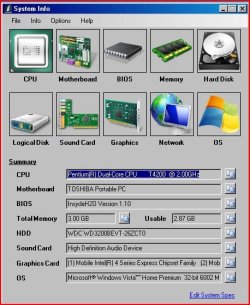
Here are my specs.
Wait, that was the wrong computer, sorry for that. I'll try and post the specs for the broken computer.
Ignore the image on this post.
 

Attachments

  • Capture.JPG
    Capture.JPG
    55.4 KB · Views: 10
Last edited:

My Computer

Computer type
PC/Desktop
OS
Windows 7 Home Premium 64
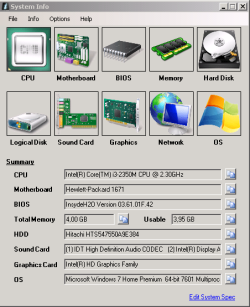
Ok, here are the broken comp's specs (the comp works fine, just the usb ports don't work
Capture.PNG
 
Last edited:

My Computer

Computer type
PC/Desktop
OS
Windows 7 Home Premium 64
Back
Top