Usb ports extremely slow

patchwork

New member
Local time
12:14 PM
Messages
3
So i was working on a midterm paper last night and i put in my sprint card into the usb port after removing it my computer started doing what it is not supposed to do have a mind of its own.... i plugged in my mouse to the usb port it it took 5 min. for it to even recongnize it, i have since shutdown my laptop and started it up again and still slower than turtle, i have tried looking for ways to find the latest drivers for the usb ports, i am currently running a Acer Aspire 5532 with wondows 7, i have a AMD Athelon 64 Processor (1.6 Ghz) i have 3 gb ram and i have 2.0 ubs plugins..... i am needing some help here cause i can't wait ten hours and a lifetime for my crap to be recognized any help would be great...
 

My Computer

Computer Manufacturer/Model Number
Acer/ Aspire 5532
OS
Windows 7
Graphics Card(s)
ATI RADEON HD 3200
So i was working on a midterm paper last night and i put in my sprint card into the usb port after removing it my computer started doing what it is not supposed to do have a mind of its own.... i plugged in my mouse to the usb port it it took 5 min. for it to even recongnize it, i have since shutdown my laptop and started it up again and still slower than turtle, i have tried looking for ways to find the latest drivers for the usb ports, i am currently running a Acer Aspire 5532 with wondows 7, i have a AMD Athelon 64 Processor (1.6 Ghz) i have 3 gb ram and i have 2.0 ubs plugins..... i am needing some help here cause i can't wait ten hours and a lifetime for my crap to be recognized any help would be great...


First check your drivers.

Please go to start>search>type device manager.
Are there any "unknown devices" with yellow triangles on them?
Is you driver there , listed, and working?

If your driver is missing, or there is a yellow triangle on it, you will need to update it.


If device manager is ok and all drivers are functioning correctly go to event viewer.

There are several ways to find what the problem is. The best is to go into event viewer (type eventvwr in search). Go to the windows log>application tab.

You want to look for critical errors (they have red in the left column ).

When you find them you want to look for critical errors that say app hang, app crash, or anything that relates to the problem.

When you find them please note the event ID, and the source codes and tell us what they are.

Let us know if you need help with any of this.

Ken
 

My Computer

Computer Manufacturer/Model Number
HP Pavillion dv-7 1005 Tx
OS
Win 8 Release candidate 8400
CPU
[email protected]
Memory
4 gigs
Graphics Card(s)
Nvidia 9600M
Sound Card
HD built-in
Monitor(s) Displays
17" Wxga
Screen Resolution
1440x900
Cooling
none
Internet Speed
45Mb down 5Mb up
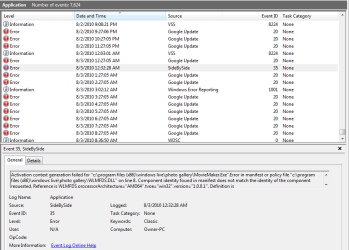
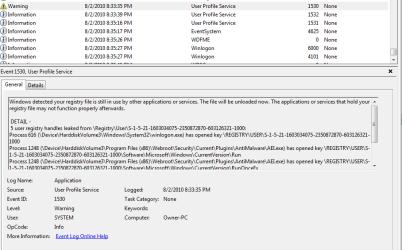
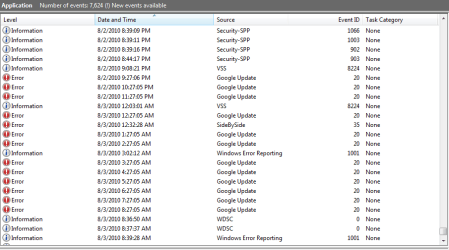
i checked that last night and here are the results at the bottom files i had several just info events which i presume just means they where OK and i also went through reports a little and found the second file (capture 2) the one that says user profile service and i went ahead and captured a shot of it report in full. i also did some looking and ever since i loaded Google chrome the Google update errors have been occurring.
 

Attachments

  • Capture.PNG
    Capture.PNG
    20.7 KB · Views: 172
  • Capture2.PNG
    Capture2.PNG
    17.6 KB · Views: 62
  • Capture3.PNG
    Capture3.PNG
    13.8 KB · Views: 46

My Computer

Computer Manufacturer/Model Number
Acer/ Aspire 5532
OS
Windows 7
Graphics Card(s)
ATI RADEON HD 3200
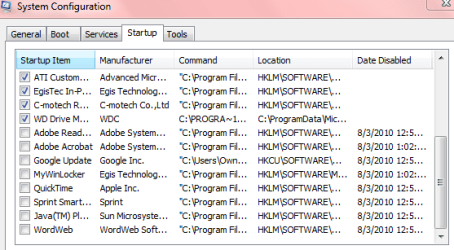
i also just realized i have disabled some programs on startup i will send a picture of that also i have not touched any of the services they are all left on so yeah just startup programs......

also to note the java(TM) pl... is the java updater
 

Attachments

  • Capture4.PNG
    Capture4.PNG
    11.3 KB · Views: 55

My Computer

Computer Manufacturer/Model Number
Acer/ Aspire 5532
OS
Windows 7
Graphics Card(s)
ATI RADEON HD 3200
Back
Top