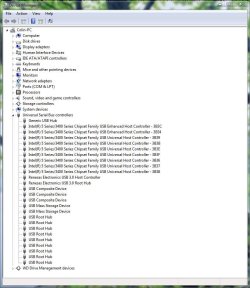
I just upgraded to Win 7 Home Premium 64-bit with a fresh installation on a new HDD. I have only put on a few utilities so far, and allowed Windows to do all the updates it wanted.
When I plug a memory stick or externall HDD into the USB ports, nothing happens! I can't see the drive in the Computer view. Do I need to install a USB driver?
Thanks!
When I plug a memory stick or externall HDD into the USB ports, nothing happens! I can't see the drive in the Computer view. Do I need to install a USB driver?
Thanks!
My Computer
- Computer type
- PC/Desktop
- Computer Manufacturer/Model Number
- custom build
- OS
- Microsoft Windows 7 Home Premium 64-bit Service Pack 1
- CPU
- Intel(R) Core(TM)2 Quad CPU Q9550 @ 2.83GHz
- Motherboard
- Gigabyte Technology Co., Ltd. EP45-DS3
- Memory
- 8.00 GB
- Graphics Card(s)
- ATI Radeon HD 4800 Series (Microsoft Corporation WDDM 1.1)
- Sound Card
- ASUS Xonar Essence ST
- Monitor(s) Displays
- Dell UltraSharp 2711, ViewSonic VX2240w
- Screen Resolution
- 1680 x 1050 x 32 bits (4294967296 colors) @ 59 Hz
- Hard Drives
- (1) ST500DM002-1BC142 ATA Device (2) Generic Flash Disk USB Device
- PSU
- Thermaltake Toughpower (750 W)
- Case
- Thermaltake
- Keyboard
- Logitech
- Mouse
- Kensington Expert Mouse (trackball)
- Internet Speed
- bloody slow
- Antivirus
- Norton
- Browser
- Chrome, Firefox, IE9
- Other Info
- Secondary HDD (500 GB) with Win XP installed, not currently connected. External HDDs: 500 GB & 1 TB.