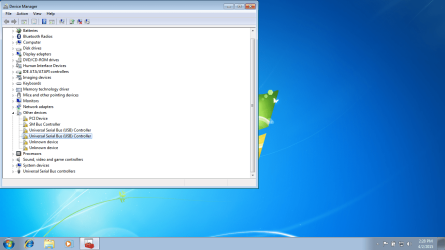
I am a technician working on an HP 15 - p213cl.
The job was to downgrade the original OS (Windows 8) to Windows 7 Pro 64. Fairly easy process I have done many times.
I downgraded to 7, Updated all drivers that the HP support site had for my model. Also did all windows updates.
Everything seems to work, therefore I'm ready to run final checks before contacting customer and what do I find? No working USB ports. They work in BIOS and I can boot from USB. I have tried searching for the drivers with no luck. Also Right click and update in Device Manager but says cant find online.
I also checked the BIOS for USB security settings but didn't see any to enable or disable.
The job was to downgrade the original OS (Windows 8) to Windows 7 Pro 64. Fairly easy process I have done many times.
I downgraded to 7, Updated all drivers that the HP support site had for my model. Also did all windows updates.
Everything seems to work, therefore I'm ready to run final checks before contacting customer and what do I find? No working USB ports. They work in BIOS and I can boot from USB. I have tried searching for the drivers with no luck. Also Right click and update in Device Manager but says cant find online.
I also checked the BIOS for USB security settings but didn't see any to enable or disable.
My Computer
- Computer type
- PC/Desktop
- OS
- Pc Technician