usb ports

F17ZY

New member
Local time
4:44 AM
Messages
101
hey guys i have had some problams with my usb prots just these past few days it seem when ther under strain thay just cut off and then back on also disconnecting my wireless internet and my ex hdd but i can't find out why the hell this is happening now ther are no errors and no sign of shorting out any ware i have tryed reinstalling the drivers and rolling back the drivers just no luck at all and i am using 32bit windows 7 ultamate i would just love for this to get fixed as i love win 7
 

My Computer

Computer Manufacturer/Model Number
custom build
OS
windows 7 hp 64bit
CPU
intel 3.00 ghz @ 3.31
Motherboard
gigabyte P43-ES3G
Memory
6GB OCZ DDR2 800mhz
Graphics Card(s)
ati hd pro 2400 1gb
Sound Card
on board
Monitor(s) Displays
19 inch
Hard Drives
2x 80gb sata and 2x500gb sata
PSU
600w
Case
galaxy 3 gaming case
Cooling
everest water cooling
Internet Speed
7mb down/1.2mb up
someone must no something about this please help me
 

My Computer

Computer Manufacturer/Model Number
custom build
OS
windows 7 hp 64bit
CPU
intel 3.00 ghz @ 3.31
Motherboard
gigabyte P43-ES3G
Memory
6GB OCZ DDR2 800mhz
Graphics Card(s)
ati hd pro 2400 1gb
Sound Card
on board
Monitor(s) Displays
19 inch
Hard Drives
2x 80gb sata and 2x500gb sata
PSU
600w
Case
galaxy 3 gaming case
Cooling
everest water cooling
Internet Speed
7mb down/1.2mb up
hey guys i have had some problams with my usb prots just these past few days it seem when ther under strain thay just cut off and then back on also disconnecting my wireless internet and my ex hdd but i can't find out why the hell this is happening now ther are no errors and no sign of shorting out any ware i have tryed reinstalling the drivers and rolling back the drivers just no luck at all and i am using 32bit windows 7 ultamate i would just love for this to get fixed as i love win 7
F17ZY;

My first suspicion would be that your usb devices are pulling more power than the usb can supply. Do any of your devices have a plug for an external power supply? Do you have any external power supplies you can use? If you supply external power to the devices, then the usb only has to transmit data, which is a good thing?

Hope I have helped?

Robert
 

My Computer

OS
...
yes only my ex hdd but that is always pluged into the mains and runs fine on my bros vista pc and my mums xp but it will run on my then act as if i unpluged it and give me pop up for autoplay again and my wireless disconnects to but that is just usb powered so i have not got a clue what is draing power so much
 

My Computer

Computer Manufacturer/Model Number
custom build
OS
windows 7 hp 64bit
CPU
intel 3.00 ghz @ 3.31
Motherboard
gigabyte P43-ES3G
Memory
6GB OCZ DDR2 800mhz
Graphics Card(s)
ati hd pro 2400 1gb
Sound Card
on board
Monitor(s) Displays
19 inch
Hard Drives
2x 80gb sata and 2x500gb sata
PSU
600w
Case
galaxy 3 gaming case
Cooling
everest water cooling
Internet Speed
7mb down/1.2mb up
yes only my ex hdd but that is always pluged into the mains and runs fine on my bros vista pc and my mums xp but it will run on my then act as if i unpluged it and give me pop up for autoplay again and my wireless disconnects to but that is just usb powered so i have not got a clue what is draing power so much
Well, I can't say for sure, but you are talking about three different computers, with three different motherboards with different circuits and components. Some are engineered better than others? Try the external power supply with your External hard drive and see if that cures it?

Robert
 

My Computer

OS
...
hey sorry for making it sound like 3 pc's but it's just my win 7 one i was just using them as my ex hdd woks on them like a charm so does my wireless and i am using mains power for my ex hdd so it has all the power it needs but i can not find out whats taking al the power and now sometimes when i plug my ex hdd in it will say missing hardware id untill i uninstall my usb drivers and let windwos install them again but i am lost with what it could be

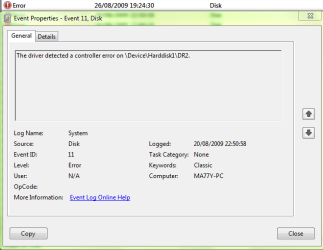
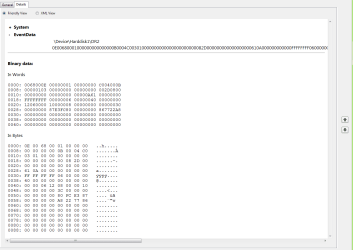
edit i just found alot of these in the event viewer
 

Attachments

  • Capture.PNG
    Capture.PNG
    14.3 KB · Views: 30
  • Capture1.PNG
    Capture1.PNG
    16 KB · Views: 20

My Computer

Computer Manufacturer/Model Number
custom build
OS
windows 7 hp 64bit
CPU
intel 3.00 ghz @ 3.31
Motherboard
gigabyte P43-ES3G
Memory
6GB OCZ DDR2 800mhz
Graphics Card(s)
ati hd pro 2400 1gb
Sound Card
on board
Monitor(s) Displays
19 inch
Hard Drives
2x 80gb sata and 2x500gb sata
PSU
600w
Case
galaxy 3 gaming case
Cooling
everest water cooling
Internet Speed
7mb down/1.2mb up
hey sorry for making it sound like 3 pc's *snip* my ex hdd woks on them like a charm
F17ZY; I think I understood you ... your external hard drive works OK on either of the other two computers, but you still get errors when you plug it in to your computer. Right?

I looked at you system specs (nice job by the way, filling your sys specs!! ;) ) and see you have a 650W Power Supply. From what I have read and from my own experience I can not tell by looking at a power supply, or by the rating sticker on the side, just how well it has been engineered or what quality of parts have been used. I have seen trusted name brand 250W PS hold up where some other 480W PS goes up in smoke. So what kind of power supplies are in the other two computers? Are they of better quality than the PS in your computer? I don't know ... and most likely could not tell by looking. The same question applies to the motherboard. Is your Foxconn i925 engineered to supply adequate current to your 2 80GB sata hard drives, 2 500GB sata hard drives, ati hd pro 2400 video card, AND an external usb hard drive? I don't know and couldn't tell by looking. So by supplying external power to the external usb hard drive, we might just be able to confirm or eliminate "Power Supply" as a cause of your issue. Then we could move on.

Nice pics also. Good call. Someone who understands that gibberish may be able to shed some light on what it means? Did you try googling the actual "controller error"?

Actually this if the first time I have come across the possibility of a 7 usb driver issue so I am looking forward to solving this!

Robert
 

My Computer

OS
...
hey yes you understod right and sorry my ps is not a 650 i must have typed it wrong it's a 600w and it's this 1 here 600W CIT ATX Power Supply : ATX Power Supplies : Maplin and the other 2 pc's are dell with the own brand in them and my m/b manual says it can take 6 1tb hdd and 2500gb as it has 8 sata ports but that says if i use all the ports to use a 1000w ps but i am only using 4 of them and 1 of my 500gb hdd's not in right now so i am only using 3 and my video card if only running my screen but i had to buy it as my m/b has no vga output and yes my ex hdd works well with the mains power it just acts like it hates win7 sadly and i am looking forward to solving this to :D if it can be done and well i have seen a lot of peeps here who ask for the error codes and pics so i just fort i would up load them and cheers for the help
 

My Computer

Computer Manufacturer/Model Number
custom build
OS
windows 7 hp 64bit
CPU
intel 3.00 ghz @ 3.31
Motherboard
gigabyte P43-ES3G
Memory
6GB OCZ DDR2 800mhz
Graphics Card(s)
ati hd pro 2400 1gb
Sound Card
on board
Monitor(s) Displays
19 inch
Hard Drives
2x 80gb sata and 2x500gb sata
PSU
600w
Case
galaxy 3 gaming case
Cooling
everest water cooling
Internet Speed
7mb down/1.2mb up
No offence but this is a cheap powersupply.. This is what happens when you don't put out the cash for one of the most important parts of your computer. But before we conclude it's the PSU, what OS did you have on before?

Everything used to work fine on it?

Is it a clean install or did you upgrade?
 

My Computer

Computer type
PC/Desktop
Computer Manufacturer/Model Number
DELL VOSTRO 3650
OS
Windows 8.1 PRO
CPU
3rd Generation Intel Core i7‐3612QM CPU @ 2.10GHZ
Memory
8GB DDR3
Graphics Card(s)
NVIDIA GeForce GT 525M (128 bit), 1GB Grpahics
Screen Resolution
1920X1080
Hard Drives
750GB 5400RPM
hey i no it is but sadly spending money on the rest of my rig left me abit short but will get a new 1 soon and i was running vista 32 bit fine never had anything go wrong and this is the 2nd time i have had anything go wrong with 7 and it was a fresh install i don't like upgrades :)
 

My Computer

Computer Manufacturer/Model Number
custom build
OS
windows 7 hp 64bit
CPU
intel 3.00 ghz @ 3.31
Motherboard
gigabyte P43-ES3G
Memory
6GB OCZ DDR2 800mhz
Graphics Card(s)
ati hd pro 2400 1gb
Sound Card
on board
Monitor(s) Displays
19 inch
Hard Drives
2x 80gb sata and 2x500gb sata
PSU
600w
Case
galaxy 3 gaming case
Cooling
everest water cooling
Internet Speed
7mb down/1.2mb up
Does your problem occur when you leave your computer idle.. Or it just happens anytime?
 

My Computer

Computer type
PC/Desktop
Computer Manufacturer/Model Number
DELL VOSTRO 3650
OS
Windows 8.1 PRO
CPU
3rd Generation Intel Core i7‐3612QM CPU @ 2.10GHZ
Memory
8GB DDR3
Graphics Card(s)
NVIDIA GeForce GT 525M (128 bit), 1GB Grpahics
Screen Resolution
1920X1080
Hard Drives
750GB 5400RPM
it happends as soon as i turn my ex hdd on or if i plug a new device into 1 of my usb ports thats it but for the past 24+hours it has not happend as i have been using that safely remove hardware thing but i have never had to use that as my ex hdd has a unlock button on the front but it happens it other usb not just my ex hdd
 

My Computer

Computer Manufacturer/Model Number
custom build
OS
windows 7 hp 64bit
CPU
intel 3.00 ghz @ 3.31
Motherboard
gigabyte P43-ES3G
Memory
6GB OCZ DDR2 800mhz
Graphics Card(s)
ati hd pro 2400 1gb
Sound Card
on board
Monitor(s) Displays
19 inch
Hard Drives
2x 80gb sata and 2x500gb sata
PSU
600w
Case
galaxy 3 gaming case
Cooling
everest water cooling
Internet Speed
7mb down/1.2mb up
The controller error is most likely:
- an issue with the controller (on the mobo)
- an issue with the drivers for it
- or an issue with the attached devices/cables
 

My Computer

Computer Manufacturer/Model Number
Home built (x64), Lenovo x61s Tablet, Samsung Netbook
OS
Win7 x64 + x86
CPU
Intel i7 920, other Intel chips, and the Atom in the netbook
Motherboard
Asus P6T Deluxe
Memory
12 gB; 4 gB Lenovo; 1 gB Samsung netbook
Graphics Card(s)
ATI 4870
Sound Card
Yes, I have one of these
Monitor(s) Displays
32" Sharp Aquos TV
Screen Resolution
800x600 - I have vision issues
Hard Drives
4 - 150 gB Velociraptors in RAID 5
Promise controller
PSU
1000 watt (can't recall the brand)
Case
Antec 300
Cooling
Big honking cooler that was rated highly at Toms Hardware
Keyboard
Microsoft Natural
Mouse
Logitech Trackman
Internet Speed
Cable
Other Info
GeekSquad UPS
CyberPower UPS
DLink DNS-323 NAS (2 tB)
Netgear wireless router as an access point
Netgear wired router FSV-318
Home network consists of
4 desktop computers (2 Vista, 2 Win7)
1 netbook (Win7)
4 laptop computers (XP, 2-Vista, Win7)
Wii and XBox 360
how would i go about testing my m/b if everything is ok with it ?
 

My Computer

Computer Manufacturer/Model Number
custom build
OS
windows 7 hp 64bit
CPU
intel 3.00 ghz @ 3.31
Motherboard
gigabyte P43-ES3G
Memory
6GB OCZ DDR2 800mhz
Graphics Card(s)
ati hd pro 2400 1gb
Sound Card
on board
Monitor(s) Displays
19 inch
Hard Drives
2x 80gb sata and 2x500gb sata
PSU
600w
Case
galaxy 3 gaming case
Cooling
everest water cooling
Internet Speed
7mb down/1.2mb up
Back
Top