
USB Power Surge/Device shocked me on touch

The static charge that was on the controller most likely traveled to the USB port on the computer. From there, it should have been sent to ground via ESD protection circuits* and the ground connection on the APC battery backup. Your APC unit might have a light or some other indicator to tell you that it is happy with the ground that it has from the wall outlet.

*rated to handle 8kv to 15kv - depending on the vendor.
...which is too low - IMO :-(

8kv rating from NXP (PDF)
15kv rating from TI (PDF)

So, to answer your question: "Could the controller of fed electricity back into my motherboard and damaged it? " Yes, it could have; despite the ESD protections built-in.
 

My Computer My Computer

At a glance

W7 Pro SP1 64biti78GBIntel HD Graphics
Computer type
Laptop
Computer Manufacturer/Model Number
Employer provided Dell Latitude
OS
W7 Pro SP1 64bit
CPU
i7
Memory
8GB
Graphics Card(s)
Intel HD Graphics
Hard Drives
crappy SSD
Antivirus
Employer mandated Symantec Endpoint Protection
Browser
Pale Moon 64bit, IE11 64bit & Chrome 64bit
Thanks Username ISsues, so what kind of signs would I be looking for if I damaged my board? And if so could this lead to future damaged parts like my GPU or cpu?
 

My Computer My Computer

At a glance

Windows 7 Home X64
Computer type
PC/Desktop
OS
Windows 7 Home X64
You probably won't see anything. You just use your system and it will let you know if other damage has been done.
 

My Computer My Computer

At a glance

Windows 10 Pro. 64/ version 1709 Windows 7 Pr...Intel i7-6800K @ 4.3Corsair Platinum 16 gig @2400EVGA GTX 1070 OC
Computer type
PC/Desktop
Computer Manufacturer/Model Number
Home made Desktop
OS
Windows 10 Pro. 64/ version 1709 Windows 7 Pro/64
CPU
Intel i7-6800K @ 4.3
Motherboard
ASUS X-99 Deluxe II
Memory
Corsair Platinum 16 gig @2400
Graphics Card(s)
EVGA GTX 1070 OC
Monitor(s) Displays
Asus 27" LED LCD/VE278Q
Screen Resolution
1920-1080 or 1280-720 HDMI
Hard Drives
INTEL SSD 730-240 Gb Sata 3.0/
PSU
EVGA Platium 1200W
Case
Phanteks Luxe Tempered Glass 8 fans/ one radiator
Cooling
XSPC/ Water Cooled CPU
Keyboard
Das 4 Professional
Mouse
Logitech M705/MX Anywhere 2-S
Internet Speed
100 mbits
Antivirus
Microsoft Security Essentials/ Malwarebytes Premium 3.0/ SAS
Browser
I.E. 11 default/Firefox/ ISP Time Warner Cable/Spectrum
Other Info
LG BluRay Burner/
Sound system-KLipsch-THX/
Icy Dock ssd Hot Swap bays.
Meaning the fact that Im using it and everything appears to be operating means Im probably in the clear?
 

My Computer My Computer

At a glance

Windows 7 Home X64
Computer type
PC/Desktop
OS
Windows 7 Home X64
You want guarantees. There are no guarantees. Just use the system as you normally would and be happy. What happens down the road, happens.
 

My Computer My Computer

At a glance

Windows 10 Pro. 64/ version 1709 Windows 7 Pr...Intel i7-6800K @ 4.3Corsair Platinum 16 gig @2400EVGA GTX 1070 OC
Computer type
PC/Desktop
Computer Manufacturer/Model Number
Home made Desktop
OS
Windows 10 Pro. 64/ version 1709 Windows 7 Pro/64
CPU
Intel i7-6800K @ 4.3
Motherboard
ASUS X-99 Deluxe II
Memory
Corsair Platinum 16 gig @2400
Graphics Card(s)
EVGA GTX 1070 OC
Monitor(s) Displays
Asus 27" LED LCD/VE278Q
Screen Resolution
1920-1080 or 1280-720 HDMI
Hard Drives
INTEL SSD 730-240 Gb Sata 3.0/
PSU
EVGA Platium 1200W
Case
Phanteks Luxe Tempered Glass 8 fans/ one radiator
Cooling
XSPC/ Water Cooled CPU
Keyboard
Das 4 Professional
Mouse
Logitech M705/MX Anywhere 2-S
Internet Speed
100 mbits
Antivirus
Microsoft Security Essentials/ Malwarebytes Premium 3.0/ SAS
Browser
I.E. 11 default/Firefox/ ISP Time Warner Cable/Spectrum
Other Info
LG BluRay Burner/
Sound system-KLipsch-THX/
Icy Dock ssd Hot Swap bays.
There are no user level tests to determine if ESD has done damage to the motherboard. You can pay to x-ray each chip, but it would be cheaper to buy a dozen new computers.
 

My Computer My Computer

At a glance

W7 Pro SP1 64biti78GBIntel HD Graphics
Computer type
Laptop
Computer Manufacturer/Model Number
Employer provided Dell Latitude
OS
W7 Pro SP1 64bit
CPU
i7
Memory
8GB
Graphics Card(s)
Intel HD Graphics
Hard Drives
crappy SSD
Antivirus
Employer mandated Symantec Endpoint Protection
Browser
Pale Moon 64bit, IE11 64bit & Chrome 64bit
Sounds like Im just being paranoid about this. Huh?
 

My Computer My Computer

At a glance

Windows 7 Home X64
Computer type
PC/Desktop
OS
Windows 7 Home X64
Your concern is normal/valid...
...but there is no cost effective way to know if damage has been done.
 

My Computer My Computer

At a glance

W7 Pro SP1 64biti78GBIntel HD Graphics
Computer type
Laptop
Computer Manufacturer/Model Number
Employer provided Dell Latitude
OS
W7 Pro SP1 64bit
CPU
i7
Memory
8GB
Graphics Card(s)
Intel HD Graphics
Hard Drives
crappy SSD
Antivirus
Employer mandated Symantec Endpoint Protection
Browser
Pale Moon 64bit, IE11 64bit & Chrome 64bit
What kinds of things should I be on the lookout for then?
 

My Computer My Computer

At a glance

Windows 7 Home X64
Computer type
PC/Desktop
OS
Windows 7 Home X64
If the USB port that the controller was plugged into gets to where it will not recognize a variety of devices, then that is probably the result of this ESD event. If that starts happening, just use other USB ports.

I doubt that the damage would spread to things like the graphics card.
 

My Computer My Computer

At a glance

W7 Pro SP1 64biti78GBIntel HD Graphics
Computer type
Laptop
Computer Manufacturer/Model Number
Employer provided Dell Latitude
OS
W7 Pro SP1 64bit
CPU
i7
Memory
8GB
Graphics Card(s)
Intel HD Graphics
Hard Drives
crappy SSD
Antivirus
Employer mandated Symantec Endpoint Protection
Browser
Pale Moon 64bit, IE11 64bit & Chrome 64bit
Thanks, do you have any advice as to how to ground myself when I sit down at my desk?

Would touching my metal desk frame be enough to ground myself? Or the metal filing cabinet next to me?
 

My Computer My Computer

At a glance

Windows 7 Home X64
Computer type
PC/Desktop
OS
Windows 7 Home X64
Thanks, do you have any advice as to how to ground myself when I sit down at my desk?

Would touching my metal desk frame be enough to ground myself? Or the metal filing cabinet next to me?

Ether would be fine
 

My Computer My Computer

At a glance

win 10
Computer type
PC/Desktop
Computer Manufacturer/Model Number
dell xps 9000
OS
win 10
Grounding yourself by touching something only works if that "something" has an electrical path to earth ground. Your desk might have a path to ground if there is a grounded metal plug strip bolted to the desk. I doubt that the filing cabinet would be grounded in any way.


In cold, dry climates, your body can build up a lot of static charge. The actual voltage is not easy/cheap to measure (nor does it really matter much). That is why you will see websites claiming vastly different voltages that static charges can reach in a human. The expensive equipment used to test products (like cell phones) can generate 30,000 volts to be sent into the phone. Humans walking on carpet can generate more than that and it really hurts when you discharge that much static electricity into a grounded object (e.g. some door knobs).

To prevent the pain of those extreme static discharges, the path to earth ground needs to have some resistance to slow the rate of discharge. Think of the path to ground as being a water hose. Think of the resistance as being a valve in that water hose. If the valve is all the way open, then water (electricity) is going to flow relatively fast. If the valve is almost all the way closed, then water (electricity) is going to slowly flow thru the hose (wire).

If the path to earth ground has the correct resistance (to prevent pain), then it should take about 3 to 5 seconds to discharge the static build up in your body. Humans - being the impatient creatures that they are - tend not to want to wait those few seconds.


You can buy expensive discharge mats to place under a keyboard. Those mats generally come with a wire that plugs into the ground part of an electrical outlet (in your case, the APC unit). That wire and/or the mat itself should have resistance built in. However, it is cheaper (uglier?) to move your APC unit to a location where you can touch a grounded part before touching your computer/controller.

What model APC unit do you have?
 

My Computer My Computer

At a glance

W7 Pro SP1 64biti78GBIntel HD Graphics
Computer type
Laptop
Computer Manufacturer/Model Number
Employer provided Dell Latitude
OS
W7 Pro SP1 64bit
CPU
i7
Memory
8GB
Graphics Card(s)
Intel HD Graphics
Hard Drives
crappy SSD
Antivirus
Employer mandated Symantec Endpoint Protection
Browser
Pale Moon 64bit, IE11 64bit & Chrome 64bit
Thanks, do you have any advice as to how to ground myself when I sit down at my desk?

Would touching my metal desk frame be enough to ground myself? Or the metal filing cabinet next to me?

Ether would be fine
You might feel a "discharge" shock when touching a metal desk or a metal cabinet, but don't mistake that for truly discharging the static that a human can build up. If the desk or cabinet is not grounded, then all you are doing is sharing your static charge with the desk or cabinet. Your are not getting rid of the majority of your static charge.
 
Last edited:

My Computer My Computer

At a glance

W7 Pro SP1 64biti78GBIntel HD Graphics
Computer type
Laptop
Computer Manufacturer/Model Number
Employer provided Dell Latitude
OS
W7 Pro SP1 64bit
CPU
i7
Memory
8GB
Graphics Card(s)
Intel HD Graphics
Hard Drives
crappy SSD
Antivirus
Employer mandated Symantec Endpoint Protection
Browser
Pale Moon 64bit, IE11 64bit & Chrome 64bit
APC Back-UPS® ES 550VA 8-Outlet Power-Saving UPS (BE550G)

This is the unit I have. both monitors and the computer are plugged into the batter back up slots.
 

My Computer My Computer

At a glance

Windows 7 Home X64
Computer type
PC/Desktop
OS
Windows 7 Home X64
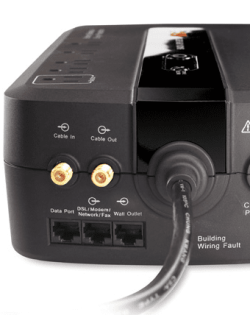
Bummer. That APC model does not have coax connectors that are grounded and easy to touch:

apc.PNG
 

My Computer My Computer

At a glance

W7 Pro SP1 64biti78GBIntel HD Graphics
Computer type
Laptop
Computer Manufacturer/Model Number
Employer provided Dell Latitude
OS
W7 Pro SP1 64bit
CPU
i7
Memory
8GB
Graphics Card(s)
Intel HD Graphics
Hard Drives
crappy SSD
Antivirus
Employer mandated Symantec Endpoint Protection
Browser
Pale Moon 64bit, IE11 64bit & Chrome 64bit
So, considering I dont have one of those, what would you suggest?
 

My Computer My Computer

At a glance

Windows 7 Home X64
Computer type
PC/Desktop
OS
Windows 7 Home X64
Do you have anything (like a desk lamp) that is metal and uses a 3 wire plug?
 

My Computer My Computer

At a glance

W7 Pro SP1 64biti78GBIntel HD Graphics
Computer type
Laptop
Computer Manufacturer/Model Number
Employer provided Dell Latitude
OS
W7 Pro SP1 64bit
CPU
i7
Memory
8GB
Graphics Card(s)
Intel HD Graphics
Hard Drives
crappy SSD
Antivirus
Employer mandated Symantec Endpoint Protection
Browser
Pale Moon 64bit, IE11 64bit & Chrome 64bit
No. My desk lamp is 2 pronged. I suppose I could just plug in an extra PSU and place it on the back corner of my desk.
 

My Computer My Computer

At a glance

Windows 7 Home X64
Computer type
PC/Desktop
OS
Windows 7 Home X64
That is the sort of thing that you need to touch. A grounded, unpainted metal object.
 

My Computer My Computer

At a glance

W7 Pro SP1 64biti78GBIntel HD Graphics
Computer type
Laptop
Computer Manufacturer/Model Number
Employer provided Dell Latitude
OS
W7 Pro SP1 64bit
CPU
i7
Memory
8GB
Graphics Card(s)
Intel HD Graphics
Hard Drives
crappy SSD
Antivirus
Employer mandated Symantec Endpoint Protection
Browser
Pale Moon 64bit, IE11 64bit & Chrome 64bit
Back
Top