USB probem

Helen23

New member
Local time
12:08 AM
Messages
9
Hello..
I have a problem with a USB device.
When I plug it in, I can't find it in my computer. I can't get into my folders or format it.
I can see it in Device Manager and in the Device status box it said "This device is working properly."
a little help.. thank you!!
 

My Computer

OS
Windows 7
Knowing exactly what device this is may be helpful information
 

My Computer

Computer Manufacturer/Model Number
Insane hobo technologies. ;-)
OS
Windows 7 x64
CPU
Intel i7 2600k
Motherboard
Asrock z68 extreme 4 gen 3
Memory
G.skill Ripjaw 16gigs @ 1866
Graphics Card(s)
Nvidia gtx580 (evga)
Sound Card
Integrated HD audio + hdmi
Monitor(s) Displays
24" ASUS widescreen + 42" insignia
Screen Resolution
1080p (1920x1080)
Hard Drives
128 Samsung 830
256 Samsung 840
3 x 1tb storage drive (various)
1 western digital 1tb (eSATA)
1 Seagate 1tb (eSATA)
PSU
1 kilowatt SLI/Crossfire rated Silverstone modular
Case
NZXT Phantom + additional 220 fan
Cooling
Zalmann
Keyboard
Microsoft wireless 3000 (v2)
Mouse
MS - wireless 5000 (bluetrack)
Internet Speed
depends on if you ask me or my provider.
Other Info
The above information is provided as is, and the author assumes no responsibility for issues it may cause with your sanity or fanboyism.
The truth is that I can't read the name..
It is just an 4Gb usb device.
I had plug it in on my PC when I made a system update in windows and after that it stop working... (sorry for my english :S )
 

My Computer

OS
Windows 7
Is this a flash drive - thumb drive?
 

My Computer

Computer Manufacturer/Model Number
Custom built
OS
Windows 7 Ultimate 64 bit
CPU
AMD Phenom II X4 965 Black Edition
Motherboard
Gigabyte GA-MA790X-DS4
Memory
GSkill 4 X 2 GB PC 8500
Graphics Card(s)
XFX Radeon HD 6790 D
Sound Card
On board RealTek HD
Monitor(s) Displays
Dual monitors:Samsung SyncMaster S20B300
Screen Resolution
1600 X 900
Hard Drives
Seagate Barracuda 1TB (primary)
Seagate Barracuda 2 X 320 GB
PSU
Ultra X4 750 watt fully modular
Case
Thermaltake Overseer RX 1 full tower
Cooling
Core-Contact 92 mm CPU Cooler
Keyboard
Logitech G510
Mouse
Razor DeathAdder
Internet Speed
50/5 Mbps UL/DL
Other Info
Optical: Super Muliti DVD burner w/lightscribe, Hauppauge WinTV HVR-1800
according to what I read the difference is that the Thumb drives has a switch located at the bottom of the drive.
My usb has one, so Thumb drive. But I try to switch it and there is no difference.
 

My Computer

OS
Windows 7
it could have lost somehow its partition. Stuff without partitions is usually hidden from the Computer menu. (so you cannot even reformat it, dumb thing)

you need to open up Disk Management and from there you can see what is happened (i.e. if there is still a partition with data or not). how to open disk management

Post a screenshot of it if you can. how to post a screenshot into sevenforums
 

My Computer

Computer type
PC/Desktop
Computer Manufacturer/Model Number
custom built
OS
Win 7 Pro 64-bit 7601
CPU
AMD Phenom 9650 QuadCore, revision DR-B3
Motherboard
ASUS M4A78
Memory
5 GB yes I run 2x 2GB and 1x 1GB, different brand, spank me.
Graphics Card(s)
NVIDIA GeForce 9800 GT 512 Mb, unknown manufacturer.
Sound Card
Crappy Realtek Integrated Audio
Monitor(s) Displays
Fujitsu Siemens P19-3P
Screen Resolution
1280 x 1024 x 32 bits @ 60 Hz Oh yeah, 4:3 rocks!
Hard Drives
(1) MAXTOR S TM3320613AS SATA Disk Device (2) STM35004 18AS SATA Disk Device (3) TOSHIBA USB 2.5"-HDD
PSU
whatever, around 450w
Case
Scavenged from old company PC, 10+ years old
Cooling
CPU fan, GPU fan, case fan, nothing fancy
Keyboard
Microsoft, PS/2, white.
Mouse
Optical, logitec.
Internet Speed
effective max speeds: 70-ish kB/s down 30-ish kB/s up
Antivirus
Avira, free edition.
Browser
Firefox with FXChrome to make it look like Google Chrome :P
Other Info
Was discarded by previous owner due to "horrible performance".
Was running Win Xp from a IDE drive. Yeah. Was a pain.
SATA II drive and Win7 and it zips away! Yay!
I had done that before and nothing..
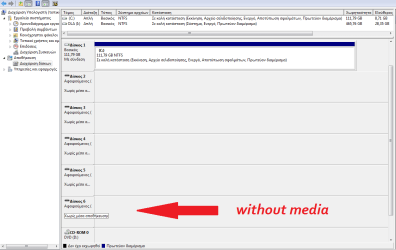
It is in Greek so I put a translate...
the place with the arrow is my usb (the others are the mouse etc.)...
 

Attachments

  • usb.png
    usb.png
    26.5 KB · Views: 13

My Computer

OS
Windows 7
And thank you for the detailed and helpfull description. :)
 

My Computer

OS
Windows 7
Helen23, I'm sorry but I can't read the language. Under drive # 6, if that word means offline, right click it and select online.
 

My Computers

System One System Two

  • Computer type
    PC/Desktop
    Computer Manufacturer/Model Number
    ALWAYS UNDER CONSTRUCTION
    OS
    Windows 11 Pro
    CPU
    Ryzen 9 5900X
    Motherboard
    Asus X570 Crosshair Viii Hero
    Memory
    32GB G Skill DDR4-3600
    Graphics Card(s)
    EVGA RTX 3080 FTW 3 Ultra
    Sound Card
    On Board/Sennheiser PC37X Headset
    Monitor(s) Displays
    3 X Asus 27"
    Screen Resolution
    2560x1440
    Hard Drives
    2 X 1 TB NVME drives
    PSU
    EVGA 850
    Case
    Phanteks Eclipse P400A
    Cooling
    EVGA 280 AIO
    Keyboard
    Logitech G510s/ Logitech G13
    Mouse
    Logitech G502
    Internet Speed
    24/1
    Antivirus
    ESET/MBAM Pro/SAS Pro
    Browser
    Chrome/ Firefox/ Edge
  • Computer type
    Laptop
    System Manufacturer/Model Number
    Dell 16 Plus
    OS
    Windows 11 Pro
    CPU
    Intel Ultra 9 288V
    Memory
    32 GB LPDDR5X 8533
    Monitor(s) Displays
    16" Mini-LED HDR600 Touch 90 Hz
    Screen Resolution
    2560X1600
    Hard Drives
    1 TB NVME
of course you can't understand. Thank for been patient. I didn't know what you want to read to translate it..
no, it said:
device 6
removable (K: )
without data

when I right klik with my mouse I have this options:
change the letter or the root of the device...
(export (can't klik it))
properties
help

There is nowhere the option offline-online... :)
 

My Computer

OS
Windows 7
Try to change the drive letter of the device and see if it show in your MY COMPUTER
 

My Computer

Computer type
PC/Desktop
Computer Manufacturer/Model Number
Gigabyte Technology Co. Ltd.
OS
Windows 10 Pro 64-Bit
CPU
Intel(R) Core(TM) i5-4460 CPU @ 3.20 GHz(4CPU's), ~3.2GHz
Motherboard
Gigabyte B85M-HD3-A
Memory
8192 RAM
Graphics Card(s)
NVIDIA GeForce 710
Sound Card
Integrated High Definition audio with Realtek ALC888 codec
Monitor(s) Displays
Acer V183HV Ab 18.5" LCD Display
Screen Resolution
1366 x 768
Keyboard
HP
Mouse
HP
Internet Speed
100mbps
Antivirus
Microsoft Security Essentials
Browser
Chrome, Firefox
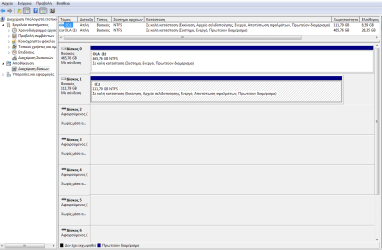
In your screenshot of Disk Management it shows 2 drives. Drive C with a size of 111 GB and Drive called OLA Drive I with a size of 465 GB. I do not see drive I in the lists of drives below where it lists each drive number. Where is it?

The drive in question appears to be empty. Is there data on it? It appears that your computer is not recognizing the drive at all. There is no partition on it. Notice drive C. It has a blue line above it. If it was just a blank drive with no partition it would say unallocated space. Have you tried this drive in another computer?

Do not do this if you have data on the drive. Right click where you wrote without Media. Do you have an option of New Simple Volume? If you do, click that and follow the prompts for a new volume. Doing this will cause all data on the drive to be lost. Do not do it, if you have data on the drive.

So, where is Drive I?
Is there data on the USB drive?
If you remove the USB drive, does drive 6 appear in disk management?
Do you have a card reader on your computer? Your Mouse and keyboard should not show up in disk management.
Please try the drive in another computer. If the drive is recognized by the computer, it should make a sound when you plug it in. Does it do that?
When you installed Windows 7, did you also install the motherboard drivers?
Also, please fill out your system Information as best as you can. If you have a store bought computer please list the manufacturer and model number. In the bottom left of your last post you will see 'My System Specs'. Click that and then click update your system specs and click save at the bottom. That information may help us to help you. If you want to know what it should look like, click the my system specs in my post.
If you have any questions about anything, please feel free to ask.

 

My Computers

System One System Two

  • Computer type
    PC/Desktop
    Computer Manufacturer/Model Number
    ALWAYS UNDER CONSTRUCTION
    OS
    Windows 11 Pro
    CPU
    Ryzen 9 5900X
    Motherboard
    Asus X570 Crosshair Viii Hero
    Memory
    32GB G Skill DDR4-3600
    Graphics Card(s)
    EVGA RTX 3080 FTW 3 Ultra
    Sound Card
    On Board/Sennheiser PC37X Headset
    Monitor(s) Displays
    3 X Asus 27"
    Screen Resolution
    2560x1440
    Hard Drives
    2 X 1 TB NVME drives
    PSU
    EVGA 850
    Case
    Phanteks Eclipse P400A
    Cooling
    EVGA 280 AIO
    Keyboard
    Logitech G510s/ Logitech G13
    Mouse
    Logitech G502
    Internet Speed
    24/1
    Antivirus
    ESET/MBAM Pro/SAS Pro
    Browser
    Chrome/ Firefox/ Edge
  • Computer type
    Laptop
    System Manufacturer/Model Number
    Dell 16 Plus
    OS
    Windows 11 Pro
    CPU
    Intel Ultra 9 288V
    Memory
    32 GB LPDDR5X 8533
    Monitor(s) Displays
    16" Mini-LED HDR600 Touch 90 Hz
    Screen Resolution
    2560X1600
    Hard Drives
    1 TB NVME
I didn't print scrn the I disc just to save space.. It is my second hard disk...
The usb it is not empty, it is full but I don't care to delete the data if it is necessary..
I try with left and right click and nothing appears to choose.. no change..
The usb stop working in my father's computer (windows 7), then I try it to my netbook which has Ubuntu via command line and this is the 3rd copmuter and again doesn't work..
It used to work in every PC so every one has the drivers..
When I unplug it just disappear the box with disc 6 and when I plug it in again it appears again...
 

Attachments

  • usb2.png
    usb2.png
    27.3 KB · Views: 4

My Computer

OS
Windows 7
Unfortunately, if it does not work in 3 computers, it appears like the drive is dead. You may have a opportunity to recover some of the data using your Unbutu computer. They can see some data sometimes. I'm sorry your problem came to this, but I don't know what else to try.
 

My Computers

System One System Two

  • Computer type
    PC/Desktop
    Computer Manufacturer/Model Number
    ALWAYS UNDER CONSTRUCTION
    OS
    Windows 11 Pro
    CPU
    Ryzen 9 5900X
    Motherboard
    Asus X570 Crosshair Viii Hero
    Memory
    32GB G Skill DDR4-3600
    Graphics Card(s)
    EVGA RTX 3080 FTW 3 Ultra
    Sound Card
    On Board/Sennheiser PC37X Headset
    Monitor(s) Displays
    3 X Asus 27"
    Screen Resolution
    2560x1440
    Hard Drives
    2 X 1 TB NVME drives
    PSU
    EVGA 850
    Case
    Phanteks Eclipse P400A
    Cooling
    EVGA 280 AIO
    Keyboard
    Logitech G510s/ Logitech G13
    Mouse
    Logitech G502
    Internet Speed
    24/1
    Antivirus
    ESET/MBAM Pro/SAS Pro
    Browser
    Chrome/ Firefox/ Edge
  • Computer type
    Laptop
    System Manufacturer/Model Number
    Dell 16 Plus
    OS
    Windows 11 Pro
    CPU
    Intel Ultra 9 288V
    Memory
    32 GB LPDDR5X 8533
    Monitor(s) Displays
    16" Mini-LED HDR600 Touch 90 Hz
    Screen Resolution
    2560X1600
    Hard Drives
    1 TB NVME
Hi Helen23,

Since you do not mind reformatting your drive, I would suggest this as a last resort before writing the obituary to the disk. It may or may not work but no harm in trying.

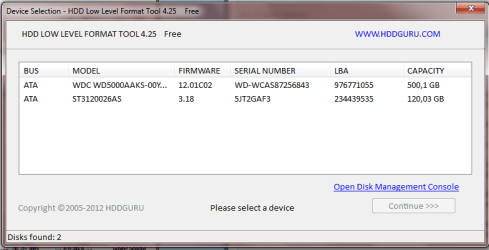
Download the Windows Executable (works without installation): HDD Low Level Format Tool ver.4.25 (HDDGURU: HDD LLF Low Level Format Tool ) , right click on it and run it as an admistrator. Make sure that you choose the correct drive before you click on the button "FORMAT THIS DEVICE"

This will start writing zeroes to each and every sector of the external hard drive and reinitialise it to the factory condition. Depending upon the size of the hard disk, it may take quite some time. So be patient.

If it runs successfully and reinitialises your external HDD, you have to do a regular format using any format tools ( including Windows Disk Management.)

If you get any error message, please put out a screenshot for our information. ( yes, for information only. I am not going to suggest any alternative solutions, since it only confirms that the drive is dead.)
 

My Computer

OS
Windows 7 Home Premium 32 bit
unfortunatelly the usb is dead..
There is nowhere.. I can't find it...
Thanks a lot every one for your help and your time!!!! :)
 

Attachments

  • usb3.png
    usb3.png
    16.4 KB · Views: 4

My Computer

OS
Windows 7
Back
Top