USB problems on Windows 7

TheBaron

New member
Local time
5:11 AM
Messages
7
Hi everyone, this the first time I post something on this forum. :)

I've been using Windows 7 Home Premium 64-bit on my computer 4 months now, everythng has been working fine, but now suddenly I can't connect anything to the USB-ports.
The only things that works are my keyboard, mouse and external harddrive, if I try to connect anything else Windows can't find any drivers. It start's looking for them on Windows Update, but after a while it says that it can't find anything.
I've set Windows Update to automatically download drivers.

Does anybody have any experience about these kinds of problems? :)
 

My Computer

OS
Windows 7 Home Premium 64bit
CPU
AMD Phenom X4 9950 Black Edition
Motherboard
ASRock ALiveXFire-eSATA2
Memory
4.0GB Dual-Channel DDR2 @ 399MHz (6-6-6-18)
Graphics Card(s)
512MB GeForce 9500 GT (nVidia)
Sound Card
High Definition Audio Device
Monitor(s) Displays
BenQ G900W @ 1440x900 + HP L1502 @ 1024x768
Screen Resolution
1440x900 and 1024x768
Hard Drives
250GB Seagate ST3250310AS ATA Device
500GB Iomega External HDD
PSU
CoolerMaster Extreme Power Plus 400W
Case
ACE Ecco 420
Keyboard
Logitech Deluxe 250
Mouse
Logitech
Internet Speed
5/1
Welcome to SF, Baron.

First please do the following:

HOW TO FILL OUT YOUR SYSTEM SPECS

In the line at the top of www.SevenForums.com you will see UserCP.
That is an abbreviation for User Control Panel.
Click on UserCP.
In the left-hand column, under Your Profile you will see Edit System Spec.
Click on Edit System Spec
You can copy and paste from the output of Speccy, Speccy - System Information - Free Download to fill out much of the info. Be sure to use the Other Info section of your System Specs for such info as your optical drive, your wireless adapter, your speakers, etc.[FONT=&quot][/FONT]

Next, check your Device Manager to see if there are any yellow exclamation marks. Let us know if you do, and include a screen capture.

Did you recently install anything prior to having the USB problem? Any new firewall, anti-virus program, etc.? Make any changes to your registry?

Go ahead and scan with malwarebytes and your virus scanner while you're at it.
 

My Computer

Computer Manufacturer/Model Number
Dell and Custom
OS
Systems 1 and 2: Windows 7 Enterprise x64, Win 8 Developer
CPU
System 1: i7 [email protected], System 2: AMD FX-4100 Zambezi 3.6G
Motherboard
System 1:Dell 06NWYK System 2: ASUS M5A97 AM3+
Memory
System 1: 8GB System 2: 8GB
Graphics Card(s)
System 1: ATI FirePro V4800 System 2: Radeon HD 6850
Sound Card
System 1: onboard System 2: onboard
Monitor(s) Displays
System1: Viewsonic HDMI 24"
Screen Resolution
System 1: 1920x1080 System 2: 1920x1080
Hard Drives
System 1: Mirrored .5B drives System 2: Seagate Barracuda ST1000DM003 1TB 7200 RPM 64MB Cache SATA 6.0Gb/s
Case
System 1: Dell System 2: Cooler Master
Internet Speed
10 MBPS
I haven't installed any new programs or anything recently. :(

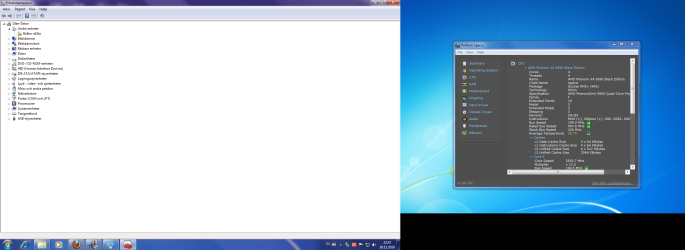
Here's a picture from the device manager when I tried to connect my Belkin n52te speedpad. (My computer is in Swedish, but you can anyway see the yellow exclamation mark in the davice manager :))
 

Attachments

  • device manager.png
    device manager.png
    193.2 KB · Views: 35

My Computer

OS
Windows 7 Home Premium 64bit
CPU
AMD Phenom X4 9950 Black Edition
Motherboard
ASRock ALiveXFire-eSATA2
Memory
4.0GB Dual-Channel DDR2 @ 399MHz (6-6-6-18)
Graphics Card(s)
512MB GeForce 9500 GT (nVidia)
Sound Card
High Definition Audio Device
Monitor(s) Displays
BenQ G900W @ 1440x900 + HP L1502 @ 1024x768
Screen Resolution
1440x900 and 1024x768
Hard Drives
250GB Seagate ST3250310AS ATA Device
500GB Iomega External HDD
PSU
CoolerMaster Extreme Power Plus 400W
Case
ACE Ecco 420
Keyboard
Logitech Deluxe 250
Mouse
Logitech
Internet Speed
5/1
God dag.

Well, you have a Belkin Speedpad that is in need of a driver. Try updating this and see if it helps. This is plugged into your USB. Is that working?

Or unplug and remove driver to see if that helps.
 

My Computer

Computer Manufacturer/Model Number
Dell and Custom
OS
Systems 1 and 2: Windows 7 Enterprise x64, Win 8 Developer
CPU
System 1: i7 [email protected], System 2: AMD FX-4100 Zambezi 3.6G
Motherboard
System 1:Dell 06NWYK System 2: ASUS M5A97 AM3+
Memory
System 1: 8GB System 2: 8GB
Graphics Card(s)
System 1: ATI FirePro V4800 System 2: Radeon HD 6850
Sound Card
System 1: onboard System 2: onboard
Monitor(s) Displays
System1: Viewsonic HDMI 24"
Screen Resolution
System 1: 1920x1080 System 2: 1920x1080
Hard Drives
System 1: Mirrored .5B drives System 2: Seagate Barracuda ST1000DM003 1TB 7200 RPM 64MB Cache SATA 6.0Gb/s
Case
System 1: Dell System 2: Cooler Master
Internet Speed
10 MBPS
No Windows 7 drivers for that unit so Win 7 Update won't find any. Try downloading from here and maybe the Vista drivers will work.

Belkin : Support : n52te Drivers

Jim :geek:
 

My Computer

Computer type
PC/Desktop
Computer Manufacturer/Model Number
Home Built
OS
Windows 8.1 Pro w/Media Center 64bit, Windows 7 HP 64bit
CPU
Phenom II X6 1100T
Motherboard
ASUS M5A99X EVO
Memory
Crucial Balistic 8gb DDR3-1866 CL9
Graphics Card(s)
MSI R6850 Cyclone IGD5 PE
Sound Card
On Board
Monitor(s) Displays
ASUS VE258Q 25" LED with DVI-HDMI-DisplayPort
Screen Resolution
1920 x 1080
Hard Drives
Two WD Cavier Black 2TB Sata III, WD My Book Essential 2TB USB 3.0
PSU
Seasonic X650 80 Plus GOLD Modular
Case
Corsair 400R
Cooling
Antec Kuhler H2O 620, Two 120mm and four 140mm
Keyboard
Logitech K120
Mouse
Logitech Marble Mouse USB, Logitech Precision Game Pad
Internet Speed
15MB
Antivirus
Norton IS 2013, Malwarebytes Pro Beta 2
Browser
IE-11, FF-27
Other Info
APC UPS ES 750, Netgear WNR3500L Gigabit & Wireless N Router with SamKnows Test Program, Motorola SB6120 Gigabit Cable Modem. Brother HL-2170W Laser Printer, Epson V300 Scanner
The Speedpad has been working before, but I had to uninstall it, and now when I tried to reinstall it a couple of days ago it didn't work. I have got the disc whit the driver on it, but it still doesn't install. And I have tried it on my laptop, which also has got 7 Home Premium 64-bit, and there it works right away, and windows downloads the drivers from Update by itself. :(

But the problem is not just with the Speedpad, everytime I try to connect some new Usb device, it tells me that it can't find a driver for it. :(

I'll post a picture here from when I tried to connect a normal USB 2.0 hub
 

Attachments

  • device manager1.png
    device manager1.png
    282.7 KB · Views: 12

My Computer

OS
Windows 7 Home Premium 64bit
CPU
AMD Phenom X4 9950 Black Edition
Motherboard
ASRock ALiveXFire-eSATA2
Memory
4.0GB Dual-Channel DDR2 @ 399MHz (6-6-6-18)
Graphics Card(s)
512MB GeForce 9500 GT (nVidia)
Sound Card
High Definition Audio Device
Monitor(s) Displays
BenQ G900W @ 1440x900 + HP L1502 @ 1024x768
Screen Resolution
1440x900 and 1024x768
Hard Drives
250GB Seagate ST3250310AS ATA Device
500GB Iomega External HDD
PSU
CoolerMaster Extreme Power Plus 400W
Case
ACE Ecco 420
Keyboard
Logitech Deluxe 250
Mouse
Logitech
Internet Speed
5/1
Back
Top