
USB selective suspend not working

leftkidney

New member
Local time
9:19 PM
Messages
24
well the USB selective suspend option I have set to "never" and it dont care, it turns off the drive all the time

I can sit there and the drive will spin up and then turn off every 30-45 min, it spins up and then spins down pretty fast as if it was just work up by me and then it is going back to sleep - I cant figure out what on my computer is waking it up but I dont care I dont want it to even go to sleep in the first place

I dont want the USB drives to ever, ever, EVER! spin down no matter what I dont care about power useage or drive life, I cant effing stand this, when I boot into Linux no problems at all the drive will stay running for hours at a time but stupid effing Windows dont work
 

My Computer

Computer Manufacturer/Model Number
Custom Built
OS
Windows 7 Ultimate - Signature Edition
CPU
Intel Q6600 G0 @3.2GHz
Motherboard
ASUS P5W DH Deluxe
Memory
8GB DDR2
Graphics Card(s)
660 2gb ram
Sound Card
mobo
Monitor(s) Displays
Acer 19" - Poineer Elite PRO-111FD
Screen Resolution
1440x900 and 1920x1080
Hard Drives
12 1TB drives - all WD RE4 edition 10 in a raid setup and 2 in a NAS
3 500GB drives - 3 Seagate
1 300GB drive - Seagate - OS Drive
PSU
Antec True Power Quattro 850
Case
Antec P-182
Cooling
Thermalright Ultra 120 Extreme Black Edition
Many times we see this behavior on certain machines but not others. It is a hard behavior to pin down.

Sometimes it is the motherboard, the chipset actually, or the chipset driver that is not playing nice with the particular external.
Also it can be the external drive itself, or the data cord, or the USB port that results in a transfer fault. You can test for this by plugging the drive into one of the rear USB ports that are connected to the motherboard, try all the USB ports, try a shorter/thicker data cable.
External drives that do not have a power supply and are powered only by USB are notorious for this. Some work better than others, even within the same model.

I run W7 and my external hard drive will run constantly if I let it, and I have not made any changes to my selective suspend settings from default. I believe your issue lies with your hardware.

The other thing I noticed were your 10 hard drives and RAID array. I can't help but wonder if that might have something to do with it.
 

My Computer

Computer type
PC/Desktop
Computer Manufacturer/Model Number
Home Built - Jan 2013
OS
Windows 7 64 Bit Home Premium SP1
CPU
i7-3820
Motherboard
Asus P9X79-PRO - Bios 4608
Memory
GSkill F3-14900CL9Q - 16GB
Graphics Card(s)
EVGA GeForce GTX660 - Driver 352.86
Sound Card
On board Realtek ALC898
Monitor(s) Displays
Acer S271HL
Screen Resolution
1920 x 1080
Hard Drives
#1- Samsung 840 Pro Series
#2- Western Digital WD1002FAEX Sata3 Black
#3- Western Digital WD1002FAEX Sata3 Black
PSU
Corsair CMPSU-850TX-V2 - 850 watt (by Seasonic)
Case
Corsair Obsidian 550D
Cooling
Standard 3 120mm case fans, Cooler Master Hyper 212 EVO
Keyboard
MS KC-0405
Mouse
Intellimouse 5-button
Internet Speed
56 Mbits/Sec (on a good day)
Antivirus
Avast & Malwarebytes
Browser
Firefox
Other Info
Asus DVD - DRW-24B1ST 24X
I had the same problem with one of my USB drives. I ended up using this to keep it awake. NoSleepHD
 

My Computer

Computer type
Laptop
Computer Manufacturer/Model Number
Hewlett-Packard/G62-107SA Notebook
OS
Microsoft Windows 7 Home Premium 64-bit Service Pack 1
CPU
Intel(R) Core(TM) i3 CPU M 330 @ 2.13GHz
Motherboard
Hewlett-Packard 1425
Memory
8 GB DDR3
Graphics Card(s)
Intel(R) HD Graphics
Sound Card
Realtek High Definition Audio
Monitor(s) Displays
Builtin
Screen Resolution
1366 x 768 x 32 bits (4294967296 colors) @ 60 Hz
Hard Drives
250 GB SATA Hard Disk Drive 7200 rpm
2TB Seagate GoFlex USB 2 Drive
1TB Iomega Prestige USB 2 Drive
1.5TB Iomega Prestige USB 2 Drive (Samsung)
2TB WD MyBook Live NAS.
Mouse
Logitech Anywhere MX
Internet Speed
152 Mbs download 10 Mbs upload
Antivirus
Norton 360
Browser
Chrome
Many times we see this behavior on certain machines but not others. It is a hard behavior to pin down.

Sometimes it is the motherboard, the chipset actually, or the chipset driver that is not playing nice with the particular external.
Also it can be the external drive itself, or the data cord, or the USB port that results in a transfer fault. You can test for this by plugging the drive into one of the rear USB ports that are connected to the motherboard, try all the USB ports, try a shorter/thicker data cable.
External drives that do not have a power supply and are powered only by USB are notorious for this. Some work better than others, even within the same model.

I run W7 and my external hard drive will run constantly if I let it, and I have not made any changes to my selective suspend settings from default. I believe your issue lies with your hardware.

The other thing I noticed were your 10 hard drives and RAID array. I can't help but wonder if that might have something to do with it.


well I can narrow it down to 1 thing - the OS - it dont do this running many versions of Linux, but it does with Windows 7 - yea it could be all those other things but at least Linux ignores these problems and keeps it running at all times - also I had Vista Ultimate before this with the same hardware and XP for a little bit also and both Vista and XP had no problem with the drive staying awake but Windows 7 does - the only reason I even run Windows is so I can play PC games other wise I would have nothing to do with this crappy OS I havent found anything in the last 12 years that I can do on Windows that I cant do on Linux except for play PC games and get a virus, lol

but I would be fine if it stayed off or on, now its off and then wakes up every 30-45 min just to go back to sleep after 1-2 min - but again only with Windows 7

I dont think I said anything about having 10 HD's but I only have 2 external ones that are USB, the rest are NAS and internal, way more then 10 HD though thats for sure
 

My Computer

Computer Manufacturer/Model Number
Custom Built
OS
Windows 7 Ultimate - Signature Edition
CPU
Intel Q6600 G0 @3.2GHz
Motherboard
ASUS P5W DH Deluxe
Memory
8GB DDR2
Graphics Card(s)
660 2gb ram
Sound Card
mobo
Monitor(s) Displays
Acer 19" - Poineer Elite PRO-111FD
Screen Resolution
1440x900 and 1920x1080
Hard Drives
12 1TB drives - all WD RE4 edition 10 in a raid setup and 2 in a NAS
3 500GB drives - 3 Seagate
1 300GB drive - Seagate - OS Drive
PSU
Antec True Power Quattro 850
Case
Antec P-182
Cooling
Thermalright Ultra 120 Extreme Black Edition
Well, do the tests to try and determine what the cause is. That may lead to a solution someone can suggest.

The software that Kado suggests looks like a very good work around.

But if you just wanted to vent about how bad Windows is and how great Linux is then I have noted that.
 

My Computer

Computer type
PC/Desktop
Computer Manufacturer/Model Number
Home Built - Jan 2013
OS
Windows 7 64 Bit Home Premium SP1
CPU
i7-3820
Motherboard
Asus P9X79-PRO - Bios 4608
Memory
GSkill F3-14900CL9Q - 16GB
Graphics Card(s)
EVGA GeForce GTX660 - Driver 352.86
Sound Card
On board Realtek ALC898
Monitor(s) Displays
Acer S271HL
Screen Resolution
1920 x 1080
Hard Drives
#1- Samsung 840 Pro Series
#2- Western Digital WD1002FAEX Sata3 Black
#3- Western Digital WD1002FAEX Sata3 Black
PSU
Corsair CMPSU-850TX-V2 - 850 watt (by Seasonic)
Case
Corsair Obsidian 550D
Cooling
Standard 3 120mm case fans, Cooler Master Hyper 212 EVO
Keyboard
MS KC-0405
Mouse
Intellimouse 5-button
Internet Speed
56 Mbits/Sec (on a good day)
Antivirus
Avast & Malwarebytes
Browser
Firefox
Other Info
Asus DVD - DRW-24B1ST 24X
I like the idea of the software because of how it works by writing a file in a set amount of time to keep it awake - my question is is that the same way that windows "should" keep it awake, like does windows just create a temp file or something and then just keep replacing it to keep dries from spinning down?

or is windows doing what linux does, that is to send the drive a "stay awake" message of sorts using the SMART system built into the drive - like a DMA command not just writing a file
 

My Computer

Computer Manufacturer/Model Number
Custom Built
OS
Windows 7 Ultimate - Signature Edition
CPU
Intel Q6600 G0 @3.2GHz
Motherboard
ASUS P5W DH Deluxe
Memory
8GB DDR2
Graphics Card(s)
660 2gb ram
Sound Card
mobo
Monitor(s) Displays
Acer 19" - Poineer Elite PRO-111FD
Screen Resolution
1440x900 and 1920x1080
Hard Drives
12 1TB drives - all WD RE4 edition 10 in a raid setup and 2 in a NAS
3 500GB drives - 3 Seagate
1 300GB drive - Seagate - OS Drive
PSU
Antec True Power Quattro 850
Case
Antec P-182
Cooling
Thermalright Ultra 120 Extreme Black Edition
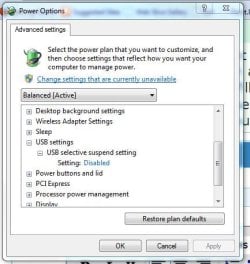
I don't know how Windows does it but I somehow doubt that it would use such a crude (although effective) method.
 

My Computer

Computer type
Laptop
Computer Manufacturer/Model Number
Hewlett-Packard/G62-107SA Notebook
OS
Microsoft Windows 7 Home Premium 64-bit Service Pack 1
CPU
Intel(R) Core(TM) i3 CPU M 330 @ 2.13GHz
Motherboard
Hewlett-Packard 1425
Memory
8 GB DDR3
Graphics Card(s)
Intel(R) HD Graphics
Sound Card
Realtek High Definition Audio
Monitor(s) Displays
Builtin
Screen Resolution
1366 x 768 x 32 bits (4294967296 colors) @ 60 Hz
Hard Drives
250 GB SATA Hard Disk Drive 7200 rpm
2TB Seagate GoFlex USB 2 Drive
1TB Iomega Prestige USB 2 Drive
1.5TB Iomega Prestige USB 2 Drive (Samsung)
2TB WD MyBook Live NAS.
Mouse
Logitech Anywhere MX
Internet Speed
152 Mbs download 10 Mbs upload
Antivirus
Norton 360
Browser
Chrome
I don't know how Windows does it but I somehow doubt that it would use such a crude (although effective) method.

I dont put it past windows to use such a crude method, they are known for doing things that make no sense or that should have been changed years ago if not decades like the WMF exploit a few years ago
 

My Computer

Computer Manufacturer/Model Number
Custom Built
OS
Windows 7 Ultimate - Signature Edition
CPU
Intel Q6600 G0 @3.2GHz
Motherboard
ASUS P5W DH Deluxe
Memory
8GB DDR2
Graphics Card(s)
660 2gb ram
Sound Card
mobo
Monitor(s) Displays
Acer 19" - Poineer Elite PRO-111FD
Screen Resolution
1440x900 and 1920x1080
Hard Drives
12 1TB drives - all WD RE4 edition 10 in a raid setup and 2 in a NAS
3 500GB drives - 3 Seagate
1 300GB drive - Seagate - OS Drive
PSU
Antec True Power Quattro 850
Case
Antec P-182
Cooling
Thermalright Ultra 120 Extreme Black Edition
Sometimes it is the motherboard, the chipset actually, or the chipset driver that is not playing nice with the particular external.
Also it can be the external drive itself, or the data cord, or the USB port that results in a transfer fault. You can test for this by plugging the drive into one of the rear USB ports that are connected to the motherboard, try all the USB ports, try a shorter/thicker data cable.
External drives that do not have a power supply and are powered only by USB are notorious for this. Some work better than others, even within the same model.

I run W7 and my external hard drive will run constantly if I let it, and I have not made any changes to my selective suspend settings from default. I believe your issue lies with your hardware.

The other thing I noticed were your 10 hard drives and RAID array. I can't help but wonder if that might have something to do with it.


well I can narrow it down to 1 thing - the OS - it dont do this running many versions of Linux, but it does with Windows 7 - yea it could be all those other things but at least Linux ignores these problems and keeps it running at all times - also I had Vista Ultimate before this with the same hardware and XP for a little bit also and both Vista and XP had no problem with the drive staying awake but Windows 7 does - the only reason I even run Windows is so I can play PC games other wise I would have nothing to do with this crappy OS I havent found anything in the last 12 years that I can do on Windows that I cant do on Linux except for play PC games and get a virus, lol

but I would be fine if it stayed off or on, now its off and then wakes up every 30-45 min just to go back to sleep after 1-2 min - but again only with Windows 7

I dont think I said anything about having 10 HD's but I only have 2 external ones that are USB, the rest are NAS and internal, way more then 10 HD though thats for sure

I ran into this problem recently on a New Win 7 64bit PC. I found that it was not sufficient to disable sleep mode for USB in pwer options but I had to check alldrives and it was necessary to additioanlly disable sleep for USB 3 drives
 

My Computer

Computer Manufacturer/Model Number
ACPI Multiprocessor PC
OS
Win 7 Ultimate SP1
CPU
CPU Type QuadCore Intel Core i7 960, 3333 MHz (25 x 133)
Motherboard
Motherboard Name Asus P6T (2 PCI, 1 PCI-E x1, 3 PCI-E x16,
Memory
DIMMS: Kingston 99U5458-001.A00LF 6 GB DDR3-1333 DDR3 SDRAM
Graphics Card(s)
Video Adapter NVIDIA GeForce GTX 480 (1536 MB)
Sound Card
Audio Adapter Realtek ALC1200 @ Intel 82801JB ICH10 - High D
Monitor(s) Displays
Monitor Hannstar HZ281H [28" LCD] (015LM3AY00458)
Screen Resolution
1920X 1200
Hard Drives
586GB Western Digital WDC WD6000HLHX-01JJPV0 ATA Device (SATA)
1954GB Western Digital WDC WD20EARS-00MVWB0 ATA Device (SATA)
586GB Western Digital WDC WD6000HLHX-01JJPV0 ATA Device (SATA)
PSU
APC 650
Case
GameMaster
Cooling
8 fans
Keyboard
Logitech HID-Compliant Keyboard
Mouse
Logitech HID-compliant TrackMan Wheel Mouse
Internet Speed
Enabled via DHCP 30mbs
Other Info
Optical Drives
HL-DT-ST BD-RE BH10LS30 SCSI CdRom Device
Iomega RRD2 SCSI CdRom Device
ASUS DRW-20B1LT ATA Device
I ran into this problem recently on a New Win 7 64bit PC. I found that it was not sufficient to disable sleep mode for USB in pwer options but I had to check alldrives and it was necessary to additioanlly disable sleep for USB 3 drives

How does one disable sleep to particular USB ports and how does one distinguish them from each other?

This (see picture) is the only command interface I know of for the USB ports - - Is there another?

USB.JPG
 

My Computer

Computer type
PC/Desktop
Computer Manufacturer/Model Number
Home built
OS
ASUS X79 DELUXE LGA 2011 Intel X79 SATA 6Gb/s USB 3.0 ATX
CPU
Intel Core i7-4930K Ivy Bridge-E 3.4GHz LGA 2011 130W 6-Core
Motherboard
ASUS X79 DELUXE LGA 2011 Intel X79 SATA 6Gb/s USB 3.0 ATX
Memory
CORSAIR Dominator Platinum 16GB (4 x 4GB) 240-Pin DDR3 SDRAM
Graphics Card(s)
ASUS EAH6450 Silent/DI/1GD3(LP) Radeon HD 6450 1GB 64-bit DD
Sound Card
onboard
Monitor(s) Displays
Dell lcd 32"
Hard Drives
1tb SATA, 2tb SATA, 500 gig SATA, 500 Gig SATA, 500 Gig IDE
PSU
CORSAIR HX Series HX750 750W ATX12V 2.3 / EPS12V 2.91 SLI Re
Case
something colored black
Cooling
Cooler Master Seidon 120XL
Keyboard
this thing with buttons on it
Mouse
a tailed devil
Internet Speed
whizzing along
Antivirus
KASPERSKY
Browser
Firefox. Opra, Explorer.
Other Info
I am naked and outside your window shouting Non Sequiturs in a loony high pitched voice.
Back
Top