Solved USB smartphone driver failure

TristanCooper

New member
Local time
4:54 AM
Messages
7
Location
Surrey UK
Acer 5738Z running Win 7 64 bit

New XiaoMi Rednote 3 smartphone

Plug phone into USB the first time and a driver is loaded and everything works fine

Reboot laptop and plug in phone - laptop makes bingbong noise as if it recognises the phone but the phone does not appear in My Computer.

Check Device Manager - the phone is shown but with a warning triangle.

Driver gives the message "Windows cannot initialize the device driver for this hardware. (Code 37)"

The only way to make it work is to uninstall the device and reinstall the driver.

I've tried a motherboard reset to no avail

Guidance welcome
 

My Computer My Computer

Computer type
Laptop
Computer Manufacturer/Model Number
Acer Aspire 5738Z
OS
Windows 7 Home Premium 64 bit
CPU
Pentium T4200
Memory
4 GB DDR3
Hard Drives
500MB
Antivirus
Avast
Browser
Chrome
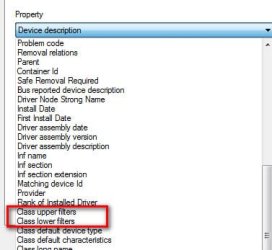
Let's see if any filters are defined. They, sometimes, can be problematic.

Right click the yellow icon device ->Properties->Details tab. Carefully scroll through the pull down menu looking for Upper class filters and/or Lower class filters. Are any defined? If yes, you can click their display, Ctl-A to select all then copy/paste the result into next post
 

Attachments

  • Filters.jpg
    Filters.jpg
    18.7 KB · Views: 15

My Computer My Computer

Computer type
PC/Desktop
Computer Manufacturer/Model Number
Dell Optiplex 360 and Optiplex 755
OS
Desk 1: Win 7 Pro x32; Desk 2: Windows 10 x64
Hard Drives
500GB Crucial SSD in both Desktops
Other Info
Buffalo 6TB NAS, Raid 1
Thank you for taking an interest.

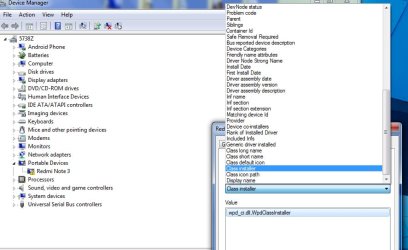
There is :

Device lower filters value Winusb
Class installer value wpd_ci.dll,WpdClassInstaller


but no Upper or Lower class filters

Screen grab attached
 

Attachments

  • grab.jpg
    grab.jpg
    70.2 KB · Views: 2

My Computer My Computer

Computer type
Laptop
Computer Manufacturer/Model Number
Acer Aspire 5738Z
OS
Windows 7 Home Premium 64 bit
CPU
Pentium T4200
Memory
4 GB DDR3
Hard Drives
500MB
Antivirus
Avast
Browser
Chrome
Filters aren't the problem. Let's see if any hints in the Event Log

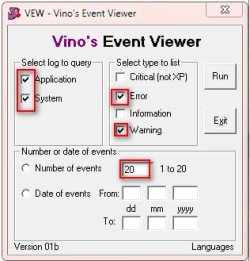
Download VEW. Right click VEW.exe and Run as Administrator

When VEW opens
>Under Select log to query: select Application and System
>Under Select type to list: select Error and Warning
>Click the radio button for Number of events, Type 20 in the 1 to 20 box
>Click the Run button. It may take several seconds, Notepad will open with the output log
>In the Notepad window, click Ctrl+A to select all, then Ctrl+C to copy, then Ctrl-V to paste the result in your post
 

Attachments

  • VEW.jpg
    VEW.jpg
    19.5 KB · Views: 15

My Computer My Computer

Computer type
PC/Desktop
Computer Manufacturer/Model Number
Dell Optiplex 360 and Optiplex 755
OS
Desk 1: Win 7 Pro x32; Desk 2: Windows 10 x64
Hard Drives
500GB Crucial SSD in both Desktops
Other Info
Buffalo 6TB NAS, Raid 1
VEW 1 I had to split the report into 2 parts

Vino's Event Viewer v01c run on Windows 2008 in English
Report run at 11/02/2016 09:18:43

Note: All dates below are in the format dd/mm/yyyy

~~~~~~~~~~~~~~~~~~~~~~~~~~~~~~~~~~
'Application' Log - Critical Type
~~~~~~~~~~~~~~~~~~~~~~~~~~~~~~~~~~
~~~~~~~~~~~~~~~~~~~~~~~~~~~~~~~~~~
'Application' Log - Error Type
~~~~~~~~~~~~~~~~~~~~~~~~~~~~~~~~~~
Log: 'Application' Date/Time: 10/02/2016 13:23:00
Type: Error Category: 0
Event: 1101 Source: .NET Runtime Optimization Service
.NET Runtime Optimization Service (clr_optimization_v4.0.30319_64) - Failed to compile: Microsoft.JScript, Version=8.0.0.0, Culture=neutral, PublicKeyToken=b03f5f7f11d50a3a . Error code = 0x80070020


Log: 'Application' Date/Time: 10/02/2016 12:33:54
Type: Error Category: 0
Event: 1101 Source: .NET Runtime Optimization Service
.NET Runtime Optimization Service (clr_optimization_v4.0.30319_32) - Failed to compile: MMCEx, Version=3.0.0.0, Culture=Neutral, PublicKeyToken=31bf3856ad364e35, processorArchitecture=msil . Error code = 0x80070020


Log: 'Application' Date/Time: 10/02/2016 11:52:36
Type: Error Category: 0
Event: 1101 Source: .NET Runtime Optimization Service
.NET Runtime Optimization Service (clr_optimization_v4.0.30319_32) - Failed to compile: System.Design, Version=2.0.0.0, Culture=neutral, PublicKeyToken=b03f5f7f11d50a3a . Error code = 0x80070020


Log: 'Application' Date/Time: 10/02/2016 11:52:10
Type: Error Category: 0
Event: 1101 Source: .NET Runtime Optimization Service
.NET Runtime Optimization Service (clr_optimization_v4.0.30319_32) - Failed to compile: System.Web, Version=2.0.0.0, Culture=neutral, PublicKeyToken=b03f5f7f11d50a3a . Error code = 0x80070020


Log: 'Application' Date/Time: 31/01/2016 15:23:17
Type: Error Category: 100
Event: 1000 Source: Application Error
Faulting application name: DllHost.exe, version: 6.1.7600.16385, time stamp: 0x4a5bc6b7 Faulting module name: unknown, version: 0.0.0.0, time stamp: 0x00000000 Exception code: 0xc0000005 Fault offset: 0x3f800000 Faulting process id: 0x17d8 Faulting application start time: 0x01d15c37ef173810 Faulting application path: C:\Windows\SysWOW64\DllHost.exe Faulting module path: unknown Report Id: 8cc86656-c82e-11e5-886e-001f16a9af8a

Log: 'Application' Date/Time: 24/01/2016 13:07:07
Type: Error Category: 3
Event: 455 Source: ESENT
DllHost (5016) WebCacheLocal: Error -1811 occurred while opening logfile C:\Users\Tristan Cooper\AppData\Local\Microsoft\Windows\WebCache\V0100056.log.

Log: 'Application' Date/Time: 15/01/2016 12:58:57
Type: Error Category: 0
Event: 1024 Source: MsiInstaller
Product: Adobe Acrobat Reader DC - Update '{AC76BA86-7AD7-0000-2550-AC0F0A4E5800}' could not be installed. Error code 1625. Windows Installer can create logs to help troubleshoot issues with installing software packages. Use the following link for instructions on turning on logging support: http://go.microsoft.com/fwlink/?LinkId=23127

Log: 'Application' Date/Time: 13/01/2016 11:03:28
Type: Error Category: 100
Event: 1000 Source: Application Error
Faulting application name: Explorer.EXE, version: 6.1.7601.17514, time stamp: 0x4ce7a144 Faulting module name: SHELL32.dll, version: 6.1.7601.18952, time stamp: 0x55c3a0ed Exception code: 0xc0000005 Fault offset: 0x000000000009a661 Faulting process id: 0x54c Faulting application start time: 0x01d14df0755567ea Faulting application path: C:\Windows\Explorer.EXE Faulting module path: C:\Windows\system32\SHELL32.dll Report Id: 45dfbc9c-b9e5-11e5-b591-001f16a9af8a

Log: 'Application' Date/Time: 26/12/2015 15:42:16
Type: Error Category: 0
Event: 1 Source: Chrome
The event description cannot be found.

Log: 'Application' Date/Time: 23/12/2015 15:45:07
Type: Error Category: 0
Event: 33 Source: SideBySide
Activation context generation failed for "C:\Program Files\AVAST Software\Avast\Setup\30872e28-770e-4e03-b6e7-0478ab0fc150.dll". Dependent Assembly Avast.VC110.DebugCRT,processorArchitecture="x86",publicKeyToken="2036b14a11e83e4a",type="win32",version="11.0.60610.1" could not be found. Please use sxstrace.exe for detailed diagnosis.

Log: 'Application' Date/Time: 20/12/2015 12:09:29
Type: Error Category: 0
Event: 1 Source: Chrome
The event description cannot be found.

Log: 'Application' Date/Time: 19/12/2015 09:12:13
Type: Error Category: 0
Event: 1 Source: Chrome
The event description cannot be found.

Log: 'Application' Date/Time: 16/12/2015 12:21:45
Type: Error Category: 101
Event: 1002 Source: Application Hang
The program PhotoshopElements.exe version 2.0.0.0 stopped interacting with Windows and was closed. To see if more information about the problem is available, check the problem history in the Action Center control panel. Process ID: 11c4 Start Time: 01d137fc3f5d775a Termination Time: 30 Application Path: C:\Program Files (x86)\Adobe\Photoshop Elements 2\PhotoshopElements.exe Report Id: 9007b211-a3ef-11e5-9218-001f16a9af8a

Log: 'Application' Date/Time: 16/12/2015 12:21:05
Type: Error Category: 101
Event: 1002 Source: Application Hang
The program PhotoshopElements.exe version 2.0.0.0 stopped interacting with Windows and was closed. To see if more information about the problem is available, check the problem history in the Action Center control panel. Process ID: 9c0 Start Time: 01d137fbe78046b1 Termination Time: 30 Application Path: C:\Program Files (x86)\Adobe\Photoshop Elements 2\PhotoshopElements.exe Report Id: 76bd0e6d-a3ef-11e5-9218-001f16a9af8a

Log: 'Application' Date/Time: 15/12/2015 14:22:57
Type: Error Category: 0
Event: 1024 Source: MsiInstaller
Product: Adobe Acrobat Reader DC - Update '{AC76BA86-7AD7-0000-2550-AC0F094E6F00}' could not be installed. Error code 1625. Windows Installer can create logs to help troubleshoot issues with installing software packages. Use the following link for instructions on turning on logging support: http://go.microsoft.com/fwlink/?LinkId=23127

Log: 'Application' Date/Time: 13/12/2015 22:14:13
Type: Error Category: 0
Event: 1 Source: Chrome
The event description cannot be found.

Log: 'Application' Date/Time: 10/12/2015 08:24:42
Type: Error Category: 101
Event: 1002 Source: Application Hang
The program QQ.exe version 1.91.1369.0 stopped interacting with Windows and was closed. To see if more information about the problem is available, check the problem history in the Action Center control panel. Process ID: 9bc Start Time: 01d13322608e7ab0 Termination Time: 35 Application Path: C:\Program Files (x86)\Tencent\QQIntl\Bin\QQ.exe Report Id: 72f27b6c-9f17-11e5-9268-001f16a9af8a

Log: 'Application' Date/Time: 05/12/2015 17:58:09
Type: Error Category: 0
Event: 35 Source: SideBySide
Activation context generation failed for "C:\Program Files (x86)\Pandora Recovery\PandoraRecovery.exe".Error in manifest or policy file "C:\Program Files (x86)\Pandora Recovery\Microsoft.VC80.CRT.MANIFEST" on line 4. Component identity found in manifest does not match the identity of the component requested. Reference is Microsoft.VC80.CRT,processorArchitecture="x86",publicKeyToken="1fc8b3b9a1e18e3b",type="win32",version="8.0.50727.6195". Definition is Microsoft.VC80.CRT,processorArchitecture="x86",publicKeyToken="1fc8b3b9a1e18e3b",type="win32",version="8.0.50727.762". Please use sxstrace.exe for detailed diagnosis.

Log: 'Application' Date/Time: 05/12/2015 17:57:52
Type: Error Category: 0
Event: 35 Source: SideBySide
Activation context generation failed for "C:\Program Files (x86)\Pandora Recovery\PandoraRecovery.exe".Error in manifest or policy file "C:\Program Files (x86)\Pandora Recovery\Microsoft.VC80.CRT.MANIFEST" on line 4. Component identity found in manifest does not match the identity of the component requested. Reference is Microsoft.VC80.CRT,processorArchitecture="x86",publicKeyToken="1fc8b3b9a1e18e3b",type="win32",version="8.0.50727.6195". Definition is Microsoft.VC80.CRT,processorArchitecture="x86",publicKeyToken="1fc8b3b9a1e18e3b",type="win32",version="8.0.50727.762". Please use sxstrace.exe for detailed diagnosis.

Log: 'Application' Date/Time: 05/12/2015 17:57:09
Type: Error Category: 0
Event: 35 Source: SideBySide
Activation context generation failed for "C:\Program Files (x86)\Pandora Recovery\PandoraRecovery.exe".Error in manifest or policy file "C:\Program Files (x86)\Pandora Recovery\Microsoft.VC80.CRT.MANIFEST" on line 4. Component identity found in manifest does not match the identity of the component requested. Reference is Microsoft.VC80.CRT,processorArchitecture="x86",publicKeyToken="1fc8b3b9a1e18e3b",type="win32",version="8.0.50727.6195". Definition is Microsoft.VC80.CRT,processorArchitecture="x86",publicKeyToken="1fc8b3b9a1e18e3b",type="win32",version="8.0.50727.762". Please use sxstrace.exe for detailed diagnosis.

~~~~~~~~~~~~~~~~~~~~~~~~~~~~~~~~~~
'Application' Log - Warning Type
~~~~~~~~~~~~~~~~~~~~~~~~~~~~~~~~~~
Log: 'Application' Date/Time: 11/02/2016 08:52:22
Type: Warning Category: 0
Event: 1 Source: Execution Service
Could not open process with PID: 5576

Log: 'Application' Date/Time: 10/02/2016 23:03:52
Type: Warning Category: 0
Event: 1530 Source: Microsoft-Windows-User Profiles Service
Windows detected your registry file is still in use by other applications or services. The file will be unloaded now. The applications or services that hold your registry file may not function properly afterwards. DETAIL - 16 user registry handles leaked from \Registry\User\S-1-5-21-2344238871-4168707119-2302447882-1000:
Process 1836 (\Device\HarddiskVolume2\Program Files\Common Files\Microsoft Shared\Windows Live\WLIDSVC.EXE) has opened key \REGISTRY\USER\S-1-5-21-2344238871-4168707119-2302447882-1000
Process 1192 (\Device\HarddiskVolume2\Program Files\AVAST Software\Avast\AvastSvc.exe) has opened key \REGISTRY\USER\S-1-5-21-2344238871-4168707119-2302447882-1000
Process 1836 (\Device\HarddiskVolume2\Program Files\Common Files\Microsoft Shared\Windows Live\WLIDSVC.EXE) has opened key \REGISTRY\USER\S-1-5-21-2344238871-4168707119-2302447882-1000\Software\Microsoft\SystemCertificates\trust
Process 1836 (\Device\HarddiskVolume2\Program Files\Common Files\Microsoft Shared\Windows Live\WLIDSVC.EXE) has opened key \REGISTRY\USER\S-1-5-21-2344238871-4168707119-2302447882-1000\Software\Microsoft\SystemCertificates\TrustedPeople
Process 1836 (\Device\HarddiskVolume2\Program Files\Common Files\Microsoft Shared\Windows Live\WLIDSVC.EXE) has opened key \REGISTRY\USER\S-1-5-21-2344238871-4168707119-2302447882-1000\Software\Microsoft\SystemCertificates\Root
Process 1836 (\Device\HarddiskVolume2\Program Files\Common Files\Microsoft Shared\Windows Live\WLIDSVC.EXE) has opened key \REGISTRY\USER\S-1-5-21-2344238871-4168707119-2302447882-1000\Software\Policies\Microsoft\SystemCertificates
Process 1836 (\Device\HarddiskVolume2\Program Files\Common Files\Microsoft Shared\Windows Live\WLIDSVC.EXE) has opened key \REGISTRY\USER\S-1-5-21-2344238871-4168707119-2302447882-1000\Software\Microsoft\SystemCertificates\Disallowed
Process 1836 (\Device\HarddiskVolume2\Program Files\Common Files\Microsoft Shared\Windows Live\WLIDSVC.EXE) has opened key \REGISTRY\USER\S-1-5-21-2344238871-4168707119-2302447882-1000\Software\Microsoft\SystemCertificates\SmartCardRoot
Process 1836 (\Device\HarddiskVolume2\Program Files\Common Files\Microsoft Shared\Windows Live\WLIDSVC.EXE) has opened key \REGISTRY\USER\S-1-5-21-2344238871-4168707119-2302447882-1000\Software\Microsoft\SystemCertificates\My
Process 1836 (\Device\HarddiskVolume2\Program Files\Common Files\Microsoft Shared\Windows Live\WLIDSVC.EXE) has opened key \REGISTRY\USER\S-1-5-21-2344238871-4168707119-2302447882-1000\Software\Microsoft\SystemCertificates\CA


Log: 'Application' Date/Time: 10/02/2016 15:20:56
Type: Warning Category: 0
Event: 1 Source: Execution Service
Watched process exited with code 1

Log: 'Application' Date/Time: 10/02/2016 15:20:28
Type: Warning Category: 0
Event: 1 Source: Execution Service
Watched process exited with code 1

Log: 'Application' Date/Time: 10/02/2016 11:36:37
Type: Warning Category: 0
Event: 1 Source: Execution Service
Could not open process with PID: 1592

Log: 'Application' Date/Time: 10/02/2016 11:34:58
Type: Warning Category: 0
Event: 6004 Source: Microsoft-Windows-Winlogon
The winlogon notification subscriber <TrustedInstaller> failed a critical notification event.

Log: 'Application' Date/Time: 10/02/2016 11:34:18
Type: Warning Category: 0
Event: 1 Source: Execution Service
Could not open process with PID: 1324

Log: 'Application' Date/Time: 10/02/2016 10:27:02
Type: Warning Category: 0
Event: 1530 Source: Microsoft-Windows-User Profiles Service
Windows detected your registry file is still in use by other applications or services. The file will be unloaded now. The applications or services that hold your registry file may not function properly afterwards. DETAIL - 1 user registry handles leaked from \Registry\User\S-1-5-21-2344238871-4168707119-2302447882-1000:
Process 1208 (\Device\HarddiskVolume2\Program Files\AVAST Software\Avast\AvastSvc.exe) has opened key \REGISTRY\USER\S-1-5-21-2344238871-4168707119-2302447882-1000


Log: 'Application' Date/Time: 10/02/2016 08:20:08
Type: Warning Category: 0
Event: 1 Source: Execution Service
Could not open process with PID: 3816

Log: 'Application' Date/Time: 09/02/2016 22:37:26
Type: Warning Category: 0
Event: 1 Source: Execution Service
ServiceWorkerThread: Exited with code: 0

Log: 'Application' Date/Time: 09/02/2016 22:33:48
Type: Warning Category: 0
Event: 1 Source: Execution Service
Watched process exited with code 1

Log: 'Application' Date/Time: 09/02/2016 22:17:36
Type: Warning Category: 0
Event: 1 Source: Execution Service
Watched process exited with code 1

Log: 'Application' Date/Time: 09/02/2016 22:17:09
Type: Warning Category: 0
Event: 1 Source: Execution Service
Watched process exited with code 1

Log: 'Application' Date/Time: 09/02/2016 22:16:32
Type: Warning Category: 0
Event: 1 Source: Execution Service
Watched process exited with code 1

Log: 'Application' Date/Time: 09/02/2016 22:16:18
Type: Warning Category: 0
Event: 1 Source: Execution Service
Watched process exited with code 1

Log: 'Application' Date/Time: 09/02/2016 22:15:59
Type: Warning Category: 0
Event: 1 Source: Execution Service
Watched process exited with code 1

Log: 'Application' Date/Time: 09/02/2016 22:15:39
Type: Warning Category: 0
Event: 1 Source: Execution Service
Watched process exited with code 1

Log: 'Application' Date/Time: 09/02/2016 21:27:53
Type: Warning Category: 0
Event: 1 Source: Execution Service
Watched process exited with code 1

Log: 'Application' Date/Time: 09/02/2016 21:27:27
Type: Warning Category: 0
Event: 1 Source: Execution Service
Watched process exited with code 1

Log: 'Application' Date/Time: 09/02/2016 21:27:01
Type: Warning Category: 0
Event: 1 Source: Execution Service
Watched process exited with code 1

 

My Computer My Computer

Computer type
Laptop
Computer Manufacturer/Model Number
Acer Aspire 5738Z
OS
Windows 7 Home Premium 64 bit
CPU
Pentium T4200
Memory
4 GB DDR3
Hard Drives
500MB
Antivirus
Avast
Browser
Chrome
Vew 2

~~~~~~~~~~~~~~~~~~~~~~~~~~~~~~~~~~
'System' Log - Critical Type
~~~~~~~~~~~~~~~~~~~~~~~~~~~~~~~~~~
Log: 'System' Date/Time: 09/02/2016 06:24:00
Type: Critical Category: 64
Event: 10111 Source: Microsoft-Windows-DriverFrameworks-UserMode
The device MTP USB Device (location 0000.001a.0007.004.000.000.000.000.000) is offline due to a user-mode driver crash. Windows will attempt to restart the device 5 more times. Please contact the device manufacturer for more information about this problem.

Log: 'System' Date/Time: 09/02/2016 06:24:00
Type: Critical Category: 64
Event: 10110 Source: Microsoft-Windows-DriverFrameworks-UserMode
A problem has occurred with one or more user-mode drivers and the hosting process has been terminated. This may temporarily interrupt your ability to access the devices.

~~~~~~~~~~~~~~~~~~~~~~~~~~~~~~~~~~
'System' Log - Error Type
~~~~~~~~~~~~~~~~~~~~~~~~~~~~~~~~~~
Log: 'System' Date/Time: 10/02/2016 23:03:32
Type: Error Category: 0
Event: 10010 Source: Microsoft-Windows-DistributedCOM
The server {3EB3C877-1F16-487C-9050-104DBCD66683} did not register with DCOM within the required timeout.

Log: 'System' Date/Time: 10/02/2016 14:27:06
Type: Error Category: 0
Event: 36888 Source: Schannel
The following fatal alert was generated: 40. The internal error state is 252.

Log: 'System' Date/Time: 10/02/2016 14:26:50
Type: Error Category: 0
Event: 36888 Source: Schannel
The following fatal alert was generated: 10. The internal error state is 10.

Log: 'System' Date/Time: 10/02/2016 10:26:57
Type: Error Category: 0
Event: 10010 Source: Microsoft-Windows-DistributedCOM
The server {3EB3C877-1F16-487C-9050-104DBCD66683} did not register with DCOM within the required timeout.

Log: 'System' Date/Time: 09/02/2016 22:37:07
Type: Error Category: 0
Event: 10010 Source: Microsoft-Windows-DistributedCOM
The server {3EB3C877-1F16-487C-9050-104DBCD66683} did not register with DCOM within the required timeout.

Log: 'System' Date/Time: 09/02/2016 14:17:19
Type: Error Category: 0
Event: 36888 Source: Schannel
The following fatal alert was generated: 40. The internal error state is 252.

Log: 'System' Date/Time: 09/02/2016 14:17:00
Type: Error Category: 0
Event: 36888 Source: Schannel
The following fatal alert was generated: 10. The internal error state is 10.

Log: 'System' Date/Time: 09/02/2016 10:25:09
Type: Error Category: 0
Event: 10010 Source: Microsoft-Windows-DistributedCOM
The server {3EB3C877-1F16-487C-9050-104DBCD66683} did not register with DCOM within the required timeout.

Log: 'System' Date/Time: 08/02/2016 22:33:16
Type: Error Category: 0
Event: 10010 Source: Microsoft-Windows-DistributedCOM
The server {3EB3C877-1F16-487C-9050-104DBCD66683} did not register with DCOM within the required timeout.

Log: 'System' Date/Time: 08/02/2016 14:24:48
Type: Error Category: 0
Event: 10010 Source: Microsoft-Windows-DistributedCOM
The server {3EB3C877-1F16-487C-9050-104DBCD66683} did not register with DCOM within the required timeout.

Log: 'System' Date/Time: 08/02/2016 14:07:09
Type: Error Category: 0
Event: 36888 Source: Schannel
The following fatal alert was generated: 40. The internal error state is 252.

Log: 'System' Date/Time: 08/02/2016 14:06:51
Type: Error Category: 0
Event: 36888 Source: Schannel
The following fatal alert was generated: 10. The internal error state is 10.

Log: 'System' Date/Time: 08/02/2016 09:32:28
Type: Error Category: 0
Event: 10010 Source: Microsoft-Windows-DistributedCOM
The server {3EB3C877-1F16-487C-9050-104DBCD66683} did not register with DCOM within the required timeout.

Log: 'System' Date/Time: 07/02/2016 22:31:26
Type: Error Category: 0
Event: 14332 Source: Microsoft-Windows-WMPNSS-Service
Service 'WMPNetworkSvc' did not start correctly because CoCreateInstance(CLSID_UPnPDeviceFinder) encountered error '0x80004005'. Verify that the UPnPHost service is running and that the UPnPHost component of Windows is installed properly.

Log: 'System' Date/Time: 07/02/2016 13:59:22
Type: Error Category: 0
Event: 36888 Source: Schannel
The following fatal alert was generated: 40. The internal error state is 252.

Log: 'System' Date/Time: 07/02/2016 13:59:05
Type: Error Category: 0
Event: 36888 Source: Schannel
The following fatal alert was generated: 10. The internal error state is 10.

Log: 'System' Date/Time: 07/02/2016 09:56:02
Type: Error Category: 0
Event: 10010 Source: Microsoft-Windows-DistributedCOM
The server {3EB3C877-1F16-487C-9050-104DBCD66683} did not register with DCOM within the required timeout.

Log: 'System' Date/Time: 06/02/2016 13:49:26
Type: Error Category: 0
Event: 36888 Source: Schannel
The following fatal alert was generated: 40. The internal error state is 252.

Log: 'System' Date/Time: 06/02/2016 13:49:08
Type: Error Category: 0
Event: 36888 Source: Schannel
The following fatal alert was generated: 10. The internal error state is 10.

Log: 'System' Date/Time: 06/02/2016 08:11:12
Type: Error Category: 0
Event: 10010 Source: Microsoft-Windows-DistributedCOM
The server {3EB3C877-1F16-487C-9050-104DBCD66683} did not register with DCOM within the required timeout.

~~~~~~~~~~~~~~~~~~~~~~~~~~~~~~~~~~
'System' Log - Warning Type
~~~~~~~~~~~~~~~~~~~~~~~~~~~~~~~~~~
Log: 'System' Date/Time: 11/02/2016 09:01:40
Type: Warning Category: 212
Event: 219 Source: Microsoft-Windows-Kernel-PnP
The driver \Driver\WUDFRd failed to load for the device USB\VID_2717&PID_FF40&MI_00\6&1def4596&1&0000.

Log: 'System' Date/Time: 11/02/2016 08:52:08
Type: Warning Category: 0
Event: 4 Source: k57nd60a
Broadcom NetLink (TM) Gigabit Ethernet: The network link is down. Check to make sure the network cable is properly connected.

Log: 'System' Date/Time: 10/02/2016 23:04:20
Type: Warning Category: 0
Event: 4001 Source: Microsoft-Windows-WLAN-AutoConfig
WLAN AutoConfig service has successfully stopped.

Log: 'System' Date/Time: 10/02/2016 20:28:47
Type: Warning Category: 212
Event: 219 Source: Microsoft-Windows-Kernel-PnP
The driver \Driver\WUDFRd failed to load for the device USB\VID_2717&PID_FF40&MI_00\6&1def4596&1&0000.

Log: 'System' Date/Time: 10/02/2016 20:19:51
Type: Warning Category: 212
Event: 219 Source: Microsoft-Windows-Kernel-PnP
The driver \Driver\WUDFRd failed to load for the device USB\VID_2717&PID_FF40&MI_00\6&1def4596&1&0000.

Log: 'System' Date/Time: 10/02/2016 20:07:44
Type: Warning Category: 212
Event: 219 Source: Microsoft-Windows-Kernel-PnP
The driver \Driver\WUDFRd failed to load for the device USB\VID_2717&PID_FF40&MI_00\6&1def4596&1&0000.

Log: 'System' Date/Time: 10/02/2016 11:35:43
Type: Warning Category: 0
Event: 4 Source: k57nd60a
Broadcom NetLink (TM) Gigabit Ethernet: The network link is down. Check to make sure the network cable is properly connected.

Log: 'System' Date/Time: 10/02/2016 11:35:01
Type: Warning Category: 0
Event: 4001 Source: Microsoft-Windows-WLAN-AutoConfig
WLAN AutoConfig service has successfully stopped.

Log: 'System' Date/Time: 10/02/2016 11:33:12
Type: Warning Category: 0
Event: 4 Source: k57nd60a
Broadcom NetLink (TM) Gigabit Ethernet: The network link is down. Check to make sure the network cable is properly connected.

Log: 'System' Date/Time: 10/02/2016 11:31:32
Type: Warning Category: 0
Event: 4 Source: k57nd60a
Broadcom NetLink (TM) Gigabit Ethernet: The network link is down. Check to make sure the network cable is properly connected.

Log: 'System' Date/Time: 10/02/2016 10:52:18
Type: Warning Category: 0
Event: 4001 Source: Microsoft-Windows-WLAN-AutoConfig
WLAN AutoConfig service has successfully stopped.

Log: 'System' Date/Time: 10/02/2016 08:19:54
Type: Warning Category: 0
Event: 4 Source: k57nd60a
Broadcom NetLink (TM) Gigabit Ethernet: The network link is down. Check to make sure the network cable is properly connected.

Log: 'System' Date/Time: 09/02/2016 22:37:34
Type: Warning Category: 0
Event: 4001 Source: Microsoft-Windows-WLAN-AutoConfig
WLAN AutoConfig service has successfully stopped.

Log: 'System' Date/Time: 09/02/2016 22:35:28
Type: Warning Category: 0
Event: 1014 Source: Microsoft-Windows-DNS-Client
Name resolution for the name trends.revcontent.com timed out after none of the configured DNS servers responded.

Log: 'System' Date/Time: 09/02/2016 22:16:41
Type: Warning Category: 0
Event: 1014 Source: Microsoft-Windows-DNS-Client
Name resolution for the name beacons2.gvt2.com timed out after none of the configured DNS servers responded.

Log: 'System' Date/Time: 09/02/2016 22:16:40
Type: Warning Category: 0
Event: 1014 Source: Microsoft-Windows-DNS-Client
Name resolution for the name notify7.dropbox.com timed out after none of the configured DNS servers responded.

Log: 'System' Date/Time: 09/02/2016 22:16:31
Type: Warning Category: 0
Event: 1014 Source: Microsoft-Windows-DNS-Client
Name resolution for the name play.google.com timed out after none of the configured DNS servers responded.

Log: 'System' Date/Time: 09/02/2016 20:51:48
Type: Warning Category: 0
Event: 1014 Source: Microsoft-Windows-DNS-Client
Name resolution for the name cm.g.doubleclick.net timed out after none of the configured DNS servers responded.

Log: 'System' Date/Time: 09/02/2016 12:36:05
Type: Warning Category: 0
Event: 4 Source: k57nd60a
Broadcom NetLink (TM) Gigabit Ethernet: The network link is down. Check to make sure the network cable is properly connected.

Log: 'System' Date/Time: 09/02/2016 10:25:15
Type: Warning Category: 0
Event: 4001 Source: Microsoft-Windows-WLAN-AutoConfig
WLAN AutoConfig service has successfully stopped.
 

My Computer My Computer

Computer type
Laptop
Computer Manufacturer/Model Number
Acer Aspire 5738Z
OS
Windows 7 Home Premium 64 bit
CPU
Pentium T4200
Memory
4 GB DDR3
Hard Drives
500MB
Antivirus
Avast
Browser
Chrome
Wish I could be of better help :(

1. Not clear from your post. Did you install the smartphone drivers? Or are you using the Windows generic MTP drivers? Look for and use hardware specific drivers from the vendor

2. One shot in the dark worth a try: (this has helped some MTP issues - but don't know if it would help yours)
> Control Panel->Administrator Tools->Services
> Scroll down to Windows Driver Foundation. Right click select Properties. Then change startup type to Automatic.
 

My Computer My Computer

Computer type
PC/Desktop
Computer Manufacturer/Model Number
Dell Optiplex 360 and Optiplex 755
OS
Desk 1: Win 7 Pro x32; Desk 2: Windows 10 x64
Hard Drives
500GB Crucial SSD in both Desktops
Other Info
Buffalo 6TB NAS, Raid 1
Thanks for trying anyway, sir, much appreciated.

I let windows find the driver so I presume it is a MS generic. Xiaomi don't market the phone in the UK and don't appear to have a specific driver for it. But I'll ask them again.

I'l also try suggestion 2. and report back

Thanks again.
 

My Computer My Computer

Computer type
Laptop
Computer Manufacturer/Model Number
Acer Aspire 5738Z
OS
Windows 7 Home Premium 64 bit
CPU
Pentium T4200
Memory
4 GB DDR3
Hard Drives
500MB
Antivirus
Avast
Browser
Chrome

My Computer My Computer

Computer type
PC/Desktop
Computer Manufacturer/Model Number
Custom build
OS
Windows 7 Home Premium
CPU
i5-3570k
Motherboard
ASUS Sabertooth z77
Memory
16 GB DDR3 G Skill Sniper
Graphics Card(s)
GIGABYTE GeForce GTX 970 GV-N970WF3OC-4GD
Monitor(s) Displays
ASUS ROG PG278Q
Screen Resolution
2560x1440@60Hz/120Hz/144Hz
Hard Drives
56GB KINGSTON SVP200S37A60G
512GB Crucial MX100
1863GB Seagate ST2000DM001-1CH164
2795GB Seagate ST3000DM001-9YN166
PSU
Corsair GS800
Case
Storm Trooper Stryker White
Keyboard
Logitech G910 Orion Spark
Mouse
Logitech G502
Antivirus
MSE
Browser
Firefox/Chrome
Other Info
Logitech G633
Logitech Mouse Matt
The trick with setting start up to automatic seems to have worked ! YAY thank you Mr Computergeek. I'll double check tomorrow and, if it's still good, set the thread to solved.

Good find Boris, thank you, but the Redmi Note 3 is not actually there, even though it appears to be. I think it may be too recent.
 

My Computer My Computer

Computer type
Laptop
Computer Manufacturer/Model Number
Acer Aspire 5738Z
OS
Windows 7 Home Premium 64 bit
CPU
Pentium T4200
Memory
4 GB DDR3
Hard Drives
500MB
Antivirus
Avast
Browser
Chrome
Oh well hm.
 

My Computer My Computer

Computer type
PC/Desktop
Computer Manufacturer/Model Number
Custom build
OS
Windows 7 Home Premium
CPU
i5-3570k
Motherboard
ASUS Sabertooth z77
Memory
16 GB DDR3 G Skill Sniper
Graphics Card(s)
GIGABYTE GeForce GTX 970 GV-N970WF3OC-4GD
Monitor(s) Displays
ASUS ROG PG278Q
Screen Resolution
2560x1440@60Hz/120Hz/144Hz
Hard Drives
56GB KINGSTON SVP200S37A60G
512GB Crucial MX100
1863GB Seagate ST2000DM001-1CH164
2795GB Seagate ST3000DM001-9YN166
PSU
Corsair GS800
Case
Storm Trooper Stryker White
Keyboard
Logitech G910 Orion Spark
Mouse
Logitech G502
Antivirus
MSE
Browser
Firefox/Chrome
Other Info
Logitech G633
Logitech Mouse Matt
I can confirm that setting start up to automatic has cured the problem. You are a genius, Computergeek. How would anyone know that that was the problem?

Thanks again.
 

My Computer My Computer

Computer type
Laptop
Computer Manufacturer/Model Number
Acer Aspire 5738Z
OS
Windows 7 Home Premium 64 bit
CPU
Pentium T4200
Memory
4 GB DDR3
Hard Drives
500MB
Antivirus
Avast
Browser
Chrome
You're most welcome. Very happy I was able to help :)
 

My Computer My Computer

Computer type
PC/Desktop
Computer Manufacturer/Model Number
Dell Optiplex 360 and Optiplex 755
OS
Desk 1: Win 7 Pro x32; Desk 2: Windows 10 x64
Hard Drives
500GB Crucial SSD in both Desktops
Other Info
Buffalo 6TB NAS, Raid 1
Back
Top