USB Stick has a slow transfer speed

Fuzz Ball

New member
Local time
3:37 AM
Messages
31
Location
Melbourne, Australia
Ohai. I've got a Kingston Datatraveler 2.0 USB stick. On other PCs (Both windows 7 and XP), I was getting write speeds of up to 30MB/s, averaging around 22MB/s.

On my currently laptop, I'm only getting around 7MB/s for large files, with the peak at 11MB/s. Small files transfer at around 2MB/s which is unbearable... since on everything else it transfers at least at 10MB/s.

I have checked for driver updates (Windows says its fine), and I've also changed it to 'Optimised for speed', or whatever it is. I also uninstalled the drivers, and let the USB reinstall them just in case something went wrong the first time.

So, any tips on how to get transfer speeds on my USB up? Or is this a hardware issue with power distribution of USB ports/motherboard issues?
 

My Computer My Computer

Computer Manufacturer/Model Number
msi GX740-235US
OS
Windows 7 Home Premium 64-bit
CPU
Intel i5 450 @ 2.4GHz
Motherboard
Unknown
Memory
4GB DDR3 1066MHz
Graphics Card(s)
ATi Mobile Radeon HD5870 1GB vDDR5
Sound Card
On-board Realtek HD Audio
Monitor(s) Displays
17" WSXGA+
Screen Resolution
1680x1050
Hard Drives
Western Digital 320GB 7200 RPM
PSU
Unknown
Case
msi GX740 Laptop Case
Cooling
Unknown
Keyboard
Full laptop keyboard (including Numpad)
Mouse
Logitech G500
Internet Speed
18.75Mbps DL, 0.49Mbps UP (Cable). ISP upload limits.
Other Info
My graphics card says its a 5870, my processor says its an i5 and my ram says its 4GB. What's to say that they're not actually this? MY PARTS MIGHT BE FOOLING ME.
Windows is not always the best source for driver updates.
Could we have more specific information about the make and model of the laptop for that purpose?

Also, does the laptop use different antivirus / firewall than the other computers in this equation?
 

My Computer My Computer

Computer Manufacturer/Model Number
Insane hobo technologies. ;-)
OS
Windows 7 x64
CPU
Intel i7 2600k
Motherboard
Asrock z68 extreme 4 gen 3
Memory
G.skill Ripjaw 16gigs @ 1866
Graphics Card(s)
Nvidia gtx580 (evga)
Sound Card
Integrated HD audio + hdmi
Monitor(s) Displays
24" ASUS widescreen + 42" insignia
Screen Resolution
1080p (1920x1080)
Hard Drives
128 Samsung 830
256 Samsung 840
3 x 1tb storage drive (various)
1 western digital 1tb (eSATA)
1 Seagate 1tb (eSATA)
PSU
1 kilowatt SLI/Crossfire rated Silverstone modular
Case
NZXT Phantom + additional 220 fan
Cooling
Zalmann
Keyboard
Microsoft wireless 3000 (v2)
Mouse
MS - wireless 5000 (bluetrack)
Internet Speed
depends on if you ask me or my provider.
Other Info
The above information is provided as is, and the author assumes no responsibility for issues it may cause with your sanity or fanboyism.
Did you try it out on all the USB ports of your laptop? What about any other make pendrive? Do these too exhibit the same slow speeds?

And can you check out your Kingston on some other PC, NOW - you said you WERE getting good write speeds - and confirm you ARE getting good speeds on it?
 

My Computer My Computer

Computer Manufacturer/Model Number
self-assembled
OS
Windows 7 Ultimate 32bit
CPU
AMD Phenom II X3 720 Processor
Motherboard
Gigabyte GA-MA78GM-S2H Revision 1.0
Memory
Transcend DDR2 (PC2 6400) 4 X 1GB
Graphics Card(s)
Integrated + ATI Radeon 4550
Sound Card
Integrated Realtek ALC 889A
Monitor(s) Displays
DELL 1704 FPT
Screen Resolution
1280 x 1024
Hard Drives
Western Digital Caviar SE16 250 GB x2 in RAID 0
PSU
Coolermaster 400 W
Case
Zebronics Cube
Cooling
stock
Keyboard
Microsoft - wired
Mouse
Microsoft - wired
Internet Speed
ADSL 256-512Kbps
The model of the laptop is an MSI GX740-235US
I'm fairly confident that it's not an antivirus program issue, as both the other PCs I tested this USB had the same anti virus software as this laptop had (AVG 8). Now I use Avast, no difference in speed.

EVERY USB port on the laptop has the problem, including the USB/eSATA hybrid port.

I do have another 'pen drive' (USB Stick lol), but it in general has slow write/read speeds, as it maxes about 10MB/s write speed, regardless of the PC. I'll test the USB stick AGAIN on other PCs when I get it back. I do have another of the same model which belongs to my brother, so I'll test that one out on here too.

Drivers shouldn't technically be an issue, as with outdated drivers both the other test PCs/laptops used whatever drive came on the USB stick. Anyway, Kingston is making it extremely hard to find drivers for it, as they don't sell the USB anymore.
 

My Computer My Computer

Computer Manufacturer/Model Number
msi GX740-235US
OS
Windows 7 Home Premium 64-bit
CPU
Intel i5 450 @ 2.4GHz
Motherboard
Unknown
Memory
4GB DDR3 1066MHz
Graphics Card(s)
ATi Mobile Radeon HD5870 1GB vDDR5
Sound Card
On-board Realtek HD Audio
Monitor(s) Displays
17" WSXGA+
Screen Resolution
1680x1050
Hard Drives
Western Digital 320GB 7200 RPM
PSU
Unknown
Case
msi GX740 Laptop Case
Cooling
Unknown
Keyboard
Full laptop keyboard (including Numpad)
Mouse
Logitech G500
Internet Speed
18.75Mbps DL, 0.49Mbps UP (Cable). ISP upload limits.
Other Info
My graphics card says its a 5870, my processor says its an i5 and my ram says its 4GB. What's to say that they're not actually this? MY PARTS MIGHT BE FOOLING ME.
People often make this mistake, just because something works on another pc you have, or even has worked (up until now) on the one you have doesn't eliminate it from scrutiny.

If you believe it's a driver issue, you can enable driver verifier and possibly generate some dump files we can check for specific errors.
http://www.sevenforums.com/tutorials/101379-driver-verifier-enable-disable.html

Read the entire post before starting in some instances it will make the machine unresponsive and you need to know what to do.
 

My Computer My Computer

Computer Manufacturer/Model Number
Insane hobo technologies. ;-)
OS
Windows 7 x64
CPU
Intel i7 2600k
Motherboard
Asrock z68 extreme 4 gen 3
Memory
G.skill Ripjaw 16gigs @ 1866
Graphics Card(s)
Nvidia gtx580 (evga)
Sound Card
Integrated HD audio + hdmi
Monitor(s) Displays
24" ASUS widescreen + 42" insignia
Screen Resolution
1080p (1920x1080)
Hard Drives
128 Samsung 830
256 Samsung 840
3 x 1tb storage drive (various)
1 western digital 1tb (eSATA)
1 Seagate 1tb (eSATA)
PSU
1 kilowatt SLI/Crossfire rated Silverstone modular
Case
NZXT Phantom + additional 220 fan
Cooling
Zalmann
Keyboard
Microsoft wireless 3000 (v2)
Mouse
MS - wireless 5000 (bluetrack)
Internet Speed
depends on if you ask me or my provider.
Other Info
The above information is provided as is, and the author assumes no responsibility for issues it may cause with your sanity or fanboyism.
I don't think its a driver issue... as other PCs with the same drivers worked. I'm wondering whether there's another setting in Windows 7 I don't know about to change the speed. Changing from 'quick removal' to 'performance' didn't seem to make any difference at all. The other thing I think it could be is hardware. I'm confident that they're high speed USB 2.0 ports, but the motherboard or something else might be interfering with something in the transferal stage.
 

My Computer My Computer

Computer Manufacturer/Model Number
msi GX740-235US
OS
Windows 7 Home Premium 64-bit
CPU
Intel i5 450 @ 2.4GHz
Motherboard
Unknown
Memory
4GB DDR3 1066MHz
Graphics Card(s)
ATi Mobile Radeon HD5870 1GB vDDR5
Sound Card
On-board Realtek HD Audio
Monitor(s) Displays
17" WSXGA+
Screen Resolution
1680x1050
Hard Drives
Western Digital 320GB 7200 RPM
PSU
Unknown
Case
msi GX740 Laptop Case
Cooling
Unknown
Keyboard
Full laptop keyboard (including Numpad)
Mouse
Logitech G500
Internet Speed
18.75Mbps DL, 0.49Mbps UP (Cable). ISP upload limits.
Other Info
My graphics card says its a 5870, my processor says its an i5 and my ram says its 4GB. What's to say that they're not actually this? MY PARTS MIGHT BE FOOLING ME.

Attachments

  • brys snap ?22 ?February ?2011 08h13m22s.png
    brys snap ?22 ?February ?2011 08h13m22s.png
    76.7 KB · Views: 339

My Computer My Computer

Computer Manufacturer/Model Number
packard bell IXTREME M5722
OS
Operating System : Windows 7 Home Premium Edition 6.01.7600 SP1 (x64)
CPU
Processor : Intel Core 2 Quad Q8300 @ 2500 MHz
Motherboard
Mainboard : Packard Bell (Acer EG43M )
Memory
Physical Memory :8GB Corsair4x 2GB 800MHz C5 DDR2
Graphics Card(s)
Video Card : XFX 6700 AMD
Monitor(s) Displays
Maestro 234DL - BenQ V2220 - BenQ VW2420H
Screen Resolution
Current Display :1920x1080p pixels at 60 Hz in HD LED
Hard Drives
Hard Disks : WDC (1000 GB)
Drive C: (Hard Disk) : 428 GB available on 491 GB
Drive D: (Hard Disk) : 426 GB available on 492 GB
SAMSUNG spinpoint HD103SJ 1000.2 GB
(X 2) KINGSTON SSD NOW V 30GB
PSU
XFX ProSeries 550W PSU
Case
PACKARD BELL IXTREME
Cooling
System Blower Current: 150mA Air Flow16CFM ;Akasa 90mm rear
Keyboard
Gigabyte Aivia K8100
Mouse
TRUST-Wireless Laser Mouse - Carbon edition MI-7770C
Internet Speed
TP-LINK > TL-WN951N / AV500 Gigabit Powerline Adapters
Browser
chrome dev
Other Info
EXTRA COOLING>(FAN CONTROLLER) PC Bay Cooler 3 x 40mm fans; Akasa AK-HD-BL Blue hard drive cooler 2 x 40 mm fan 4500 rpm 29.7 dBA
Bios> American Megatrends Inc.
Version : P01-A1
Date : 08/31/2009
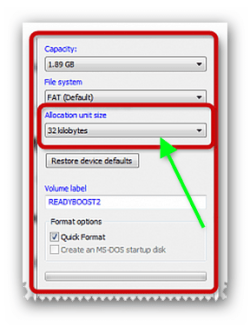
its also worth seeing what the drive was formatted at in the allocation unit size i always use default. right click on the drive >> click format.

The allocation unit size should be chosen to best utilize the space on the disk for all files and should not be selected just on the size of the largest file you plan to store.Example: The allocation unit size of 64kB means that everytime you go to store data on the drive, a minimum of 64kB is allocated. If you only need 8kB, then you're allocating 56kB more than you need which results in waste and fragmentation. Select the allocation unit size based on the average size of the files you plan to store.

File Systems and thumb drives: Choosing between FAT16, FAT32 and NTFS to get a faster USB Flash Drive LINK :ar: http://www.irongeek.com/i.php?page=security/usb-flash-thumb-drive-ntfs-filesystem

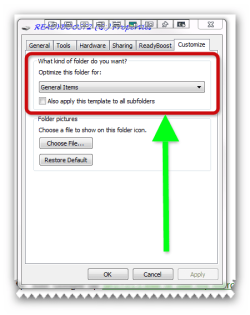
also look in customize in properties and choose what files are best for optimization .
 

Attachments

  • brys snap ?22 ?February ?2011 08h26m39s.png
    brys snap ?22 ?February ?2011 08h26m39s.png
    25.2 KB · Views: 160
  • brys snap ?22 ?February ?2011 08h48m25s.png
    brys snap ?22 ?February ?2011 08h48m25s.png
    17.5 KB · Views: 208
Last edited:

My Computer My Computer

Computer Manufacturer/Model Number
packard bell IXTREME M5722
OS
Operating System : Windows 7 Home Premium Edition 6.01.7600 SP1 (x64)
CPU
Processor : Intel Core 2 Quad Q8300 @ 2500 MHz
Motherboard
Mainboard : Packard Bell (Acer EG43M )
Memory
Physical Memory :8GB Corsair4x 2GB 800MHz C5 DDR2
Graphics Card(s)
Video Card : XFX 6700 AMD
Monitor(s) Displays
Maestro 234DL - BenQ V2220 - BenQ VW2420H
Screen Resolution
Current Display :1920x1080p pixels at 60 Hz in HD LED
Hard Drives
Hard Disks : WDC (1000 GB)
Drive C: (Hard Disk) : 428 GB available on 491 GB
Drive D: (Hard Disk) : 426 GB available on 492 GB
SAMSUNG spinpoint HD103SJ 1000.2 GB
(X 2) KINGSTON SSD NOW V 30GB
PSU
XFX ProSeries 550W PSU
Case
PACKARD BELL IXTREME
Cooling
System Blower Current: 150mA Air Flow16CFM ;Akasa 90mm rear
Keyboard
Gigabyte Aivia K8100
Mouse
TRUST-Wireless Laser Mouse - Carbon edition MI-7770C
Internet Speed
TP-LINK > TL-WN951N / AV500 Gigabit Powerline Adapters
Browser
chrome dev
Other Info
EXTRA COOLING>(FAN CONTROLLER) PC Bay Cooler 3 x 40mm fans; Akasa AK-HD-BL Blue hard drive cooler 2 x 40 mm fan 4500 rpm 29.7 dBA
Bios> American Megatrends Inc.
Version : P01-A1
Date : 08/31/2009

My Computer My Computer

Computer Manufacturer/Model Number
packard bell IXTREME M5722
OS
Operating System : Windows 7 Home Premium Edition 6.01.7600 SP1 (x64)
CPU
Processor : Intel Core 2 Quad Q8300 @ 2500 MHz
Motherboard
Mainboard : Packard Bell (Acer EG43M )
Memory
Physical Memory :8GB Corsair4x 2GB 800MHz C5 DDR2
Graphics Card(s)
Video Card : XFX 6700 AMD
Monitor(s) Displays
Maestro 234DL - BenQ V2220 - BenQ VW2420H
Screen Resolution
Current Display :1920x1080p pixels at 60 Hz in HD LED
Hard Drives
Hard Disks : WDC (1000 GB)
Drive C: (Hard Disk) : 428 GB available on 491 GB
Drive D: (Hard Disk) : 426 GB available on 492 GB
SAMSUNG spinpoint HD103SJ 1000.2 GB
(X 2) KINGSTON SSD NOW V 30GB
PSU
XFX ProSeries 550W PSU
Case
PACKARD BELL IXTREME
Cooling
System Blower Current: 150mA Air Flow16CFM ;Akasa 90mm rear
Keyboard
Gigabyte Aivia K8100
Mouse
TRUST-Wireless Laser Mouse - Carbon edition MI-7770C
Internet Speed
TP-LINK > TL-WN951N / AV500 Gigabit Powerline Adapters
Browser
chrome dev
Other Info
EXTRA COOLING>(FAN CONTROLLER) PC Bay Cooler 3 x 40mm fans; Akasa AK-HD-BL Blue hard drive cooler 2 x 40 mm fan 4500 rpm 29.7 dBA
Bios> American Megatrends Inc.
Version : P01-A1
Date : 08/31/2009
Ohai. I've got a Kingston Datatraveler 2.0 USB stick. On other PCs (Both windows 7 and XP), I was getting write speeds of up to 30MB/s, averaging around 22MB/s.

On my currently laptop, I'm only getting around 7MB/s for large files, with the peak at 11MB/s. Small files transfer at around 2MB/s which is unbearable... since on everything else it transfers at least at 10MB/s.

I have checked for driver updates (Windows says its fine), and I've also changed it to 'Optimised for speed', or whatever it is. I also uninstalled the drivers, and let the USB reinstall them just in case something went wrong the first time.

So, any tips on how to get transfer speeds on my USB up? Or is this a hardware issue with power distribution of USB ports/motherboard issues?

The current line up of Kingston Flash drives have speeds from 5MB/s to 10MB/s Write times.
Only 3 are rated higher,
the 256GB unit at 12MB/s,
the 16-64GB High Speed at 20MB/s
and the 16-64GB USB 3.0 at 60MB/s

I personally would time a transfer on the PC's that were giving you 30MB/s writes to verify the speed since the speeds you list that you get with your laptop are what the Kingston you have is rated for.
 

My Computer My Computer

Computer Manufacturer/Model Number
HAL-9000
OS
Windows 7 Ultimate 64bit
CPU
Intel i7 3770K
Motherboard
Asus Sabertooth Z77
Memory
16GB DDR3 1333 Corsair XMS3
Graphics Card(s)
XFX HD6950 2GB EyeFinity
Sound Card
Logitech G35 & Sennheiser PC135 & VIA HD
Monitor(s) Displays
23" HP 2310e, 23" Samsung B2230, 21.5" Viewsonic
Screen Resolution
5760x1080
Hard Drives
16TB of Storage
128GB & 256GB Crucial M4 SSD's, 2X 1TB WD Black, 3x 2TB WD, 3x 2TB Samsung F4, 1.5TB Seagate, WD 500GB,
PSU
Antec True Power New 650watt
Case
Cooler Master HAF-932
Cooling
Corsair H60 Hydro Cooler, 3x 230mm Fans, 2x120mm Fan
Keyboard
Logitech G15 and G13
Mouse
Logitech G700 Gaming Mouse
Internet Speed
50/10 Mbit
Other Info
Speakers : Alesis M1 Active Mk2 Studio Monitors , APC RS 1200 UPS, HP 4500DN Color Laser, HP P1006 mono Laser, Kodak 8500 Dye-Sub, Epson 1280 inkjet, Epson Worforce 610 MFC
...I personally would time a transfer on the PC's that were giving you 30MB/s writes to verify the speed since the speeds you list that you get with your laptop are what the Kingston you have is rated for.

+1 for your thoughts.

And again for any tests to be meaningful, he should write the same large file or a collection of small files on the X PC and on his laptop and verify the transfer speeds.
 

My Computer My Computer

Computer Manufacturer/Model Number
self-assembled
OS
Windows 7 Ultimate 32bit
CPU
AMD Phenom II X3 720 Processor
Motherboard
Gigabyte GA-MA78GM-S2H Revision 1.0
Memory
Transcend DDR2 (PC2 6400) 4 X 1GB
Graphics Card(s)
Integrated + ATI Radeon 4550
Sound Card
Integrated Realtek ALC 889A
Monitor(s) Displays
DELL 1704 FPT
Screen Resolution
1280 x 1024
Hard Drives
Western Digital Caviar SE16 250 GB x2 in RAID 0
PSU
Coolermaster 400 W
Case
Zebronics Cube
Cooling
stock
Keyboard
Microsoft - wired
Mouse
Microsoft - wired
Internet Speed
ADSL 256-512Kbps
Back
Top