
USB transfer causes Interrupt Service 80% CPU usage.

canadianghost

New member
Local time
9:11 AM
Messages
2
Greetings..
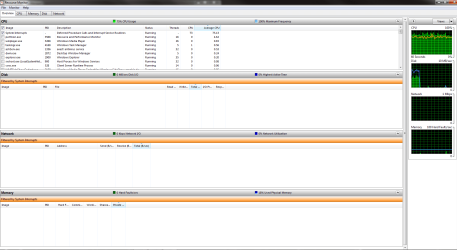
I have a real annoying problem in Windows 7, whenever I try to transfer anything to a USB device, whether it is a Flash drive or a portable HD or Ipod, the transfer screen comes up, about 10% of the file is transferred then I loose all usb capabilities, (except keyboard and mouse) my usb wireless network adapter quits and whatever usb drive I was transferring to also quits. But the interesting part is that my Deferred Procedure Calls and Interrupt Service Routines causes the CPU usage to run at a constant 70-90%. The only way to return to normal is to do a restart. I run a dual boot system with Vista 32 and Windows 7 64, same system 2 different physical HDs. If I boot into Vista this does not happen, everything transfers normally. Included a capture of Resource Monitor. Any help would be much appreciated.
 

Attachments
  • Capture.PNG
    Capture.PNG
    41.6 KB · Views: 238

My Computer My Computer

At a glance

Windows 7 - RTM 7100AMD Phenom II X2 550 Black Edition @ 3800Kingston HyperX T1 8GBEVGA E-GEFORCE GTX 260 Core 216 SC 55NM
Computer Manufacturer/Model Number
Home Build
OS
Windows 7 - RTM 7100
CPU
AMD Phenom II X2 550 Black Edition @ 3800
Motherboard
MSI K9N2 SLI Platinum AM2 nForce 750A
Memory
Kingston HyperX T1 8GB
Graphics Card(s)
EVGA E-GEFORCE GTX 260 Core 216 SC 55NM
Sound Card
Onboard
Monitor(s) Displays
Samsung T220 & Acer H233H
Screen Resolution
1680x1050 & 1920x1080
Hard Drives
Western Digital WD1001FALS Caviar Black 1TB
Western Digital WD10EADS Caviar Green 1TB
Seagate ST3640323AS 640GB
PSU
Coolermaster 600 SLI
Keyboard
G15
Mouse
G5
Looks like there are many users with similar problem...

I also have the same problem in copying large files from internal HDD to external USB devices (flash disk and portable HDD). The copy process start and then halt after a while, then a restart is needed.

My 2 other computers, Dell 600m and Asus EeePC 1000HE (both are using Win7 Prof 32), do not have this problem.

My affected computer is Acer M5641 (Q6600, nForce, Win7 Ultimate x64) and already installed latest nvidia nforce chipset 15.37 and 15.46.
 

My Computer My Computer

At a glance

Windows 7 Ultimate x64Core 2 Duo Q66004 GBATI Radeon 4670
Computer Manufacturer/Model Number
Desktop Acer Aspire M5641
OS
Windows 7 Ultimate x64
CPU
Core 2 Duo Q6600
Motherboard
MCP73PV w/ nForce 630i
Memory
4 GB
Graphics Card(s)
ATI Radeon 4670
I'm having the same issue here. This has been a problem since RC1, possibly before. I've attached a DXDiag for giggles so people know what I'm running in case it helps.
 

Attachments

My Computer My Computer

At a glance

Windows 7 Home Premium x64AMD Phenom(tm) II X4 945 (3.0GHz)4GB CorsairnVidia Gefore 8800 GTX
OS
Windows 7 Home Premium x64
CPU
AMD Phenom(tm) II X4 945 (3.0GHz)
Motherboard
MSI K9N2 Platinum/750a SLI
Memory
4GB Corsair
Graphics Card(s)
nVidia Gefore 8800 GTX
Sound Card
On-Board/Realtek
Hard Drives
nVidia SATA RAID
465GB RAID5

3 x 230GB Western Digital Cavier
PSU
750W
Hi, i've been having the same issue transferring data to my external usb HDD. the drive has no problems being read and excepting transfers from my other non- windows 7 ultimate machines, but freezes when i attempt to transfer files to it using windows 7 ultimate. is Microsoft working on this.
 

My Computer My Computer

At a glance

Windows 7 ultimateAMD Athlon 1.6GHz, 512KB L2 cache, 800MHz FSB2GATI Radeon™ X1200 Graphics
Computer Manufacturer/Model Number
EMACHINES D620
OS
Windows 7 ultimate
CPU
AMD Athlon 1.6GHz, 512KB L2 cache, 800MHz FSB
Motherboard
AMD RS690MC
Memory
2G
Graphics Card(s)
ATI Radeon™ X1200 Graphics
Sound Card
High-definition audio support
Monitor(s) Displays
14.1" WXGA high-brightness TFT LCD (1280×800)
Hard Drives
160GB SATA II (5400rpm, 8MB cache)
I know this is a old topic, but this is pretty much the prob I am facing right now. :( For some reason when I try to transfer a lot or just a large file to my flash drive the CPU will go to 100% because of a darn system interrupt (tho task manager just shows it as a few items using a lot of CPU) the only way I found to fix it was a restart. That so blows.
 

My Computer My Computer

At a glance

Windows 7 Pro X64AMD Phenom II X4 975 Black EditionCORSAIR Vengeance 8GB (2 x 4GB) 240-Pin DDR3 ...ASUS EN9800GT HB/HTDI/512M GeForce 9800 GT 51...
Computer Manufacturer/Model Number
custom build
OS
Windows 7 Pro X64
CPU
AMD Phenom II X4 975 Black Edition
Motherboard
MSI 870A-G54 (FX)
Memory
CORSAIR Vengeance 8GB (2 x 4GB) 240-Pin DDR3 SDRAM DDR3 1600
Graphics Card(s)
ASUS EN9800GT HB/HTDI/512M GeForce 9800 GT 512MB 256-bit GDD
Sound Card
Realtek ALC892
Monitor(s) Displays
Viewsonic 19' 16:10
Screen Resolution
1680X1050
Hard Drives
Western Digital Caviar Black WD6401AALS 640GB 7200 RPM SATA,
Western Digital Caviar Black 1TB 7200RPM SATA
PSU
Thermaltake Purepower W0100RU 500W ATX 12V
Case
COOLER MASTER Elite RC-331-KKN1-GP Black SECC ATX Mid Tower
Cooling
Nothing beyond what etch part came with
Keyboard
Logitech G11
Mouse
USB Logitech gaming mouse
Internet Speed
Cable
Other Info
New CPU, Motherboard, and Ram installed 02/2012

Logitech G35 Headset
Just so folk know, as old as a post as this is, it is still an issue for me as well. Boo. Can't even use my iPhone because any large sync (including a firmware update) will cause the problem. C'mon Microsoft! You can fix this!:mad:
 

My Computer My Computer

At a glance

Windows 7 Home Premium x64AMD Phenom(tm) II X4 945 (3.0GHz)4GB CorsairnVidia Gefore 8800 GTX
OS
Windows 7 Home Premium x64
CPU
AMD Phenom(tm) II X4 945 (3.0GHz)
Motherboard
MSI K9N2 Platinum/750a SLI
Memory
4GB Corsair
Graphics Card(s)
nVidia Gefore 8800 GTX
Sound Card
On-Board/Realtek
Hard Drives
nVidia SATA RAID
465GB RAID5

3 x 230GB Western Digital Cavier
PSU
750W
I have found a solution that worked for me, I got rid of my wireless usb stick. I had a Lynksys WUSB300N, bought a WUSB600N tried that one and had the same problem, so I went to a wired connection to my hub and all the problems stopped.:party: For some reason for me anyhow using a wireless usb stick seemed to be at the root of the problem. I still don't know why this happens but at least I have narrowed it down. Hope this works for you.
 

My Computer My Computer

At a glance

Windows 7 - RTM 7100AMD Phenom II X2 550 Black Edition @ 3800Kingston HyperX T1 8GBEVGA E-GEFORCE GTX 260 Core 216 SC 55NM
Computer Manufacturer/Model Number
Home Build
OS
Windows 7 - RTM 7100
CPU
AMD Phenom II X2 550 Black Edition @ 3800
Motherboard
MSI K9N2 SLI Platinum AM2 nForce 750A
Memory
Kingston HyperX T1 8GB
Graphics Card(s)
EVGA E-GEFORCE GTX 260 Core 216 SC 55NM
Sound Card
Onboard
Monitor(s) Displays
Samsung T220 & Acer H233H
Screen Resolution
1680x1050 & 1920x1080
Hard Drives
Western Digital WD1001FALS Caviar Black 1TB
Western Digital WD10EADS Caviar Green 1TB
Seagate ST3640323AS 640GB
PSU
Coolermaster 600 SLI
Keyboard
G15
Mouse
G5
I have found a solution that worked for me, I got rid of my wireless usb stick. I had a Lynksys WUSB300N, bought a WUSB600N tried that one and had the same problem, so I went to a wired connection to my hub and all the problems stopped.:party: For some reason for me anyhow using a wireless usb stick seemed to be at the root of the problem. I still don't know why this happens but at least I have narrowed it down. Hope this works for you.

Wow that worked thanks :). I disconnected my USB WiFi adapter and transferred 3 ~170 MB Files. Tho windows did not update the time till complete info correctly it still worked.

1: WTF Why dose it do it and
2: How can I get both to work at the same time because disconnecting whenever I want to copy files to a flash drive sucks.
 

My Computer My Computer

At a glance

Windows 7 Pro X64AMD Phenom II X4 975 Black EditionCORSAIR Vengeance 8GB (2 x 4GB) 240-Pin DDR3 ...ASUS EN9800GT HB/HTDI/512M GeForce 9800 GT 51...
Computer Manufacturer/Model Number
custom build
OS
Windows 7 Pro X64
CPU
AMD Phenom II X4 975 Black Edition
Motherboard
MSI 870A-G54 (FX)
Memory
CORSAIR Vengeance 8GB (2 x 4GB) 240-Pin DDR3 SDRAM DDR3 1600
Graphics Card(s)
ASUS EN9800GT HB/HTDI/512M GeForce 9800 GT 512MB 256-bit GDD
Sound Card
Realtek ALC892
Monitor(s) Displays
Viewsonic 19' 16:10
Screen Resolution
1680X1050
Hard Drives
Western Digital Caviar Black WD6401AALS 640GB 7200 RPM SATA,
Western Digital Caviar Black 1TB 7200RPM SATA
PSU
Thermaltake Purepower W0100RU 500W ATX 12V
Case
COOLER MASTER Elite RC-331-KKN1-GP Black SECC ATX Mid Tower
Cooling
Nothing beyond what etch part came with
Keyboard
Logitech G11
Mouse
USB Logitech gaming mouse
Internet Speed
Cable
Other Info
New CPU, Motherboard, and Ram installed 02/2012

Logitech G35 Headset
I had the wireless USB NIC (WUSB600n) and replaced it with a WMP600N - no fix for me :( Boo!
 

My Computer My Computer

At a glance

Windows 7 Home Premium x64AMD Phenom(tm) II X4 945 (3.0GHz)4GB CorsairnVidia Gefore 8800 GTX
OS
Windows 7 Home Premium x64
CPU
AMD Phenom(tm) II X4 945 (3.0GHz)
Motherboard
MSI K9N2 Platinum/750a SLI
Memory
4GB Corsair
Graphics Card(s)
nVidia Gefore 8800 GTX
Sound Card
On-Board/Realtek
Hard Drives
nVidia SATA RAID
465GB RAID5

3 x 230GB Western Digital Cavier
PSU
750W
Similar issue...

I'm having a similar issue to this, the only difference being the problem occurs when I'm gaming, instead of when transferring files, although I really haven't done much of that so it may still occur during file transfer as well. The computer will boot and run perfectly fine, until I've been online gaming for an hour or so, then all of a sudden, I lose most all USB functionality, and the CPU usage shoots up to about 100%. After rebooting, the problem goes away, until another hour or so later (it's quite random, really) then it happens all over again.

I noticed I don't really have the problems when connected to the internet via ethernet cable, only when using my USB wi-fi adapter. This is driving me nuts though, because I hate having to drag an ethernet cable all through the house everytime I want to play CODMW2, just so I don't drop-out on my team randomly.

Can someone please find a fix for this?
 

My Computer My Computer

At a glance

W7AMD Phenom 9950 Quad-Core 2.61GHz Black EditionKingston HyperX 4GB (4 x 1GB) 240-Pin DDR2 SD...Nvidia GeForce 8800 GTS OC 512
Computer Manufacturer/Model Number
N/A
OS
W7
CPU
AMD Phenom 9950 Quad-Core 2.61GHz Black Edition
Motherboard
Asus Crosshair II Formula
Memory
Kingston HyperX 4GB (4 x 1GB) 240-Pin DDR2 SDRAM 1066
Graphics Card(s)
Nvidia GeForce 8800 GTS OC 512
Sound Card
SupremeFX II audio card
Monitor(s) Displays
Asus VW246 27 inch
Hard Drives
Seagate barracuda 1TB
PSU
BFG Tech 750 Watt
Case
Sunbeam Transformer
Back
Top