

Ghastly
New member
- Local time
- 3:35 AM
- Messages
- 3
Samsung G7 ThinQ Phone USB File Transfer to Windows 7 Reoccurring Issues
I've been having these problems for a long time now. I used to be able to transfer files no problem at the beginning of last year, and all times before then. At some point after I got PHOBOS virus last year and had to wipe my PC / reinstall Windows 7, I began getting these errors. If I recall correctly, file transfer was working fine at first after reinstalling Windows, so I believe it's possible that certain Windows updates might have screwed this up.
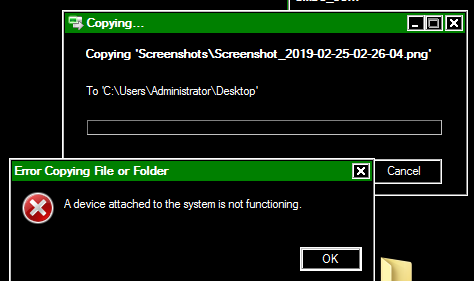
With my older USB cable I'm still able to connect and view files. Sometimes it'll manage to copy a few files before failing. Sometimes it's not detected, but mostly is.
I got a new cable a few weeks back that was working better than the older one at first, but still ended up failing before being able to copy all selected files (but was capable of copying more than other cable did). Now, that same wire doesn't get detected by Windows at all and just automatically charges my phone through PC without any transfer options appearing on the phone. It even does this same thing on another PC I have which is Windows 8.
I've tried USB transfer on my Windows 7 (main PC), Acer Laptop, and Windows 8 PC, to no avail. I even checked today to see if my last old phone (which used to transfer 100% fine) would still transfer properly, and it didn't work either.
I highly doubt that either of the USB cables or both of my phones are the problem. I really don't understand how a brand new cable would be the cause of this issue. Both cables still work completely fine for charging my phone. I also doubt that both of these phones have issues with their micro USB slots or are damaged at all, considering the fact they charge fine and have no other defects.
So what could the problem possibly be here? It's extremely annoying and all the basic fix videos on YouTube don't help. I've attempted reinstalling different drivers multiple times, which did nothing (maybe done incorrectly?). Drawing my own conclusions, I think this whole situation could be a combination of errors caused by Windows updates, and maybe drivers not being recognized properly. All of those computers I mentioned trying stuff on have recent updates.

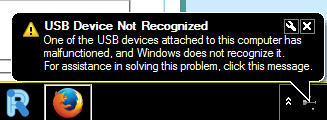
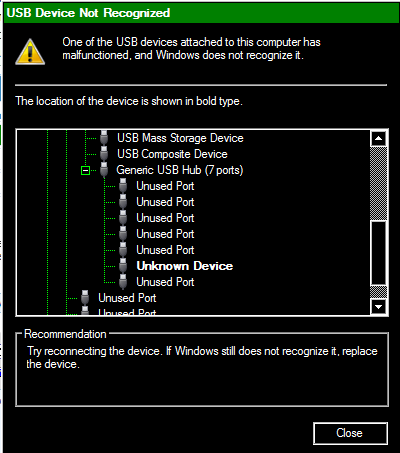
I've been having these problems for a long time now. I used to be able to transfer files no problem at the beginning of last year, and all times before then. At some point after I got PHOBOS virus last year and had to wipe my PC / reinstall Windows 7, I began getting these errors. If I recall correctly, file transfer was working fine at first after reinstalling Windows, so I believe it's possible that certain Windows updates might have screwed this up.
With my older USB cable I'm still able to connect and view files. Sometimes it'll manage to copy a few files before failing. Sometimes it's not detected, but mostly is.
I got a new cable a few weeks back that was working better than the older one at first, but still ended up failing before being able to copy all selected files (but was capable of copying more than other cable did). Now, that same wire doesn't get detected by Windows at all and just automatically charges my phone through PC without any transfer options appearing on the phone. It even does this same thing on another PC I have which is Windows 8.
I've tried USB transfer on my Windows 7 (main PC), Acer Laptop, and Windows 8 PC, to no avail. I even checked today to see if my last old phone (which used to transfer 100% fine) would still transfer properly, and it didn't work either.
I highly doubt that either of the USB cables or both of my phones are the problem. I really don't understand how a brand new cable would be the cause of this issue. Both cables still work completely fine for charging my phone. I also doubt that both of these phones have issues with their micro USB slots or are damaged at all, considering the fact they charge fine and have no other defects.
So what could the problem possibly be here? It's extremely annoying and all the basic fix videos on YouTube don't help. I've attempted reinstalling different drivers multiple times, which did nothing (maybe done incorrectly?). Drawing my own conclusions, I think this whole situation could be a combination of errors caused by Windows updates, and maybe drivers not being recognized properly. All of those computers I mentioned trying stuff on have recent updates.
My Computer
At a glance
Windows 7 Ultimate x64Intel Core i7 86016.0 GBNVIDIA GeForce GTX 580
- Computer type
- PC/Desktop
- Computer Manufacturer/Model Number
- DIYPC (eBay Custom Build)
- OS
- Windows 7 Ultimate x64
- CPU
- Intel Core i7 860
- Motherboard
- HP Pro 3130 Microtower PC
- Memory
- 16.0 GB
- Graphics Card(s)
- NVIDIA GeForce GTX 580
- Monitor(s) Displays
- AOC V22
- Screen Resolution
- 1600 x 1024
- Antivirus
- Comodo / CryptoPrevent
- Browser
- Chrome / Opera


