USB video capture driver problem

ssarcastic

New member
Local time
4:01 PM
Messages
3
i was using the usb easycap video capturing device

USB Video Capture Devices - Convert Video to Digital

and the usb video capture driver on windows xp perfectly using Ulead video studio software.

but when i changed to windows 7 i cant find the usb video capture driver so i cant use the easycap device...

help anyone?
 

My Computer

OS
windows 7
Right click on it in device manager. Properties. Details tab. Change dropdown to hardware ids. Copy and paste the results to here and please do not use a screenshot as alternative.

Is this x86 or x64? We'll find a driver if one exists.
 

My Computer

Computer Manufacturer/Model Number
self built
OS
7600.20510 x86
CPU
P4 550 3.4 GHz HT running at 3.5 GHz
Motherboard
MSI PM8M3-V (MS-7211 v1.x) Micro-ATX mainboard
Memory
OCZ 2 GB(2x1GB) DDR400mHz running @ 414 mHz
Graphics Card(s)
HIS Radeon HD 3850 IceQ 3 Turbo HDMI Dual DL-DVI AGP
Sound Card
MOTU Traveler firewire studio interface 192 kHz 24 bit
Monitor(s) Displays
22" widescreen Acer X223W LCD, 17" Compaq P75 CRT
Screen Resolution
1680x1050 and 1280x1024
Hard Drives
SATA I x2 WD, 400 GB and 120 GB, SATA 2 WD Caviar Black 1 TB
PSU
350W generic
Case
Cybertronpc, it glows blue
Cooling
stock cpu fan, Ice-Q 3 gpu and system, many case fans
Keyboard
Logitch Classical Keyboard 200
Mouse
Logitech Mediaplay cordless
Internet Speed
1792/448 kbits/sec
Other Info
SATA II PCI fake RAID adapter, 1 GB Readyboost, original ATI Remote Wonder (even works with WMC perfectly), Logitech Rumblepad 2 game controller x2
thank u for the quick reply...

i did what u asked me and here it is :

USB\VID_05E1&PID_0408&REV_0005&MI_00
USB\VID_05E1&PID_0408&MI_00


and i am running a windows 7 x86 (i am not very much technical but i have 2 program files folders one of them is just program files and the other is program filesx86)

i really hope u can help me people because capturing video from other devices is very essential to my work.....

appreciate ur help
 

My Computer

OS
windows 7
i have look into my system information and it said that it s a x64 - based pc !

i dont know if this is 64 or 86 ::(
 

My Computer

OS
windows 7

My Computer

OS
Windows 7 x64
CPU
7850 x2 2.8ghz
Motherboard
asus
Memory
4gb 6400
Graphics Card(s)
9800gt 1g
Sound Card
on bord
Monitor(s) Displays
AOC 2216Vw 22"
Did anyone manage to find any compatible software for this device?
I downloaded and installed the driver as suggested in an earlier post and it said that it had accepted it but I still can't get any video to stream.

Neoxalucard, you said that you have the same OS and device, what software do you use?

(I contacted the manufacturer about the device and they said that there is no support for a windows 7 x64 driver.)

Andrew
 

My Computer

OS
windows 7 x64
CPU
e8400 core 2 duo 3Ghz
Motherboard
Asus p5kpl-cm
Memory
2 x 1GB ddr2-800
Graphics Card(s)
gtx 260
Monitor(s) Displays
42" LCD 1080p
Hard Drives
500GB SATA 32MB cache
PSU
450W
Case
Cooler Master
Cooling
Active, cpu, gpu, case
The manufacturer say's there is no support for Win 7 x64, because they don't want to bother to write the 64bit drivers. Luckily the easycap is somewhat generic. That's why I'm using Sabrent's drivers you can get them here http://www.sabrent.com/drivers/USB-AVCPTSetup_For_Win7.zip

As far as software, aside from Win movie maker and Win live movie maker. It's not that it wasn't compatible, I just don't see an option to capture or import from capture device on either. I have used the easy cap on just about everything else. Haven't had a problem on the software side.

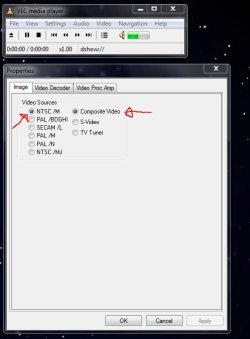
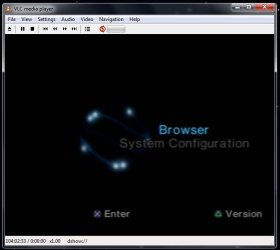
Here it is my PS2 in VLC hooked up to my easycap. Make sure you set the right source in properties NTSC and composite for me.
Capture1.JPG

Bam, it worked.
Capture2.JPG

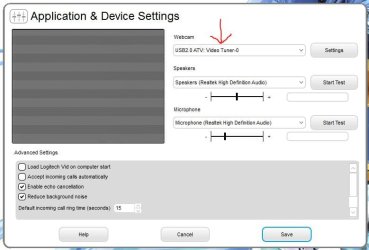
Again in logitech vid. See, its set to tuner by default.
Capture3.JPG

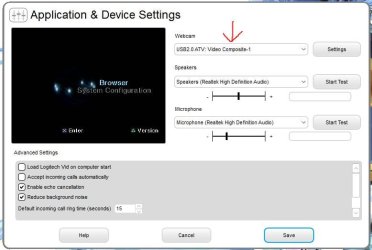
Just change to composite and we're all good.
Capture4.JPG

On a side note, although not spacifily supported, it does work with DScaler. DScaler - Home <--Careful with that if you do use it, I hear it can eff up you're capture device if you don't know what you're doing.
 

My Computer

OS
Windows 7 x64
CPU
7850 x2 2.8ghz
Motherboard
asus
Memory
4gb 6400
Graphics Card(s)
9800gt 1g
Sound Card
on bord
Monitor(s) Displays
AOC 2216Vw 22"
Just about to try these drivers on the 4 channel DVR security version, will report back...

Just waiting for my salty wet string internet connection...
 

My Computer

Computer Manufacturer/Model Number
gigabyte ga35p ds3r v1
OS
win7
CPU
q6600
Motherboard
gigabyte ga35p ds3r v1
Memory
4gb ocz ddr2 1033
Graphics Card(s)
ati 4850
Sound Card
Onboard ac96 realtek
Monitor(s) Displays
Hitachi lcdv42v01ldp thing on dvi/hdm
Hard Drives
lots, boot drive 2*samsung 500gb in raid 0 on intel ich8 / mb
PSU
cheap 650w thing, systems pulls only 220w at wall
Case
metal - oh with a imon ultrabay which are very very poor
Cooling
lots of noisy fans
Tried them...
says its a stk1160 and a atv usb2 video capture device, but only seems to see first video input, in acitive webcam it gives options for tuner svideo and composite, selecting composite sets it to video 1, other options give a blank screen.


Its a start.....
 

My Computer

Computer Manufacturer/Model Number
gigabyte ga35p ds3r v1
OS
win7
CPU
q6600
Motherboard
gigabyte ga35p ds3r v1
Memory
4gb ocz ddr2 1033
Graphics Card(s)
ati 4850
Sound Card
Onboard ac96 realtek
Monitor(s) Displays
Hitachi lcdv42v01ldp thing on dvi/hdm
Hard Drives
lots, boot drive 2*samsung 500gb in raid 0 on intel ich8 / mb
PSU
cheap 650w thing, systems pulls only 220w at wall
Case
metal - oh with a imon ultrabay which are very very poor
Cooling
lots of noisy fans
just an update failed to get all 4 capture channels working, only the first one.:cry:


going back to windows xp on an semi duff laptop to use a webcam server/nas
 

My Computer

Computer Manufacturer/Model Number
gigabyte ga35p ds3r v1
OS
win7
CPU
q6600
Motherboard
gigabyte ga35p ds3r v1
Memory
4gb ocz ddr2 1033
Graphics Card(s)
ati 4850
Sound Card
Onboard ac96 realtek
Monitor(s) Displays
Hitachi lcdv42v01ldp thing on dvi/hdm
Hard Drives
lots, boot drive 2*samsung 500gb in raid 0 on intel ich8 / mb
PSU
cheap 650w thing, systems pulls only 220w at wall
Case
metal - oh with a imon ultrabay which are very very poor
Cooling
lots of noisy fans
hurray
driver worked perfectly for me
I use win seven 64bit
he recognized STK 1160
 

My Computer

OS
Windows 7 Ultimate x64
Hi i use easycap and ive downloaded so many drivers to try and get it working but ive had no luck... I use windows 7 professional and im using ulead videostudio 10.0.
Whenever i try and capture video i get this message

Unable to switch to capture mode
Check if your video capture driver is working properly
Failed to build a preview graph

the hardware Ids is
USB\VID_1C88&PID_003C&REV_0100
USB\VID_1C88&PID_003C

Please help
 

My Computer

Computer Manufacturer/Model Number
dell vostro 430
OS
windows 7 professional 64 bit
CPU
intel core i7 870 @ 2.93 GHz
Memory
4gb ram
Usb\vid_1c88&pid_003c&rev_0100

Hi Everyone

I Looked for days to find the correct drivers.

You see the cd that came with mine was incorrect so you cannot use Superviewer after you install these drivers.

Uninstall everything plug the 4ch usb dvr into the usb and install these drivers.

See attached zip file.
Grabster_AV_300_MX_Drv_Setup_1.0.8.30_Vista_7_8_64Bit.zip (2.29 MB)
 

Attachments

My Computer

Computer type
PC/Desktop
OS
Windows 10 professional 64BIT latest
Next time try a local install of running Windows XP. How the heck is that achieved? Through the use of a virtual machine software. I chose to use the free for home use VMware Workstation Player. This virtual drive software has great USB emulation. In Windows 7 you can only use version 15.x. Version 16 and up is for Windows 10. Yes, you can run more than one OS at a time. I once had ten instances of XP running all at the same time. LOL

VMware Maintenance
 

My Computer

Computer type
PC/Desktop
OS
Windows 7 Ultimate x64
Hi Everyone

I Looked for days to find the correct drivers.

You see the cd that came with mine was incorrect so you cannot use Superviewer after you install these drivers.

Uninstall everything plug the 4ch usb dvr into the usb and install these drivers.

See attached zip file.
Grabster_AV_300_MX_Drv_Setup_1.0.8.30_Vista_7_8_64Bit.zip (2.29 MB)

No viruses according to Virus Total as of this post using SHA256 hash of:5a08c272efc68d08ed81d3169fa50f3159d9962bfcf3f5ecd93a9a26c479329c

VirusTotal

You can verify the hash of a file with the program HashCalc.
 

My Computer

Computer type
PC/Desktop
OS
Windows 7 Ultimate x64
Back
Top