USB Virus

qwertymikey

New member
Member
Local time
3:47 PM
Messages
45
Hi,

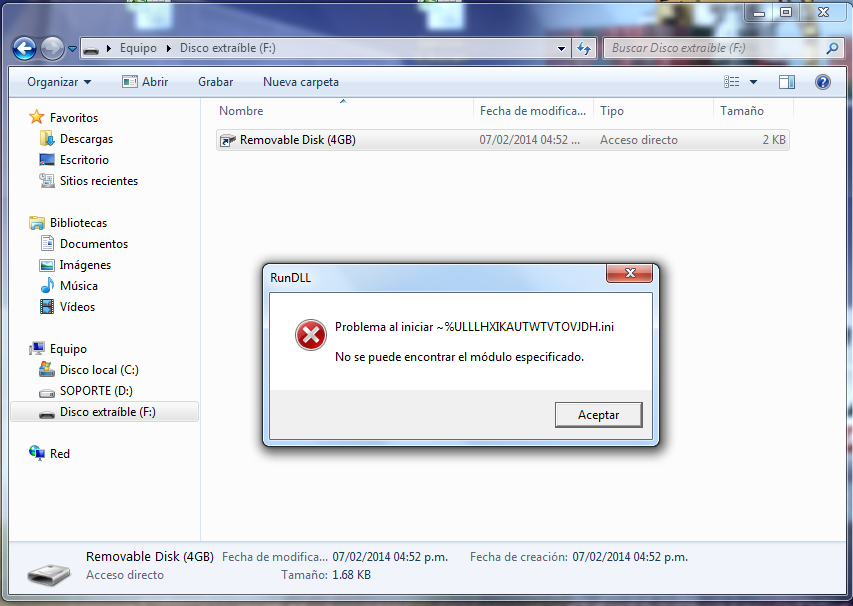
As you can see on the picture below, my USB has got a weird virus. When I try to view the contents of my flash drive, I only see a file shortcut to my own flash drive, but when I try to access to it, I get the window shown below.

How can I fix this?
JuIRNym.png
 

My Computer

OS
Windows 7 Home Premium x64
CPU
Intel Core i7 3770
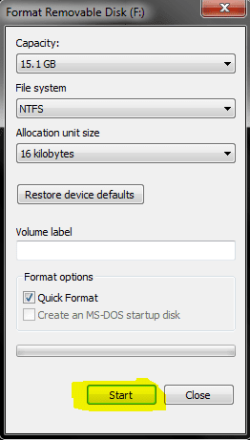
Hey there, Have a look at the pictures ive attached and see if that works. All data on the drive will be lost by doing this method.
 

Attachments

  • Capture.PNG
    Capture.PNG
    5.5 KB · Views: 0
  • Capture 1.png
    Capture 1.png
    146 KB · Views: 0
  • Capture3.PNG
    Capture3.PNG
    8.2 KB · Views: 41

My Computer

Computer type
Laptop
Computer Manufacturer/Model Number
Packard Bell
OS
Windows 7 Home Premium 64Bit
CPU
AMD A6-3420M 1.5GHZ OC - 2.0GHZ
Memory
4GB DDR3 1600MHZ
Graphics Card(s)
AMD RADEON 6520G+AMD RADEON HD7470M 1GB DDR3
Screen Resolution
1366x768
Hard Drives
500GB SATA
Internet Speed
18Mb Unlimited
Antivirus
AVAST!
Browser
MOZILLA FIREFOX
qwertymikey,

Welcome to the WindowsSeven forum!!

All data on the drive will be lost by doing this method.
No need for the above!! ;)

Please do the following...

:info: Download UsbFix:
http://www.en.usbfix.net
Save to the Desktop.

When a window requesting the connection of removable drives appears, please connect the problem USB drive as requested!

Right-click the downloaded USBFix file and select: Run as Administrator
Press: Research
This option scans the connected drives, and reports its infected Files and Folders
When done, the program closes on its own, and a report appears.
(The report file is also found at C:\UsbFix.txt)

:ar: Please post the UsbFix.txt (Research) report in your reply.

:info: Once again, run USBFix as Administrator, but, this time, press: Listing
It creates a report of all the Folders and Files found at the root of every hard drive, partition, or removable drive connected.

:ar: Also post the UsbFix.txt (Listing) report in your reply.

Note 1: If USBFix does not run in normal Windows, please run in Safe Mode:
Restart your computer.
When the computer starts, tap the F8 key on the keyboard repeatedly until presented with the Advanced Boot Options menu
Using the arrow keys, select: Safe Mode
Press the Enter key on your keyboard to boot into the selected mode.

Note 2: If your AntiVirus program detects USB as malware, either let the AV program allow USBFix to run, or, temporarily disable your AntiVirus program:
Info -http://www.bleepingcomputer.com/forums/t/114351/how-to-temporarily-disable-your-anti-virus-firewall-and-anti-malware-programs/
When done with USBFix, re-enable your AV!


:info: Last, please download the Farbar Recovery Scan Tool
Download >http://www.bleepingcomputer.com/download/farbar-recovery-scan-tool/
Select the version that applies to your system: 64-bit
Save it to your Desktop.

Double-click the downloaded file to run it.
When the tool opens click Yes to the disclaimer.

Press the Scan button.

The tool makes a log (FRST.txt) in the same directory from which the tool is run (Desktop).

:ar: Please provide the FRST.txt in your reply.

The first time the tool is run, it also makes another log: Addition.txt
:ar: Also post the Addition.txt in your reply.
 

My Computer

Computer type
PC/Desktop
Computer Manufacturer/Model Number
An ol' eMachines
OS
Windows 7 Home Premium
Internet Speed
Fine for me...I'm retired!
  • Like
Reactions: Arc
If theres nothing on the USB stick/Nothing that isnt already backed up/Not needed my option would be to format...takes seconds and would be a fresh start.
 

My Computer

Computer type
Laptop
Computer Manufacturer/Model Number
Packard Bell
OS
Windows 7 Home Premium 64Bit
CPU
AMD A6-3420M 1.5GHZ OC - 2.0GHZ
Memory
4GB DDR3 1600MHZ
Graphics Card(s)
AMD RADEON 6520G+AMD RADEON HD7470M 1GB DDR3
Screen Resolution
1366x768
Hard Drives
500GB SATA
Internet Speed
18Mb Unlimited
Antivirus
AVAST!
Browser
MOZILLA FIREFOX
In the screenshot you posted, you ARE viewing your USB drive contents. Look at the address bar, look at how it says "Computer => Removable disk (F:)".
The disk only contents is a shortcut named exactly the same as the real link in Computer. Note how the "Type" column says "shortcut" and while everything there is in Spanish, that icon is in English. It obviously point to a virus in the same drive, that you are attempting to run unintentionally by double-clicking it. Apparently, your USB has been completely wiped and only a virus was left on it.
Try enabling show of hidden files, at least if there is something of your files left out there, they will appear. If nothing still shows up, you might want to try some undelete program, or simply reformat the drive, as your data is already lost.
 

My Computer

Computer type
Laptop
Computer Manufacturer/Model Number
Toshiba Sattelite A665-S6092
OS
Windows 7 Ultimate x64
CPU
Intel Core i7-740QM
Memory
8 GB DDR3
Graphics Card(s)
NVIDIA GeForce 330GT
Screen Resolution
1366x768
Hard Drives
Samsung 840 SSD 500GB
1TB USB3 external HD
Cooling
Coolermaster Notepal U3 notebook cooling pad
Internet Speed
3mbps ASDL
Antivirus
ClamWin 0.98.7
Browser
Opera 12.17 x86 (main), Firefox 38 (sec), IE11 (last resort)
sorry for the delayed reply.

I was at my school when i made this thread and kaspersky wasnt able to remove the virus. I just connected the usb to my computer and NOD 32 removed the virus. all my files were in a hidden folder. since they were just songs i already have here i just formatted it :D

how can i prevent my usb to get any other virus?
 

My Computer

OS
Windows 7 Home Premium x64
CPU
Intel Core i7 3770
So problem solved buddy! It is very rare that you will get a USB virus, i have several USB sticks and throughout the years i've never had a virus on one, I'd suggest running the tool Cottonball suggested every month or so to be sure:)!
 

My Computer

Computer type
Laptop
Computer Manufacturer/Model Number
Packard Bell
OS
Windows 7 Home Premium 64Bit
CPU
AMD A6-3420M 1.5GHZ OC - 2.0GHZ
Memory
4GB DDR3 1600MHZ
Graphics Card(s)
AMD RADEON 6520G+AMD RADEON HD7470M 1GB DDR3
Screen Resolution
1366x768
Hard Drives
500GB SATA
Internet Speed
18Mb Unlimited
Antivirus
AVAST!
Browser
MOZILLA FIREFOX
Back
Top