I am a complete noob re WiFi (alway use hard wired) but recently bought a cheap USB dongle described as 150Mbps 11n. On testing I found I was getting about 22Mbps download with the dongle (1 metre from router) compared to 62Mbps wired. Upload speed was about the same as wired.
A bit of Googling told me this was a simplex/duplex problem. I did a test with a friends laptop and got full speed, so its not my router (BT homehub) and I have the latest driver from Windows update. So - is this about par for a four quid WiFi dongle, or do I need to set some value or other to get duplex? I could see this half speed business being a problem for someone already on a low speed line.
My Computer
At a glance
Windows 7 pro x64 SP1Intel i7-2600k o/c to 4.6GHz8GB Mushkin 1866MHzNvidia GTX 750 Ti 2GB
Computer type
PC/Desktop
Computer Manufacturer/Model Number
self build
OS
Windows 7 pro x64 SP1
CPU
Intel i7-2600k o/c to 4.6GHz
Motherboard
MSI Z68-GD80
Memory
8GB Mushkin 1866MHz
Graphics Card(s)
Nvidia GTX 750 Ti 2GB
Sound Card
integrated
Monitor(s) Displays
Liyama ProLite 27"
Screen Resolution
1920*1080 px
Hard Drives
Seagate 2TB
PSU
Coolermaster GX 750W
Case
Antec 300 case + 5 fans
Cooling
Dark Rock Pro
Internet Speed
62Mbit down 18Mbit up
Antivirus
MSE
Browser
Firefox
Other Info
Blackgold BGT3650 Quad HD TV card. Also have various 3770 + 4770K render boxes.
The dongle is connected to USB 2. The test with friend's laptop was using the LT built in WiFi, and down speed was about 55 Mbps ie full speed, which I guess shows the router is capable of full speed. The dongle box says 802.11n 150 Mbps - this one from Amazon in UK
Like I said, I'm a WiFi noob who uses wired normally, but I also build computers for friends etc, and nowadays they often ask 'Is it wireless ?' - hence my interest in USB dongles.
edit : just remembered I have USB3 on back of box. Tested on that socket, but same speed.
My Computer
At a glance
Windows 7 pro x64 SP1Intel i7-2600k o/c to 4.6GHz8GB Mushkin 1866MHzNvidia GTX 750 Ti 2GB
Computer type
PC/Desktop
Computer Manufacturer/Model Number
self build
OS
Windows 7 pro x64 SP1
CPU
Intel i7-2600k o/c to 4.6GHz
Motherboard
MSI Z68-GD80
Memory
8GB Mushkin 1866MHz
Graphics Card(s)
Nvidia GTX 750 Ti 2GB
Sound Card
integrated
Monitor(s) Displays
Liyama ProLite 27"
Screen Resolution
1920*1080 px
Hard Drives
Seagate 2TB
PSU
Coolermaster GX 750W
Case
Antec 300 case + 5 fans
Cooling
Dark Rock Pro
Internet Speed
62Mbit down 18Mbit up
Antivirus
MSE
Browser
Firefox
Other Info
Blackgold BGT3650 Quad HD TV card. Also have various 3770 + 4770K render boxes.
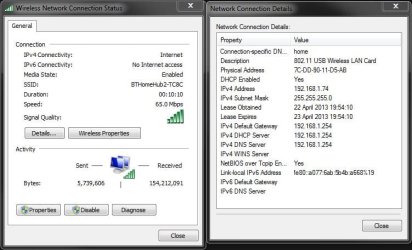
I have one here which was just a cheap one like your's which doesn't get the full speed either if your looking to get the full speed you will need a better one. A lot of people get fooled by it including myself There's ones you can get for about £20 and above. I paid €12 for mine and it's not great.
Hope this helps you
My Computer
At a glance
Windows 7 Ultimate 64-bitIntel Core 2 Duo E6550 @2.33GHz4GB DDR"NVIDIA GeForce 8600 GS
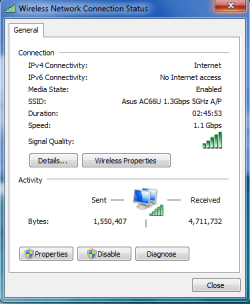
The D-Link DWA-130 will give you the full 300Mbps for practically nothing. The 802.11n Only setting and using channel bonding "20-40Mhz" setting might get you more from your current wireless NIC. Amazon.com: dwa-130
But I like the one I'm using now the best.
Attachments
1.1Gbps.PNG
13.4 KB
· Views: 4
Last edited:
My Computer
At a glance
Windows 7 Ult, Windows 8.1 Pro,Q9650-4.275GHz, E8600 4.5GHz, E6750-3.8GHzG.Skill PC2 9600 1200Mhz 5 5 5 15 2TGTX480



 There's ones you can get for about £20 and above. I paid €12 for mine and it's not great.