Solved Usb won't show up on a newly factory reset computer (no internet)

mesmerrow

New member
Member
Local time
6:28 PM
Messages
65
Hello everyone, I am kinda stuck in a loop right now, i ran a factory reset on one of my two computers, i had already prepared all the drives on a usb stick, however when the factory reset was successfully done i quickly found out that my usb stick isn't showing in my computer, i then spent almost half a day looking for a way to make my usb appear which none of my attempts where successful,
So because my computer can't see my usb stick, it means that it can't connect to the internet as well, nor have i been able to update any of the drivers on this computer because the usb stick can't be seen by this computer.

I also wan't to state that i have tried some of the basic solutions on the internet.

Feel free to ask questions.
Thanks in advance
 

My Computer My Computer

At a glance

Windows 10 Home 64-bitIntel Core i7 6700 - Skylake16,0GB4095MB NVIDIA GeForce GTX 970 (ASUStek Comput...
Computer type
PC/Desktop
Computer Manufacturer/Model Number
Custom
OS
Windows 10 Home 64-bit
CPU
Intel Core i7 6700 - Skylake
Motherboard
ASUSTeK COMPUTER INC. Z170-P
Memory
16,0GB
Graphics Card(s)
4095MB NVIDIA GeForce GTX 970 (ASUStek Computer Inc)
Monitor(s) Displays
S24B350 - Samsung (1 monitor)
Screen Resolution
1920x1080@60Hz
Hard Drives
931GB Seagate ST1000DM003-1SB10C (SATA)
111GB KINGSTON SV300S37A120G (SATA-2 (SSD))
1862GB Western Digital WD My Passport 0820 USB Device (USB (SATA)
Keyboard
Steelseries Apex M800
Mouse
Steelseries Rival 700
Antivirus
BullGuard Internet Security
Browser
Google Chrome // Microsoft Edge
Can you not put drivers on DVD?
 

My Computer My Computer

At a glance

win 8 32 bit
Computer type
PC/Desktop
OS
win 8 32 bit
Can you not put drivers on DVD?

I can but my other computer (a laptop which i am using now) do not have a built in CD drive,
my factory reset desktop on the other hand have one.

Also i tried installing the drivers from an official Windows 7 CD, however since there isn't an internet connection that didn't wok.
 

My Computer My Computer

At a glance

Windows 10 Home 64-bitIntel Core i7 6700 - Skylake16,0GB4095MB NVIDIA GeForce GTX 970 (ASUStek Comput...
Computer type
PC/Desktop
Computer Manufacturer/Model Number
Custom
OS
Windows 10 Home 64-bit
CPU
Intel Core i7 6700 - Skylake
Motherboard
ASUSTeK COMPUTER INC. Z170-P
Memory
16,0GB
Graphics Card(s)
4095MB NVIDIA GeForce GTX 970 (ASUStek Computer Inc)
Monitor(s) Displays
S24B350 - Samsung (1 monitor)
Screen Resolution
1920x1080@60Hz
Hard Drives
931GB Seagate ST1000DM003-1SB10C (SATA)
111GB KINGSTON SV300S37A120G (SATA-2 (SSD))
1862GB Western Digital WD My Passport 0820 USB Device (USB (SATA)
Keyboard
Steelseries Apex M800
Mouse
Steelseries Rival 700
Antivirus
BullGuard Internet Security
Browser
Google Chrome // Microsoft Edge
Its rare if its a factory reset that it doesnt have all the drivers are the usb etc showing a yellow triangle? Does it have a recovery parition you could try in diskmanger givimg it a drive letter then tell windows to search for drivers on that drive
 

My Computer My Computer

At a glance

win 8 32 bit
Computer type
PC/Desktop
OS
win 8 32 bit
Can you not put drivers on DVD?

I asked a friend if he had an external CD drive and he had one, so i borrowed it and put all the necessary drivers in a disc and right after ran them on my desktop PC, however after doing that i ran into this
wznDwcM.jpg


This happened right after i restarted my computer and i have spent hours trying to figure out what to do, no luck and i have run out of ideas.
 
Last edited:

My Computer My Computer

At a glance

Windows 10 Home 64-bitIntel Core i7 6700 - Skylake16,0GB4095MB NVIDIA GeForce GTX 970 (ASUStek Comput...
Computer type
PC/Desktop
Computer Manufacturer/Model Number
Custom
OS
Windows 10 Home 64-bit
CPU
Intel Core i7 6700 - Skylake
Motherboard
ASUSTeK COMPUTER INC. Z170-P
Memory
16,0GB
Graphics Card(s)
4095MB NVIDIA GeForce GTX 970 (ASUStek Computer Inc)
Monitor(s) Displays
S24B350 - Samsung (1 monitor)
Screen Resolution
1920x1080@60Hz
Hard Drives
931GB Seagate ST1000DM003-1SB10C (SATA)
111GB KINGSTON SV300S37A120G (SATA-2 (SSD))
1862GB Western Digital WD My Passport 0820 USB Device (USB (SATA)
Keyboard
Steelseries Apex M800
Mouse
Steelseries Rival 700
Antivirus
BullGuard Internet Security
Browser
Google Chrome // Microsoft Edge
You have secure boot turned on in the bios disable it as it will only let you boot registered o/s
 

My Computer My Computer

At a glance

win 8 32 bit
Computer type
PC/Desktop
OS
win 8 32 bit
You have secure boot turned on in the bios disable it as it will only let you boot registered o/s

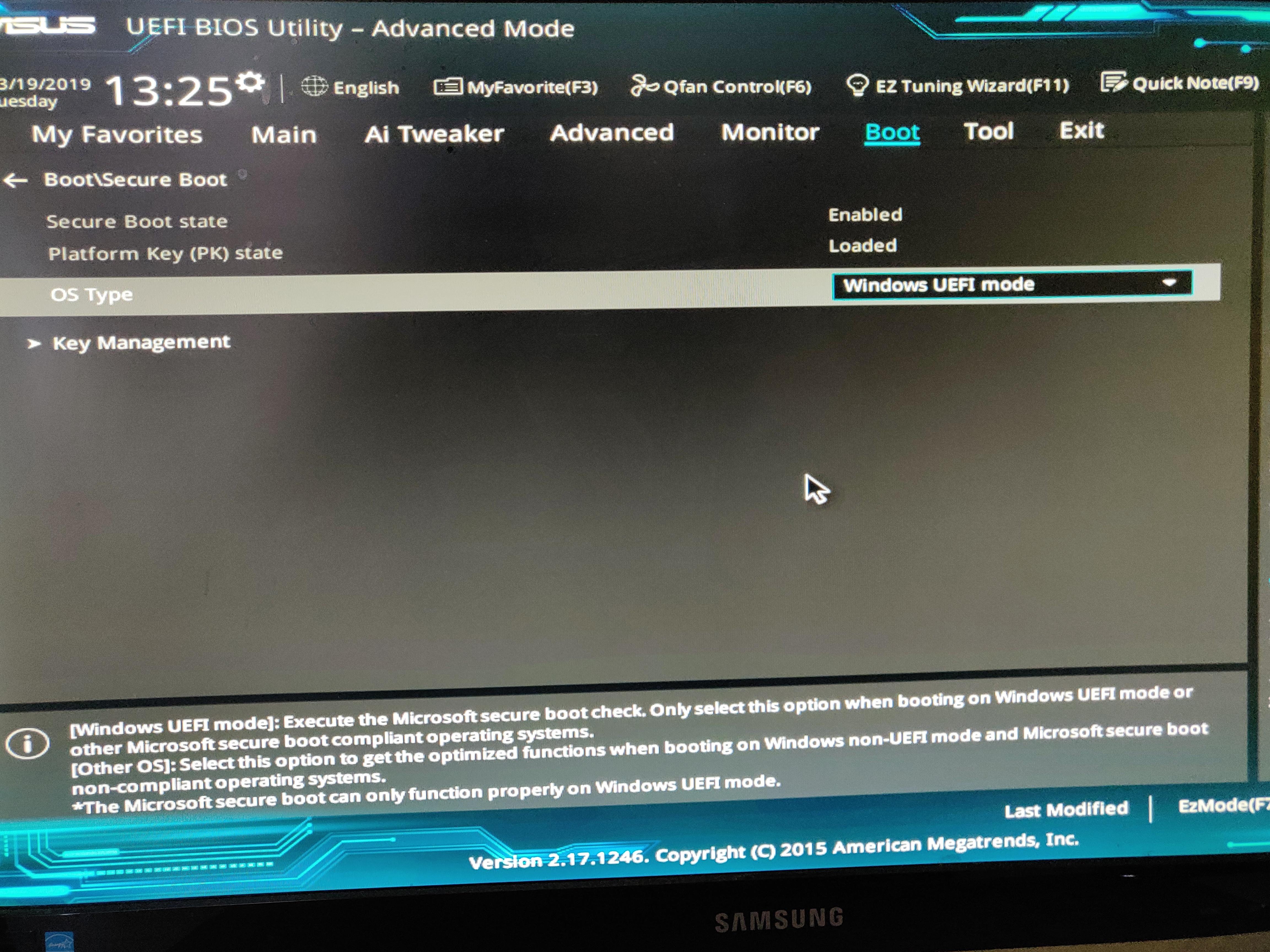
This is what i am getting, as you may or may not be able to see due to the quality of the picture the secure boot state is gray and cannot be changed
JDIREkn.jpg

I may not be looking at the right stuff, but i can't find anything similar on the Bios (which i am stuck in)
 
Last edited:

My Computer My Computer

At a glance

Windows 10 Home 64-bitIntel Core i7 6700 - Skylake16,0GB4095MB NVIDIA GeForce GTX 970 (ASUStek Comput...
Computer type
PC/Desktop
Computer Manufacturer/Model Number
Custom
OS
Windows 10 Home 64-bit
CPU
Intel Core i7 6700 - Skylake
Motherboard
ASUSTeK COMPUTER INC. Z170-P
Memory
16,0GB
Graphics Card(s)
4095MB NVIDIA GeForce GTX 970 (ASUStek Computer Inc)
Monitor(s) Displays
S24B350 - Samsung (1 monitor)
Screen Resolution
1920x1080@60Hz
Hard Drives
931GB Seagate ST1000DM003-1SB10C (SATA)
111GB KINGSTON SV300S37A120G (SATA-2 (SSD))
1862GB Western Digital WD My Passport 0820 USB Device (USB (SATA)
Keyboard
Steelseries Apex M800
Mouse
Steelseries Rival 700
Antivirus
BullGuard Internet Security
Browser
Google Chrome // Microsoft Edge
Sorry, but it seems you're not telling us all the story.

Factory Reset formats C: partition and loads an image from a Restore partition.
All OEM computers that has a SkyLake (6th gen) computer like yours came with Win 10, not Win 7.

I suppose that you're trying to install win 7 on a computer that came with win 10.

If Win 7 is already running but you can't use the USB flash disk with the drivers (can you use the keyboard?), my suggestion is to make a Linux boot able flash drive, boot from it, and copy the drivers from the USB flash disk with the drivers to the HDD, and once in win 7 install the drivers from the HDD.

On BIOS, Secure boot and Fast boot must be disabled. OS type must be set to Other.
 

My Computers My Computers

  • At a glance

    Windows 7 HP 64i5 6600K - 800MHz to 4200MHz4+4G GSkill DDR4 3000IG - Intel 530
    Computer type
    PC/Desktop
    Computer Manufacturer/Model Number
    custom build
    OS
    Windows 7 HP 64
    CPU
    i5 6600K - 800MHz to 4200MHz
    Motherboard
    GA-Z170-HD3P
    Memory
    4+4G GSkill DDR4 3000
    Graphics Card(s)
    IG - Intel 530
    Monitor(s) Displays
    Samsung 226BW
    Screen Resolution
    1680x1050
    Hard Drives
    (1) -1 SM951 – 128GB M.2 AHCI PCIe SSD drive for Windows 7 and Lubuntu
    (2) -1 WD SATA 3 - 1T for Data
    (3) -1 WD SATA 3 - 1T for backup
    PSU
    Thermaltake 450W TR2 gold
    Keyboard
    Old and good Chicony mechanical keyboard
    Mouse
    Logitech mX performance - 9 buttons (had to disable some)
    Internet Speed
    500Mb/s
    Browser
    Firefox 64
    Other Info
    TinyWall firewall
  • At a glance

    Windows 7 Proi7-4500U 800MHz to 3.0GHz(4+4)G DDR3 1600IG intel 4400 + NVIDIA GeForce GT 745M
    Computer type
    Laptop
    System Manufacturer/Model Number
    Asus Q550LF
    OS
    Windows 7 Pro
    CPU
    i7-4500U 800MHz to 3.0GHz
    Motherboard
    Asus Q550LF
    Memory
    (4+4)G DDR3 1600
    Graphics Card(s)
    IG intel 4400 + NVIDIA GeForce GT 745M
    Sound Card
    Realtek
    Monitor(s) Displays
    LG Display LP156WF4-SPH1
    Screen Resolution
    1920 x 1080
    Hard Drives
    BX500 120G SSD for Windows and programs +
    1T HDD for data
    Internet Speed
    500 Mb/s
    Browser
    Firefox
    Other Info
    TinyWall firewall
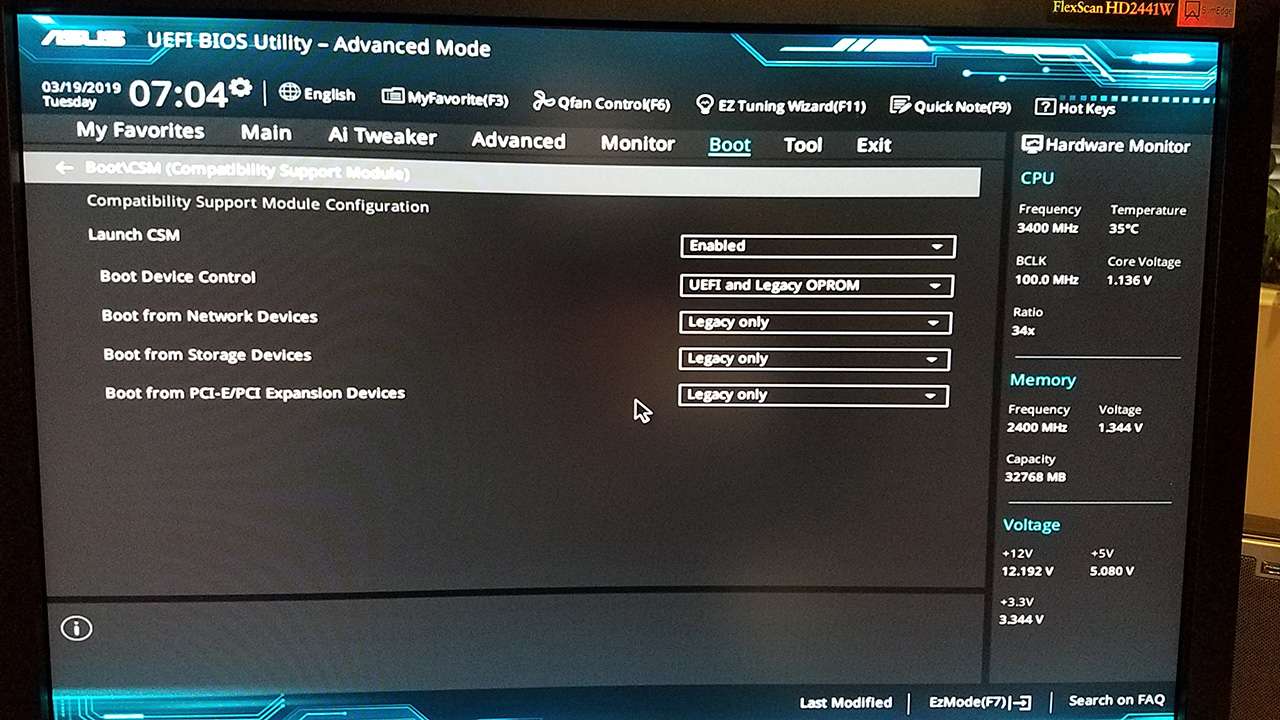
In passing, I mention that I recently was fooling around with my own ASUS-based machine (Z170-Deluxe), thinking I could change the default options to reconfigure for "UEFI-only" with "CSM enabled". I don't run Win10 but only Win7, and this is how I have my Lenovo laptops and Lenovo desktops, and figured I could/should do the same thing for my ASUS desktop.

Well, obviously didn't do it right, or I shouldn't have fooled around at all, or the ASUS BIOS works differently than Lenovo BIOS. I couldn't seem to get things to work properly, and also experienced "red error message boxes" similar to the one you showed in your earlier screenshot. I was trying to boot to bootable USB (for both Macrium Reflect and Partition Wizard, both of which are WinPE and UEFI-enabled, so you'd think this should work) but couldn't.

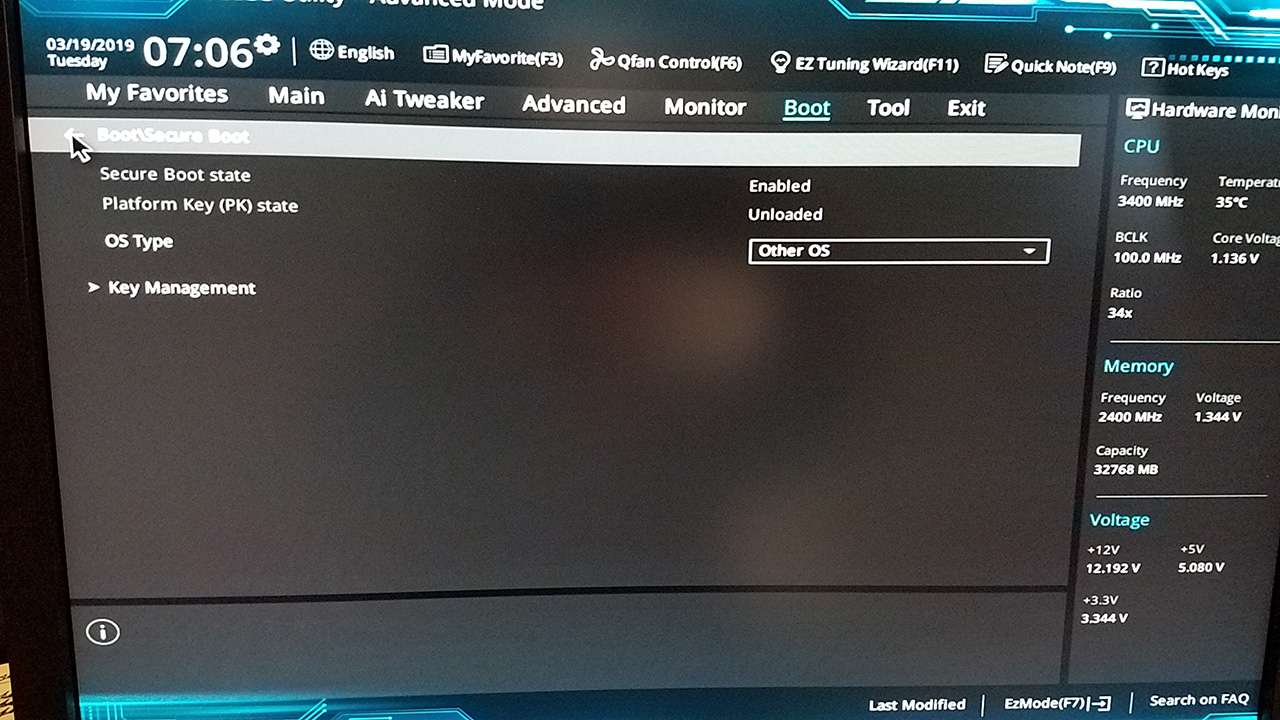
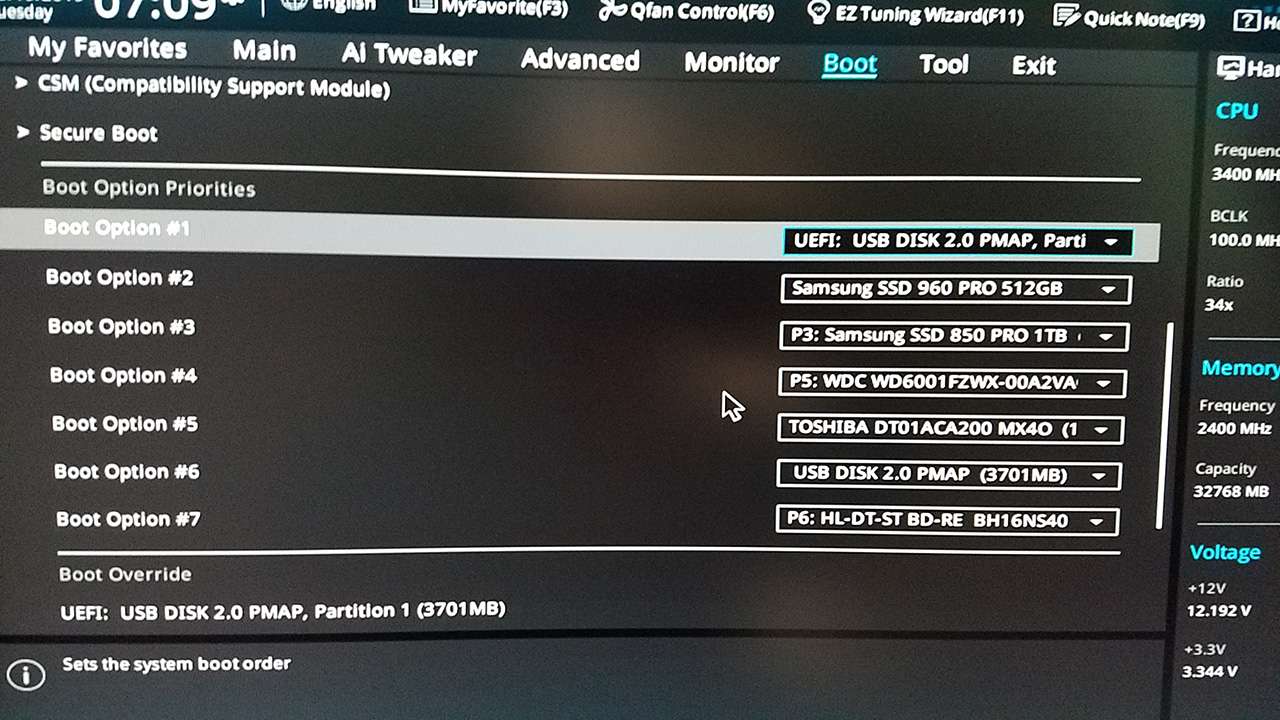
So eventually I had to put things back to the way they were (see screenshots below). Now I was able to boot to both of those USB media, as well as to my normal Win7 system from Samsung M.2 NVMe.

The following setup allows me to boot correctly, from both bootable USB as well as from M.2 NVMe. At the moment I took the photos there was the Macrium Reflect WinPE USB media inserted into a USB port on my machine.

(1) BOOT-CSM

m9BNdg.jpg


(2) BOOT-SECURE

iOISOG.jpg


(3) Boot device list

j4sgwa.jpg
 

My Computer My Computer

At a glance

Windows 7 Pro x64 (1), Win7 Pro X64 (2)i5-3350p 3.1Ghz/6MB-cache (1); E8400 3.0Ghz/6...8GB PC3-12800 DDR3 (1); 4GB PC3-10600 DDR3 (2)ATI HD7750 (1), (see TV cards); ATI R7 250 (2)
Computer type
PC/Desktop
Computer Manufacturer/Model Number
Home-built, two systems (1) and (2)
OS
Windows 7 Pro x64 (1), Win7 Pro X64 (2)
CPU
i5-3350p 3.1Ghz/6MB-cache (1); E8400 3.0Ghz/6MB-cache (2)
Motherboard
ASUS P8Z77-V Pro (1); ASUS P5Q3 (2)
Memory
8GB PC3-12800 DDR3 (1); 4GB PC3-10600 DDR3 (2)
Graphics Card(s)
ATI HD7750 (1), (see TV cards); ATI R7 250 (2)
Sound Card
Realtek ALC892 HD Audio (1); Realtek ALC1200 HD Audio (2)
Monitor(s) Displays
Eizo HD2441W LCD, Eizo S2433W (1); Eizo 24" S2433W (2)
Screen Resolution
1920x1200, 1920x1200 (1); 1920x1200 (2)
Hard Drives
(1) 1TB SATA-II (7200RPM), 2x2TB SATA-III (7200RPM), 250GB SATA-III (10000RPM) for OS; 2x2TB external USB 3.0

(2) 320GB SATA-II (7200RPM), 750GB SATA-II (7200RPM), 150GB SATA-II (10000RPM) for OS; 2TB external USB 3.0
PSU
Nesteq ECS-6001 600W (1); Nesteq ECS-5001 500W (2)
Case
Acousti-Case 360 (1) and (2)
Cooling
Noctua NH-U12P SE2 for CPU, 2x120mm case fans (1) and (2)
Keyboard
IBM PS/2 (1) and (2)
Mouse
Logitech MX Revolution wireless (1); Microsoft wired (2)
Internet Speed
100mbps down / 10mbps up
Antivirus
Microsoft Security Essentials; Malwarebyte Anti-Malware Pro
Browser
Firefox
Other Info
Ceton InfiniTV 4-tuner cablecard-enabled TV card as well as Hauppauge HVR-2250 OTA/ATSC 2-tuner TV card in (1), running under Win7 WMC
Sorry, but it seems you're not telling us all the story.

Factory Reset formats C: partition and loads an image from a Restore partition.
All OEM computers that has a SkyLake (6th gen) computer like yours came with Win 10, not Win 7.

I suppose that you're trying to install win 7 on a computer that came with win 10.

If Win 7 is already running but you can't use the USB flash disk with the drivers (can you use the keyboard?), my suggestion is to make a Linux boot able flash drive, boot from it, and copy the drivers from the USB flash disk with the drivers to the HDD, and once in win 7 install the drivers from the HDD.

On BIOS, Secure boot and Fast boot must be disabled. OS type must be set to Other.

I am telling you everything i see and understand, if there is any questions feel fee to ask i am here to get help after all :-)

My computer came with Windows 7 not Windows 10, the computer is a pre-built Desktop PC.

My first issue with the drivers has been kind of fixed, samuria gave me some ideas that eventually lead me to a solution, however as i stated above, when i restarted my computer after the drivers where installed and almost 200 windows updates later it gave me the red box you can see above.

I'll try out your idea in a moment.
 
Last edited:

My Computer My Computer

At a glance

Windows 10 Home 64-bitIntel Core i7 6700 - Skylake16,0GB4095MB NVIDIA GeForce GTX 970 (ASUStek Comput...
Computer type
PC/Desktop
Computer Manufacturer/Model Number
Custom
OS
Windows 10 Home 64-bit
CPU
Intel Core i7 6700 - Skylake
Motherboard
ASUSTeK COMPUTER INC. Z170-P
Memory
16,0GB
Graphics Card(s)
4095MB NVIDIA GeForce GTX 970 (ASUStek Computer Inc)
Monitor(s) Displays
S24B350 - Samsung (1 monitor)
Screen Resolution
1920x1080@60Hz
Hard Drives
931GB Seagate ST1000DM003-1SB10C (SATA)
111GB KINGSTON SV300S37A120G (SATA-2 (SSD))
1862GB Western Digital WD My Passport 0820 USB Device (USB (SATA)
Keyboard
Steelseries Apex M800
Mouse
Steelseries Rival 700
Antivirus
BullGuard Internet Security
Browser
Google Chrome // Microsoft Edge
Hi All,
Greets,
mesmerrow :
As said by Seniors, the things are quite strange about your desktop. But I assume that your OS is all well, you are having problems with some BIOS settings & need to change them.
I warn you that BIOS is the most critical part of any PC to deal, advise & repair. As many machines, so many configurations. So, Proceed only if everything is crystal clear.

1. Disable Fast Boot : Can you find & do it ?

2. Disable Secure Boot : I would like to point you to a tutorial. I have successfully helped disabling Secure Boot in the same conditions with this guide :

How to Disable or Enable Secure Boot for ASUS Motherboard

The section for us is : Step-by-Step: Take Backup of Existing Keys and Disable Secure Boot

You may want to enable secure boot again in future! So. it would be better to backup the keys on a Pen Drive & keep it preserved, untouched & safe.
To avoid any problems : copy all the files from the pen drive & quick format the pen drive with default settings.
A 4gb pen drive is more than enough.

So,
Go through the guide, Backup the keys & get the things done.

( To avoid any problems : make sure that the 'Secure Boot' is 'disabled' & 'Platform Key (KY) State' is 'unloaded' for all the 'OS Types'. You can choose all the OS Type one by one in the menu and check the status of the two! )

3. If you are still not able to boot into win 7, we may need to change UEFI, Legacy,CSM, etc. things.

Let us know.

Thanks & Regards. ...
 

My Computer My Computer

At a glance

Windows 7 Ultimate x32 With Sp1 + Vista Ultim...Intel Mobile Core 2 Duo T5750 @ 2.00GHz Merom...2.00GB Dual-Channel DDR2 @ 332MHz (5-5-5-15)Mobile Intel(R) 965 Express Chipset Family
Computer type
Laptop
Computer Manufacturer/Model Number
hp compaq presario c795VU notebook pc
OS
Windows 7 Ultimate x32 With Sp1 + Vista Ultimate x32 with Sp1 & Sp2 !!
CPU
Intel Mobile Core 2 Duo T5750 @ 2.00GHz Merom 65nm Technolog
Motherboard
Hewlett-Packard 30D9 (CPU)
Memory
2.00GB Dual-Channel DDR2 @ 332MHz (5-5-5-15)
Graphics Card(s)
Mobile Intel(R) 965 Express Chipset Family
Sound Card
High Definition Audio Device
Monitor(s) Displays
LP154WX4-TLCB on Mobile Intel 965 Express Chipset Family
Screen Resolution
1280x800 @ 60Hz
Hard Drives
149GB Western Digital WDC WD1600BEVS-60VAT0 ATA Device (SATA)
Keyboard
Standard 101/102-Key or Microsoft Natural PS/2 Key + HP QLB
Mouse
ALPS pointing device
Antivirus
Kaspersky AV 2017(Win 7) & AVG AntiVirus Free 2016 (VISTA)
Browser
google chrome
Sorry for the late reply, i went through Megahertz07 and dsperber's methods and both worked! i am now back on my windows desktop (feels good)

However i noticed that there is a slight delay to many things like loading websites, software and and so on, in fact even booting up my computer from a shutdown takes longer,
What i find really odd is that before the factory reset, when my computer was full of stuff and had never been formatted since i purchased it back in mid 2016 it wasn't this slow,
I want to make it clear however that the delay isn't huge, just long enough to notice the difference.
 

My Computer My Computer

At a glance

Windows 10 Home 64-bitIntel Core i7 6700 - Skylake16,0GB4095MB NVIDIA GeForce GTX 970 (ASUStek Comput...
Computer type
PC/Desktop
Computer Manufacturer/Model Number
Custom
OS
Windows 10 Home 64-bit
CPU
Intel Core i7 6700 - Skylake
Motherboard
ASUSTeK COMPUTER INC. Z170-P
Memory
16,0GB
Graphics Card(s)
4095MB NVIDIA GeForce GTX 970 (ASUStek Computer Inc)
Monitor(s) Displays
S24B350 - Samsung (1 monitor)
Screen Resolution
1920x1080@60Hz
Hard Drives
931GB Seagate ST1000DM003-1SB10C (SATA)
111GB KINGSTON SV300S37A120G (SATA-2 (SSD))
1862GB Western Digital WD My Passport 0820 USB Device (USB (SATA)
Keyboard
Steelseries Apex M800
Mouse
Steelseries Rival 700
Antivirus
BullGuard Internet Security
Browser
Google Chrome // Microsoft Edge
Hi All,
Greets,
mesmerrow :
As said by Seniors, the things are quite strange about your desktop. But I assume that your OS is all well, you are having problems with some BIOS settings & need to change them.
I warn you that BIOS is the most critical part of any PC to deal, advise & repair. As many machines, so many configurations. So, Proceed only if everything is crystal clear.

1. Disable Fast Boot : Can you find & do it ?

2. Disable Secure Boot : I would like to point you to a tutorial. I have successfully helped disabling Secure Boot in the same conditions with this guide :

How to Disable or Enable Secure Boot for ASUS Motherboard

The section for us is : Step-by-Step: Take Backup of Existing Keys and Disable Secure Boot

You may want to enable secure boot again in future! So. it would be better to backup the keys on a Pen Drive & keep it preserved, untouched & safe.
To avoid any problems : copy all the files from the pen drive & quick format the pen drive with default settings.
A 4gb pen drive is more than enough.

So,
Go through the guide, Backup the keys & get the things done.

( To avoid any problems : make sure that the 'Secure Boot' is 'disabled' & 'Platform Key (KY) State' is 'unloaded' for all the 'OS Types'. You can choose all the OS Type one by one in the menu and check the status of the two! )

3. If you are still not able to boot into win 7, we may need to change UEFI, Legacy,CSM, etc. things.

Let us know.

Thanks & Regards. ...

Thanks man, i'll read it today.
 

My Computer My Computer

At a glance

Windows 10 Home 64-bitIntel Core i7 6700 - Skylake16,0GB4095MB NVIDIA GeForce GTX 970 (ASUStek Comput...
Computer type
PC/Desktop
Computer Manufacturer/Model Number
Custom
OS
Windows 10 Home 64-bit
CPU
Intel Core i7 6700 - Skylake
Motherboard
ASUSTeK COMPUTER INC. Z170-P
Memory
16,0GB
Graphics Card(s)
4095MB NVIDIA GeForce GTX 970 (ASUStek Computer Inc)
Monitor(s) Displays
S24B350 - Samsung (1 monitor)
Screen Resolution
1920x1080@60Hz
Hard Drives
931GB Seagate ST1000DM003-1SB10C (SATA)
111GB KINGSTON SV300S37A120G (SATA-2 (SSD))
1862GB Western Digital WD My Passport 0820 USB Device (USB (SATA)
Keyboard
Steelseries Apex M800
Mouse
Steelseries Rival 700
Antivirus
BullGuard Internet Security
Browser
Google Chrome // Microsoft Edge
Open Device manager. Is there any yellow alerts of missing drivers?

My suggestion is to set WU to manual under services and on WU page set to Never Check and un mark Recommended update.
Once a month, manually download and Install the security only updates from Windows 7 SP1 update history .

If you have M$ Office or other M$ software, manually search for updates and install only those for Office etc.
 

My Computers My Computers

  • At a glance

    Windows 7 HP 64i5 6600K - 800MHz to 4200MHz4+4G GSkill DDR4 3000IG - Intel 530
    Computer type
    PC/Desktop
    Computer Manufacturer/Model Number
    custom build
    OS
    Windows 7 HP 64
    CPU
    i5 6600K - 800MHz to 4200MHz
    Motherboard
    GA-Z170-HD3P
    Memory
    4+4G GSkill DDR4 3000
    Graphics Card(s)
    IG - Intel 530
    Monitor(s) Displays
    Samsung 226BW
    Screen Resolution
    1680x1050
    Hard Drives
    (1) -1 SM951 – 128GB M.2 AHCI PCIe SSD drive for Windows 7 and Lubuntu
    (2) -1 WD SATA 3 - 1T for Data
    (3) -1 WD SATA 3 - 1T for backup
    PSU
    Thermaltake 450W TR2 gold
    Keyboard
    Old and good Chicony mechanical keyboard
    Mouse
    Logitech mX performance - 9 buttons (had to disable some)
    Internet Speed
    500Mb/s
    Browser
    Firefox 64
    Other Info
    TinyWall firewall
  • At a glance

    Windows 7 Proi7-4500U 800MHz to 3.0GHz(4+4)G DDR3 1600IG intel 4400 + NVIDIA GeForce GT 745M
    Computer type
    Laptop
    System Manufacturer/Model Number
    Asus Q550LF
    OS
    Windows 7 Pro
    CPU
    i7-4500U 800MHz to 3.0GHz
    Motherboard
    Asus Q550LF
    Memory
    (4+4)G DDR3 1600
    Graphics Card(s)
    IG intel 4400 + NVIDIA GeForce GT 745M
    Sound Card
    Realtek
    Monitor(s) Displays
    LG Display LP156WF4-SPH1
    Screen Resolution
    1920 x 1080
    Hard Drives
    BX500 120G SSD for Windows and programs +
    1T HDD for data
    Internet Speed
    500 Mb/s
    Browser
    Firefox
    Other Info
    TinyWall firewall
Open Device manager. Is there any yellow alerts of missing drivers?

My suggestion is to set WU to manual under services and on WU page set to Never Check and un mark Recommended update.
Once a month, manually download and Install the security only updates from Windows 7 SP1 update history .

If you have M$ Office or other M$ software, manually search for updates and install only those for Office etc.

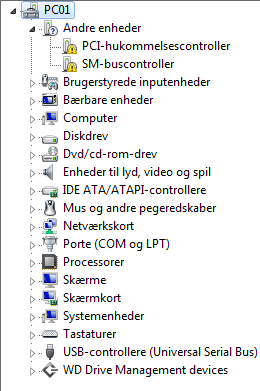
Now that you mention it i checked and found 2 yellow marks i can't get rid of, i tried letting windows search online for updates but it simply states that no updates where found.
(Also it's danish if you are wondering, wish i could change it to English)
Rdyht7E.png


Also i have already done the Windows Update stuff, thanks anyway, good catch, might not have done it if i didn't think of it.
 

My Computer My Computer

At a glance

Windows 10 Home 64-bitIntel Core i7 6700 - Skylake16,0GB4095MB NVIDIA GeForce GTX 970 (ASUStek Comput...
Computer type
PC/Desktop
Computer Manufacturer/Model Number
Custom
OS
Windows 10 Home 64-bit
CPU
Intel Core i7 6700 - Skylake
Motherboard
ASUSTeK COMPUTER INC. Z170-P
Memory
16,0GB
Graphics Card(s)
4095MB NVIDIA GeForce GTX 970 (ASUStek Computer Inc)
Monitor(s) Displays
S24B350 - Samsung (1 monitor)
Screen Resolution
1920x1080@60Hz
Hard Drives
931GB Seagate ST1000DM003-1SB10C (SATA)
111GB KINGSTON SV300S37A120G (SATA-2 (SSD))
1862GB Western Digital WD My Passport 0820 USB Device (USB (SATA)
Keyboard
Steelseries Apex M800
Mouse
Steelseries Rival 700
Antivirus
BullGuard Internet Security
Browser
Google Chrome // Microsoft Edge

Attachments

My Computers My Computers

  • At a glance

    Windows 7 HP 64i5 6600K - 800MHz to 4200MHz4+4G GSkill DDR4 3000IG - Intel 530
    Computer type
    PC/Desktop
    Computer Manufacturer/Model Number
    custom build
    OS
    Windows 7 HP 64
    CPU
    i5 6600K - 800MHz to 4200MHz
    Motherboard
    GA-Z170-HD3P
    Memory
    4+4G GSkill DDR4 3000
    Graphics Card(s)
    IG - Intel 530
    Monitor(s) Displays
    Samsung 226BW
    Screen Resolution
    1680x1050
    Hard Drives
    (1) -1 SM951 – 128GB M.2 AHCI PCIe SSD drive for Windows 7 and Lubuntu
    (2) -1 WD SATA 3 - 1T for Data
    (3) -1 WD SATA 3 - 1T for backup
    PSU
    Thermaltake 450W TR2 gold
    Keyboard
    Old and good Chicony mechanical keyboard
    Mouse
    Logitech mX performance - 9 buttons (had to disable some)
    Internet Speed
    500Mb/s
    Browser
    Firefox 64
    Other Info
    TinyWall firewall
  • At a glance

    Windows 7 Proi7-4500U 800MHz to 3.0GHz(4+4)G DDR3 1600IG intel 4400 + NVIDIA GeForce GT 745M
    Computer type
    Laptop
    System Manufacturer/Model Number
    Asus Q550LF
    OS
    Windows 7 Pro
    CPU
    i7-4500U 800MHz to 3.0GHz
    Motherboard
    Asus Q550LF
    Memory
    (4+4)G DDR3 1600
    Graphics Card(s)
    IG intel 4400 + NVIDIA GeForce GT 745M
    Sound Card
    Realtek
    Monitor(s) Displays
    LG Display LP156WF4-SPH1
    Screen Resolution
    1920 x 1080
    Hard Drives
    BX500 120G SSD for Windows and programs +
    1T HDD for data
    Internet Speed
    500 Mb/s
    Browser
    Firefox
    Other Info
    TinyWall firewall

My Computer My Computer

At a glance

Windows 10 Home 64-bitIntel Core i7 6700 - Skylake16,0GB4095MB NVIDIA GeForce GTX 970 (ASUStek Comput...
Computer type
PC/Desktop
Computer Manufacturer/Model Number
Custom
OS
Windows 10 Home 64-bit
CPU
Intel Core i7 6700 - Skylake
Motherboard
ASUSTeK COMPUTER INC. Z170-P
Memory
16,0GB
Graphics Card(s)
4095MB NVIDIA GeForce GTX 970 (ASUStek Computer Inc)
Monitor(s) Displays
S24B350 - Samsung (1 monitor)
Screen Resolution
1920x1080@60Hz
Hard Drives
931GB Seagate ST1000DM003-1SB10C (SATA)
111GB KINGSTON SV300S37A120G (SATA-2 (SSD))
1862GB Western Digital WD My Passport 0820 USB Device (USB (SATA)
Keyboard
Steelseries Apex M800
Mouse
Steelseries Rival 700
Antivirus
BullGuard Internet Security
Browser
Google Chrome // Microsoft Edge
Good. Please mark this thread as solved.
 

My Computers My Computers

  • At a glance

    Windows 7 HP 64i5 6600K - 800MHz to 4200MHz4+4G GSkill DDR4 3000IG - Intel 530
    Computer type
    PC/Desktop
    Computer Manufacturer/Model Number
    custom build
    OS
    Windows 7 HP 64
    CPU
    i5 6600K - 800MHz to 4200MHz
    Motherboard
    GA-Z170-HD3P
    Memory
    4+4G GSkill DDR4 3000
    Graphics Card(s)
    IG - Intel 530
    Monitor(s) Displays
    Samsung 226BW
    Screen Resolution
    1680x1050
    Hard Drives
    (1) -1 SM951 – 128GB M.2 AHCI PCIe SSD drive for Windows 7 and Lubuntu
    (2) -1 WD SATA 3 - 1T for Data
    (3) -1 WD SATA 3 - 1T for backup
    PSU
    Thermaltake 450W TR2 gold
    Keyboard
    Old and good Chicony mechanical keyboard
    Mouse
    Logitech mX performance - 9 buttons (had to disable some)
    Internet Speed
    500Mb/s
    Browser
    Firefox 64
    Other Info
    TinyWall firewall
  • At a glance

    Windows 7 Proi7-4500U 800MHz to 3.0GHz(4+4)G DDR3 1600IG intel 4400 + NVIDIA GeForce GT 745M
    Computer type
    Laptop
    System Manufacturer/Model Number
    Asus Q550LF
    OS
    Windows 7 Pro
    CPU
    i7-4500U 800MHz to 3.0GHz
    Motherboard
    Asus Q550LF
    Memory
    (4+4)G DDR3 1600
    Graphics Card(s)
    IG intel 4400 + NVIDIA GeForce GT 745M
    Sound Card
    Realtek
    Monitor(s) Displays
    LG Display LP156WF4-SPH1
    Screen Resolution
    1920 x 1080
    Hard Drives
    BX500 120G SSD for Windows and programs +
    1T HDD for data
    Internet Speed
    500 Mb/s
    Browser
    Firefox
    Other Info
    TinyWall firewall
I would like to thank everyone here who helped me get my desktop computer running again

Thanks
 

My Computer My Computer

At a glance

Windows 10 Home 64-bitIntel Core i7 6700 - Skylake16,0GB4095MB NVIDIA GeForce GTX 970 (ASUStek Comput...
Computer type
PC/Desktop
Computer Manufacturer/Model Number
Custom
OS
Windows 10 Home 64-bit
CPU
Intel Core i7 6700 - Skylake
Motherboard
ASUSTeK COMPUTER INC. Z170-P
Memory
16,0GB
Graphics Card(s)
4095MB NVIDIA GeForce GTX 970 (ASUStek Computer Inc)
Monitor(s) Displays
S24B350 - Samsung (1 monitor)
Screen Resolution
1920x1080@60Hz
Hard Drives
931GB Seagate ST1000DM003-1SB10C (SATA)
111GB KINGSTON SV300S37A120G (SATA-2 (SSD))
1862GB Western Digital WD My Passport 0820 USB Device (USB (SATA)
Keyboard
Steelseries Apex M800
Mouse
Steelseries Rival 700
Antivirus
BullGuard Internet Security
Browser
Google Chrome // Microsoft Edge
Back
Top