USB write protected, cant reformat

rurikomai

New member
Local time
4:31 PM
Messages
14
Location
philippines
badly needed help here

my friend used my 8gb flash drive and now it was infected with virus
and she reformat it without telling me...

now its write protected and cant be reformat

can someone help me how to remove the write protected thingy and recover it back?

gv5AKBH.png
 

My Computer

Computer type
Laptop
Computer Manufacturer/Model Number
Lenovo
OS
windows 7 Professional x64
Try this.

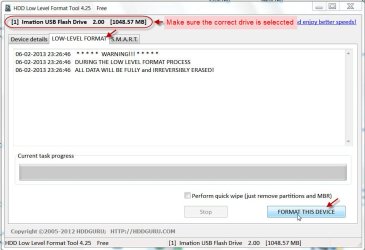
Download Windows Executable (works without installation): HDD Low Level Format Tool ver.4.25

HDDGURU: HDD LLF Low Level Format Tool

Plugin your pendrive, run the executable and low level format it. It fills all the sectors with zero and reinitialises it to the factory condition.

06-02-2013 23-28-21.jpg

Once the lowlevel format is successfully completed, do a regular format.

I recommend HP USB Disk Storage Format Tool. (Run it as administrator)

Download HP USB Disk Storage Format Tool 2.2.3 Free - Windows-based Format Utility for HP Drive Key or DiskOnKey USB Device - Softpedia
 

My Computer

OS
Windows 7 Home Premium 32 bit
oh..
i will try this when i get back home...
and give u feedback if it works

:::EDIT:::

both applications not working :cry:
 
Last edited:

My Computer

Computer type
Laptop
Computer Manufacturer/Model Number
Lenovo
OS
windows 7 Professional x64
ive tried the links u gave
but both didnt work.

..and also i did try formatting my USB using the DOS command but still it fails.

is there any remedies aside from those links?
 

My Computer

Computer type
Laptop
Computer Manufacturer/Model Number
Lenovo
OS
windows 7 Professional x64
Sometimes one may overlook the switch on some pendrives. Check on that.

A pendrive can get write-protected with virus affliction. In this case it should be possible to zerofill it and format it.

A pendrive can also get write-protected when it reaches its end of life. In this case no more reserved sectors are available to map the bad sectors and the pendrive controller makes it write-protected making it impossible to write any files which will only get corrupted. That is the safety mechanism and in this case nothing can be done.

It most probably died on its own volition when it was with your friend and you may be thinking it is because of a virus.

Anyway, you may try to format it in the command window in safe mode - Advanced Options.

You may also check the manufacturer's website for any format/repair Utility. ( Transcend, I know, has one. Do not know about others.)
 
Last edited:

My Computer

OS
Windows 7 Home Premium 32 bit
ive tried transcend repair but it failed at the middle part..
and in safe mode, it ask for volume label since the usb doesnt have one :(
 

My Computer

Computer type
Laptop
Computer Manufacturer/Model Number
Lenovo
OS
windows 7 Professional x64
Seems the USB flashdrive got virtually bricked.
Are pendrives too expensive where you live?
 

My Computer

Computer type
PC/Desktop
OS
Windows 7 professional X64
CPU
AMD A10-5800K OC@ 4.4Ghz.
Motherboard
Gigabyte F2A85X-UP4
Memory
8GB Kingston HyperX Blu 1333mhz
Graphics Card(s)
XFX HD7870 2GB Core Edition
Monitor(s) Displays
Acer AL2216W
Screen Resolution
1680x1050
Hard Drives
Seagate Barracuda 500gb 7200rpm
Seagate Barracuda 1.5TB 7200rpm
PSU
Cooler Master Silent Pro M 850W
Case
Thermaltake Commander MS-I
Cooling
Cooler Master N520
Mouse
Logitech M504
Internet Speed
10Mbps
Try running chkdsk on the thumb drive two times, checking if the thumb drive is write protected between executions

1) no boxes ticked
--> still write protected?
2) fix file system box ticked
--> still write protected?

If the problem persists,
open and elevated command prompt
launch Diskpart
lis dis
sel disk #(your thumbdrive)
lis par
sel par #(your thumbdrive)
lis vol #(your thumbdrive)
det vol
att clear readonly
exit
exit


Any change?


Regardless if you fix the R/W state of the thumb drive - it has questionable reliablity and shouldbe replaced. At the very least it should be wiped.


Good luck.
 

My Computer

Computer type
Laptop
Computer Manufacturer/Model Number
HP Pavilion dv6-6c10us
OS
x64 (6.3.9600) Win8.1 Pro & soon dual boot x64 (6.1.7601) Win7_SP1 HomePrem
CPU
AMD A6-3420M APU with Radeon(tm) HD Graphics
Motherboard
Hewlett-Packard 1805
Memory
6.00 GB
Graphics Card(s)
AMD Radeon(TM) HD 6520G
Sound Card
(1) AMD High Definition Audio Device (2) IDT High Definiti
Monitor(s) Displays
HP W2072a 20" LCD (1600 x 900) @ 60 Hz
Screen Resolution
1366 x 768 x 32 bits (4294967296 colors) @ 60 Hz
Hard Drives
ST640LM0 00 HM641JI SATA Disk Device
Keyboard
Logitech k520 wireless KB
Mouse
Logitech m320 wireless mouse (bundled with KB)
Internet Speed
15/5 | 54 MB Wireless 'n'
Antivirus
Realtime: Defender or Avast | On-demand: Malwarebytes, ESET
Browser
IE 11 on Win8, IE 10 on win 7
Other Info
Media: [Gimp, Audacity, VLC] || Comm: [WEmail 2012, Skype] || Productivity: [OpenOffice,| Textpad] || Utils: [Sysinternals, cCleaner, Speccy, Defraggler]
Back
Top