USB2 runs at USB1?

Kuss

New member
Local time
7:22 PM
Messages
47
HI guys iv been trying to work out why windows is runnin all my USB2 at Usb1.1
i got a g25 wheel,R.A.T.7 Mouse,Zfang and flashdrives, everytime i plug in any of them windows tells me its can run faster if pluged in to USB2 my MB is P5W DH DELUXE.http://uk.asus.com/Motherboards/Intel_Socket_775/P5W_DH_Deluxe/#specifications
Iv reinstalled all drivers checked the Bios USB2=Enable and set to Hispeed and i got everest iswell to check the ports and all is reporting as USB1.1.

any help or info will help me alot plz

Oh and i think this happend after some win updates dont no which one tho
 

My Computer

OS
Windows 7 7601 x64
CPU
E6600
Motherboard
P5W DH Deluxe
Graphics Card(s)
HD4890
Sound Card
G35
ok thanks will check it out and get back to you
 

My Computer

OS
Windows 7 7601 x64
CPU
E6600
Motherboard
P5W DH Deluxe
Graphics Card(s)
HD4890
Sound Card
G35
na nothing worked for me
 

My Computer

OS
Windows 7 7601 x64
CPU
E6600
Motherboard
P5W DH Deluxe
Graphics Card(s)
HD4890
Sound Card
G35
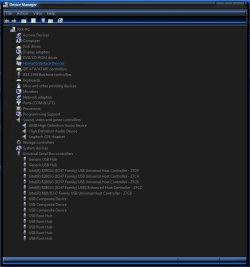
heres the SS.
iv tryed changing the the controllers around from Intel n10/ICH7 USB2 to what you see now and still no joy
 

Attachments

  • DM.jpg
    DM.jpg
    51.5 KB · Views: 65

My Computer

OS
Windows 7 7601 x64
CPU
E6600
Motherboard
P5W DH Deluxe
Graphics Card(s)
HD4890
Sound Card
G35
iv tryed 3 drive sticks and 2 bluetooths sticks that are usb2 and windos just keeps saying the same thing that it can run faster
 

My Computer

OS
Windows 7 7601 x64
CPU
E6600
Motherboard
P5W DH Deluxe
Graphics Card(s)
HD4890
Sound Card
G35
Try this; http://www.sevenforums.com/tutorials/165554-usb-driver-general-fix-problems.html?filter[2]=Hardware%20and%20Drivers
At the end it says; 7. Connect a USB device, but not the one you were having trouble with this will make a new INFCACHE.1 In your case you should be able to insert any working device.

In addition I would normally recommend updating BIOS and Chipset, but I have already looked for you and seen that there is no recent Chipset driver and also no windows 7 support which may just leave you to live with this problem :(
 

My Computer

Computer Manufacturer/Model Number
Something I threw together
OS
Windows 7 Ultimate x64
CPU
Intel Core i7-2600K
Motherboard
Asus P8P67
Memory
16 GB G Skill F3-10666 CL9D-4GBRL
Graphics Card(s)
ATI Radeon HD 6870
Sound Card
ATI Radeon HDMI / Realtek ALC892
Monitor(s) Displays
2 x 22" standard monitors / LG32LC56v TV to watch films
Screen Resolution
1920 x1080
Hard Drives
2 x OCZ Vertex2 111.79GB
3 x Samsung103SJ
1 x Samsung103UJ
1 x WD3200BEVT
1 x Hitachi5K320-160
PSU
Thermaltake Toughpower Cable Management 750W
Case
Antec 300
Cooling
Noctua NH-U12P SE2 and 5 120mm Case fans
Keyboard
Microsoft Comfort Curve Keyboard 2000
Mouse
Hama M3110 / Logitech M305
Internet Speed
16000
Other Info
I have also used Fedora, Suse, Ubuntu Linux
And all other Windows from 95 to date except ME
One thing I've noticed here - ASUSTeK Computer Inc. - Motherboards- ASUS P5W DH Deluxe is that the site list no drivers for Windows 7 :confused:


That's "might" be an issue.

What is interesting though is that the chipset is a 975X chipset which does support Window 7 - I have an Intel 975x board (D975XBX2) and the USB 2.0 ports work fine on 7 with SP1 installed, so.....

The other thing I notice is that there are no issues shown in this screenshot......


With that said, have you looked to see if there is a BIOS update for your board?
 

My Computer

Computer type
PC/Desktop
Computer Manufacturer/Model Number
Custom built by me.
OS
Windows 10 Pro
CPU
Intel Core i7-4770K (3.5Ghz)
Motherboard
Gigabyte G1 Sniper 5 (F10 Bios)
Memory
32 gig Corsair Dominator Platinum (4x8Gig)
Graphics Card(s)
Sapphire Tri-X R9 Fury
Sound Card
Soundblaster ZXR
Monitor(s) Displays
NEC PA242W 24" LCD Monitor
Screen Resolution
1920 x 1200
Hard Drives
Primary - Samsung 850 Pro (512gig), Samsung 840 Pro (256gig), 2TB WD Caviar Black.
PSU
EVGA Supernova 1000 G2
Case
Cooler Master HAF X
Cooling
Corsair H100i with Corsair Air Series SP120 Quiet Fans
Keyboard
Logitech Wireless Wave
Mouse
Logitech Performance MX
Internet Speed
High Speed Cable
Antivirus
Norton Security
Browser
IE11
Other Info
Memory Timings - 1866MHz @ 9-9-9-27-1T @ 1.5 volts
BIOS and Chipset up to date as i know of, ill try that fix now and let you no what happends.
they was all working till 2 maybe 3 months ago
 

My Computer

OS
Windows 7 7601 x64
CPU
E6600
Motherboard
P5W DH Deluxe
Graphics Card(s)
HD4890
Sound Card
G35

My Computer

Computer Manufacturer/Model Number
Something I threw together
OS
Windows 7 Ultimate x64
CPU
Intel Core i7-2600K
Motherboard
Asus P8P67
Memory
16 GB G Skill F3-10666 CL9D-4GBRL
Graphics Card(s)
ATI Radeon HD 6870
Sound Card
ATI Radeon HDMI / Realtek ALC892
Monitor(s) Displays
2 x 22" standard monitors / LG32LC56v TV to watch films
Screen Resolution
1920 x1080
Hard Drives
2 x OCZ Vertex2 111.79GB
3 x Samsung103SJ
1 x Samsung103UJ
1 x WD3200BEVT
1 x Hitachi5K320-160
PSU
Thermaltake Toughpower Cable Management 750W
Case
Antec 300
Cooling
Noctua NH-U12P SE2 and 5 120mm Case fans
Keyboard
Microsoft Comfort Curve Keyboard 2000
Mouse
Hama M3110 / Logitech M305
Internet Speed
16000
Other Info
I have also used Fedora, Suse, Ubuntu Linux
And all other Windows from 95 to date except ME
Hi there
note that sometimes if you have USB 1 and USB 2 devices on the same "string" or USB port for example a USB printer and a disk then the USB devices attached to that port will operate at the SLOWEST speed

The computer will normally prompt you however by issuing a message saying this device can operate at a higher speed if you connect it to a different USB slot.

in this case just move it to a different USB slot.

Cheers
jimbo
 

My Computer

Computer type
PC/Desktop
Computer Manufacturer/Model Number
Custom built, several laptops HP/ASUS
OS
Linux CENTOS 7 / various Windows OS'es and servers
CPU
Intel i7 Intel i5
Memory
8GB, 16GB
Graphics Card(s)
On Motherboard
Sound Card
Realtek HD audio
Monitor(s) Displays
Apple Cinema display, Samsung LCD
Screen Resolution
1920 X 1080
Hard Drives
4 X 1TB SATA
Mouse
Toshiba wireless laser
Internet Speed
> 20MB up
ok thank
everything is now gone as for usb but the mouse lol now im useing the OSK to type :D

and for INFCACHE.1 only 1 found
 

My Computer

OS
Windows 7 7601 x64
CPU
E6600
Motherboard
P5W DH Deluxe
Graphics Card(s)
HD4890
Sound Card
G35
Hi there
note that sometimes if you have USB 1 and USB 2 devices on the same "string" or USB port for example a USB printer and a disk then the USB devices attached to that port will operate at the SLOWEST speed

The computer will normally prompt you however by issuing a message saying this device can operate at a higher speed if you connect it to a different USB slot.

in this case just move it to a different USB slot.

Cheers
jimbo

Good point Jimbo. I'll also add that cables can be an issue as well - if you're using an old USB 1 cable for example. With that, try switching cables and see if it helps.

BTW I just tried my USB 2.0 WD Passport hard drive on my 975x system and there were no issues/warnings.
 

My Computer

Computer type
PC/Desktop
Computer Manufacturer/Model Number
Custom built by me.
OS
Windows 10 Pro
CPU
Intel Core i7-4770K (3.5Ghz)
Motherboard
Gigabyte G1 Sniper 5 (F10 Bios)
Memory
32 gig Corsair Dominator Platinum (4x8Gig)
Graphics Card(s)
Sapphire Tri-X R9 Fury
Sound Card
Soundblaster ZXR
Monitor(s) Displays
NEC PA242W 24" LCD Monitor
Screen Resolution
1920 x 1200
Hard Drives
Primary - Samsung 850 Pro (512gig), Samsung 840 Pro (256gig), 2TB WD Caviar Black.
PSU
EVGA Supernova 1000 G2
Case
Cooler Master HAF X
Cooling
Corsair H100i with Corsair Air Series SP120 Quiet Fans
Keyboard
Logitech Wireless Wave
Mouse
Logitech Performance MX
Internet Speed
High Speed Cable
Antivirus
Norton Security
Browser
IE11
Other Info
Memory Timings - 1866MHz @ 9-9-9-27-1T @ 1.5 volts
ok thank
everything is now gone as for usb but the mouse lol now im useing the OSK to type :D

and for INFCACHE.1 only 1 found
There should be only one :)
 

My Computer

Computer Manufacturer/Model Number
Something I threw together
OS
Windows 7 Ultimate x64
CPU
Intel Core i7-2600K
Motherboard
Asus P8P67
Memory
16 GB G Skill F3-10666 CL9D-4GBRL
Graphics Card(s)
ATI Radeon HD 6870
Sound Card
ATI Radeon HDMI / Realtek ALC892
Monitor(s) Displays
2 x 22" standard monitors / LG32LC56v TV to watch films
Screen Resolution
1920 x1080
Hard Drives
2 x OCZ Vertex2 111.79GB
3 x Samsung103SJ
1 x Samsung103UJ
1 x WD3200BEVT
1 x Hitachi5K320-160
PSU
Thermaltake Toughpower Cable Management 750W
Case
Antec 300
Cooling
Noctua NH-U12P SE2 and 5 120mm Case fans
Keyboard
Microsoft Comfort Curve Keyboard 2000
Mouse
Hama M3110 / Logitech M305
Internet Speed
16000
Other Info
I have also used Fedora, Suse, Ubuntu Linux
And all other Windows from 95 to date except ME
na nothing worked :(
 

My Computer

OS
Windows 7 7601 x64
CPU
E6600
Motherboard
P5W DH Deluxe
Graphics Card(s)
HD4890
Sound Card
G35
will ICH voltage do anything in bios mine set 2 1.05?
 

My Computer

OS
Windows 7 7601 x64
CPU
E6600
Motherboard
P5W DH Deluxe
Graphics Card(s)
HD4890
Sound Card
G35
You shouldn't be messing with any voltages you don't understand. And that voltage setting shouldn't have anything to do with the issue of your USB ports running at 1.0 speeds.

I would highly suggest you visit a Asus forum and post your issue there. I would also suggest you give Asus tech support a call to see what they have to say about the issue.

My two cents.
 

My Computer

Computer type
PC/Desktop
Computer Manufacturer/Model Number
Custom built by me.
OS
Windows 10 Pro
CPU
Intel Core i7-4770K (3.5Ghz)
Motherboard
Gigabyte G1 Sniper 5 (F10 Bios)
Memory
32 gig Corsair Dominator Platinum (4x8Gig)
Graphics Card(s)
Sapphire Tri-X R9 Fury
Sound Card
Soundblaster ZXR
Monitor(s) Displays
NEC PA242W 24" LCD Monitor
Screen Resolution
1920 x 1200
Hard Drives
Primary - Samsung 850 Pro (512gig), Samsung 840 Pro (256gig), 2TB WD Caviar Black.
PSU
EVGA Supernova 1000 G2
Case
Cooler Master HAF X
Cooling
Corsair H100i with Corsair Air Series SP120 Quiet Fans
Keyboard
Logitech Wireless Wave
Mouse
Logitech Performance MX
Internet Speed
High Speed Cable
Antivirus
Norton Security
Browser
IE11
Other Info
Memory Timings - 1866MHz @ 9-9-9-27-1T @ 1.5 volts

My Computer

Computer Manufacturer/Model Number
Something I threw together
OS
Windows 7 Ultimate x64
CPU
Intel Core i7-2600K
Motherboard
Asus P8P67
Memory
16 GB G Skill F3-10666 CL9D-4GBRL
Graphics Card(s)
ATI Radeon HD 6870
Sound Card
ATI Radeon HDMI / Realtek ALC892
Monitor(s) Displays
2 x 22" standard monitors / LG32LC56v TV to watch films
Screen Resolution
1920 x1080
Hard Drives
2 x OCZ Vertex2 111.79GB
3 x Samsung103SJ
1 x Samsung103UJ
1 x WD3200BEVT
1 x Hitachi5K320-160
PSU
Thermaltake Toughpower Cable Management 750W
Case
Antec 300
Cooling
Noctua NH-U12P SE2 and 5 120mm Case fans
Keyboard
Microsoft Comfort Curve Keyboard 2000
Mouse
Hama M3110 / Logitech M305
Internet Speed
16000
Other Info
I have also used Fedora, Suse, Ubuntu Linux
And all other Windows from 95 to date except ME
Back
Top