USB3 phenomenon

whs

New member
Guru
Gold Member
VIP
Local time
3:08 PM
Messages
26,200
Location
Florida in winter, Black Forest/Germany
As some of you may know, I am running several Windows and Linux systems in virtual using VMware Player from an external SSD.

If I attach the SSD via USB3, it takes forever to shutdoen the virtual system - and that with different caddies on different Computers. If I attach the SSD via eSata, the shutdown is quasi instant.

I have also observed that writing something to a USB3 attached disk (e.g. a 30GB image to a SSHD) takes longer than to the same disk attached via eSata - although the USB3 specs suggest that it is faster than eSata.

Something is wrong with USB3. It does not live up to it's specifications.
 

My Computer

Computer Manufacturer/Model Number
HP, Dell, Gateway, Toshiba - 4 laptops and 2 desktops
OS
Vista, Windows7, Mint Mate, Zorin, Windows 8
CPU
from 1.6GHz Duo to i7
Monitor(s) Displays
2x HP w2207
Hard Drives
5x HDD, 7x SSD, 12x Externals
Keyboard
with trackball - no mices
Mouse
Trackball mice
Internet Speed
DSL 6000
One problem I've noticed is that the USB3 ports on a lot of motherboards are not native to the chipset. They are an add-on controller, installed by the motherboard manufacturer.
I suspect that this means they do not really function in these systems until the operating system takes over and loads the drivers for them.

How a VM would handle this situation is beyond me, but I would suspect the VM software itself would need to handle it.

I seem to recall the Intel Haswell has native USB3 in it's chipset. Don't know too much about AMD systems.
 

My Computer

Computer type
PC/Desktop
Computer Manufacturer/Model Number
Home Built - Jan 2013
OS
Windows 7 64 Bit Home Premium SP1
CPU
i7-3820
Motherboard
Asus P9X79-PRO - Bios 4608
Memory
GSkill F3-14900CL9Q - 16GB
Graphics Card(s)
EVGA GeForce GTX660 - Driver 352.86
Sound Card
On board Realtek ALC898
Monitor(s) Displays
Acer S271HL
Screen Resolution
1920 x 1080
Hard Drives
#1- Samsung 840 Pro Series
#2- Western Digital WD1002FAEX Sata3 Black
#3- Western Digital WD1002FAEX Sata3 Black
PSU
Corsair CMPSU-850TX-V2 - 850 watt (by Seasonic)
Case
Corsair Obsidian 550D
Cooling
Standard 3 120mm case fans, Cooler Master Hyper 212 EVO
Keyboard
MS KC-0405
Mouse
Intellimouse 5-button
Internet Speed
56 Mbits/Sec (on a good day)
Antivirus
Avast & Malwarebytes
Browser
Firefox
Other Info
Asus DVD - DRW-24B1ST 24X
I am not that modern. I have a Dell Inc. 0Y2MRG A00 board on a XPS 8300.
 

My Computer

Computer Manufacturer/Model Number
HP, Dell, Gateway, Toshiba - 4 laptops and 2 desktops
OS
Vista, Windows7, Mint Mate, Zorin, Windows 8
CPU
from 1.6GHz Duo to i7
Monitor(s) Displays
2x HP w2207
Hard Drives
5x HDD, 7x SSD, 12x Externals
Keyboard
with trackball - no mices
Mouse
Trackball mice
Internet Speed
DSL 6000
And it has USB3 ports?

Or are you using an add-on card?
 

My Computer

Computer type
PC/Desktop
Computer Manufacturer/Model Number
Home Built - Jan 2013
OS
Windows 7 64 Bit Home Premium SP1
CPU
i7-3820
Motherboard
Asus P9X79-PRO - Bios 4608
Memory
GSkill F3-14900CL9Q - 16GB
Graphics Card(s)
EVGA GeForce GTX660 - Driver 352.86
Sound Card
On board Realtek ALC898
Monitor(s) Displays
Acer S271HL
Screen Resolution
1920 x 1080
Hard Drives
#1- Samsung 840 Pro Series
#2- Western Digital WD1002FAEX Sata3 Black
#3- Western Digital WD1002FAEX Sata3 Black
PSU
Corsair CMPSU-850TX-V2 - 850 watt (by Seasonic)
Case
Corsair Obsidian 550D
Cooling
Standard 3 120mm case fans, Cooler Master Hyper 212 EVO
Keyboard
MS KC-0405
Mouse
Intellimouse 5-button
Internet Speed
56 Mbits/Sec (on a good day)
Antivirus
Avast & Malwarebytes
Browser
Firefox
Other Info
Asus DVD - DRW-24B1ST 24X
It has USB2, USB3 and eSata ports on the board - I guess. I did not add anything.
 

My Computer

Computer Manufacturer/Model Number
HP, Dell, Gateway, Toshiba - 4 laptops and 2 desktops
OS
Vista, Windows7, Mint Mate, Zorin, Windows 8
CPU
from 1.6GHz Duo to i7
Monitor(s) Displays
2x HP w2207
Hard Drives
5x HDD, 7x SSD, 12x Externals
Keyboard
with trackball - no mices
Mouse
Trackball mice
Internet Speed
DSL 6000
A few things to check

Which version(s) of Windows are you running that you tried USB3.0?

Open Device Manager, click View->Devices by Connection (to see how hardware devices are connecting to each other)

Expand ACPI devices till you drill down to the PCI bus. Find the USB3.0 Controller
> Is the USB3.0 controller attached to a PCI device? What is it connected to?
> Is your drive attached to a 3.0 controller?
> Does the drive device name include the words Non-Functional?
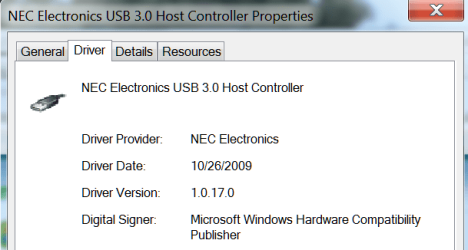
> Rt click the 3.0 Controller->Properties->Driver tab. Who is the Provider? Version and date?

/* EDIT */
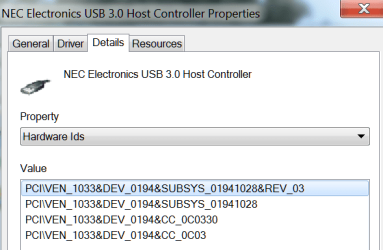
And also under Properties, Details tab, select Hardware IDs and post what you see
 

My Computer

Computer type
PC/Desktop
Computer Manufacturer/Model Number
Dell Optiplex 360 and Optiplex 755
OS
Desk 1: Win 7 Pro x32; Desk 2: Windows 10 x64
Hard Drives
500GB Crucial SSD in both Desktops
Other Info
Buffalo 6TB NAS, Raid 1
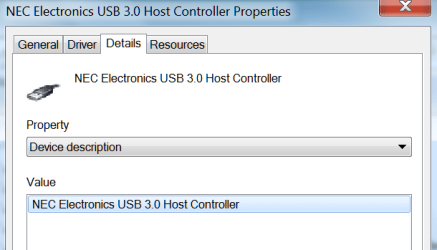
I think this is all in good order.

2014-01-18_2132.png

2014-01-18_2135.png

2014-01-18_2136.png
 

My Computer

Computer Manufacturer/Model Number
HP, Dell, Gateway, Toshiba - 4 laptops and 2 desktops
OS
Vista, Windows7, Mint Mate, Zorin, Windows 8
CPU
from 1.6GHz Duo to i7
Monitor(s) Displays
2x HP w2207
Hard Drives
5x HDD, 7x SSD, 12x Externals
Keyboard
with trackball - no mices
Mouse
Trackball mice
Internet Speed
DSL 6000

My Computer

Computer type
PC/Desktop
Computer Manufacturer/Model Number
Home Built Desktop By DataTech
OS
Windows 7 Ultimate X64 SP1
CPU
Intel i5-2550K, Differing ~4.4-4.8GHz No built in GPU
Motherboard
ASUS P8Z68-V PRO/GEN3
Memory
16GB G.Skill Sniper 1866MHz @ 2133MHz 2x8GB
Graphics Card(s)
ASUS GTX650TIB-DC2OC-2GD5, (650TI Boost)
Sound Card
Onboard Realtek 5-1
Monitor(s) Displays
Samsung P2570HD
Screen Resolution
1920x1080
Hard Drives
Samsung 840 Pro 256GB SSD for OS, 500GB Seagate Constellation (Enterprise drive) for Data
PSU
Corsair HX650W
Case
Inwin Dragon Rider
Cooling
Hyper 212 EVO w/two Noctua fans, push-pull, @1300 RPM
Keyboard
E-Z Eyes, bright yellow keys with large characters
Mouse
steelseries SENSEI Laser Pro Gaming
Internet Speed
48-51Mbs Mbs down, 11 Mbs up Xfinity Cable
Antivirus
Norton Internet Security 2013
Browser
IE 10, Opera, Pale Moon if needed
Other Info
4 case fans, LG BluRay-RE, ASUS DVD-RW, Mr. Fusion power supply, 1.21 gigawatts.
yes, those look right. A couple other things that come to mind
> Have you checked for firmware updates for your SSD? and
> (just to double check the basics) You verified you're using a USB 3.0 cable (it has the 3.0 symbol?)
 

My Computer

Computer type
PC/Desktop
Computer Manufacturer/Model Number
Dell Optiplex 360 and Optiplex 755
OS
Desk 1: Win 7 Pro x32; Desk 2: Windows 10 x64
Hard Drives
500GB Crucial SSD in both Desktops
Other Info
Buffalo 6TB NAS, Raid 1

My Computer

Computer Manufacturer/Model Number
HP, Dell, Gateway, Toshiba - 4 laptops and 2 desktops
OS
Vista, Windows7, Mint Mate, Zorin, Windows 8
CPU
from 1.6GHz Duo to i7
Monitor(s) Displays
2x HP w2207
Hard Drives
5x HDD, 7x SSD, 12x Externals
Keyboard
with trackball - no mices
Mouse
Trackball mice
Internet Speed
DSL 6000
yes, those look right. A couple other things that come to mind
> Have you checked for firmware updates for your SSD? and
> (just to double check the basics) You verified you're using a USB 3.0 cable (it has the 3.0 symbol?)
I have 7 SSDs. Used a few different ones with the same effect. The last one is a brand new 256GB Mushkin.

I don't think it is the SSDs. They work perfectly on eSata.
 

My Computer

Computer Manufacturer/Model Number
HP, Dell, Gateway, Toshiba - 4 laptops and 2 desktops
OS
Vista, Windows7, Mint Mate, Zorin, Windows 8
CPU
from 1.6GHz Duo to i7
Monitor(s) Displays
2x HP w2207
Hard Drives
5x HDD, 7x SSD, 12x Externals
Keyboard
with trackball - no mices
Mouse
Trackball mice
Internet Speed
DSL 6000
USB 3.0 seldom lives up to the published specs. USB3 is susceptible to RFI (wifi router) that can slow transfer speeds. As stated above using a incorrect cable can slow things to near 2.0 speeds.

Chip set and drivers play a big part in effective speeds. How is the USB3 integrated to your mobo? 19 pin header on mobo or pcie card. If tied to the pcie is it pcie 2.0 spec and is it a a x4 or faster lane.

I have a Seagate 2TB USB3 external drive, it performs pretty good connected to the USB3 port on a GA990FXA I/O panel. Changing the connection to a RocketU 1142A in a PCIe x4 lane speeds doubled to near the USB3 spec.

I have experienced problems with VIA USB3 drivers with W7 shutdown, very slow and sometimes it hangs.
 

My Computer

Computer type
PC/Desktop
Computer Manufacturer/Model Number
Custom, Dell and Lenono LT's
OS
Win8/8.1,Win7-U64, Vista U64, uncounted Linux distor's
CPU
AMD and Intell, 9590, 8350, i5 3570k
Motherboard
CFVFZ, GA990FXA, Z77e-itx
Memory
Corsair G Skill
Graphics Card(s)
Crossfired Sapphire HD 7950 Vapor-X, ASUS R9 280X TOP
Sound Card
Realtek ALC889
Monitor(s) Displays
ViewSonic VX2770SMH 27" / ViewSonic VX2433 LCD 24"
Screen Resolution
1080i HD
Hard Drives
Samsung SSD 840 Pro
OCZ Agility 3's
OCZ Vector's
WD's Blue, red, green, Velociraptors
Seagate USB3 & Hybrid's
ASUS Blu-Ray
ASUS DVD
PSU
Corsair AX1200i, Seasonice 850 Gold
Case
Cooler Master HAF 922 & HAF 932, Lian Li Train case.
Cooling
Air, Glacer 240L expanded, custom EK loop with duel D5's
Keyboard
Microsoft SideWinder X4 USB Keyboard / Logitech 250 PS2
Mouse
Logitech G500 / MS wireless 5000
Internet Speed
Best of 5ms / 75+ dn / 12+ up More or less.
Antivirus
MS esentials-MalwareBytes
Browser
Firefox Chromebook
Back
Top