USB3 Problem

Kuro Neko

New member
Local time
12:34 AM
Messages
10
I recently purchased a new computer (Windows 7 Home Premium 64bit, Intel i5 2.8 @ 3.8, 8GB RAM) with the Gigabyte P55-USB3 motherboard, which has two USB3 ports to the rear of the machine. I've tried a number of different USB3 external HDDs on the ports (Seagate, WD and Iomega) and all of them generate the little "this drive can perform faster if you connect it to a superspeed port" message.

All the drives are USB3. I've checked both the cables and the ports to make sure I'm using the ones with the 'blue tabs'. I've checked in BIOS (I have version F10g) and USB3 is enabled. I've also updated both the NEC/Renesas firmware and drivers to the latest versions (Driver: 2.1.16.0 - Firmware: 3028).

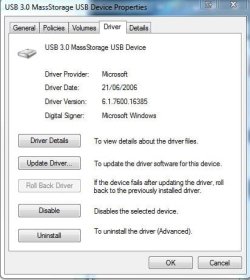
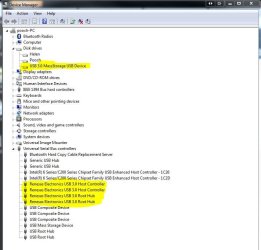
I notice under device manager>properties>driver that the drives are showing what I assume is an old USB2 driver (it's dated 2006) - see picture below.
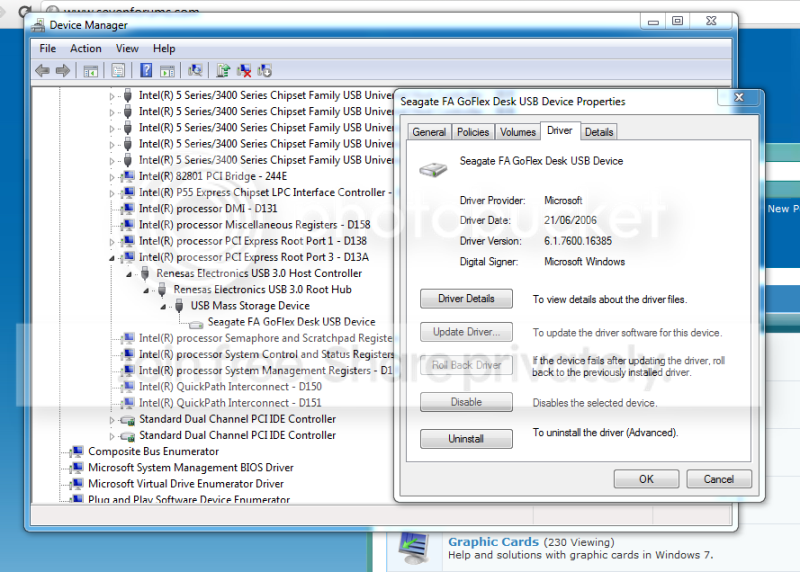
Capture.png


I'm guessing this is why my USB3 drive wont work correctly. Does anyone have any ideas as to how I can fix this?

All help gratefully received.
 

My Computer

OS
Windows 7 Home Premium 64bit
CPU
Intel i5 2.8 @3.8
Motherboard
Gigabyte P55-USB3
Memory
8GB
Graphics Card(s)
Nvidia Geforce GTX 460
Hard Drives
1x 40GB OCZ-Agility SSD
1x Seagate Barracuda 500GB
Kuro, welcome to the Seven Forums.

Seeing as the USB3 controller is independent of the chipset, did you remember to install the driver for it? If not use what is on the driver disk, or if newer the one from the download page for your motherboard,

GIGABYTE - Motherboard - Socket 1156 - GA-P55-USB3 (rev. 2.0)
 

My Computer

Computer type
PC/Desktop
Computer Manufacturer/Model Number
Me
OS
Win 7 Ultimate x64
CPU
FX-8350 @ 4.6 GHz so far
Motherboard
Asus M5A97 EVO
Memory
ADATA XPG V1 Series Black 8GB DDR3 1600
Graphics Card(s)
Sapphire R9 270x Dual-X
Sound Card
Xonar DGX w/ Corsair Vengence 1300
Monitor(s) Displays
Acer S232HL Abid
Screen Resolution
1920x1080
Hard Drives
120 GB OCZ Vertex 3
500 GB Seagate 7200.12
PSU
Antec Earthwatts 650W Green
Case
Antec Three Hundred
Cooling
Cooler Master 212 EVO
Keyboard
Logitech G510
Mouse
Logitech G500s
Internet Speed
35000/3000
Try Stormy 13 advice.

NEC USB 3.0 Driver Version 2.0.30.0

This may work better as it is designed for the Gigabyte mother board.

It is still a new driver dated December 2010.

I have had a problem using the newest Renesas branded drivers on my ASUS board.
NEC's and ASUS seem to work fine.
 

My Computer

Computer Manufacturer/Model Number
Hopalong/ Godzilla
OS
Windows7 Pro 64bit SP-1; Windows XP Pro 32bit
CPU
Intel Core i7-870 Lynnfield 2.93GHz LGA 1156 95W Quad-Core
Motherboard
ASUS P7P55D-E PRO
Memory
8GB@1400MHz Crucial Ballistix DDR3-1600 4x2GB
Graphics Card(s)
ASUS ENGTX460 DirectCU/2DI/1GD5 1GB 256-bit GDDR5
Sound Card
VIA Onboard
Monitor(s) Displays
Asus VS248H-P 24"; Samsung SyncMaster 941BW 19"ws
Screen Resolution
1920x1080; 1440x900
Hard Drives
Samsung 830 120GB SSD
Intel 320 120GB SSD
Western Digital Caviar Black WD7501AALS 750GB 7200 RPM SATA 3.0Gb/s
Western Digital Caviar Black WD6401AALS 640GB 7200 RPM SATA 3.0Gb/s
PSU
COOLER MASTER Silent Pro RS850-AMBAJ3-US 850W Modular
Case
COOLER MASTER HAF 932 RC-932-KKN5-GP Black
Cooling
Scythe "Mugen-2 Rev.B" (2 ScytheKaze-Jyuni PWM fans)
Keyboard
Logitech K-320
Mouse
Kensington
Antivirus
Avast Inernet Suite
Browser
IE 9 ; Chrome
All the drives are USB3. I've checked both the cables and the ports to make sure I'm using the ones with the 'blue tabs'. I've checked in BIOS (I have version F10g) and USB3 is enabled. I've also updated both the NEC/Renesas firmware and drivers to the latest versions (Driver: 2.1.16.0 - Firmware: 3028).
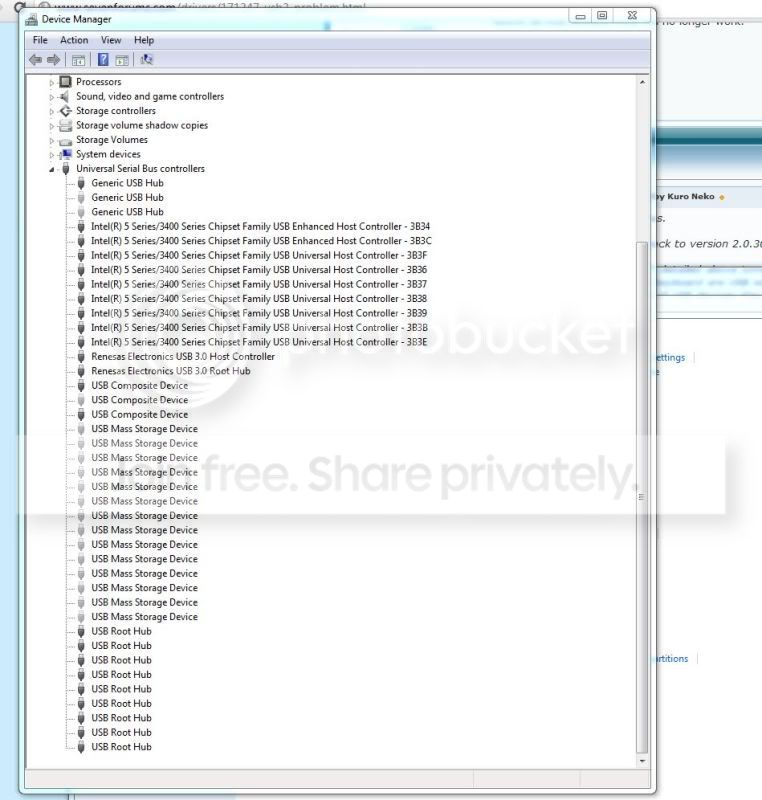
Yes you can see that these drivers are correctly installed.

I notice under device manager>properties>driver that the drives are showing what I assume is an old USB2 driver (it's dated 2006)

This is the driver for the Seagate device (see my snip) it is also correct.


I am a little confused at your Device Manager placing. My external HDD shows up under drives and my USB 3 drivers show up under USB controllers. but this maybe nothing.

I think this is a case of Windows reporting the right thing but doing the wrong thing. Your USB3 ports are shared with USB2 hence the backward compatibility. this is quite new to me but I have first hand experience where windows recognised a USB wireless device correctly but still called it a CD drive:confused:

I think it may help to go through this tutorial; http://www.sevenforums.com/tutorials/165554-usb-driver-general-fix-problems.html?filter[2]=Hardware%20and%20Drivers
Take your time and go through it step for step.
At the end where it says to insert a USB device use first time a USB2 device in a USB2 port. If this does not work go through it again and this time try a USB3 device in a USB3 port.
It is important to follow this in order!!

Have all USB drivers handy for devices that were not installed by windows the first time around eg, Renesas drivers as you may have to reinstall them when you are finished.
 

Attachments

  • Capture.JPG
    Capture.JPG
    34.4 KB · Views: 46
  • Capture1.JPG
    Capture1.JPG
    67.8 KB · Views: 222

My Computer

Computer Manufacturer/Model Number
Something I threw together
OS
Windows 7 Ultimate x64
CPU
Intel Core i7-2600K
Motherboard
Asus P8P67
Memory
16 GB G Skill F3-10666 CL9D-4GBRL
Graphics Card(s)
ATI Radeon HD 6870
Sound Card
ATI Radeon HDMI / Realtek ALC892
Monitor(s) Displays
2 x 22" standard monitors / LG32LC56v TV to watch films
Screen Resolution
1920 x1080
Hard Drives
2 x OCZ Vertex2 111.79GB
3 x Samsung103SJ
1 x Samsung103UJ
1 x WD3200BEVT
1 x Hitachi5K320-160
PSU
Thermaltake Toughpower Cable Management 750W
Case
Antec 300
Cooling
Noctua NH-U12P SE2 and 5 120mm Case fans
Keyboard
Microsoft Comfort Curve Keyboard 2000
Mouse
Hama M3110 / Logitech M305
Internet Speed
16000
Other Info
I have also used Fedora, Suse, Ubuntu Linux
And all other Windows from 95 to date except ME
Thanks for the swift replies.

Unfortunately reverting back to version 2.0.30.0 of the driver didn't help.

I'll try the USB General Fix detailed above tomorrow, but before I do could some one tell me if the fact that both my mouse and keyboard are USB will cause a problem. It's probably a stupid question, but presumably once I delete all USB devices they will no longer work.
 

My Computer

OS
Windows 7 Home Premium 64bit
CPU
Intel i5 2.8 @3.8
Motherboard
Gigabyte P55-USB3
Memory
8GB
Graphics Card(s)
Nvidia Geforce GTX 460
Hard Drives
1x 40GB OCZ-Agility SSD
1x Seagate Barracuda 500GB
Thanks for the swift replies.

Unfortunately reverting back to version 2.0.30.0 of the driver didn't help.

I'll try the USB General Fix detailed above tomorrow, but before I do could some one tell me if the fact that both my mouse and keyboard are USB will cause a problem. It's probably a stupid question, but presumably once I delete all USB devices they will no longer work.
You uninstall the drivers yes, but a copy remains on the PC. When you insert the first USB Device, for example your mouse, it should automatically install the driver as usual. After the new start everything should be back to normal except the drivers that windows cannot install.
 

My Computer

Computer Manufacturer/Model Number
Something I threw together
OS
Windows 7 Ultimate x64
CPU
Intel Core i7-2600K
Motherboard
Asus P8P67
Memory
16 GB G Skill F3-10666 CL9D-4GBRL
Graphics Card(s)
ATI Radeon HD 6870
Sound Card
ATI Radeon HDMI / Realtek ALC892
Monitor(s) Displays
2 x 22" standard monitors / LG32LC56v TV to watch films
Screen Resolution
1920 x1080
Hard Drives
2 x OCZ Vertex2 111.79GB
3 x Samsung103SJ
1 x Samsung103UJ
1 x WD3200BEVT
1 x Hitachi5K320-160
PSU
Thermaltake Toughpower Cable Management 750W
Case
Antec 300
Cooling
Noctua NH-U12P SE2 and 5 120mm Case fans
Keyboard
Microsoft Comfort Curve Keyboard 2000
Mouse
Hama M3110 / Logitech M305
Internet Speed
16000
Other Info
I have also used Fedora, Suse, Ubuntu Linux
And all other Windows from 95 to date except ME
Sorry, another quick question before I commit myself. Do I need to uninstall the Intel Chipset USB Enhanced Host entries too?

Capture2.jpg
 

My Computer

OS
Windows 7 Home Premium 64bit
CPU
Intel i5 2.8 @3.8
Motherboard
Gigabyte P55-USB3
Memory
8GB
Graphics Card(s)
Nvidia Geforce GTX 460
Hard Drives
1x 40GB OCZ-Agility SSD
1x Seagate Barracuda 500GB
Yes
 

My Computer

Computer Manufacturer/Model Number
Something I threw together
OS
Windows 7 Ultimate x64
CPU
Intel Core i7-2600K
Motherboard
Asus P8P67
Memory
16 GB G Skill F3-10666 CL9D-4GBRL
Graphics Card(s)
ATI Radeon HD 6870
Sound Card
ATI Radeon HDMI / Realtek ALC892
Monitor(s) Displays
2 x 22" standard monitors / LG32LC56v TV to watch films
Screen Resolution
1920 x1080
Hard Drives
2 x OCZ Vertex2 111.79GB
3 x Samsung103SJ
1 x Samsung103UJ
1 x WD3200BEVT
1 x Hitachi5K320-160
PSU
Thermaltake Toughpower Cable Management 750W
Case
Antec 300
Cooling
Noctua NH-U12P SE2 and 5 120mm Case fans
Keyboard
Microsoft Comfort Curve Keyboard 2000
Mouse
Hama M3110 / Logitech M305
Internet Speed
16000
Other Info
I have also used Fedora, Suse, Ubuntu Linux
And all other Windows from 95 to date except ME
I'm going to need a non USB mouse. As I uninstalled the USB devices in Device Manager eventually I uninstalled the one relating to the mouse, which of course meant that I could no longer continue as the mouse no longer worked and I therefore had no way of interacting with Windows.
 

My Computer

OS
Windows 7 Home Premium 64bit
CPU
Intel i5 2.8 @3.8
Motherboard
Gigabyte P55-USB3
Memory
8GB
Graphics Card(s)
Nvidia Geforce GTX 460
Hard Drives
1x 40GB OCZ-Agility SSD
1x Seagate Barracuda 500GB
As the mouse is not a part of the problem try going through the tutorial and delete all but the mouse.
 

My Computer

Computer Manufacturer/Model Number
Something I threw together
OS
Windows 7 Ultimate x64
CPU
Intel Core i7-2600K
Motherboard
Asus P8P67
Memory
16 GB G Skill F3-10666 CL9D-4GBRL
Graphics Card(s)
ATI Radeon HD 6870
Sound Card
ATI Radeon HDMI / Realtek ALC892
Monitor(s) Displays
2 x 22" standard monitors / LG32LC56v TV to watch films
Screen Resolution
1920 x1080
Hard Drives
2 x OCZ Vertex2 111.79GB
3 x Samsung103SJ
1 x Samsung103UJ
1 x WD3200BEVT
1 x Hitachi5K320-160
PSU
Thermaltake Toughpower Cable Management 750W
Case
Antec 300
Cooling
Noctua NH-U12P SE2 and 5 120mm Case fans
Keyboard
Microsoft Comfort Curve Keyboard 2000
Mouse
Hama M3110 / Logitech M305
Internet Speed
16000
Other Info
I have also used Fedora, Suse, Ubuntu Linux
And all other Windows from 95 to date except ME
Sadly, no luck. I've tried three time without success. Any other ideas?
 

My Computer

OS
Windows 7 Home Premium 64bit
CPU
Intel i5 2.8 @3.8
Motherboard
Gigabyte P55-USB3
Memory
8GB
Graphics Card(s)
Nvidia Geforce GTX 460
Hard Drives
1x 40GB OCZ-Agility SSD
1x Seagate Barracuda 500GB
My Computer

Computer Manufacturer/Model Number
Something I threw together
OS
Windows 7 Ultimate x64
CPU
Intel Core i7-2600K
Motherboard
Asus P8P67
Memory
16 GB G Skill F3-10666 CL9D-4GBRL
Graphics Card(s)
ATI Radeon HD 6870
Sound Card
ATI Radeon HDMI / Realtek ALC892
Monitor(s) Displays
2 x 22" standard monitors / LG32LC56v TV to watch films
Screen Resolution
1920 x1080
Hard Drives
2 x OCZ Vertex2 111.79GB
3 x Samsung103SJ
1 x Samsung103UJ
1 x WD3200BEVT
1 x Hitachi5K320-160
PSU
Thermaltake Toughpower Cable Management 750W
Case
Antec 300
Cooling
Noctua NH-U12P SE2 and 5 120mm Case fans
Keyboard
Microsoft Comfort Curve Keyboard 2000
Mouse
Hama M3110 / Logitech M305
Internet Speed
16000
Other Info
I have also used Fedora, Suse, Ubuntu Linux
And all other Windows from 95 to date except ME
The transfer speeds I get are usually around 30MBps, same as USB2.
 

My Computer

OS
Windows 7 Home Premium 64bit
CPU
Intel i5 2.8 @3.8
Motherboard
Gigabyte P55-USB3
Memory
8GB
Graphics Card(s)
Nvidia Geforce GTX 460
Hard Drives
1x 40GB OCZ-Agility SSD
1x Seagate Barracuda 500GB
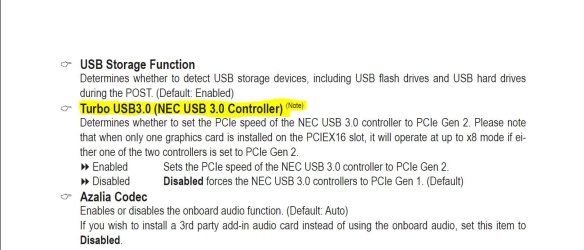
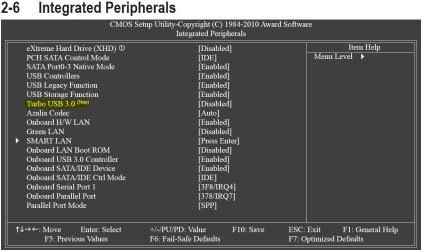
Hopefully I got the right manual for your mobo. For USB3 in the BIOS is a turbo switch. I won't pretend to understand what is written there But I do believe it could play an important role in your problem. What I do understand from my last mobo which had a similar setup is that the USB3 speed and The PCI speed are available but at a trade off, In other words only one will work with full speed and that is controlled I believe by the turbo switch see my snip,
Depending on the setting off this switch in your BIOS you should just need to change it, from Disabled to Enabled or vice-verse to get your USB3 to work.
 

Attachments

  • Capture.JPG
    Capture.JPG
    102.2 KB · Views: 107
  • Capture1.JPG
    Capture1.JPG
    104.5 KB · Views: 67

My Computer

Computer Manufacturer/Model Number
Something I threw together
OS
Windows 7 Ultimate x64
CPU
Intel Core i7-2600K
Motherboard
Asus P8P67
Memory
16 GB G Skill F3-10666 CL9D-4GBRL
Graphics Card(s)
ATI Radeon HD 6870
Sound Card
ATI Radeon HDMI / Realtek ALC892
Monitor(s) Displays
2 x 22" standard monitors / LG32LC56v TV to watch films
Screen Resolution
1920 x1080
Hard Drives
2 x OCZ Vertex2 111.79GB
3 x Samsung103SJ
1 x Samsung103UJ
1 x WD3200BEVT
1 x Hitachi5K320-160
PSU
Thermaltake Toughpower Cable Management 750W
Case
Antec 300
Cooling
Noctua NH-U12P SE2 and 5 120mm Case fans
Keyboard
Microsoft Comfort Curve Keyboard 2000
Mouse
Hama M3110 / Logitech M305
Internet Speed
16000
Other Info
I have also used Fedora, Suse, Ubuntu Linux
And all other Windows from 95 to date except ME
Thanks for all your help so far. It is really appreciated.

In my BIOS the USB3 Turbo was set to 'Enable' so I switched it to 'disable' but no luck I'm afraid.

I have also tried running Ubuntu from a CD as that natively supports USB3. However, the transfer speeds were the same as those that I get with Windows 7. This would seem to indicate that the problem lies somewhere in the BIOS. I'm beginning to wonder if the problem is caused by the fact that my machine is overclocked - I hasten to add that it wasn't something I did, it was purchased that way.

Any other thoughts? In the meantime I'm going to try running Ubuntu from a USB pen drive just to make sure that running it from a CD didn't cause it to run slowly (although I can't see why that would be the case).
 

My Computer

OS
Windows 7 Home Premium 64bit
CPU
Intel i5 2.8 @3.8
Motherboard
Gigabyte P55-USB3
Memory
8GB
Graphics Card(s)
Nvidia Geforce GTX 460
Hard Drives
1x 40GB OCZ-Agility SSD
1x Seagate Barracuda 500GB
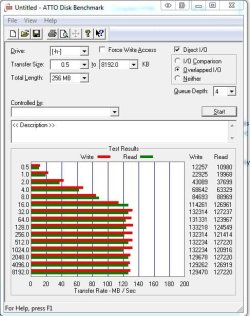
when you say your transfer speed is 30MBps have you tried moving larger files?
Did you try those benchmark programs on a USB3 drive it would be interesting to see what they make of it, especially ATTO
This is a snip of ATTO on my USB3 drive as you can see the bigger the file the more speed.
 

Attachments

  • Capture.JPG
    Capture.JPG
    62 KB · Views: 32

My Computer

Computer Manufacturer/Model Number
Something I threw together
OS
Windows 7 Ultimate x64
CPU
Intel Core i7-2600K
Motherboard
Asus P8P67
Memory
16 GB G Skill F3-10666 CL9D-4GBRL
Graphics Card(s)
ATI Radeon HD 6870
Sound Card
ATI Radeon HDMI / Realtek ALC892
Monitor(s) Displays
2 x 22" standard monitors / LG32LC56v TV to watch films
Screen Resolution
1920 x1080
Hard Drives
2 x OCZ Vertex2 111.79GB
3 x Samsung103SJ
1 x Samsung103UJ
1 x WD3200BEVT
1 x Hitachi5K320-160
PSU
Thermaltake Toughpower Cable Management 750W
Case
Antec 300
Cooling
Noctua NH-U12P SE2 and 5 120mm Case fans
Keyboard
Microsoft Comfort Curve Keyboard 2000
Mouse
Hama M3110 / Logitech M305
Internet Speed
16000
Other Info
I have also used Fedora, Suse, Ubuntu Linux
And all other Windows from 95 to date except ME
Silly question...is USB 3.0 enabled in BIOS? I had the same problem until I did that.
If you delete your USB devices and reboot, Windows should pick up the drivers again.


EDIT: Sorry I was on the wrong page.:o
 

My Computer

Computer type
PC/Desktop
Computer Manufacturer/Model Number
Home Built Desktop By DataTech
OS
Windows 7 Ultimate X64 SP1
CPU
Intel i5-2550K, Differing ~4.4-4.8GHz No built in GPU
Motherboard
ASUS P8Z68-V PRO/GEN3
Memory
16GB G.Skill Sniper 1866MHz @ 2133MHz 2x8GB
Graphics Card(s)
ASUS GTX650TIB-DC2OC-2GD5, (650TI Boost)
Sound Card
Onboard Realtek 5-1
Monitor(s) Displays
Samsung P2570HD
Screen Resolution
1920x1080
Hard Drives
Samsung 840 Pro 256GB SSD for OS, 500GB Seagate Constellation (Enterprise drive) for Data
PSU
Corsair HX650W
Case
Inwin Dragon Rider
Cooling
Hyper 212 EVO w/two Noctua fans, push-pull, @1300 RPM
Keyboard
E-Z Eyes, bright yellow keys with large characters
Mouse
steelseries SENSEI Laser Pro Gaming
Internet Speed
48-51Mbs Mbs down, 11 Mbs up Xfinity Cable
Antivirus
Norton Internet Security 2013
Browser
IE 10, Opera, Pale Moon if needed
Other Info
4 case fans, LG BluRay-RE, ASUS DVD-RW, Mr. Fusion power supply, 1.21 gigawatts.
I've done the benchmark test on my Iomega External 3TB HDD and my Transcend 16GB Flash Drive (both USB3 drives) and have attached copies. As you can see they quickly hit the proverbial ceiling at around 40MBps.
 

Attachments

My Computer

OS
Windows 7 Home Premium 64bit
CPU
Intel i5 2.8 @3.8
Motherboard
Gigabyte P55-USB3
Memory
8GB
Graphics Card(s)
Nvidia Geforce GTX 460
Hard Drives
1x 40GB OCZ-Agility SSD
1x Seagate Barracuda 500GB
Not looking good :(
The USB turbo should be set to disabled I am sure now that is correct.
I think you should turn off any overclocking to see if that makes a difference.
I am wondering if it is maybe a MB fault.
 

My Computer

Computer Manufacturer/Model Number
Something I threw together
OS
Windows 7 Ultimate x64
CPU
Intel Core i7-2600K
Motherboard
Asus P8P67
Memory
16 GB G Skill F3-10666 CL9D-4GBRL
Graphics Card(s)
ATI Radeon HD 6870
Sound Card
ATI Radeon HDMI / Realtek ALC892
Monitor(s) Displays
2 x 22" standard monitors / LG32LC56v TV to watch films
Screen Resolution
1920 x1080
Hard Drives
2 x OCZ Vertex2 111.79GB
3 x Samsung103SJ
1 x Samsung103UJ
1 x WD3200BEVT
1 x Hitachi5K320-160
PSU
Thermaltake Toughpower Cable Management 750W
Case
Antec 300
Cooling
Noctua NH-U12P SE2 and 5 120mm Case fans
Keyboard
Microsoft Comfort Curve Keyboard 2000
Mouse
Hama M3110 / Logitech M305
Internet Speed
16000
Other Info
I have also used Fedora, Suse, Ubuntu Linux
And all other Windows from 95 to date except ME
hi man i can help you here

1-delete usb 3.0 driver if it has been installd properly
2-restart ur machin
3-insrete mobo driver disk
4-install usb 3.0 driver sepretly dont do express installtions
5-enjoyyyyyyyy and tell me the news
 

My Computer

Computer Manufacturer/Model Number
0599849409804
OS
Windows 7 Ultimate x64
CPU
i5
Motherboard
p55 usb3
Memory
2GB CORSIAR
Graphics Card(s)
ATI 5570 2GB
Sound Card
NON
Monitor(s) Displays
SAMSUNG B2230
Hard Drives
SEGATE 1TB
PSU
MUSHKIN 650 WATT
Case
COOLER MASTER ELITE
Cooling
NON
Back
Top