USB3 - The performance mystery

whs

New member
Guru
Gold Member
VIP
Local time
6:18 PM
Messages
26,200
Location
Florida in winter, Black Forest/Germany
Since the availability of USB3 on the market, there has been a lot of guessing – and disappointments – regarding the performance of this new external attachment option. In this article I will try to clarify some facts that rule the speed of the various disk attachments.


Note1
For simplicity reasons, I will use Megabytes (MB) as the discussion unit. I convert 1MB from 10Mb (Megabits). That is not quite exact, but that is close enough. One byte has 8 data bits and 1 control bit. In addition, there is control information when a file is written to disk.
Note2
The data I use for this analysis is from my systems. Those are not absolute numbers. You may see different numbers on your system depending on your hardware configuration. If you run the Atto tests on your system, you will get your numbers and can compare.

Disk performance

It is important to understand what you can expect from your disk(s). Rotating disks will typically have Read/Write speeds between 60 and 100MB/sec, some are a bit faster. But this applies only if the blocks are rather large – 128KB or larger. If the blocks are small, e.g. 4KB as the Windows NT systems mostly use, the R/W speed will be significantly lower. 4KB is also the formatted blocksize on the current disk hardware.

If you want faster R/W speeds then you can choose an SSD. They provide speeds up to 350MB/sec for Reads and somewhat less for Writes.

The top dog in the disk speed race is a Revo drive which is configured as 4 way hardware Raid. They attach via PCI-E x4 and have R/W speeds around 500MB/sec and more (Example).

Attachment performance

USB2 can transfer data up to a maximum speed of 48MB/sec. That means that a fast disk or SSD cannot Read or Write at speeds at which it would be capable.

USB3 is a lot faster – it can transfer data at speeds up to 600MB/sec. However, there are no disks (rotating disks or SSDs) on the market at this time that can feed the attachment at that speed.

eSata is another option. It provides transfer capability up to 300MB/sec. That is ample for rotating disks and possibly a bit tight for top performing SSDs (if big blocksizes are used).

Firewire (IEEE 1394) is an external attachment method that comes in two versions – a 40MB/sec and an 80 MB/sec version.

PCI-E x4 is the attachment method for Revo drives. It can transfer data at speeds up to 1000MB/sec.

Measurements

I have measured USB2, USB3 and eSata on my systems. I use Atto because it seems to provide the most consistent results. But there are other measurement tools (e.g. HD Tune) that may provide slightly different numbers.

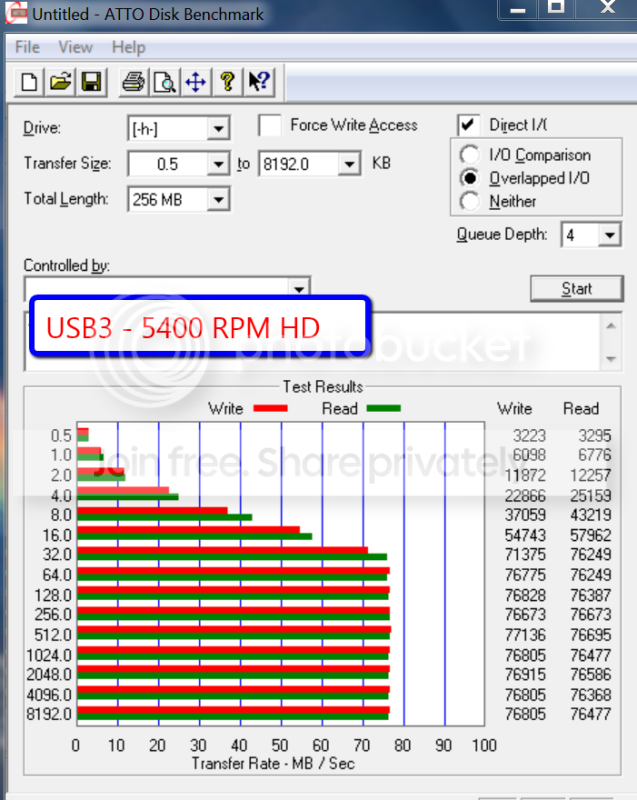
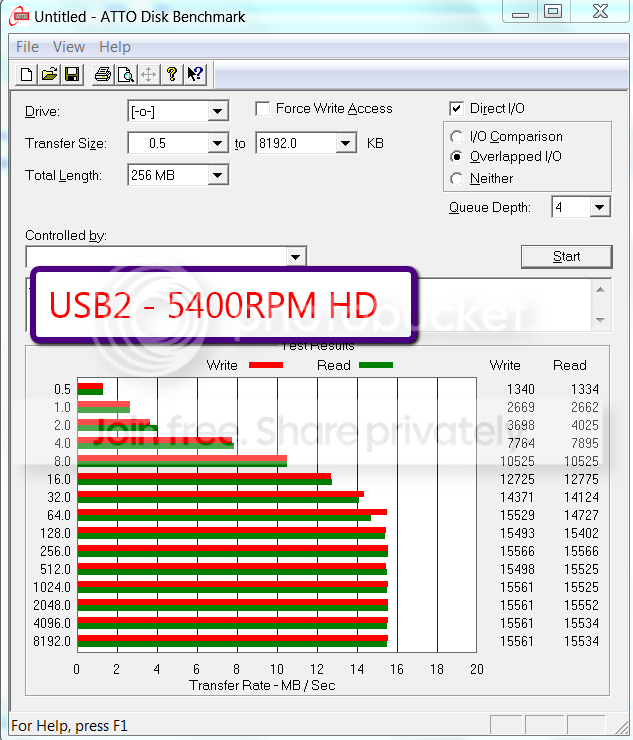
Test1 – here I use a 5400RPM disk running from USB2 and USB3

a.png


b.png


As you can see, USB3 is more than 4 times faster for large blocks and about 3 times faster for 4K blocks.

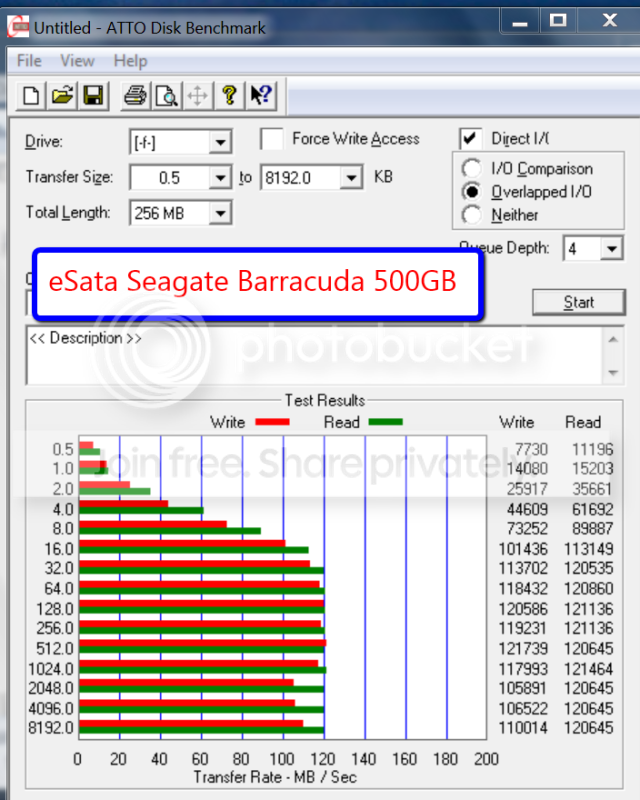
Test2 – here I use a 7200RPM disk attached to eSata

c.png


This is faster than USB3. The 4K times are twice as fast. But consider that this was a slightly faster disk. However, there have been several reports stating that eSata was faster than USB3 on other systems too.

Conclusion

Yes, USB3 provides fast data transfer speeds. But, there are no disks on the market right now that can exploit that capability. Rotating disks are probably maxed out with the 10.000RPM Raptors and SSDs are still too expensive for large amounts of data storage – and even the SSDs of today would not use the full USB3 capability.

I suppose we have to wait for the future developments in the disk technology to make full use of USB3. But then there is already Thunderbolt offered by Intel and Apple which provides PCI-E type performance for an external attachment. There is always the next step.


.
 
Last edited:

My Computer

Computer Manufacturer/Model Number
HP, Dell, Gateway, Toshiba - 4 laptops and 2 desktops
OS
Vista, Windows7, Mint Mate, Zorin, Windows 8
CPU
from 1.6GHz Duo to i7
Monitor(s) Displays
2x HP w2207
Hard Drives
5x HDD, 7x SSD, 12x Externals
Keyboard
with trackball - no mices
Mouse
Trackball mice
Internet Speed
DSL 6000
Very informative article Wolfgang. I am just now playing with my first SSD and I must say performance isnt what I expected, although MUCH better that rotating drives. :)
 

My Computer

Computer Manufacturer/Model Number
Custom
OS
Windows 7 ultimate X64
CPU
Core i7 870 Lynnfield
Motherboard
MSI P55-GD55
Memory
4GB Corsair XMS 3 1600Mhz
Graphics Card(s)
GeForce 8800 GTS (for the time being)
Sound Card
Onboard 7.1 digital
Monitor(s) Displays
Dell 19"
Screen Resolution
1280x1024
Hard Drives
Barracuda 750Gb
PSU
Corsair TX 650w
Case
Thermaltake Armour Extreme Edition
Cooling
Corsair H50
Keyboard
Dell XPS slim
Mouse
Dell XPS mouse (only good product)
Internet Speed
100 Mbps +/-
Excellent artical, Wolfgang.
Great for us novices to get a better handle on things.:)
 

My Computer

Computer Manufacturer/Model Number
Home build
OS
Win7 Ultimate x64
CPU
3820
Motherboard
Rampage IV formula
Memory
12 GB kit
Graphics Card(s)
XFX nVidia GeForce GTX 560
Sound Card
On board card
Monitor(s) Displays
LG 27" x 2
Screen Resolution
1920 x 1080
Hard Drives
1 x OCZ Vertex 4 , 256Gb
PSU
875W Thermal Take
Case
Antec P160W
Cooling
Noctua
Keyboard
Logitech Wave Pro
Mouse
Logitech
Internet Speed
1.5 Mb
Other Info
Logitech G25 steering wheel, Logitech Extreme 3D Pro joystick.
Logitech surround sound speaker system.
Of course, given the exact same hard drive...which provides a certain amount of speed given the physical drive itself.....in almost every situation I have read about, the performance is faster with eSATA than it is with USB 3.0....even though from a theortetical perspective, USB3.0 provides room for 2x the performance. I think THAT is the part that really confuses people. I believe it has to do with USB3.0 overhead, and driver support for the USB 3.0 chipsets at the present time.
 

My Computer

Computer Manufacturer/Model Number
Self-Built in July 2009
OS
Windows 7 Ultimate x64
CPU
Intel Q9550 2.83Ghz OC'd to 3.40Ghz
Motherboard
Gigabyte GA-EP45-UD3R rev. 1.1, F12 BIOS
Memory
8GB G.Skill PI DDR2-800, 4-4-4-12 timings
Graphics Card(s)
EVGA 1280MB Nvidia GeForce GTX570
Sound Card
Realtek ALC899A 8 channel onboard audio
Monitor(s) Displays
23" Acer x233H
Screen Resolution
1920x1080
Hard Drives
Intel X25-M 80GB Gen 2 SSD
Western Digital 1TB Caviar Black, 32MB cache. WD1001FALS
PSU
Corsair 620HX modular
Case
Antec P182
Cooling
stock
Keyboard
ABS M1 Mechanical
Mouse
Logitech G9 Laser Mouse
Internet Speed
15/2 cable modem
Other Info
Windows and Linux enthusiast. Logitech G35 Headset.
Yes right. On one of my systems I have both USB3 and eSata, but I always use eSata for imaging. It is indeed faster. If only the eSata cable would not be so stiff.
 

My Computer

Computer Manufacturer/Model Number
HP, Dell, Gateway, Toshiba - 4 laptops and 2 desktops
OS
Vista, Windows7, Mint Mate, Zorin, Windows 8
CPU
from 1.6GHz Duo to i7
Monitor(s) Displays
2x HP w2207
Hard Drives
5x HDD, 7x SSD, 12x Externals
Keyboard
with trackball - no mices
Mouse
Trackball mice
Internet Speed
DSL 6000
I don't even give USB3.0 a thought these days. I just make sure what I want to use has eSATA since that gives me best performance.
 

My Computer

Computer Manufacturer/Model Number
Self-Built in July 2009
OS
Windows 7 Ultimate x64
CPU
Intel Q9550 2.83Ghz OC'd to 3.40Ghz
Motherboard
Gigabyte GA-EP45-UD3R rev. 1.1, F12 BIOS
Memory
8GB G.Skill PI DDR2-800, 4-4-4-12 timings
Graphics Card(s)
EVGA 1280MB Nvidia GeForce GTX570
Sound Card
Realtek ALC899A 8 channel onboard audio
Monitor(s) Displays
23" Acer x233H
Screen Resolution
1920x1080
Hard Drives
Intel X25-M 80GB Gen 2 SSD
Western Digital 1TB Caviar Black, 32MB cache. WD1001FALS
PSU
Corsair 620HX modular
Case
Antec P182
Cooling
stock
Keyboard
ABS M1 Mechanical
Mouse
Logitech G9 Laser Mouse
Internet Speed
15/2 cable modem
Other Info
Windows and Linux enthusiast. Logitech G35 Headset.
Yes right. On one of my systems I have both USB3 and eSata, but I always use eSata for imaging. It is indeed faster. If only the eSata cable would not be so stiff.

Same here.

Have you tried running a USB 2.0 drive on a USB 3.0 port? You might be surprised! :)

Regards....Mike Connor
 

My Computer

OS
Several, including Windows 7 x64 Ultimate
Nice post Wolfgang.

I use eSATA also, hopefully USB3 will evolve.
 

My Computer

Computer type
PC/Desktop
Computer Manufacturer/Model Number
76~2.0
OS
Windows 7 Ult x64 - SP1/ Windows 8 Pro x64
CPU
Intel Core i5-3570K 4.6GHz
Motherboard
Gigabyte GA-Z77X UD3H, f18
Memory
8GB (2X4GB) DDR3 1600 Corsair Vengeance CL8 1.5v
Graphics Card(s)
Sapphire HD 7770 Vapor-X OC 1GB DDR5
Sound Card
Onboard VIA VT2021
Monitor(s) Displays
22" LCD Dell
Screen Resolution
1680x1050
Hard Drives
Samsung 840Pro 128GB SSD,
Seagate Barracuda 500GB SATA2 7200rpm 32MB cache, Seagate Barracuda 1TB SATA2 7200rpm 32MB cache,
PSU
Corsair HX650W
Case
Cooler Master Storm Scout
Cooling
Corsair H80 2x12cm Noctua NF P12 , 2x14cm case fans
Keyboard
Logitech Wave
Mouse
CM Sentinel
Internet Speed
Dismal
Antivirus
Avast
Browser
Opera Next
Other Info
Haswell laptop: HP Envy 17t-j, i7-4700MQ, GeForce 740M 2GB DDR3, 17.3" Full HD 1920x1080, 16GB RAM, Samsung 840 Pro 128GB, 1TB Hitachi 7200 HDD,
Desktop: eSATA ports,
External eSATA Seagate 500GB SATA2 7200rpm,
External WD USB 500GB
Yes right. On one of my systems I have both USB3 and eSata, but I always use eSata for imaging. It is indeed faster. If only the eSata cable would not be so stiff.

Same here.

Have you tried running a USB 2.0 drive on a USB 3.0 port? You might be surprised! :)

Regards....Mike Connor
Hi Mike, I am afraid you lost me a bit. The first to measurements above were with the same drive on USB2 and USB3. Is there something else I should expect and I have missed?
 

My Computer

Computer Manufacturer/Model Number
HP, Dell, Gateway, Toshiba - 4 laptops and 2 desktops
OS
Vista, Windows7, Mint Mate, Zorin, Windows 8
CPU
from 1.6GHz Duo to i7
Monitor(s) Displays
2x HP w2207
Hard Drives
5x HDD, 7x SSD, 12x Externals
Keyboard
with trackball - no mices
Mouse
Trackball mice
Internet Speed
DSL 6000
Yes right. On one of my systems I have both USB3 and eSata, but I always use eSata for imaging. It is indeed faster. If only the eSata cable would not be so stiff.

Same here.

Have you tried running a USB 2.0 drive on a USB 3.0 port? You might be surprised! :)

Regards....Mike Connor
Hi Mike, I am afraid you lost me a bit. The first to measurements above were with the same drive on USB2 and USB3. Is there something else I should expect and I have missed?

Running a USB 2.0 drive on a USB 3.0 port produces some odd results on various systems. But it is usually a lot faster than running a USB 2.0 drive on a USB 2.0 port.

I have tested a few and was rather surprised at the results, because although USB 3.0 is legacy capable ( backward compatible) to USB 2.0. It should not be faster than 2.0 if the drive is only 2.0 capable, but they almost always are, and by an appreciable amount.

If I get time tomorrow I will hook a few up and run a few tests.

On my personal machines I now only use eSATA.

Regards....Mike Connor
 

My Computer

OS
Several, including Windows 7 x64 Ultimate
Mike, thanks for the explanations. The way I understand it is you are talking about external disk drives where the electronics are designed for USB2.

I did all my runs with HDDs I recovered from my laptops after I upgraded them to SSDs. Those disks are run in external enclosures that are designed for USB2, USB3 and eSata. I also used a 3.5" internal drive (Barracuda) in an enclosure.
 

My Computer

Computer Manufacturer/Model Number
HP, Dell, Gateway, Toshiba - 4 laptops and 2 desktops
OS
Vista, Windows7, Mint Mate, Zorin, Windows 8
CPU
from 1.6GHz Duo to i7
Monitor(s) Displays
2x HP w2207
Hard Drives
5x HDD, 7x SSD, 12x Externals
Keyboard
with trackball - no mices
Mouse
Trackball mice
Internet Speed
DSL 6000
Mike, thanks for the explanations. The way I understand it is you are talking about external disk drives where the electronics are designed for USB2.

I did all my runs with HDDs I recovered from my laptops after I upgraded them to SSDs. Those disks are run in external enclosures that are designed for USB2, USB3 and eSata. I also used a 3.5" internal drive (Barracuda) in an enclosure.


Yes, I was only referring to externals with the relevant interfaces.

Regards....Mike Connor
 

My Computer

OS
Several, including Windows 7 x64 Ultimate
If I understand Mike correctly, he is correct. If you plug a usb 2.0 thumb drive into a USB 3.0 port you will get much faster performance from it than plugging it into a USB 2.0 port.

By the same token, Try a sata2 external into an esata2 port. Then try that same sata2 drive plugged into an esata3 port and see if you get better transfer rates.
 

My Computers

System One System Two

  • Computer type
    PC/Desktop
    Computer Manufacturer/Model Number
    ALWAYS UNDER CONSTRUCTION
    OS
    Windows 11 Pro
    CPU
    Ryzen 9 5900X
    Motherboard
    Asus X570 Crosshair Viii Hero
    Memory
    32GB G Skill DDR4-3600
    Graphics Card(s)
    EVGA RTX 3080 FTW 3 Ultra
    Sound Card
    On Board/Sennheiser PC37X Headset
    Monitor(s) Displays
    3 X Asus 27"
    Screen Resolution
    2560x1440
    Hard Drives
    2 X 1 TB NVME drives
    PSU
    EVGA 850
    Case
    Phanteks Eclipse P400A
    Cooling
    EVGA 280 AIO
    Keyboard
    Logitech G510s/ Logitech G13
    Mouse
    Logitech G502
    Internet Speed
    24/1
    Antivirus
    ESET/MBAM Pro/SAS Pro
    Browser
    Chrome/ Firefox/ Edge
  • Computer type
    Laptop
    System Manufacturer/Model Number
    Dell 16 Plus
    OS
    Windows 11 Pro
    CPU
    Intel Ultra 9 288V
    Memory
    32 GB LPDDR5X 8533
    Monitor(s) Displays
    16" Mini-LED HDR600 Touch 90 Hz
    Screen Resolution
    2560X1600
    Hard Drives
    1 TB NVME
Nice article thank you :D
USB 3 user here I am very happy with the transfer speeds
 

My Computer

Computer Manufacturer/Model Number
Something I threw together
OS
Windows 7 Ultimate x64
CPU
Intel Core i7-2600K
Motherboard
Asus P8P67
Memory
16 GB G Skill F3-10666 CL9D-4GBRL
Graphics Card(s)
ATI Radeon HD 6870
Sound Card
ATI Radeon HDMI / Realtek ALC892
Monitor(s) Displays
2 x 22" standard monitors / LG32LC56v TV to watch films
Screen Resolution
1920 x1080
Hard Drives
2 x OCZ Vertex2 111.79GB
3 x Samsung103SJ
1 x Samsung103UJ
1 x WD3200BEVT
1 x Hitachi5K320-160
PSU
Thermaltake Toughpower Cable Management 750W
Case
Antec 300
Cooling
Noctua NH-U12P SE2 and 5 120mm Case fans
Keyboard
Microsoft Comfort Curve Keyboard 2000
Mouse
Hama M3110 / Logitech M305
Internet Speed
16000
Other Info
I have also used Fedora, Suse, Ubuntu Linux
And all other Windows from 95 to date except ME
Back
Top