Use "Run as administrator" with UAC disabled

hedak

New member
Local time
4:47 AM
Messages
8
If you have UAC enabled you can start a program with administrator rights using "Run as administrator". But after disabling UAC this entry has no effect any more. As instance on my computer a have two user accounts. One for Internet and one for local usage. But some apps on my internet account need admin rights. This is an workaround for that problem using Sysinternals' psexec:

0) you need to have an (admin) account with a password set, it won't work without having set a password to that user, i call that user "Administrator" here
1) Download Sysinternals "PsTools" here: PsTools (direct link: http://download.sysinternals.com/Files/PsTools.zip)
2) Extract the zip file to "C:\Program files\PsTools"
3) Check wether "psexec.exe" is within "C:\Program files\PsTools"
4) Press Win+R and type "regedit"
5) navigate to "HKEY_LOCAL_MACHINE\SOFTWARE\Classes\exefile"
6) create a backup: right click the key "exefile" and "Export" it to any folder (remember that folder if my workaround doesn't work for you)
7) navigate to "HKEY_LOCAL_MACHINE\SOFTWARE\Classes\exefile\shell\runas\command"
8) change the value of the string "(Default)" to "C:\Program Files\PsTools\PsExec.exe" -i -d -u Administrator "%1""
9) delete the string "IsolatedCommand" (don't delete the value only)
10) you have finished :)

When using "Run as administrator" now a console will appear where you have to enter the password of Administrator.

Important note: While typing the password no letters or signs will be printed out at the console! Just type and press the enter key.

If you sometimes have problems with this solution you can backup the changed "exefile" key. So you can easily import the original or the modded backup.

@Admin: Please move this tutorial to the tutorials forum and delete this line ;)
 
Last edited:

My Computer My Computer

OS
Windows 7 Pro x32
i have uac disabled and in my context menu i still have the option "Run as administrator" ? are you saying the when you click it does not "Run as administrator" i am the only user on my machine so this has no relevance to single users?
 

My Computer My Computer

Computer Manufacturer/Model Number
packard bell IXTREME M5722
OS
Operating System : Windows 7 Home Premium Edition 6.01.7600 SP1 (x64)
CPU
Processor : Intel Core 2 Quad Q8300 @ 2500 MHz
Motherboard
Mainboard : Packard Bell (Acer EG43M )
Memory
Physical Memory :8GB Corsair4x 2GB 800MHz C5 DDR2
Graphics Card(s)
Video Card : XFX 6700 AMD
Monitor(s) Displays
Maestro 234DL - BenQ V2220 - BenQ VW2420H
Screen Resolution
Current Display :1920x1080p pixels at 60 Hz in HD LED
Hard Drives
Hard Disks : WDC (1000 GB)
Drive C: (Hard Disk) : 428 GB available on 491 GB
Drive D: (Hard Disk) : 426 GB available on 492 GB
SAMSUNG spinpoint HD103SJ 1000.2 GB
(X 2) KINGSTON SSD NOW V 30GB
PSU
XFX ProSeries 550W PSU
Case
PACKARD BELL IXTREME
Cooling
System Blower Current: 150mA Air Flow16CFM ;Akasa 90mm rear
Keyboard
Gigabyte Aivia K8100
Mouse
TRUST-Wireless Laser Mouse - Carbon edition MI-7770C
Internet Speed
TP-LINK > TL-WN951N / AV500 Gigabit Powerline Adapters
Browser
chrome dev
Other Info
EXTRA COOLING>(FAN CONTROLLER) PC Bay Cooler 3 x 40mm fans; Akasa AK-HD-BL Blue hard drive cooler 2 x 40 mm fan 4500 rpm 29.7 dBA
Bios> American Megatrends Inc.
Version : P01-A1
Date : 08/31/2009
i have uac disabled and in my context menu i still have the option "Run as administrator" ? are you saying the when you click it does not "Run as administrator" i am the only user on my machine so this has no relevance to single users?

ive never had to set anything "run as admin" everything i run has full admin rights it seems by default , i dont have UAC enabled and im the only user so maybe thats why , but ive never been troubled with any issues regarding admin rights even using command prompt
 

My Computer My Computer

Computer type
PC/Desktop
Computer Manufacturer/Model Number
Custom
OS
Win 10 Home Premium 64 Bit
CPU
I7 5930K @ 4.5
Motherboard
Asus X99 s
Memory
16GB Kingston Hyper X Fury DDR4
Graphics Card(s)
EVGA 980ti SC + ACX 2.0
Sound Card
Onboard
Monitor(s) Displays
ROG Swift PG278Q
Screen Resolution
2560x1440
Hard Drives
Kingston Hyper X 250gb SSD
Samsung 2TB mechanical
PSU
Corsair RM 850
Case
NZXT H440 Red
Cooling
Corsair H100i GTX
Keyboard
Razer Reclusa
Mouse
Logitech G5 Gamer
Internet Speed
34mb
Antivirus
Eset Smart Security
Browser
Firefox
Here is a much easier way. Turn UAC on.
 

My Computer My Computer

Computer type
PC/Desktop
Computer Manufacturer/Model Number
Alienware Aurora ALX R4
OS
Windows 10 Pro (x64)
CPU
Intel Core i7-3930K (3.2GHz - 4.5GHz)
Motherboard
Alienware Aurora-R4 x79
Memory
4x Samsung 4GB PC3-12800 DDR3 (16GB 1600MHz)
Graphics Card(s)
Nvidia Geforce GTX 690
Sound Card
SteelSeries Siberia Elite
Monitor(s) Displays
Dell UltraSharp U3011
Screen Resolution
2560x1600
Hard Drives
Samsung 850 Pro 256 GB, Seagate 1TB Desktop Hybrid HDD, 2x Western Digital 4TB Green HDD
PSU
875W Some Dell PSU <.<
Case
Alienware Aurora ALX
Cooling
Custom Liquid Cooling (EK CPU & GPU blocks) dual EK 480RAD
Keyboard
Logitech G710+ Mechanical
Mouse
Logitech G700s
Internet Speed
Verizon Fios (50 mbps average)
Other Info
Server: Intel NUC D54250WYK: i5-4250U, 16GB, 256 GB mSATA, Windows Server 2012 R2
Here is a much easier way. Turn UAC on.

I cant , i hate it , its a waste of time and energy and as annoying as hell :p Just another pointless piece of software to fool us into thinking our pc's are safe in microsofts hands , i can set my firewall to be just as annoying if i want ;)

i have friends who are pc savvy they disable it as a matter of course with zero issues , i have family members who are not as savvy leave it switched on and call me up at least once a month to remove all the rogue software from thier pc's , waste of time , or they ring me up all the time "my pc is asking for permission to do such and such what do i do?"..........................................well you start by disabling UAC :)
 

My Computer My Computer

Computer type
PC/Desktop
Computer Manufacturer/Model Number
Custom
OS
Win 10 Home Premium 64 Bit
CPU
I7 5930K @ 4.5
Motherboard
Asus X99 s
Memory
16GB Kingston Hyper X Fury DDR4
Graphics Card(s)
EVGA 980ti SC + ACX 2.0
Sound Card
Onboard
Monitor(s) Displays
ROG Swift PG278Q
Screen Resolution
2560x1440
Hard Drives
Kingston Hyper X 250gb SSD
Samsung 2TB mechanical
PSU
Corsair RM 850
Case
NZXT H440 Red
Cooling
Corsair H100i GTX
Keyboard
Razer Reclusa
Mouse
Logitech G5 Gamer
Internet Speed
34mb
Antivirus
Eset Smart Security
Browser
Firefox
I also have UAC turned off. It's an annoyance I can do without. I also still have the "run as administrator" context menu item and I have never had to use it.
 

My Computer My Computer

Computer type
PC/Desktop
Computer Manufacturer/Model Number
Home Built
OS
Windows 10 Education 64 bit
CPU
AMD Phenom II X4 980 Black Edition Deneb 3.7GHz
Motherboard
Asus M4N68T-M V2 µATX Motherboard
Memory
8GB 4GBx2 Kingston PC10600 DDR3 1333 Memory
Graphics Card(s)
Zotac NVIDIA Geforce GT640 2 Gig DDR3 PCIe
Sound Card
VIA VT1708s High Definition Audio 8-channel Onboard
Monitor(s) Displays
22" LG E2242 1080p and 2 19" I-INC AG191D
Screen Resolution
1280x1024 - 1920x1080 - 1280x1024
Hard Drives
Crucial M100 256 GB SSD and 500 GB WD Blue SATA
PSU
Thermaltake TR 620
Case
Power Up Black ATX Mid-Tower Case
Cooling
Stock heatsink and fan
Keyboard
Logitech Wireless K350 Wave
Mouse
Logitech Wireless M570 Trackman Wheel
Internet Speed
80 Mbps Down 30 Mbps Up
Antivirus
Windows Defender
Browser
Internet Explorer 11
Other Info
HP DVD1040e Lightscribe - External USB2
With UAC disabled you still have "Run as administrator" in your context menu. But it doesnt work. On my computer a have two user accounts. One for Internet and one for local usage. But some apps on my internet account need admin rights. But as i said "Run as administrator" had no effect, because UAC is disabled.
 

My Computer My Computer

OS
Windows 7 Pro x32
Here is a much easier way. Turn UAC on.

I cant , i hate it , its a waste of time and energy and as annoying as hell :p Just another pointless piece of software to fool us into thinking our pc's are safe in microsofts hands , i can set my firewall to be just as annoying if i want ;)

i have friends who are pc savvy they disable it as a matter of course with zero issues , i have family members who are not as savvy leave it switched on and call me up at least once a month to remove all the rogue software from thier pc's , waste of time , or they ring me up all the time "my pc is asking for permission to do such and such what do i do?"..........................................well you start by disabling UAC :)

i agree its to much security and annoying if you have a decent security suite that should protect you:D
 

My Computer My Computer

Computer Manufacturer/Model Number
packard bell IXTREME M5722
OS
Operating System : Windows 7 Home Premium Edition 6.01.7600 SP1 (x64)
CPU
Processor : Intel Core 2 Quad Q8300 @ 2500 MHz
Motherboard
Mainboard : Packard Bell (Acer EG43M )
Memory
Physical Memory :8GB Corsair4x 2GB 800MHz C5 DDR2
Graphics Card(s)
Video Card : XFX 6700 AMD
Monitor(s) Displays
Maestro 234DL - BenQ V2220 - BenQ VW2420H
Screen Resolution
Current Display :1920x1080p pixels at 60 Hz in HD LED
Hard Drives
Hard Disks : WDC (1000 GB)
Drive C: (Hard Disk) : 428 GB available on 491 GB
Drive D: (Hard Disk) : 426 GB available on 492 GB
SAMSUNG spinpoint HD103SJ 1000.2 GB
(X 2) KINGSTON SSD NOW V 30GB
PSU
XFX ProSeries 550W PSU
Case
PACKARD BELL IXTREME
Cooling
System Blower Current: 150mA Air Flow16CFM ;Akasa 90mm rear
Keyboard
Gigabyte Aivia K8100
Mouse
TRUST-Wireless Laser Mouse - Carbon edition MI-7770C
Internet Speed
TP-LINK > TL-WN951N / AV500 Gigabit Powerline Adapters
Browser
chrome dev
Other Info
EXTRA COOLING>(FAN CONTROLLER) PC Bay Cooler 3 x 40mm fans; Akasa AK-HD-BL Blue hard drive cooler 2 x 40 mm fan 4500 rpm 29.7 dBA
Bios> American Megatrends Inc.
Version : P01-A1
Date : 08/31/2009

My Computer My Computer

Computer type
PC/Desktop
Computer Manufacturer/Model Number
Lenovo IdeaCenter 450
OS
Windows 10 Pro X64
CPU
Intel Quad Core i7-4770 @ 3.4Ghz
Memory
16.0GB PC3-12800 DDR3 SDRAM 1600 MHz
Graphics Card(s)
Intel Integrated HD Graphics
Sound Card
Realtek HD Audio
Monitor(s) Displays
HP 22" LCD
Screen Resolution
1680 x 1050
Hard Drives
250GB Samsung EVO SATA-3 SSD
2TB Seagate ST2000DM001 SATA-2
1.5TB Seagate ST3150041AS SATA
Keyboard
Dell USB
Mouse
Lenovo USB
Internet Speed
Cable via Road Runner 3MB Upload, 30MB Download
Antivirus
Windows Defender, MBAM Pro, MBAE
Browser
Seamonkey
Other Info
UEFI/GPT
PLDS DVD-RW DH16AERSH
Is there a reason why you would want Users prompted to "Run As Adminstrator" yet not want even a minimum level of UAC turned on?

I know UAC is annoying and turn it off for my own installs or set to lowest for other installs. And it does indeed then disable Run as Admin making it the same as far as I can tell as running as hidden Admin.

Perhaps the OP has other Users he doesn't want installing Programs. Yet doesn't want constant nag messages about what he is doing.

They way I explain UAC to newbies is it might stop an internet intruder from running a program by asking you first, so dont' approve action you are not taking yourself at that moment. But most of the time it just asks you if you want to do what you are doing at the moment.

Others?
 
Perhaps the OP has other Users he doesn't want installing Programs. Yet doesn't want constant nag messages about what he is doing.
UAC won't stop other users from installing programs, they will just get prompted, and can click yes anyway. You would have to give them a "standard user" account instead of an administrator account to restrict what they can do.
 

My Computer My Computer

Computer type
PC/Desktop
Computer Manufacturer/Model Number
Home Built
OS
Windows 10 Education 64 bit
CPU
AMD Phenom II X4 980 Black Edition Deneb 3.7GHz
Motherboard
Asus M4N68T-M V2 µATX Motherboard
Memory
8GB 4GBx2 Kingston PC10600 DDR3 1333 Memory
Graphics Card(s)
Zotac NVIDIA Geforce GT640 2 Gig DDR3 PCIe
Sound Card
VIA VT1708s High Definition Audio 8-channel Onboard
Monitor(s) Displays
22" LG E2242 1080p and 2 19" I-INC AG191D
Screen Resolution
1280x1024 - 1920x1080 - 1280x1024
Hard Drives
Crucial M100 256 GB SSD and 500 GB WD Blue SATA
PSU
Thermaltake TR 620
Case
Power Up Black ATX Mid-Tower Case
Cooling
Stock heatsink and fan
Keyboard
Logitech Wireless K350 Wave
Mouse
Logitech Wireless M570 Trackman Wheel
Internet Speed
80 Mbps Down 30 Mbps Up
Antivirus
Windows Defender
Browser
Internet Explorer 11
Other Info
HP DVD1040e Lightscribe - External USB2
When using "Run as administrator" now a console will appear where you have to enter the password of Administrator.

;)

What exactly is this password for? I assumed you have a Registry hack that requires an Admin password to approve something in order to proceed.


UAC won't stop other users from installing programs, they will just get prompted, and can click yes anyway. You would have to give them a "standard user" account instead of an administrator account to restrict what they can do.


I understand it would have to be a standard User account for it to need Admin to allow changes, as an Admin would allow it anyway. But then what is the password for? Confuddling :confused:
 
With UAC disabled you still have "Run as administrator" in your context menu. But it doesnt work. On my computer a have two user accounts. One for Internet and one for local usage. But some apps on my internet account need admin rights. But as i said "Run as administrator" had no effect, because UAC is disabled.

OK, fair enough. I have no way of knowing if "run as admin" works or not, I've never had to use it. Are both of your accounts members of the administrators group? If one of them is only a standard user that would explain why you need it.
 

My Computer My Computer

Computer type
PC/Desktop
Computer Manufacturer/Model Number
Home Built
OS
Windows 10 Education 64 bit
CPU
AMD Phenom II X4 980 Black Edition Deneb 3.7GHz
Motherboard
Asus M4N68T-M V2 µATX Motherboard
Memory
8GB 4GBx2 Kingston PC10600 DDR3 1333 Memory
Graphics Card(s)
Zotac NVIDIA Geforce GT640 2 Gig DDR3 PCIe
Sound Card
VIA VT1708s High Definition Audio 8-channel Onboard
Monitor(s) Displays
22" LG E2242 1080p and 2 19" I-INC AG191D
Screen Resolution
1280x1024 - 1920x1080 - 1280x1024
Hard Drives
Crucial M100 256 GB SSD and 500 GB WD Blue SATA
PSU
Thermaltake TR 620
Case
Power Up Black ATX Mid-Tower Case
Cooling
Stock heatsink and fan
Keyboard
Logitech Wireless K350 Wave
Mouse
Logitech Wireless M570 Trackman Wheel
Internet Speed
80 Mbps Down 30 Mbps Up
Antivirus
Windows Defender
Browser
Internet Explorer 11
Other Info
HP DVD1040e Lightscribe - External USB2
When using "Run as administrator" now a console will appear where you have to enter the password of Administrator.

;)

What exactly is this password for? I assumed you have a Registry hack that requires an Admin password to approve something in order to proceed.


UAC won't stop other users from installing programs, they will just get prompted, and can click yes anyway. You would have to give them a "standard user" account instead of an administrator account to restrict what they can do.


I understand it would have to be a standard User account for it to need Admin to allow changes, as an Admin would allow it anyway. But then what is the password for? Confuddling :confused:

The password would be the password for the built in administrator account. Mine actually has one because I enabled it and set a password. His instructions tell you to do the same thing in the first couple of steps.
 

My Computer My Computer

Computer type
PC/Desktop
Computer Manufacturer/Model Number
Home Built
OS
Windows 10 Education 64 bit
CPU
AMD Phenom II X4 980 Black Edition Deneb 3.7GHz
Motherboard
Asus M4N68T-M V2 µATX Motherboard
Memory
8GB 4GBx2 Kingston PC10600 DDR3 1333 Memory
Graphics Card(s)
Zotac NVIDIA Geforce GT640 2 Gig DDR3 PCIe
Sound Card
VIA VT1708s High Definition Audio 8-channel Onboard
Monitor(s) Displays
22" LG E2242 1080p and 2 19" I-INC AG191D
Screen Resolution
1280x1024 - 1920x1080 - 1280x1024
Hard Drives
Crucial M100 256 GB SSD and 500 GB WD Blue SATA
PSU
Thermaltake TR 620
Case
Power Up Black ATX Mid-Tower Case
Cooling
Stock heatsink and fan
Keyboard
Logitech Wireless K350 Wave
Mouse
Logitech Wireless M570 Trackman Wheel
Internet Speed
80 Mbps Down 30 Mbps Up
Antivirus
Windows Defender
Browser
Internet Explorer 11
Other Info
HP DVD1040e Lightscribe - External USB2
So this is a password to continue beyond User Account prompt which no longer appears?
 
The password you have to enter is the password for an admin account (doesn't need to be the built in admin account, any other admin account works too). You will have to enter it running a standard user account and using my "Run as administrator" if the console asks for the password. You have to enter this password every time you use my "Run as administrator". You could expand the registry string i changed with the admins password, but it would stay there in clear text then...
Its like the normal "Run as administrator". But the normal "Run as administrator" works with UAC enabled only. I hope its clear now :(
 

My Computer My Computer

OS
Windows 7 Pro x32
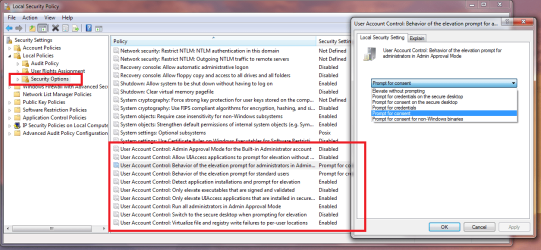
You know, you can have UAC on for standard users and off for Admin users, right?
Keeping UAC on you also get the benefits of the built in process sandbox, IE and Chrome both use.
 

Attachments

  • Untitled.png
    Untitled.png
    56.9 KB · Views: 112

My Computer My Computer

Computer type
PC/Desktop
Computer Manufacturer/Model Number
Alienware Aurora ALX R4
OS
Windows 10 Pro (x64)
CPU
Intel Core i7-3930K (3.2GHz - 4.5GHz)
Motherboard
Alienware Aurora-R4 x79
Memory
4x Samsung 4GB PC3-12800 DDR3 (16GB 1600MHz)
Graphics Card(s)
Nvidia Geforce GTX 690
Sound Card
SteelSeries Siberia Elite
Monitor(s) Displays
Dell UltraSharp U3011
Screen Resolution
2560x1600
Hard Drives
Samsung 850 Pro 256 GB, Seagate 1TB Desktop Hybrid HDD, 2x Western Digital 4TB Green HDD
PSU
875W Some Dell PSU <.<
Case
Alienware Aurora ALX
Cooling
Custom Liquid Cooling (EK CPU & GPU blocks) dual EK 480RAD
Keyboard
Logitech G710+ Mechanical
Mouse
Logitech G700s
Internet Speed
Verizon Fios (50 mbps average)
Other Info
Server: Intel NUC D54250WYK: i5-4250U, 16GB, 256 GB mSATA, Windows Server 2012 R2
OK, thanks for the tip. I'll try :)

Update: I finally got it working. The problem ist that i can't use the built in administrator account that way, because that account is hidden. My way works with every (admin) account. Anyway thanks!
 
Last edited:

My Computer My Computer

OS
Windows 7 Pro x32
You know, you can have UAC on for standard users and off for Admin users, right?
Keeping UAC on you also get the benefits of the built in process sandbox, IE and Chrome both use.

You can, but I can't. I'm running Home premium, no group policy editor. :(
 

My Computer My Computer

Computer type
PC/Desktop
Computer Manufacturer/Model Number
Home Built
OS
Windows 10 Education 64 bit
CPU
AMD Phenom II X4 980 Black Edition Deneb 3.7GHz
Motherboard
Asus M4N68T-M V2 µATX Motherboard
Memory
8GB 4GBx2 Kingston PC10600 DDR3 1333 Memory
Graphics Card(s)
Zotac NVIDIA Geforce GT640 2 Gig DDR3 PCIe
Sound Card
VIA VT1708s High Definition Audio 8-channel Onboard
Monitor(s) Displays
22" LG E2242 1080p and 2 19" I-INC AG191D
Screen Resolution
1280x1024 - 1920x1080 - 1280x1024
Hard Drives
Crucial M100 256 GB SSD and 500 GB WD Blue SATA
PSU
Thermaltake TR 620
Case
Power Up Black ATX Mid-Tower Case
Cooling
Stock heatsink and fan
Keyboard
Logitech Wireless K350 Wave
Mouse
Logitech Wireless M570 Trackman Wheel
Internet Speed
80 Mbps Down 30 Mbps Up
Antivirus
Windows Defender
Browser
Internet Explorer 11
Other Info
HP DVD1040e Lightscribe - External USB2
You know, you can have UAC on for standard users and off for Admin users, right?
Keeping UAC on you also get the benefits of the built in process sandbox, IE and Chrome both use.

You can, but I can't. I'm running Home premium, no group policy editor. :(

I don't have Home premium. But don't you even have the file "C:\Windows\System32\secpol.msc"?? That would do the trick. I know you don't have "gpedit.msc", but its not the same, right?
 

My Computer My Computer

OS
Windows 7 Pro x32
Back
Top