'Use Small Icons' fails to remain that way across reboots

JoeWulf

New member
Member
Local time
3:22 AM
Messages
13
'Use Small Icons' fails to remain that way across reboots/logins

I desire the StartBar to remain at a small/thin size and have only the time displayed, not the stacked double-height date/time.

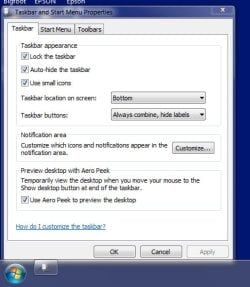
At StartMenu --> ControlPanel --> TaskBar and Start Menu, I select the check box for 'Use small icons', I select Apply and OK. The Start Bar dutifully shrinks to the correct size and the data/time simplifies down to just displaying the time. But only during this booted/login session.

However, this fails to remain this way across log-outs and reboots.

So, just previous to this...I'd recently shipped my Dell Alienware M18xR1 back to Dell for maintenance (they replaced the dying NVidia graphics cards). In the process, as they told me they would, they reinstalled the OS from scratch, and did all the default Windows updates. I'd previously saved all my data. I've gotten my laptop back, have been tailoring it, configuring the OS, reinstalling my apps and restoring my data. When I first got the laptop back, and during my initial tailoring, it was not doing this behavior. But, somehow, somewhere along the way that part of Windows 7 has seemingly gotten corrupted.

I'd really like help in getting this resolved. Insights are most welcome!

Thank you.

R,
-Joe Wulf
 
Last edited:

My Computer My Computer

At a glance

Windows 7 Ultimate x64I724GBDual NVidia 580M
Computer type
PC/Desktop
Computer Manufacturer/Model Number
Dell Alienware M18xR1
OS
Windows 7 Ultimate x64
CPU
I7
Memory
24GB
Graphics Card(s)
Dual NVidia 580M
Hard Drives
Dual Seagate EVO 1TB SSDs
Antivirus
Norton 360
Browser
Firefox
I've done Google searches and forum searches here without finding an answer.
 

My Computer My Computer

At a glance

Windows 7 Ultimate x64I724GBDual NVidia 580M
Computer type
PC/Desktop
Computer Manufacturer/Model Number
Dell Alienware M18xR1
OS
Windows 7 Ultimate x64
CPU
I7
Memory
24GB
Graphics Card(s)
Dual NVidia 580M
Hard Drives
Dual Seagate EVO 1TB SSDs
Antivirus
Norton 360
Browser
Firefox
Here are three JPGs showing the problem. Happens to me every time I log out and/or reboot.
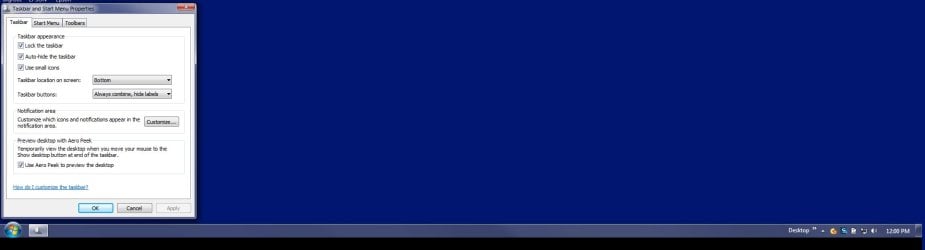
Picture 01 shows the Start Bar as being too big (i.e. stacked double-height).
Picture 02 shows the corrected state of the start bar, after being manually set every time.
Picture 03 shows the correct state exists (before correcting it every time) of 'use small icons'.

All I do, every time I log it, is call up the control panel --> TaskBar and Start Menu --> Then unset and reset the 'use small icons', click Apply and it goes to the correct behavior.

It just fails to stay that way across logouts and reboots. It reverts to the broken state every time.

Thank you.
 

Attachments

  • 01_ScreenProblem.jpg
    01_ScreenProblem.jpg
    8.8 KB · Views: 5
  • 02_UseSmallIconsState.jpg
    02_UseSmallIconsState.jpg
    32.7 KB · Views: 43
  • 03_HowItIsSupposedToLook.jpg
    03_HowItIsSupposedToLook.jpg
    43.1 KB · Views: 9
Last edited:

My Computer My Computer

At a glance

Windows 7 Ultimate x64I724GBDual NVidia 580M
Computer type
PC/Desktop
Computer Manufacturer/Model Number
Dell Alienware M18xR1
OS
Windows 7 Ultimate x64
CPU
I7
Memory
24GB
Graphics Card(s)
Dual NVidia 580M
Hard Drives
Dual Seagate EVO 1TB SSDs
Antivirus
Norton 360
Browser
Firefox
Is this something that is fixable?

How do I troubleshoot this further?
 

My Computer My Computer

At a glance

Windows 7 Ultimate x64I724GBDual NVidia 580M
Computer type
PC/Desktop
Computer Manufacturer/Model Number
Dell Alienware M18xR1
OS
Windows 7 Ultimate x64
CPU
I7
Memory
24GB
Graphics Card(s)
Dual NVidia 580M
Hard Drives
Dual Seagate EVO 1TB SSDs
Antivirus
Norton 360
Browser
Firefox
I'm looking for troubleshooting assistance, suggestions, or even web-sites that address this.

Thank you.
 

My Computer My Computer

At a glance

Windows 7 Ultimate x64I724GBDual NVidia 580M
Computer type
PC/Desktop
Computer Manufacturer/Model Number
Dell Alienware M18xR1
OS
Windows 7 Ultimate x64
CPU
I7
Memory
24GB
Graphics Card(s)
Dual NVidia 580M
Hard Drives
Dual Seagate EVO 1TB SSDs
Antivirus
Norton 360
Browser
Firefox

My Computer My Computer

At a glance

W10 32 bit, XUbuntu 18.xx 64 bitIntel(R) Celeron(R) CPU G1620T @ 2.40GHz, 240...4GBIntel HD graphics
Computer type
PC/Desktop
Computer Manufacturer/Model Number
Dell All in one Inspiron 2020
OS
W10 32 bit, XUbuntu 18.xx 64 bit
CPU
Intel(R) Celeron(R) CPU G1620T @ 2.40GHz, 2400 Mhz
Motherboard
Dell
Memory
4GB
Graphics Card(s)
Intel HD graphics
Sound Card
High Definition Audio Device
Monitor(s) Displays
20 inch Screen
Screen Resolution
W7=1280 x 720 & Linux Mint Xfce=1360 x 768
Hard Drives
500 GB hard drive
Keyboard
Usb
Mouse
Usb
Internet Speed
High-Speed
Antivirus
MSE
Browser
Main Browser Firefox
Other Info
I have done a clean install of Windows 7 using Dell re-installation disk (Dell sent me one). I also use Free Macrium reflect backup and restore.
Hi Joe,
This is going to sound stupid and totally wrong.
BUT
In your 2nd screenshot, at the very top i see EPSON, your printer i assume.
Now in my experience, (it C**** up my Mrs's) THEY (Epson) enjoy reconfiguring the desktop and context menu settings.

Try uninstalling it, see if that makes any difference.
If it works then reinstall your printer software USING the customised settings option.

Just to make sure Dell didn't muck things up can you run this tool
http://go.microsoft.com/fwlink/?LinkID=52012
copy/paste the results.

Roy
 
Last edited:

My Computer My Computer

At a glance

W7 home premium 32bit/W7HP 64bit/w10 tp insid...E5300 dual core3gbNvidia Geforce 7100 Nforce 630i
Computer type
PC/Desktop
Computer Manufacturer/Model Number
medionl/Aspire 6930G/acer x55a
OS
W7 home premium 32bit/W7HP 64bit/w10 tp insider ring
CPU
E5300 dual core
Motherboard
medion MS7366
Memory
3gb
Graphics Card(s)
Nvidia Geforce 7100 Nforce 630i
Monitor(s) Displays
avixc
Internet Speed
n (isp resticted to 72)
Antivirus
mse/pands
Browser
palemoon
Other Info
Belkin Fd7050 n USB using Railink RT2870 drivers, more upto date
@Groze... yep, mine is fully and legally licensed (as verified by following the instructions on the link you provided).

@torchwood, thank you... I'll take a look at that tomorrow---just don't have the cycles to spare tonight.
Thank you!
 

My Computer My Computer

At a glance

Windows 7 Ultimate x64I724GBDual NVidia 580M
Computer type
PC/Desktop
Computer Manufacturer/Model Number
Dell Alienware M18xR1
OS
Windows 7 Ultimate x64
CPU
I7
Memory
24GB
Graphics Card(s)
Dual NVidia 580M
Hard Drives
Dual Seagate EVO 1TB SSDs
Antivirus
Norton 360
Browser
Firefox
@torchwood, thank you for the information, much appreciated.

I'm going to defer the uninstall of the Epson drivers until I have to. I'm willing to, but as a last-resort.

I downloaded and ran the MS Diag tool you suggested. It provided a bunch of info (below) but no offers to fix anything. Nor were there any indications of not being licensed and legal.

Here's what is gave me:
Code:
Diagnostic Report (1.9.0027.0):
-----------------------------------------
Windows Validation Data-->

Validation Code: 0
Cached Online Validation Code: 0x0
Windows Product Key: *****-*****-CBG4J-8C6R2-TCVBD
Windows Product Key Hash: 6PX60gjAL/BLWe2bhoeSejdXJaw=
Windows Product ID: 00426-OEM-8992662-00008
Windows Product ID Type: 2
Windows License Type: OEM SLP
Windows OS version: 6.1.7601.2.00010100.1.0.001
ID: {F1211960-643B-4D17-A38A-05CF01B4FDC5}(3)
Is Admin: Yes
TestCab: 0x0
LegitcheckControl ActiveX: N/A, hr = 0x80070002
Signed By: N/A, hr = 0x80070002
Product Name: Windows 7 Ultimate
Architecture: 0x00000009
Build lab: 7601.win7sp1_ldr.160516-0600
TTS Error: 
Validation Diagnostic: 
Resolution Status: N/A

Vista WgaER Data-->
ThreatID(s): N/A, hr = 0x80070002
Version: N/A, hr = 0x80070002

Windows XP Notifications Data-->
Cached Result: N/A, hr = 0x80070002
File Exists: No
Version: N/A, hr = 0x80070002
WgaTray.exe Signed By: N/A, hr = 0x80070002
WgaLogon.dll Signed By: N/A, hr = 0x80070002

OGA Notifications Data-->
Cached Result: N/A, hr = 0x80070002
Version: N/A, hr = 0x80070002
OGAExec.exe Signed By: N/A, hr = 0x80070002
OGAAddin.dll Signed By: N/A, hr = 0x80070002

OGA Data-->
Office Status: 109 N/A
OGA Version: N/A, 0x80070002
Signed By: N/A, hr = 0x80070002
Office Diagnostics: 025D1FF3-364-80041010_025D1FF3-229-80041010_025D1FF3-230-1_025D1FF3-517-80040154_025D1FF3-237-80040154_025D1FF3-238-2_025D1FF3-244-80070002_025D1FF3-258-3

Browser Data-->
Proxy settings: N/A
User Agent: Mozilla/4.0 (compatible; MSIE 8.0; Win32)
Default Browser: C:\Program Files\Mozilla Firefox\firefox.exe
Download signed ActiveX controls: Prompt
Download unsigned ActiveX controls: Disabled
Run ActiveX controls and plug-ins: Allowed
Initialize and script ActiveX controls not marked as safe: Disabled
Allow scripting of Internet Explorer Webbrowser control: Disabled
Active scripting: Allowed
Script ActiveX controls marked as safe for scripting: Allowed

File Scan Data-->

Other data-->
Office Details: <GenuineResults><MachineData><UGUID>{F1211960-643B-4D17-A38A-05CF01B4FDC5}</UGUID><Version>1.9.0027.0</Version><OS>6.1.7601.2.00010100.1.0.001</OS><Architecture>x64</Architecture><PKey>*****-*****-*****-*****-TCVBD</PKey><PID>00426-OEM-8992662-00008</PID><PIDType>2</PIDType><SID>S-1-5-21-1955165029-3834674166-18951504</SID><SYSTEM><Manufacturer>Alienware</Manufacturer><Model>M18xR1</Model></SYSTEM><BIOS><Manufacturer>Alienware</Manufacturer><Version>A05</Version><SMBIOSVersion major="2" minor="7"/><Date>20111129000000.000000+000</Date></BIOS><HWID>551D3307018400FE</HWID><UserLCID>0409</UserLCID><SystemLCID>0409</SystemLCID><TimeZone>Eastern Standard Time(GMT-05:00)</TimeZone><iJoin>0</iJoin><SBID><stat>3</stat><msppid></msppid><name></name><model></model></SBID><OEM><OEMID>ALWARE</OEMID><OEMTableID>ALIENWRE</OEMTableID></OEM><GANotification/></MachineData><Software><Office><Result>109</Result><Products/><Applications/></Office></Software></GenuineResults>  

Spsys.log Content: 0x80070002

Licensing Data-->
Software licensing service version: 6.1.7601.17514

Name: Windows(R) 7, Ultimate edition
Description: Windows Operating System - Windows(R) 7, OEM_SLP channel
Activation ID: 7cfd4696-69a9-4af7-af36-ff3d12b6b6c8
Application ID: 55c92734-d682-4d71-983e-d6ec3f16059f
Extended PID: 00426-00178-926-600008-02-1033-7601.0000-1602016
Installation ID: 006962732632668870865373508550546155397230321205568522
Processor Certificate URL: [url=http://go.microsoft.com/fwlink/?LinkID=88338]SpcService Web Service[/url]
Machine Certificate URL: [url=http://go.microsoft.com/fwlink/?LinkID=88339]RacService Web Service[/url]
Use License URL: [url=http://go.microsoft.com/fwlink/?LinkID=88341]UseLicenseService Web Service[/url]
Product Key Certificate URL: [url=http://go.microsoft.com/fwlink/?LinkID=88340]PkcService Web Service[/url]
Partial Product Key: TCVBD
License Status: Licensed
Remaining Windows rearm count: 2
Trusted time: 2016/07/05 17:32:14

Windows Activation Technologies-->
HrOffline: 0x00000000
HrOnline: 0x00000000
HealthStatus: 0x0000000000000000
Event Time Stamp: 6:11:2016 20:11
ActiveX: Registered, Version: 7.1.7600.16395
Admin Service: Registered, Version: 7.1.7600.16395
HealthStatus Bitmask Output:


HWID Data-->
HWID Hash Current: MAAAAAEAAAABAAEAAQABAAAABAABAAEA1gQ+FCpy2FzstiaJWIKOcHKKvkF2bS5z

OEM Activation 1.0 Data-->
N/A

OEM Activation 2.0 Data-->
BIOS valid for OA 2.0: yes
Windows marker version: 0x20001
OEMID and OEMTableID Consistent: yes
BIOS Information: 
  ACPI Table Name    OEMID Value    OEMTableID Value
  APIC            ALWARE        ALIENWRE
  FACP            ALWARE        ALIENWRE
  HPET            ALWARE        ALIENWRE
  BOOT            ALWARE        ALIENWRE
  MCFG            ALWARE        ALIENWRE
  SLIC            ALWARE        ALIENWRE
  OSFR            ALWARE        ALIENWRE
  ASF!            ALWARE        ALIENWRE
  SSDT            INSYDE        INSYDE  
  ASPT            ALWARE        ALIENWRE
  SSDT            INSYDE        INSYDE  
  SSDT            INSYDE        INSYDE  
  DMAR            ALWARE        ALIENWRE
  SSDT            INSYDE        INSYDE  
  WDTT            ALWARE        ALIENWRE
 
Last edited by a moderator:

My Computer My Computer

At a glance

Windows 7 Ultimate x64I724GBDual NVidia 580M
Computer type
PC/Desktop
Computer Manufacturer/Model Number
Dell Alienware M18xR1
OS
Windows 7 Ultimate x64
CPU
I7
Memory
24GB
Graphics Card(s)
Dual NVidia 580M
Hard Drives
Dual Seagate EVO 1TB SSDs
Antivirus
Norton 360
Browser
Firefox
So the removal of my epson software and drivers, and multiple subsequent reboots, did not change this behavior.
Upon reinstallation, no option was evident to me that would affect the state of the 'use small icons' on the start bar.

I'm back to square one with this problem.
 

My Computer My Computer

At a glance

Windows 7 Ultimate x64I724GBDual NVidia 580M
Computer type
PC/Desktop
Computer Manufacturer/Model Number
Dell Alienware M18xR1
OS
Windows 7 Ultimate x64
CPU
I7
Memory
24GB
Graphics Card(s)
Dual NVidia 580M
Hard Drives
Dual Seagate EVO 1TB SSDs
Antivirus
Norton 360
Browser
Firefox

My Computer My Computer

At a glance

Windows 7 Home Premium 64 bit sp1Intel i5 3570 3.4Ghz Ivy Bridge SKT 1155 quad...G-Skill Rip Jaws 16Gb (8x2) DDR3 -1600 PC3 12...Gigabyte NVIDIA GT610 1Gb DDR3 810/1200 PCI-E...
Computer type
PC/Desktop
Computer Manufacturer/Model Number
Self built using existing case
OS
Windows 7 Home Premium 64 bit sp1
CPU
Intel i5 3570 3.4Ghz Ivy Bridge SKT 1155 quad core
Motherboard
Gigabyte Z77-HD3 SKT 1155 2xSata 3, 4x USB 3.0
Memory
G-Skill Rip Jaws 16Gb (8x2) DDR3 -1600 PC3 12800 CL 10 red
Graphics Card(s)
Gigabyte NVIDIA GT610 1Gb DDR3 810/1200 PCI-E 2.0 Silent
Sound Card
NVIDIA High Definition & Realtech High Definition Audio
Monitor(s) Displays
2 x Philips 226V4L 16:9 aspect ratio
Screen Resolution
1920 x 1080 HD
Hard Drives
Samsung 840 Pro 256gb SSD, SATA 3.
Hitachi Touro Portable 1tb, USB 3.0 HDD used for image b/ups.
PSU
Corsair VS450
Case
Codeng
Cooling
PSU fan & CPU fan
Keyboard
Logitech
Mouse
Logitech Wireless trackball M570
Internet Speed
Wireless 3G. 3mg down & 550kb up.
Antivirus
Bitdefender Internet Security 2020
Browser
Opera (Current Version) & Firefox
Other Info
MS Office 2013 Pro. Davis weather station software. MGE Nova 600 avr UPS.
@derekimo, thank you for fixing my post. I appreciate the simplification.
 

My Computer My Computer

At a glance

Windows 7 Ultimate x64I724GBDual NVidia 580M
Computer type
PC/Desktop
Computer Manufacturer/Model Number
Dell Alienware M18xR1
OS
Windows 7 Ultimate x64
CPU
I7
Memory
24GB
Graphics Card(s)
Dual NVidia 580M
Hard Drives
Dual Seagate EVO 1TB SSDs
Antivirus
Norton 360
Browser
Firefox
@Ranger4, thank you for that suggestion. I've recently had my laptop sent back to Dell Alienware Tech Support to replace one of the NVIDIA graphics cards. At the same time they did a full/clean reinstall of the Win 7 Ultimate OS back to factory conditions, to include the recovery partition. Once I got my laptop back, I independently booted each one of the following: AVG, Avira, BitDefender, Comodo, Kaspersky and even Micro$loth's WindozeDefender. Those that could downloaded the latest DAT Signatures. None of them reported any malware. I did this to protect myself and it took a bit of time, though it was the safest course for me to ensure my home environment remains clean. I don't need any more challenges, and it was worth the time.

I've reinstalled my OS myself on this and many many other computers over time (both Windoze and Linux), so I'm pretty experienced with the process and how to do it sensibly and safely. I've got a spreadsheet checklist-like that outlines the process of OS updates, patches, software applications to install and important configuration adjustments that need to be made. I use Acronis True Image Backup to protect my entire HD, too.

So after my malware scans came clean, I used my checklist and reinstalled all my apps, tailored/configured everything the way I like it and used Acronis to back it up to save time getting it back to this point in the future should the physical SSD drives crap out. I've reviewed my checklist and I cannot find anything that I would have done that would have borked up such a simple thing regarding stability and consistency of using small icons.

The link you shared is pretty old, from back in 2012... still it's interesting. One person points out for consideration that the user profile being used might be damaged. More on this shortly, I've gotta test that theory out.
 
Last edited:

My Computer My Computer

At a glance

Windows 7 Ultimate x64I724GBDual NVidia 580M
Computer type
PC/Desktop
Computer Manufacturer/Model Number
Dell Alienware M18xR1
OS
Windows 7 Ultimate x64
CPU
I7
Memory
24GB
Graphics Card(s)
Dual NVidia 580M
Hard Drives
Dual Seagate EVO 1TB SSDs
Antivirus
Norton 360
Browser
Firefox
Best of luck, will be interested to hear results.
 

My Computer My Computer

At a glance

Windows 7 Home Premium 64 bit sp1Intel i5 3570 3.4Ghz Ivy Bridge SKT 1155 quad...G-Skill Rip Jaws 16Gb (8x2) DDR3 -1600 PC3 12...Gigabyte NVIDIA GT610 1Gb DDR3 810/1200 PCI-E...
Computer type
PC/Desktop
Computer Manufacturer/Model Number
Self built using existing case
OS
Windows 7 Home Premium 64 bit sp1
CPU
Intel i5 3570 3.4Ghz Ivy Bridge SKT 1155 quad core
Motherboard
Gigabyte Z77-HD3 SKT 1155 2xSata 3, 4x USB 3.0
Memory
G-Skill Rip Jaws 16Gb (8x2) DDR3 -1600 PC3 12800 CL 10 red
Graphics Card(s)
Gigabyte NVIDIA GT610 1Gb DDR3 810/1200 PCI-E 2.0 Silent
Sound Card
NVIDIA High Definition & Realtech High Definition Audio
Monitor(s) Displays
2 x Philips 226V4L 16:9 aspect ratio
Screen Resolution
1920 x 1080 HD
Hard Drives
Samsung 840 Pro 256gb SSD, SATA 3.
Hitachi Touro Portable 1tb, USB 3.0 HDD used for image b/ups.
PSU
Corsair VS450
Case
Codeng
Cooling
PSU fan & CPU fan
Keyboard
Logitech
Mouse
Logitech Wireless trackball M570
Internet Speed
Wireless 3G. 3mg down & 550kb up.
Antivirus
Bitdefender Internet Security 2020
Browser
Opera (Current Version) & Firefox
Other Info
MS Office 2013 Pro. Davis weather station software. MGE Nova 600 avr UPS.
This may seem stupid but, when you checked Use Small Icons, did you click Apply before clicking OK?
 

My Computer My Computer

At a glance

Win 7 Ultimate 64 bitIntel i7-3930KKingston HyperX Genesis 32GB Kit (8x4GB Modul...MSI R7850 Twin Frozr 2GD5/OC Radeon HD 7850 2...
Computer type
PC/Desktop
Computer Manufacturer/Model Number
Custom Build
OS
Win 7 Ultimate 64 bit
CPU
Intel i7-3930K
Motherboard
ASUS P9X79 WS
Memory
Kingston HyperX Genesis 32GB Kit (8x4GB Modules) 1600MHz DDR
Graphics Card(s)
MSI R7850 Twin Frozr 2GD5/OC Radeon HD 7850 2GB 256-bit GDDR
Sound Card
Asus Xonar Essence STX
Monitor(s) Displays
3x Asus VG248QE 24", Vizio 32" TV
Screen Resolution
1920 x 1080, ?
Hard Drives
Samsung 128GB 840 Pro SSD (1),
Samsung 4TB 850 EVO SSDs (4)
Samsung 4TB 850 EVO SSDs (16) external backup drives used in 2.5" hot swap bays in the computer.
PSU
Corsair HX750w
Case
Antec Two Hundred v2 (modified)
Cooling
Cooler Master GeminII S524 120mm (fan replaced with a 140mm)
Keyboard
Logitech G510s
Mouse
Logitech M525 (two in use)
Internet Speed
=< 32Mbps down, 8Mbps up
Antivirus
AVAST!, MBAM, SAS, Spybot S&D (all but MBAM free) Glary Util
Browser
IE11
Other Info
LSI 9211-8i HBA card (8 SATA III ports), 2.5" & 3.5" Hot Swap Bays, HooToo HT-CR001 PCI-E to USB 3.0 Internal Hub + 6 Slot Card Reader, and LG Model CH12LS28 BD-ROM Optical Drive. Also, ScanSnap S1500 ADF duplexing scanner, Canon 9000F flat bed scanner, Corsair SP2500 2.1 speakers, Samsung CLP 415nw laser color printer, Cyberpower PP2200SW UPS

My Computer My Computer

At a glance

Win 10 Pro x64Intel I5-2500K @3.3GHz16GB G.Skill Ripjaws X (4x4GB)EVGA GeForce 750 Ti SC 2GB
Computer type
PC/Desktop
Computer Manufacturer/Model Number
Self Built
OS
Win 10 Pro x64
CPU
Intel I5-2500K @3.3GHz
Motherboard
Asrock P67 Extreme4
Memory
16GB G.Skill Ripjaws X (4x4GB)
Graphics Card(s)
EVGA GeForce 750 Ti SC 2GB
Sound Card
ASUS Xonar DG 5.1 Channels 24-bit 96KHz PCI Interface Sound
Monitor(s) Displays
auria eq2367
Screen Resolution
1920 x 1080
Hard Drives
250GB Samsung 850 EVO SSD
1TB WD Blue
1TB Hitachi
PSU
SeaSonic X 650W 80 Plus Gold
Case
Corsair Obsidian 750D
Cooling
Corsair H60, Three 140mm case fans
Keyboard
Logitech Wireless Keyboard K520
Mouse
Logitech Wireless Mouse M310
Internet Speed
Wave Broadband ~ 100 dn 5 up
Antivirus
Windows Defender, Malwarebytes Premium
Browser
Edge, IE11, Chrome
Other Info
Laptop specs: HP g7-1365dx /
CPU: AMD A6-3420M APU with Radeon(tm) HD Graphics /
RAM: Crucial 8Gb (2x4Gb) /
SSD: Crucial M4-CT128M4SSD2 ATA Device/ FW 000F /
GFX: AMD Radeon HD 6520G /
OS: Windows 10 Pro x64
@Lady Fitzgerald. I've actually done it both ways, the results are the same, either way. The box for it is always checked, especially when the bad/wrong/broken state is apparent. So, I uncheck it and re-check it (The Apply button us then no longer grey'ed out) and hit "OK".

I have tried it with uncheck 'Use small icons', hit [Apply], check 'Use small icons', hit [Apply], then hit [OK]. The problem goes away during the remainder of this booted/login session. Same problem returns upon the next reboot/login.

I have tried uncheck 'Use small icons', check 'Use small icons', hit [Ok]. The problem goes away during the remainder of this booted/login session. Same problem returns upon the next reboot/login.

I have tried uncheck 'Use small icons', hit [Apply], then hit [OK]; reboot. Once logged back in, I check 'Use small icons', hit [Apply], then hit [OK]; reboot. Same problem returns upon the next reboot/login.

I know it is a small, little, itty-bitty technicality, but beats the hell out of me what it is.

Thank you for the suggestion, though.
 

My Computer My Computer

At a glance

Windows 7 Ultimate x64I724GBDual NVidia 580M
Computer type
PC/Desktop
Computer Manufacturer/Model Number
Dell Alienware M18xR1
OS
Windows 7 Ultimate x64
CPU
I7
Memory
24GB
Graphics Card(s)
Dual NVidia 580M
Hard Drives
Dual Seagate EVO 1TB SSDs
Antivirus
Norton 360
Browser
Firefox

My Computer My Computer

At a glance

Win 10 Pro x64Intel I5-2500K @3.3GHz16GB G.Skill Ripjaws X (4x4GB)EVGA GeForce 750 Ti SC 2GB
Computer type
PC/Desktop
Computer Manufacturer/Model Number
Self Built
OS
Win 10 Pro x64
CPU
Intel I5-2500K @3.3GHz
Motherboard
Asrock P67 Extreme4
Memory
16GB G.Skill Ripjaws X (4x4GB)
Graphics Card(s)
EVGA GeForce 750 Ti SC 2GB
Sound Card
ASUS Xonar DG 5.1 Channels 24-bit 96KHz PCI Interface Sound
Monitor(s) Displays
auria eq2367
Screen Resolution
1920 x 1080
Hard Drives
250GB Samsung 850 EVO SSD
1TB WD Blue
1TB Hitachi
PSU
SeaSonic X 650W 80 Plus Gold
Case
Corsair Obsidian 750D
Cooling
Corsair H60, Three 140mm case fans
Keyboard
Logitech Wireless Keyboard K520
Mouse
Logitech Wireless Mouse M310
Internet Speed
Wave Broadband ~ 100 dn 5 up
Antivirus
Windows Defender, Malwarebytes Premium
Browser
Edge, IE11, Chrome
Other Info
Laptop specs: HP g7-1365dx /
CPU: AMD A6-3420M APU with Radeon(tm) HD Graphics /
RAM: Crucial 8Gb (2x4Gb) /
SSD: Crucial M4-CT128M4SSD2 ATA Device/ FW 000F /
GFX: AMD Radeon HD 6520G /
OS: Windows 10 Pro x64
@derekimo, Thanks for checking on that. I have a password-protected user login account.
I will (tommorrow) check out that hotfix though. That holds promise, I think. Thank you!
 

My Computer My Computer

At a glance

Windows 7 Ultimate x64I724GBDual NVidia 580M
Computer type
PC/Desktop
Computer Manufacturer/Model Number
Dell Alienware M18xR1
OS
Windows 7 Ultimate x64
CPU
I7
Memory
24GB
Graphics Card(s)
Dual NVidia 580M
Hard Drives
Dual Seagate EVO 1TB SSDs
Antivirus
Norton 360
Browser
Firefox
@derekimo, Thanks for checking on that. I have a password-protected user login account.
I will (tommorrow) check out that hotfix though. That holds promise, I think. Thank you!

You're welcome, I thought that might be your solve when I saw it, maybe it will do something anyway.

It's certainly worth looking into.
 

My Computer My Computer

At a glance

Win 10 Pro x64Intel I5-2500K @3.3GHz16GB G.Skill Ripjaws X (4x4GB)EVGA GeForce 750 Ti SC 2GB
Computer type
PC/Desktop
Computer Manufacturer/Model Number
Self Built
OS
Win 10 Pro x64
CPU
Intel I5-2500K @3.3GHz
Motherboard
Asrock P67 Extreme4
Memory
16GB G.Skill Ripjaws X (4x4GB)
Graphics Card(s)
EVGA GeForce 750 Ti SC 2GB
Sound Card
ASUS Xonar DG 5.1 Channels 24-bit 96KHz PCI Interface Sound
Monitor(s) Displays
auria eq2367
Screen Resolution
1920 x 1080
Hard Drives
250GB Samsung 850 EVO SSD
1TB WD Blue
1TB Hitachi
PSU
SeaSonic X 650W 80 Plus Gold
Case
Corsair Obsidian 750D
Cooling
Corsair H60, Three 140mm case fans
Keyboard
Logitech Wireless Keyboard K520
Mouse
Logitech Wireless Mouse M310
Internet Speed
Wave Broadband ~ 100 dn 5 up
Antivirus
Windows Defender, Malwarebytes Premium
Browser
Edge, IE11, Chrome
Other Info
Laptop specs: HP g7-1365dx /
CPU: AMD A6-3420M APU with Radeon(tm) HD Graphics /
RAM: Crucial 8Gb (2x4Gb) /
SSD: Crucial M4-CT128M4SSD2 ATA Device/ FW 000F /
GFX: AMD Radeon HD 6520G /
OS: Windows 10 Pro x64
Back
Top