Use the same driver for 2 cards?

nate42nd

Learning every day
Guru
Gold Member
VIP
Local time
7:54 AM
Messages
2,036
Location
The Wild West
I have been using a 9500GT video card and I just got a good deal on a GTS250. They both use the same driver on Nvidia's website. (196.75 is the latest...and I am running it)

NVIDIA DRIVERS 196.75 WHQL

Could I shut down, switch cards, and fire my machine back on and be running? I can't imagine it would be that easy....does anyone know?

Thanks
 

My Computer

Computer Manufacturer/Model Number
Keeps changing - (Custom)
OS
Windows 7 Professional x64
CPU
Intel Core i7 860
Motherboard
Gigabyte GA-P55-UD4P
Memory
4GB DDR3 Mushkin 1600Mhz @ 7-8-7-20
Graphics Card(s)
MSI GTS250 1GB DDR3 Twin Frozr
Sound Card
Onboard realtek
Monitor(s) Displays
Samsung SyncMaster 24" P2450 + Samsung 20" 2033
Screen Resolution
1920 X 1080 and 1600 X 900 (#2 system 1440 X 900)
Hard Drives
Patriot Inferno 120GB SSD + 3 WD Blue 640GB drives
PSU
Corsair 750 HX Modular
Case
Lancool PC-K62
Cooling
Cooler Master TX3 CPU cooler and 4-140mm and 1-120mm case
Keyboard
Gigabyte USB keyboard
Mouse
Microsoft wireless laser mouse 5000
Internet Speed
7 Mb down 1.5 up
Other Info
System #2: AMD Phenom II X6 1055T (Freezer 7 Pro cooler) - Gigabyte 880GMA-UD2H - WD 500GB Black - 9500GT (1GB) 500W OCZ modular PSU - Antec 200 case. System #3 (LapTop) Core 2 Duo T6670 - 320GB 7200RPM HD - 4GB DDR3 RAM.
I don't really know but when I switched from my 9600GT to GTX285 I removed the drivers and re-installed them again just to be sure. I would remove and re-install as it would only take you like 10-15 minutes so it would save you from future problems. :)
 

My Computer

Computer Manufacturer/Model Number
Modified Packard Bell M5772
OS
Windows 7 Ultimate 64 bit
CPU
Intel Core 2 Quad CPU Q8300 @ 2.55GHz
Motherboard
Packard Bell EG43M
Memory
6 GB DDR2
Graphics Card(s)
MSI GTX 570 TWIN FROZR III POWER EDITION
Sound Card
XONAR DG
Monitor(s) Displays
Samsung T200HD
Screen Resolution
1680 x 1050
Hard Drives
Western Digital Caviar Green Hard Disk (1 TB)
Western Digital Caviar Green Hard Disk (500GB)
PSU
EzCool Tornado 800w PSU
Case
Packard Bell Case
Cooling
Stock
Keyboard
Microsoft sidewinder x6
Mouse
Microsoft sidewinder x8
Internet Speed
10 mb/s
Other Info
http://support.packardbell.com/uk/item/index.php?pn=PT.U4002.012&g=1400
I don't really know but when I switched from my 9600GT to GTX285 I removed the drivers and re-installed them again just to be sure. I would remove and re-install as it would only take you like 10-15 minutes so it would save you from future problems. :)

Probably a good idea, i was just wondering. I'll bet it would work. I don't even know if it would cause any problems. Maybe I'll try it and see what happens....If I wasn't already running the latest version....it would be different.
 

My Computer

Computer Manufacturer/Model Number
Keeps changing - (Custom)
OS
Windows 7 Professional x64
CPU
Intel Core i7 860
Motherboard
Gigabyte GA-P55-UD4P
Memory
4GB DDR3 Mushkin 1600Mhz @ 7-8-7-20
Graphics Card(s)
MSI GTS250 1GB DDR3 Twin Frozr
Sound Card
Onboard realtek
Monitor(s) Displays
Samsung SyncMaster 24" P2450 + Samsung 20" 2033
Screen Resolution
1920 X 1080 and 1600 X 900 (#2 system 1440 X 900)
Hard Drives
Patriot Inferno 120GB SSD + 3 WD Blue 640GB drives
PSU
Corsair 750 HX Modular
Case
Lancool PC-K62
Cooling
Cooler Master TX3 CPU cooler and 4-140mm and 1-120mm case
Keyboard
Gigabyte USB keyboard
Mouse
Microsoft wireless laser mouse 5000
Internet Speed
7 Mb down 1.5 up
Other Info
System #2: AMD Phenom II X6 1055T (Freezer 7 Pro cooler) - Gigabyte 880GMA-UD2H - WD 500GB Black - 9500GT (1GB) 500W OCZ modular PSU - Antec 200 case. System #3 (LapTop) Core 2 Duo T6670 - 320GB 7200RPM HD - 4GB DDR3 RAM.
I don't really know but when I switched from my 9600GT to GTX285 I removed the drivers and re-installed them again just to be sure. I would remove and re-install as it would only take you like 10-15 minutes so it would save you from future problems. :)

Probably a good idea, i was just wondering. I'll bet it would work. I don't even know if it would cause any problems. Maybe I'll try it and see what happens....If I wasn't already running the latest version....it would be different.

I think it would work but you will probably have performance issues and crashes in games.
 

My Computer

Computer Manufacturer/Model Number
Modified Packard Bell M5772
OS
Windows 7 Ultimate 64 bit
CPU
Intel Core 2 Quad CPU Q8300 @ 2.55GHz
Motherboard
Packard Bell EG43M
Memory
6 GB DDR2
Graphics Card(s)
MSI GTX 570 TWIN FROZR III POWER EDITION
Sound Card
XONAR DG
Monitor(s) Displays
Samsung T200HD
Screen Resolution
1680 x 1050
Hard Drives
Western Digital Caviar Green Hard Disk (1 TB)
Western Digital Caviar Green Hard Disk (500GB)
PSU
EzCool Tornado 800w PSU
Case
Packard Bell Case
Cooling
Stock
Keyboard
Microsoft sidewinder x6
Mouse
Microsoft sidewinder x8
Internet Speed
10 mb/s
Other Info
http://support.packardbell.com/uk/item/index.php?pn=PT.U4002.012&g=1400
i would remove the drivers, shutdown, install the card, boot up and install them again for sure, well thats what ive always done anyway!
 

My Computer

Computer Manufacturer/Model Number
Markys build Num4
OS
windows 7 Home Prem x64
CPU
intel i7 920
Motherboard
asus p6t deluxe v2
Memory
6gig corsair dominators dhx 1600mhz
Graphics Card(s)
evga nvidia 285 1gig supaclocked
Sound Card
creative fatal1ty titanuim championship
Monitor(s) Displays
samsung syncmaster 22"
Screen Resolution
1680x1050
Hard Drives
1x150gig WD velociraptor
2x500gig matrox raid0
PSU
ocz xtreme 1000w
Case
coolermaster HAF932
Cooling
DIY liquid cooling
Keyboard
logitech G19
Mouse
Coolermaster Sentinel Advanced
Internet Speed
20mb ADSL
Thanks a lot guys....I will take your advice, but I may see what happens first with the existing driver since it's the same, thanks for the input.
 

My Computer

Computer Manufacturer/Model Number
Keeps changing - (Custom)
OS
Windows 7 Professional x64
CPU
Intel Core i7 860
Motherboard
Gigabyte GA-P55-UD4P
Memory
4GB DDR3 Mushkin 1600Mhz @ 7-8-7-20
Graphics Card(s)
MSI GTS250 1GB DDR3 Twin Frozr
Sound Card
Onboard realtek
Monitor(s) Displays
Samsung SyncMaster 24" P2450 + Samsung 20" 2033
Screen Resolution
1920 X 1080 and 1600 X 900 (#2 system 1440 X 900)
Hard Drives
Patriot Inferno 120GB SSD + 3 WD Blue 640GB drives
PSU
Corsair 750 HX Modular
Case
Lancool PC-K62
Cooling
Cooler Master TX3 CPU cooler and 4-140mm and 1-120mm case
Keyboard
Gigabyte USB keyboard
Mouse
Microsoft wireless laser mouse 5000
Internet Speed
7 Mb down 1.5 up
Other Info
System #2: AMD Phenom II X6 1055T (Freezer 7 Pro cooler) - Gigabyte 880GMA-UD2H - WD 500GB Black - 9500GT (1GB) 500W OCZ modular PSU - Antec 200 case. System #3 (LapTop) Core 2 Duo T6670 - 320GB 7200RPM HD - 4GB DDR3 RAM.
My two cents,

When I switched from an ATI 4850 to a 4890 I was forced to reinstall the drivers due to performance issues. Initially I hadn't done since as you say they were the same drivers. Bottom line - it's alway safe to just reinstall the drivers when making hardware changes such as these.

My two cents.
 

My Computer

Computer type
PC/Desktop
Computer Manufacturer/Model Number
Custom built by me.
OS
Windows 10 Pro
CPU
Intel Core i7-4770K (3.5Ghz)
Motherboard
Gigabyte G1 Sniper 5 (F10 Bios)
Memory
32 gig Corsair Dominator Platinum (4x8Gig)
Graphics Card(s)
Sapphire Tri-X R9 Fury
Sound Card
Soundblaster ZXR
Monitor(s) Displays
NEC PA242W 24" LCD Monitor
Screen Resolution
1920 x 1200
Hard Drives
Primary - Samsung 850 Pro (512gig), Samsung 840 Pro (256gig), 2TB WD Caviar Black.
PSU
EVGA Supernova 1000 G2
Case
Cooler Master HAF X
Cooling
Corsair H100i with Corsair Air Series SP120 Quiet Fans
Keyboard
Logitech Wireless Wave
Mouse
Logitech Performance MX
Internet Speed
High Speed Cable
Antivirus
Norton Security
Browser
IE11
Other Info
Memory Timings - 1866MHz @ 9-9-9-27-1T @ 1.5 volts
My two cents,

When I switched from an ATI 4850 to a 4890 I was forced to reinstall the drivers due to performance issues. Initially I hadn't done since as you say they were the same drivers. Bottom line - it's alway safe to just reinstall the drivers when making hardware changes such as these.

My two cents.

Thanks you for your response. This is what I was looking for. I have never been in this situation before. I will try it the "safe" way and un-install as it only takes a few minutes.
 

My Computer

Computer Manufacturer/Model Number
Keeps changing - (Custom)
OS
Windows 7 Professional x64
CPU
Intel Core i7 860
Motherboard
Gigabyte GA-P55-UD4P
Memory
4GB DDR3 Mushkin 1600Mhz @ 7-8-7-20
Graphics Card(s)
MSI GTS250 1GB DDR3 Twin Frozr
Sound Card
Onboard realtek
Monitor(s) Displays
Samsung SyncMaster 24" P2450 + Samsung 20" 2033
Screen Resolution
1920 X 1080 and 1600 X 900 (#2 system 1440 X 900)
Hard Drives
Patriot Inferno 120GB SSD + 3 WD Blue 640GB drives
PSU
Corsair 750 HX Modular
Case
Lancool PC-K62
Cooling
Cooler Master TX3 CPU cooler and 4-140mm and 1-120mm case
Keyboard
Gigabyte USB keyboard
Mouse
Microsoft wireless laser mouse 5000
Internet Speed
7 Mb down 1.5 up
Other Info
System #2: AMD Phenom II X6 1055T (Freezer 7 Pro cooler) - Gigabyte 880GMA-UD2H - WD 500GB Black - 9500GT (1GB) 500W OCZ modular PSU - Antec 200 case. System #3 (LapTop) Core 2 Duo T6670 - 320GB 7200RPM HD - 4GB DDR3 RAM.
i need to do this also (with a new 1080p monitor as well).
does THIS sound right:


Connect OLD monitor to mobo VGA connector

Start Windows, uninstall OLD Nvidia drivers

Shut down, remove OLD card, install NEW card

Connect NEW monitor to NEW card.

Start Windows, install NEW Nvidia drivers


sorry, but i'm old and have a serious case of 'CRS' ('Can't Remember Sh*t').

THANKS!
 

My Computer

Computer Manufacturer/Model Number
eMachines W3502
OS
7 Ultimate
CPU
Intel® Celeron® D 3.20GHz, 512KB L2 cache, 533MHz FSB
Motherboard
Gateway Grant County
Memory
2 Gb DDR
Graphics Card(s)
Nvidia GeForce 7200
Sound Card
Onboard 6-Channel High-Definition Audio (Realtek)
Monitor(s) Displays
Changes with mood
Screen Resolution
Changes with monitor
Hard Drives
Seagate 250 Gb, 7200 RPM SATA (internal)
PSU
CoolerMaster something or other
Case
Stock
Cooling
Case, CPU and graphics coolers
Keyboard
Saitek Illuminated - USB
Mouse
Dell POS
Internet Speed
Cable
Other Info
Optical: Samsung DVD ROM, Asus CDR/W

Config changes regularly. Won't look like this for long...
Thanks you for your response. This is what I was looking for. I have never been in this situation before. I will try it the "safe" way and un-install as it only takes a few minutes.
Glad I was able to help.

i need to do this also (with a new 1080p monitor as well).
does THIS sound right:

Connect OLD monitor to mobo VGA connector

Start Windows, uninstall OLD Nvidia drivers

Shut down, remove OLD card, install NEW card

Connect NEW monitor to NEW card.

Start Windows, install NEW Nvidia drivers


sorry, but i'm old and have a serious case of 'CRS' ('Can't Remember Sh*t').

THANKS!

You can still connect to new monitor to the old card and still do all the above.

"does THIS sound right" - Yes
 

My Computer

Computer type
PC/Desktop
Computer Manufacturer/Model Number
Custom built by me.
OS
Windows 10 Pro
CPU
Intel Core i7-4770K (3.5Ghz)
Motherboard
Gigabyte G1 Sniper 5 (F10 Bios)
Memory
32 gig Corsair Dominator Platinum (4x8Gig)
Graphics Card(s)
Sapphire Tri-X R9 Fury
Sound Card
Soundblaster ZXR
Monitor(s) Displays
NEC PA242W 24" LCD Monitor
Screen Resolution
1920 x 1200
Hard Drives
Primary - Samsung 850 Pro (512gig), Samsung 840 Pro (256gig), 2TB WD Caviar Black.
PSU
EVGA Supernova 1000 G2
Case
Cooler Master HAF X
Cooling
Corsair H100i with Corsair Air Series SP120 Quiet Fans
Keyboard
Logitech Wireless Wave
Mouse
Logitech Performance MX
Internet Speed
High Speed Cable
Antivirus
Norton Security
Browser
IE11
Other Info
Memory Timings - 1866MHz @ 9-9-9-27-1T @ 1.5 volts
i need to do this also (with a new 1080p monitor as well).
does THIS sound right:


Connect OLD monitor to mobo VGA connector

Start Windows, uninstall OLD Nvidia drivers

Shut down, remove OLD card, install NEW card

Connect NEW monitor to NEW card.

Start Windows, install NEW Nvidia drivers


sorry, but i'm old and have a serious case of 'CRS' ('Can't Remember Sh*t').

THANKS!

My motherboard has NO integrated VGA connector, but thanks for the help. I should be able to uninstall the driver from within device manager hooked to the old card and Windows 7 "generic" should take over....I think.

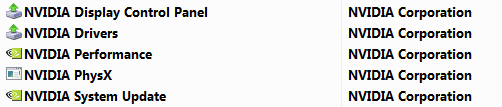
Is it better to un-install from "programs and features"? and get ALL the "sub-programs" too?

nvidiaprograms.PNG

These sound like dumb questions from a "Guru" but I've got a lot on my mind. haha
 

My Computer

Computer Manufacturer/Model Number
Keeps changing - (Custom)
OS
Windows 7 Professional x64
CPU
Intel Core i7 860
Motherboard
Gigabyte GA-P55-UD4P
Memory
4GB DDR3 Mushkin 1600Mhz @ 7-8-7-20
Graphics Card(s)
MSI GTS250 1GB DDR3 Twin Frozr
Sound Card
Onboard realtek
Monitor(s) Displays
Samsung SyncMaster 24" P2450 + Samsung 20" 2033
Screen Resolution
1920 X 1080 and 1600 X 900 (#2 system 1440 X 900)
Hard Drives
Patriot Inferno 120GB SSD + 3 WD Blue 640GB drives
PSU
Corsair 750 HX Modular
Case
Lancool PC-K62
Cooling
Cooler Master TX3 CPU cooler and 4-140mm and 1-120mm case
Keyboard
Gigabyte USB keyboard
Mouse
Microsoft wireless laser mouse 5000
Internet Speed
7 Mb down 1.5 up
Other Info
System #2: AMD Phenom II X6 1055T (Freezer 7 Pro cooler) - Gigabyte 880GMA-UD2H - WD 500GB Black - 9500GT (1GB) 500W OCZ modular PSU - Antec 200 case. System #3 (LapTop) Core 2 Duo T6670 - 320GB 7200RPM HD - 4GB DDR3 RAM.
mine only shows the nvidia drivers and nvidia control panel. i plan to remove both as the control panel is (was) bundled with the drivers. not familiar with those other things on your list. if it were me, i would uninstall the works, but its you and i don't want to give bad advice, so YMMV, as they say. i've never actually looked at the nvidia junk via device manager. i typically only see it when i right click on the desktop and choose settings or in add/remove programs in control panel (or whatever that is called in win 7). i plan to remove whatever nvidia there is in add/remove programs and be done with it. once i remove the old card, that device won't even show up in device manager anymore anyway. right?
 

My Computer

Computer Manufacturer/Model Number
eMachines W3502
OS
7 Ultimate
CPU
Intel® Celeron® D 3.20GHz, 512KB L2 cache, 533MHz FSB
Motherboard
Gateway Grant County
Memory
2 Gb DDR
Graphics Card(s)
Nvidia GeForce 7200
Sound Card
Onboard 6-Channel High-Definition Audio (Realtek)
Monitor(s) Displays
Changes with mood
Screen Resolution
Changes with monitor
Hard Drives
Seagate 250 Gb, 7200 RPM SATA (internal)
PSU
CoolerMaster something or other
Case
Stock
Cooling
Case, CPU and graphics coolers
Keyboard
Saitek Illuminated - USB
Mouse
Dell POS
Internet Speed
Cable
Other Info
Optical: Samsung DVD ROM, Asus CDR/W

Config changes regularly. Won't look like this for long...
You can still connect to new monitor to the old card and still do all the above.
yeh, i know, i was just being anal about it. thanks for confirming...
 
Last edited:

My Computer

Computer Manufacturer/Model Number
eMachines W3502
OS
7 Ultimate
CPU
Intel® Celeron® D 3.20GHz, 512KB L2 cache, 533MHz FSB
Motherboard
Gateway Grant County
Memory
2 Gb DDR
Graphics Card(s)
Nvidia GeForce 7200
Sound Card
Onboard 6-Channel High-Definition Audio (Realtek)
Monitor(s) Displays
Changes with mood
Screen Resolution
Changes with monitor
Hard Drives
Seagate 250 Gb, 7200 RPM SATA (internal)
PSU
CoolerMaster something or other
Case
Stock
Cooling
Case, CPU and graphics coolers
Keyboard
Saitek Illuminated - USB
Mouse
Dell POS
Internet Speed
Cable
Other Info
Optical: Samsung DVD ROM, Asus CDR/W

Config changes regularly. Won't look like this for long...
Back
Top