Used Revouninstaller to uninstall malware, Start menu rearranged.

deverton

New member
Local time
2:59 PM
Messages
5
Operating System: Windows 7
Computer: Dell
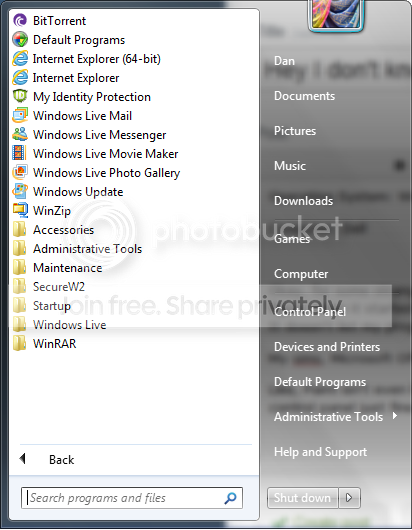
Okay, for some strange reason (and I’ve been doing system restore points trying to figure when it started but its like this all throughout), my start menu is all ****ed up. It doesn’t list my programs, and what is there is only half listed.
My sims, Microsoft Office, iTunes, etc. is not there.
Like, Paint isn’t even listed in accessories. Just notepad. BUT they show up on my control panel/remove add programs list just fine. Any desktop shortcuts work fine.


Screenshot:
startmenu.png
 

My Computer My Computer

At a glance

Windows 7
Computer Manufacturer/Model Number
Dell
OS
Windows 7

My Computer My Computer

At a glance

Windows 7 Professional SP1 64-bitIntel Core 2 Duo Processor E8300 @ 2.83GHz4.00 GB Dual-Channel DDR2 @ 332MHz (5-5-5-15)Intel(R) G33/G31 Express Chipset Family
Computer type
PC/Desktop
Computer Manufacturer/Model Number
Dell Inspiron 530
OS
Windows 7 Professional SP1 64-bit
CPU
Intel Core 2 Duo Processor E8300 @ 2.83GHz
Motherboard
Dell Inc. 0RY007 (Socket 775)
Memory
4.00 GB Dual-Channel DDR2 @ 332MHz (5-5-5-15)
Graphics Card(s)
Intel(R) G33/G31 Express Chipset Family
Sound Card
Integrated 7.1 Channel Audio
Monitor(s) Displays
Acer G245HQL 23.6" LED(1920x1080@60Hz)
Screen Resolution
1920 x 1080
Hard Drives
Disk 0 HITACHI 1TB OS Installed - Disk 1 HITACHI 1TB For Backups
Keyboard
Dell USB Keyboard
Mouse
Dell Optical USB Mouse
Internet Speed
DSL 10 meg
Antivirus
Symantec(SEP)
Browser
Pale Moon
Welcome to Seven Forums.

Try this since it was a malware problem.
Unhide.exe - A introduction as to what this program does

Are you sure that your PC is clean?

You can run MalwareBytes Anti-Malware & SuperAntispyware to see if they'll find anything. In my sig below.

I have ran them, and CCLeaner. Everything is clean, I just don't quite know what happened. Codec-C was removed successfully and everything.
 

My Computer My Computer

At a glance

Windows 7
Computer Manufacturer/Model Number
Dell
OS
Windows 7

My Computer My Computer

At a glance

Windows 7 Professional SP1 64-bitIntel Core 2 Duo Processor E8300 @ 2.83GHz4.00 GB Dual-Channel DDR2 @ 332MHz (5-5-5-15)Intel(R) G33/G31 Express Chipset Family
Computer type
PC/Desktop
Computer Manufacturer/Model Number
Dell Inspiron 530
OS
Windows 7 Professional SP1 64-bit
CPU
Intel Core 2 Duo Processor E8300 @ 2.83GHz
Motherboard
Dell Inc. 0RY007 (Socket 775)
Memory
4.00 GB Dual-Channel DDR2 @ 332MHz (5-5-5-15)
Graphics Card(s)
Intel(R) G33/G31 Express Chipset Family
Sound Card
Integrated 7.1 Channel Audio
Monitor(s) Displays
Acer G245HQL 23.6" LED(1920x1080@60Hz)
Screen Resolution
1920 x 1080
Hard Drives
Disk 0 HITACHI 1TB OS Installed - Disk 1 HITACHI 1TB For Backups
Keyboard
Dell USB Keyboard
Mouse
Dell Optical USB Mouse
Internet Speed
DSL 10 meg
Antivirus
Symantec(SEP)
Browser
Pale Moon

My Computer My Computer

At a glance

Windows 7
Computer Manufacturer/Model Number
Dell
OS
Windows 7

My Computer My Computer

At a glance

Windows 7 Professional SP1 64-bitIntel Core 2 Duo Processor E8300 @ 2.83GHz4.00 GB Dual-Channel DDR2 @ 332MHz (5-5-5-15)Intel(R) G33/G31 Express Chipset Family
Computer type
PC/Desktop
Computer Manufacturer/Model Number
Dell Inspiron 530
OS
Windows 7 Professional SP1 64-bit
CPU
Intel Core 2 Duo Processor E8300 @ 2.83GHz
Motherboard
Dell Inc. 0RY007 (Socket 775)
Memory
4.00 GB Dual-Channel DDR2 @ 332MHz (5-5-5-15)
Graphics Card(s)
Intel(R) G33/G31 Express Chipset Family
Sound Card
Integrated 7.1 Channel Audio
Monitor(s) Displays
Acer G245HQL 23.6" LED(1920x1080@60Hz)
Screen Resolution
1920 x 1080
Hard Drives
Disk 0 HITACHI 1TB OS Installed - Disk 1 HITACHI 1TB For Backups
Keyboard
Dell USB Keyboard
Mouse
Dell Optical USB Mouse
Internet Speed
DSL 10 meg
Antivirus
Symantec(SEP)
Browser
Pale Moon
Also, just found this out, but apparently it may have been an error with an update issues from Windows? I actually DID update just two days ago.
 

My Computer My Computer

At a glance

Windows 7
Computer Manufacturer/Model Number
Dell
OS
Windows 7
Right click the start button, go to properties. Click the "customize" button, play around with that.
 

My Computer My Computer

At a glance

Windows 8 RemixIntel T1000 i8 Prototype @4.5GHz16GB Crucial RAM
OS
Windows 8 Remix
CPU
Intel T1000 i8 Prototype @4.5GHz
Motherboard
Intel Coconut Creek
Memory
16GB Crucial RAM
Screen Resolution
2000x1500
Hard Drives
5TB Western Digital
Cooling
Liquid Cooled
Internet Speed
250mbps
Deverton,
Never use Revo Uninstaller to remove malware.
Use Windows Defender Offline.

Since you may still have malware on your computer,
Run WDO, Windows Defender Offline. Please use the link in my signature.

Run a full scan of all drives. This will take some time, but you will then have a system free of any and all malware.

Here is the procedure I use:
HOW TO USE WINDOWS DEFENDER OFFLINE ON A USB STICK
Windows Defender Offline
· is a free standalone, bootable malware and virus remover from Microsoft.
· performs an offline scan of an infected PC to remove viruses, rootkits and other advanced malware.

Download Windows Defender Offline (about 764 kB)

You will have the choice of downloading the 32bit version (x86) or the 64 bit version (x64).
The link will help you determine whether you are running a 32 bit version or 64 bit version of Windows

NOTE!! You can download and prepare a 32 bit version using a 64 bit version of Windows
NOTE!! You can download and prepare a 64 bit version using a 32bit version of Windows.

You run the 32 bit version on a 32 bit version of Windows.
You run the 64 bit version on a 64 bit version of Windows.

The 32 bit download file name is: mssstool32.exe
The 64 bit download file name is: mssstool64.exe

For the curious, this program was originally name Microsoft Standalone System Sweeper.


INSTALLATION:
You will need an Internet Connection.
Insert 512 mB (Microsoft’s 256 mB is no longer accurate) or larger USB stick into a usb port.
Run the downloaded program--mssstool64.exe or mssstool32.exe
NEXT button
Choose the option On a USB flash drive that is not password protected
NEXT button
NEXT button
.
The install program will format the usb stick using the NTFS format.
The install program will download about 210 mB.
The install program will name the USB stick WDO_Media32 or WDO_Media64
The WDO_Media32 usb stick will have used space of 255 mB (268,140,544 bytes)
The WDO_Media64 usb stick will have used space of 282 mB (296,165,376 bytes)
You can expect the number of mB to increase as more malware appears.

UPDATE Windows Defender Offline USB stick:
· reinsert the usb stick
· run the installation program, mssstool64.exe or mssstool32.exe, again.
· the update will download about 66 mB (mssstool32.exe) and 68 mB (mssstool64.exe).

Since the malware database is sometimes updated several times in a day, always update before running.

PERFORM AN OFFLINE SCAN
Bootup your computer from the USB stick
Windows Defender Offline will automatically perform a quick scan.
After the quick scan finishes, Choose Full Scan
Select all of your drives

The initial, full scan can easily take several hours, but
Remember, your computer is being very thoroughly checked for all types of malware.


RESULTS OF THE SCAN
The results will be in:
\Windows\Windows Defender Offline\Support,
file name format is MPLOG- as one or more files with a TXT extension which can be viewed with Notepad.

 

My Computer My Computer

At a glance

MS Windows 7 Ultimate SP1 64-bitAMD A10-4600M6.00 GB Dual-Channel DDR3 @ 798MHz (11-11-12-28)AMD Radeon HD 7660G
Computer Manufacturer/Model Number
Toshiba Satellite S875D-S7239 laptop
OS
MS Windows 7 Ultimate SP1 64-bit
CPU
AMD A10-4600M
Motherboard
AMD Pumori (Socket FT1)
Memory
6.00 GB Dual-Channel DDR3 @ 798MHz (11-11-12-28)
Graphics Card(s)
AMD Radeon HD 7660G
Sound Card
High Definition Audio Device
Monitor(s) Displays
Generic PnP Monitor (1600x900@60Hz)
Screen Resolution
1600x900@60Hz
Hard Drives
SSD 119GB Corsair CSSD-V128GB2 ATA Device
Keyboard
Standard PS/2 Keyboard
Mouse
HP Wireless Optical Mobile Mouse Model FHA-3410
Internet Speed
What the local pub, local coffee shop offers.
Other Info
Optical Drive:MATSHITA BD-CMB UJ160B ATA Device


Also have an Asus ha1002xp netbook with Win 7 Ultimate installed.
Back
Top