

- Local time
- 8:45 PM
- Messages
- 1,506
Is there a way to require a password whenever the UAC Box appears?
I'm wondering... Is there a way to force UAC to require a password anytime it pops up? I've been trying to increase security by using a non admin account, but that presents a problem. First of all, I can't use some programs due to inaccesible files. Not to mention I have to log into an admin account anytime that I want to do anything security related. I don't like to use the admin account because after the initial password, there is very little internal security other than a UAC box and even those are just Yes/No.
What I want seems to be a mix of the two, similar to the way user accounts work on OS X. Whenever I attempt to access something secure (ie. something that UAC would notify on) Windows should ask me for the administrative password. This way even if I'm on an admin account, I'd still need the password to access the feature, instead of just getting a worthless pop up that asks me whether I'd like to proceed.
Apparently in some installations, a standard user would be prompted by a password when trying to access something security related. On my computer, I just get an error and/or a dialog that says to log into an administrative account.
This is the type of prompt I want:
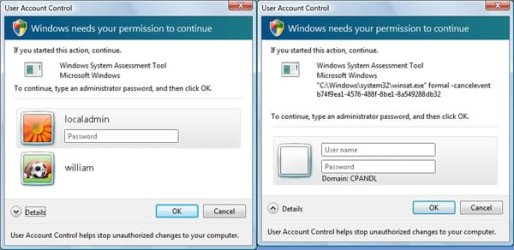
I'm wondering... Is there a way to force UAC to require a password anytime it pops up? I've been trying to increase security by using a non admin account, but that presents a problem. First of all, I can't use some programs due to inaccesible files. Not to mention I have to log into an admin account anytime that I want to do anything security related. I don't like to use the admin account because after the initial password, there is very little internal security other than a UAC box and even those are just Yes/No.
What I want seems to be a mix of the two, similar to the way user accounts work on OS X. Whenever I attempt to access something secure (ie. something that UAC would notify on) Windows should ask me for the administrative password. This way even if I'm on an admin account, I'd still need the password to access the feature, instead of just getting a worthless pop up that asks me whether I'd like to proceed.
Apparently in some installations, a standard user would be prompted by a password when trying to access something security related. On my computer, I just get an error and/or a dialog that says to log into an administrative account.
This is the type of prompt I want:
My Computer
- Computer Manufacturer/Model Number
- Apple Macbook Pro (April 2009)
- OS
- W7 Ult. x64 | OS X
- CPU
- Intel Mobile Core 2 Duo 2.93Ghz [T9800 Penryn]
- Motherboard
- NVIDIA nForce 730i Rev. B1 [Mac-F2268EC8 (U2E1)]
- Memory
- 4096MB Samsung DDR3 Dual Channel [PC3-8500F 1066Mhz]
- Graphics Card(s)
- NVIDIA GeForce 9600M GT 512MB [G96M Rev. C1]
- Sound Card
- SB X-Fi Surround 5.1 USB | Onboard Realtek (Disabled)
- Monitor(s) Displays
- Acer x223wbd 22" | Apple Anti-Glare 17" (Disabled)
- Screen Resolution
- {Current} 1440x900 {Acer} 1680x1050 {Apple} 1920x1200
- Hard Drives
- {Internal}
Seagate Momentus 320GB 2.5" 7200RPM [ST9320421AS]
{Externals}
LaCie 320GB USB 2.0 HDD [301284UR]
LaCie 750GB USB 2.0 FW400 eSATA HDD [301314U]
LaCie 1TB USB 2.0 HDD [301304UR]
- PSU
- Magsafe
- Case
- Aluminum/Unibody (MBP52)
- Cooling
- 2 x 6000 RPM Fans
- Keyboard
- Logitech G-15v2 [PN 920-000379]
- Mouse
- Logitech G-9 [PN 910-000338]
- Internet Speed
- 12Mbps/2.5Mbps w/ 24Mbps Speed Boost [Comcast]
- Other Info
- Logitech X-540 Speakers [PN 970223-0122]
Sennheiser PC-151 Headset


