User account corrupted?

gregrocker

New member
Guru
Local time
6:26 PM
Messages
50,634
I operate under hidden Admin. On my laptop I suddenly noticed I could not access Event Viewer. According to MS problem is often attributable to corrupted User account which occurs during Forced shutdown.

I created another account and the problem didn't replicate. However since i don't want my hidden Admin crippled I ran a Repair Install which did not fix the issue.

I am now operating under new User Account with no further problems or performance issues, have hidden the hidden Admin account, but would still like to solve the issue.

Can anyone suggest a more direct fix than Repair Install for possible corrupt User account where Event Viewer fails to load?
 
Getting good performance out of my new Greg User Account but still don't like the idea of the hidden Admin account being corrupted in such a way.

Researching it on the web has MS saying that corruption of Event Viewer on only one User Account results from corrupting User Account from forced shutdown affecting Registry.

If a Repair Install cannot fix this, then are there any other suggestions?

Is reimaging obsessive since i have good performance on my new User Account? I tend to be bugged by less than perfection with Win7.
 
Greg,

Found this similar issue: Corrupt User Account - Vista Forums

Its not a hidden Admin account, but Brink suggested trying an sfc /scannow (which I'm sure you have probably already tried) but it appeard not to work. Looks like new account is the way to go....but sounds like you are angling to a clean install for the hidden Admin issue?

Hope someone has a better suggestion.

Regards,
Golden
 

My Computer

Computer type
PC/Desktop
Computer Manufacturer/Model Number
Golden Mk. I.4
OS
Windows 10 Pro x64 ; Xubuntu x64
CPU
Intel i7 860 @ 2.80 GHz O/C'ed to 4.0GHz
Motherboard
Gigabyte P55A-UD3R Rev.1. Award BIOS F13
Memory
16GB Corsair Vengance DDR3 @ 661 MHz Dual Channel (9-9-9-24)
Graphics Card(s)
EVGA NVidia GTX 560 1024MB
Sound Card
Realtek Integrated
Monitor(s) Displays
Dual Samsung SyncMaster 2494HS
Screen Resolution
1920*1080 and 1920*1080
Hard Drives
1*Samsung 840 EVO 120GB SSD;
1*OCZ Vertex 2 60GB SSD;
2*Samsung F3 SpinPoint 1TB in RAID0;
1*Samsung F1 SpinPoint 1TB;
2*Western Digital 1TB External USB 3.0
1*Western Digital 500GB External USB 3.0
1*Seagate 500GB External USB 2.0
PSU
Thermaltake ToughPower QFan 750W
Case
Thermaltake Element S VK60001W2Z
Cooling
Corsair H60 Water Cooling, 2*230mm and 2*80mm case fans
Keyboard
Logitech G110
Mouse
Logitech MX518
Thanks for following up, Golden. Here's what happened:

Converted my WindowsImageBackup to Acronis .tib in TrueImage, so I could reimage it to a second partition. After using EasyBCD to add it from old Win7 partition it started right up and I was back to Jan 21st as hidden Admin, with great performance.

Seeing this was going to work (100% track record on Win7 backup imaging to date here) I deleted crippled 7 partition and resized new C into its space, which Partition Wizard boot CD always does flawlessly with file system check before and after.

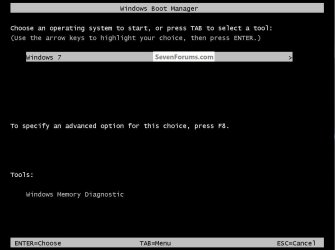
The only hiccup still just a flicker of a Dual Boot screen at bootup I would like to edit out if someone can tell me the command. It's gone from msconfig>boot and turned off in Startup Options.
 

My Computer

Computer Manufacturer/Model Number
* BFK Customs *
OS
W 7 64-bit Ultimate
CPU
Intel Q9550 Yorkfield
Motherboard
ASUS P5Q Pro
Memory
8GB Dominator 8500C5D
Graphics Card(s)
ATI : XFX 5870
Sound Card
Realtek HD Audio 7-1
Monitor(s) Displays
1x 47" LCD HDMI & 3x 26" LCD HDMI
Screen Resolution
1920x1080P & 1920x1200
Hard Drives
1x 80GB Intel X25-M G2 SSD : 1x 500GB & 1x 640GB WD Caviar Black(s)
PSU
Corsair 620HX
Case
Cooler Master RC-690
Cooling
Tuniq Tower 120, 2x 140mm and 3x 120mm case fans
Keyboard
Microsoft 500
Mouse
Razer Diamondback 3G
Internet Speed
14 Mb/s
Other Info
1x Koutech 3Gb/s SATA HDD Hot Swap Rack
Hi Ted -

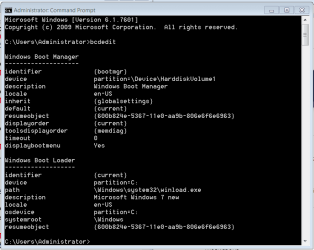
Not sure what I would edit from listings below:
Capture.PNG

Is there a command to set displaybootmenu to No?
 
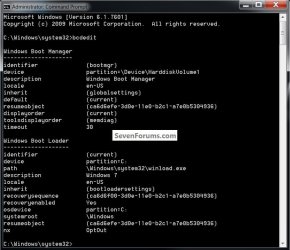
I see several differences between yours and mine, mainly the "disolaybootmenu" mine doesn't have and I haven't had to sort this before so I don't have an answer for you right now.

I bet if we can sort this it will go a long way to sorting some of the 'ghost' boot listings we see from time to time.

Do you have a SysResv partition, I do.


boot.jpg
 

My Computer

Computer Manufacturer/Model Number
* BFK Customs *
OS
W 7 64-bit Ultimate
CPU
Intel Q9550 Yorkfield
Motherboard
ASUS P5Q Pro
Memory
8GB Dominator 8500C5D
Graphics Card(s)
ATI : XFX 5870
Sound Card
Realtek HD Audio 7-1
Monitor(s) Displays
1x 47" LCD HDMI & 3x 26" LCD HDMI
Screen Resolution
1920x1080P & 1920x1200
Hard Drives
1x 80GB Intel X25-M G2 SSD : 1x 500GB & 1x 640GB WD Caviar Black(s)
PSU
Corsair 620HX
Case
Cooler Master RC-690
Cooling
Tuniq Tower 120, 2x 140mm and 3x 120mm case fans
Keyboard
Microsoft 500
Mouse
Razer Diamondback 3G
Internet Speed
14 Mb/s
Other Info
1x Koutech 3Gb/s SATA HDD Hot Swap Rack
Export a backup first, just in case.

Try ...
bcdedit /displaybootmenu {bootmgr} no

or some variation of this, maybe change the command order around


I'm off for the night here in a few, I get up at 4:30A
 

My Computer

Computer Manufacturer/Model Number
* BFK Customs *
OS
W 7 64-bit Ultimate
CPU
Intel Q9550 Yorkfield
Motherboard
ASUS P5Q Pro
Memory
8GB Dominator 8500C5D
Graphics Card(s)
ATI : XFX 5870
Sound Card
Realtek HD Audio 7-1
Monitor(s) Displays
1x 47" LCD HDMI & 3x 26" LCD HDMI
Screen Resolution
1920x1080P & 1920x1200
Hard Drives
1x 80GB Intel X25-M G2 SSD : 1x 500GB & 1x 640GB WD Caviar Black(s)
PSU
Corsair 620HX
Case
Cooler Master RC-690
Cooling
Tuniq Tower 120, 2x 140mm and 3x 120mm case fans
Keyboard
Microsoft 500
Mouse
Razer Diamondback 3G
Internet Speed
14 Mb/s
Other Info
1x Koutech 3Gb/s SATA HDD Hot Swap Rack
I worked on this some but haven't sorted it yet; will keep trying later.


Since this is possible, there has to be a way.


click to enlarge
SpaceBar.jpg
 

My Computer

Computer Manufacturer/Model Number
* BFK Customs *
OS
W 7 64-bit Ultimate
CPU
Intel Q9550 Yorkfield
Motherboard
ASUS P5Q Pro
Memory
8GB Dominator 8500C5D
Graphics Card(s)
ATI : XFX 5870
Sound Card
Realtek HD Audio 7-1
Monitor(s) Displays
1x 47" LCD HDMI & 3x 26" LCD HDMI
Screen Resolution
1920x1080P & 1920x1200
Hard Drives
1x 80GB Intel X25-M G2 SSD : 1x 500GB & 1x 640GB WD Caviar Black(s)
PSU
Corsair 620HX
Case
Cooler Master RC-690
Cooling
Tuniq Tower 120, 2x 140mm and 3x 120mm case fans
Keyboard
Microsoft 500
Mouse
Razer Diamondback 3G
Internet Speed
14 Mb/s
Other Info
1x Koutech 3Gb/s SATA HDD Hot Swap Rack
I went to confirm that the Repair console was still on F8 tools after deleting the dual boot and it wasn't. It's linked WinRE file was on the deleted OS.

I want F8 Repair console on this laptop so i deleted SysReserved, created Primary Active partition there, then ran Startup Repair x3 which failed to rebuild SysActive with "Cannot repair Win7."

Next I converted the SysReserved 7 backup image to .tib using Acronis so I could do a partition-specfic reimage of 100mb. This failed - both with and without restoring Disk signature - after trying to repair both x3.

Since I now had both partiitons' Win7 image converted to Acronis, I used Acronis boot disk to try to reimage the entire HD, which failed because it wouldn't merge the two converted .tib images correctly back together, and wouldn't work reimaging them separately. This annoys me when a paid program can't handle its own fancy features.

In the end, I fell back to original Win7 Backup image to reimage the entire HD perfectly in 20 minutes. This is about the tenth time Acronis operations have failed, whereas Win7 backup imaging has never failed me.
 
Back
Top