User Account name help

kenenfuego

New member
Local time
1:26 AM
Messages
1
Hopefully this is the right spot for this. I did look already to see if it was already addressed but couldn't find anything. I apologize if it is and I missed it.

Anyway, I bought a computer that already had Windows 7 pre-installed on it. They had created a user account with the name 'majik'. I changed it to my name, but the 'majik' still shows up in different places. For example, my music files are in C:/Users/majik/Music

I want to get rid of majik, and have it replaced with my user account name. Maybe I'm completely missing an easy way to do this, but any help would be appreciated. I've already changed the user account name to my name and restarted computer, but it still hasn't changed anything.

Thanks for the help!
 

My Computer

Computer Manufacturer/Model Number
HP G61-327CL
OS
Windows 7
Here is my best guess. See if anyone else agrees. I had this same problem on an XP machine once.

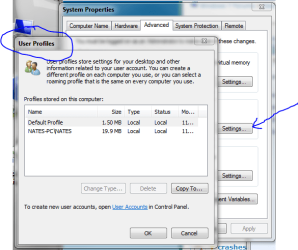
Right click "My computer" and left click "properties" go to "advanced" and "user profiles" highlight and delete the user you want to go away. I would wait for a second opinion though, I'm not quite sure. I suppose you could try it, but be sure you want to delete the user's files. This type of thing can have "far-reaching" effects. Be sure "system restore" is on before you try this.

Userprofile.PNG]

Also, welcome to the forums
 

My Computer

Computer Manufacturer/Model Number
Keeps changing - (Custom)
OS
Windows 7 Professional x64
CPU
Intel Core i7 860
Motherboard
Gigabyte GA-P55-UD4P
Memory
4GB DDR3 Mushkin 1600Mhz @ 7-8-7-20
Graphics Card(s)
MSI GTS250 1GB DDR3 Twin Frozr
Sound Card
Onboard realtek
Monitor(s) Displays
Samsung SyncMaster 24" P2450 + Samsung 20" 2033
Screen Resolution
1920 X 1080 and 1600 X 900 (#2 system 1440 X 900)
Hard Drives
Patriot Inferno 120GB SSD + 3 WD Blue 640GB drives
PSU
Corsair 750 HX Modular
Case
Lancool PC-K62
Cooling
Cooler Master TX3 CPU cooler and 4-140mm and 1-120mm case
Keyboard
Gigabyte USB keyboard
Mouse
Microsoft wireless laser mouse 5000
Internet Speed
7 Mb down 1.5 up
Other Info
System #2: AMD Phenom II X6 1055T (Freezer 7 Pro cooler) - Gigabyte 880GMA-UD2H - WD 500GB Black - 9500GT (1GB) 500W OCZ modular PSU - Antec 200 case. System #3 (LapTop) Core 2 Duo T6670 - 320GB 7200RPM HD - 4GB DDR3 RAM.
Hello Ken, and welcome to Seven Forums.

Unfortunately, the only way to change the name of the C:\Users\(user-name) folder is to create a new administrator account, copy the contents of the old account's user folders into the corresponding new account's user folders, then delete the old account from within the new account.

Hope this helps,
Shawn
 

My Computer

Computer type
PC/Desktop
Computer Manufacturer/Model Number
Self built custom
OS
64-bit Windows 11 Pro for Workstations
CPU
Intel i7-8700K OC'd to 5 GHz
Motherboard
ASUS ROG Maximus XI Formula Z390
Memory
64 GB (4x16GB) G.SKILL TridentZ RGB DDR4 3600 MHz
Graphics Card(s)
ASUS ROG-STRIX-GTX1080TI-O11G-GAMING
Sound Card
Integrated
Monitor(s) Displays
2 x Samsung Odyssey G7 27"
Screen Resolution
2560x1440
Hard Drives
1TB Samsung 990 PRO M.2,
4TB Samsung 990 PRO PRO M.2,
TerraMaster F8 SSD Plus NAS
PSU
Seasonic Prime Titanium 850W
Case
Thermaltake Core P3
Cooling
Corsair Hydro H115i
Keyboard
Logitech wireless K800
Mouse
Logitech MX Master 4
Internet Speed
2 Gb/s Download and 100 Mb/s Upload
Antivirus
Malwarebyte Anti-Malware Premium
Browser
Google Chrome
Other Info
Logitech Z625 speaker system,
Logitech BRIO 4K Pro webcam,
HP Color LaserJet Pro MFP M477fdn,
APC SMART-UPS RT 1000 XL - SURT1000XLI,
Galaxy S23 Plus phone
Hello Ken, and welcome to Seven Forums.

Unfortunately, the only way to change the name of the C:\Users\(user-name) folder is to create a new administrator account, copy the contents of the old account's user folders into the corresponding new account's user folders, then delete the old account from within the new account.

Hope this helps,
Shawn

Would you do this from within the "user account" screenshot I have there Brink?

(Use the "copy to" option?) or just simply copy the files?

Also, it has to be a NEW admin account? You cannot use an existing one?
 

My Computer

Computer Manufacturer/Model Number
Keeps changing - (Custom)
OS
Windows 7 Professional x64
CPU
Intel Core i7 860
Motherboard
Gigabyte GA-P55-UD4P
Memory
4GB DDR3 Mushkin 1600Mhz @ 7-8-7-20
Graphics Card(s)
MSI GTS250 1GB DDR3 Twin Frozr
Sound Card
Onboard realtek
Monitor(s) Displays
Samsung SyncMaster 24" P2450 + Samsung 20" 2033
Screen Resolution
1920 X 1080 and 1600 X 900 (#2 system 1440 X 900)
Hard Drives
Patriot Inferno 120GB SSD + 3 WD Blue 640GB drives
PSU
Corsair 750 HX Modular
Case
Lancool PC-K62
Cooling
Cooler Master TX3 CPU cooler and 4-140mm and 1-120mm case
Keyboard
Gigabyte USB keyboard
Mouse
Microsoft wireless laser mouse 5000
Internet Speed
7 Mb down 1.5 up
Other Info
System #2: AMD Phenom II X6 1055T (Freezer 7 Pro cooler) - Gigabyte 880GMA-UD2H - WD 500GB Black - 9500GT (1GB) 500W OCZ modular PSU - Antec 200 case. System #3 (LapTop) Core 2 Duo T6670 - 320GB 7200RPM HD - 4GB DDR3 RAM.
You don't need to be in the profile management screen. You create a new user from user accounts in control panel. The trick is that you can't be logged in as either your new permanent user account, or the old messed up account when you do it, so you need a third admin account to do the operation.

So I would create two new accounts. One will be the permanent account you are going to use. One would be the admin account to perform the change.

Log in as each of the accounts once so the folders get created. Then while logged in as the "temporary" admin, copy the files from the messed up account to your new permanent account.

Once that is done, you can log in as your new permanent user and delete both the old messed up account and the temporary admin account. Or you could leave that admin account for problems such as this.

When you delete the accounts, be sure to let it delete the files associated IF you are sure you copied everything you need.
 

My Computer

Computer Manufacturer/Model Number
Custom
OS
Windows 7 Ultimate RTM (Technet)
CPU
3.00 gigahertz Intel Core2 Duo E8400
Motherboard
ASUSTeK Computer INC. P5K/EPU Rev 1.xx
Memory
4GB
Graphics Card(s)
ATI Radeon X1950 Pro
Sound Card
Built in HD Audio
Monitor(s) Displays
22" Gateway LCD
Screen Resolution
1920 x 1200
Hard Drives
ST3160023A [Hard drive] (160.04 GB) -- drive 0, rev 8.01, ST3500630AS [Hard drive] (500.11 GB) -- drive 2, rev 3.AAK
ST3500630AS [Hard drive] (500.11 GB) -- drive 1, rev 3.AAK
Keyboard
Logitech G11
Mouse
Microsoft Wireless Laser Mouse 5000
Internet Speed
13.44 Mbps
Nate,

I could never get the copy to work for anything other than for the "Default Profile" which would not work for this. Instead I find it easier to copy and paste the files directly from the user folder themselves to the corresponding new account's user folders. It does not copy the user profile, but it will copy of the personal user files and some of the settings from the old user account.

If you have another administrator account (not the built-in Administrator account) you can copy them over to it instead of creating a new one.
 

My Computer

Computer type
PC/Desktop
Computer Manufacturer/Model Number
Self built custom
OS
64-bit Windows 11 Pro for Workstations
CPU
Intel i7-8700K OC'd to 5 GHz
Motherboard
ASUS ROG Maximus XI Formula Z390
Memory
64 GB (4x16GB) G.SKILL TridentZ RGB DDR4 3600 MHz
Graphics Card(s)
ASUS ROG-STRIX-GTX1080TI-O11G-GAMING
Sound Card
Integrated
Monitor(s) Displays
2 x Samsung Odyssey G7 27"
Screen Resolution
2560x1440
Hard Drives
1TB Samsung 990 PRO M.2,
4TB Samsung 990 PRO PRO M.2,
TerraMaster F8 SSD Plus NAS
PSU
Seasonic Prime Titanium 850W
Case
Thermaltake Core P3
Cooling
Corsair Hydro H115i
Keyboard
Logitech wireless K800
Mouse
Logitech MX Master 4
Internet Speed
2 Gb/s Download and 100 Mb/s Upload
Antivirus
Malwarebyte Anti-Malware Premium
Browser
Google Chrome
Other Info
Logitech Z625 speaker system,
Logitech BRIO 4K Pro webcam,
HP Color LaserJet Pro MFP M477fdn,
APC SMART-UPS RT 1000 XL - SURT1000XLI,
Galaxy S23 Plus phone
Back
Top