User account-need help

krishen

New member
Local time
9:52 PM
Messages
13
My user account is corrupted. To repair I have followed the instructions:-
1. Create new accounts
2. I have now three accounts all as Administrator.
3. In my main account (existing)I have under the folder options have made for system files and hidden files to be shown. On doing this I get three fainted icons on my desktop.
I am not a technical person so step by step instructions will be appreciated.
After that I cannot follow any further as there would seem to be no clear guide.
Please help so that I can repair my user profile which may have corrupted.
Thank you very much for kind help.
 

My Computer

Computer Manufacturer/Model Number
Toshiba Satellite Pro A300-1E7 laptop
OS
windows7 professional 64bit
CPU
Intel Duo core P8400
Motherboard
Dont know
Memory
3GB
Graphics Card(s)
Ati
Sound Card
Realtek
Monitor(s) Displays
Toshiba
Hard Drives
300GB
If the replacement account works ok, you can delete the old account in User Accounts after copying it's files over into your new Account - or have it place the deleted Account's files on the desktop for you to sort through until you're sure you have everything.

Some programs might need to be reinstalled to run in the new account, but unlikely if it's Adminstrator-level account.

Let us know if there are any further problems.
 
User account - need help

Thank you very much for a simple response for complex problem. Once I have created new administrative account how I transfer files from old account to new account to enable me to delete the old account to access the files etc.
Kind regards
 

My Computer

Computer Manufacturer/Model Number
Toshiba Satellite Pro A300-1E7 laptop
OS
windows7 professional 64bit
CPU
Intel Duo core P8400
Motherboard
Dont know
Memory
3GB
Graphics Card(s)
Ati
Sound Card
Realtek
Monitor(s) Displays
Toshiba
Hard Drives
300GB
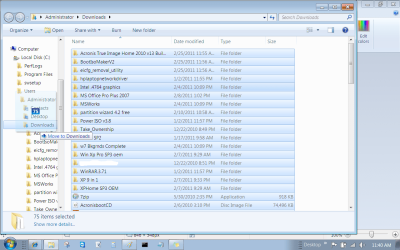
Easiest is to open each active User folder (Documents, Pictures, etc), on Organize tab "Select All" then drag the group to the same folder in the new User account under C in the explorer bar to the left. Do not release the left click until the Explorer tree unfolds fully and it says "Copy (or Move) to Documents" etc.
Untitled.png

Check each folder under the old User account to make sure you've copied everything, then you can Delete the old account in User Accounts although if it was the original owners account set up at install it will not completely go away for security reasons - just ignore it until you get around to http://www.sevenforums.com/installation-setup/125874-re-install-windows-7-a.html#post1086729
 
Many many thanks. Problem resolved. Great help and advice
 

My Computer

Computer Manufacturer/Model Number
Toshiba Satellite Pro A300-1E7 laptop
OS
windows7 professional 64bit
CPU
Intel Duo core P8400
Motherboard
Dont know
Memory
3GB
Graphics Card(s)
Ati
Sound Card
Realtek
Monitor(s) Displays
Toshiba
Hard Drives
300GB
Glad it helped. Let us know if there is anything else we can help with.
 
Back
Top