
Hey I am trying to access songs from my user account on my pc (Which is saved in "My Music" [so in my user folder]) from My Samsung Galaxy phone using a program called All Share (it uses DLNA).
When I try getting songs from other user accounts on the PC it works fine and even from other PC's. However when i try from my user account it can't!
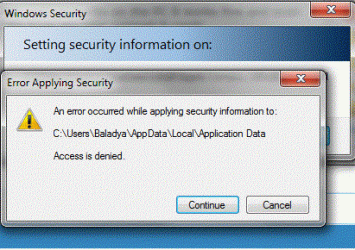
I remember messing with the Sharing permissions before in the security Tab and now I have mine (Baladya) on Full Control.. When i try to change my permissions the error in the image below comes up! Why is access denied when i am an Administrator myself 0.o Also Homeusers also have "Full Control".
When i try going to my folder and clicking "Share With" from the toolbar above and I choose 'Everybody' it doesnt change ; when I click it again it's on 'Nobody' ??
Tried right clicking on my folder > Properties>Sharing>Advanced Sharing>Check'Share this folder'>Permissions>Full Control. Still I can't access it from my phone.
What am I missing there? Is there a way to just return everything to default :S
Would really appreciate the help
Thanks,
Baladya
When I try getting songs from other user accounts on the PC it works fine and even from other PC's. However when i try from my user account it can't!
I remember messing with the Sharing permissions before in the security Tab and now I have mine (Baladya) on Full Control.. When i try to change my permissions the error in the image below comes up! Why is access denied when i am an Administrator myself 0.o Also Homeusers also have "Full Control".
When i try going to my folder and clicking "Share With" from the toolbar above and I choose 'Everybody' it doesnt change ; when I click it again it's on 'Nobody' ??
Tried right clicking on my folder > Properties>Sharing>Advanced Sharing>Check'Share this folder'>Permissions>Full Control. Still I can't access it from my phone.
What am I missing there? Is there a way to just return everything to default :S
Would really appreciate the help
Thanks,
Baladya
Attachments
My Computer
- OS
- Windows 7 Ultimate x64
- Hard Drives
- WD Black Caviar
