
User Accounts - query

IcarusII

New member
Power User
Local time
11:36 PM
Messages
108
Hi there,

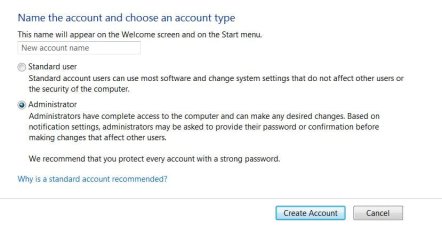
Ive literally just installed W7. I made a classic error when during installation I was asked for a user name. I forgot this would be the user name given to the administrator account

So now i have an Administrator account called 'Matthew'...which i didnt want at all. i want 'Matthew' to be my normal user account name (non admin).

I also have a Guest account - but I havent yet activated it.

I have read through the user account tutorials regarding changing the name, but they only detail how to change the name of either the guest account (if you havent activated it) and the built in administrator account (which is not activated by default).

this is just the bog standard admin account that W7 launches with. however I have read somewhere that even though you change a user account name and it changes in the login screen it is still tied to the original name....and i guess all the user folders have the wrong name?

This sounds like a mess. Can I change the administrator account name that I accidentally mis-named during installation and have everything set as if i had named it properly during installation?

thanks,

Matt
 

My Computer

Computer Manufacturer/Model Number
Manufacturer: Me
OS
W7 Home Prem, Vista home Prem
CPU
Intel E8600 3.3GHz dual core
Motherboard
Asus (need to find model)
Memory
4 Gb
Graphics Card(s)
Nvidia - GForce GTX 280 - 1Gb
Sound Card
Xonar Dx 5.1
Monitor(s) Displays
Hazro flatscreen
Screen Resolution
1920 x 1200
Hard Drives
1 x Samsung Spinpoint F1 300 gb
1 x Samsung Spinpoint F1 1 Tb
1 x Samsung Spinpoint F3 1 Tb
PSU
Later
Case
Infiniti Midi tower
Cooling
later
Keyboard
Logitech G11
Mouse
Logitech G9 Laser
Internet Speed
3mb/s - awful
Other Info
I built this three years ago. It was very fast at the time. Now it's about average but still runs any game I throw at it at max detail.

Currently
Create a new "standard" admin account and delete the original, you can't have that much to lose yet.


123.JPG
 

My Computer

Computer Manufacturer/Model Number
* BFK Customs *
OS
W 7 64-bit Ultimate
CPU
Intel Q9550 Yorkfield
Motherboard
ASUS P5Q Pro
Memory
8GB Dominator 8500C5D
Graphics Card(s)
ATI : XFX 5870
Sound Card
Realtek HD Audio 7-1
Monitor(s) Displays
1x 47" LCD HDMI & 3x 26" LCD HDMI
Screen Resolution
1920x1080P & 1920x1200
Hard Drives
1x 80GB Intel X25-M G2 SSD : 1x 500GB & 1x 640GB WD Caviar Black(s)
PSU
Corsair 620HX
Case
Cooler Master RC-690
Cooling
Tuniq Tower 120, 2x 140mm and 3x 120mm case fans
Keyboard
Microsoft 500
Mouse
Razer Diamondback 3G
Internet Speed
14 Mb/s
Other Info
1x Koutech 3Gb/s SATA HDD Hot Swap Rack
Cool.

i have nothing to lose. I was holding off installing EasyBCD for the solution to this.

Thanks a lot
 

My Computer

Computer Manufacturer/Model Number
Manufacturer: Me
OS
W7 Home Prem, Vista home Prem
CPU
Intel E8600 3.3GHz dual core
Motherboard
Asus (need to find model)
Memory
4 Gb
Graphics Card(s)
Nvidia - GForce GTX 280 - 1Gb
Sound Card
Xonar Dx 5.1
Monitor(s) Displays
Hazro flatscreen
Screen Resolution
1920 x 1200
Hard Drives
1 x Samsung Spinpoint F1 300 gb
1 x Samsung Spinpoint F1 1 Tb
1 x Samsung Spinpoint F3 1 Tb
PSU
Later
Case
Infiniti Midi tower
Cooling
later
Keyboard
Logitech G11
Mouse
Logitech G9 Laser
Internet Speed
3mb/s - awful
Other Info
I built this three years ago. It was very fast at the time. Now it's about average but still runs any game I throw at it at max detail.

Currently
You're welcome, post a snip of disk management at the other thread before you add the Vista entry with EasyBCD.
 

My Computer

Computer Manufacturer/Model Number
* BFK Customs *
OS
W 7 64-bit Ultimate
CPU
Intel Q9550 Yorkfield
Motherboard
ASUS P5Q Pro
Memory
8GB Dominator 8500C5D
Graphics Card(s)
ATI : XFX 5870
Sound Card
Realtek HD Audio 7-1
Monitor(s) Displays
1x 47" LCD HDMI & 3x 26" LCD HDMI
Screen Resolution
1920x1080P & 1920x1200
Hard Drives
1x 80GB Intel X25-M G2 SSD : 1x 500GB & 1x 640GB WD Caviar Black(s)
PSU
Corsair 620HX
Case
Cooler Master RC-690
Cooling
Tuniq Tower 120, 2x 140mm and 3x 120mm case fans
Keyboard
Microsoft 500
Mouse
Razer Diamondback 3G
Internet Speed
14 Mb/s
Other Info
1x Koutech 3Gb/s SATA HDD Hot Swap Rack
Will post the snip in a sec.

Regarding the user accounts thing though - the thing i was trying to avoid seems to have hppened.

I created a new admin account and gave it a password.

I logged off my old admin account, logged into the new one with the name im happy with and then went to user accounts, manage a different account and deleted the old admin account.

it asked if i wanted to keep the files associated and i answered no.

I then logged out and back in, to ensure changes were applied.

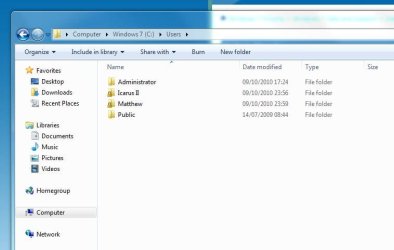
When I now navigate to c:\users there are user folders still there in the name of the old admin account i deleted. They have a padlock on them (as do my new admin folders).

Why havent the old folders gone?

Cheers,
Matt
 

My Computer

Computer Manufacturer/Model Number
Manufacturer: Me
OS
W7 Home Prem, Vista home Prem
CPU
Intel E8600 3.3GHz dual core
Motherboard
Asus (need to find model)
Memory
4 Gb
Graphics Card(s)
Nvidia - GForce GTX 280 - 1Gb
Sound Card
Xonar Dx 5.1
Monitor(s) Displays
Hazro flatscreen
Screen Resolution
1920 x 1200
Hard Drives
1 x Samsung Spinpoint F1 300 gb
1 x Samsung Spinpoint F1 1 Tb
1 x Samsung Spinpoint F3 1 Tb
PSU
Later
Case
Infiniti Midi tower
Cooling
later
Keyboard
Logitech G11
Mouse
Logitech G9 Laser
Internet Speed
3mb/s - awful
Other Info
I built this three years ago. It was very fast at the time. Now it's about average but still runs any game I throw at it at max detail.

Currently
Restart the PC.
 

My Computer

Computer Manufacturer/Model Number
* BFK Customs *
OS
W 7 64-bit Ultimate
CPU
Intel Q9550 Yorkfield
Motherboard
ASUS P5Q Pro
Memory
8GB Dominator 8500C5D
Graphics Card(s)
ATI : XFX 5870
Sound Card
Realtek HD Audio 7-1
Monitor(s) Displays
1x 47" LCD HDMI & 3x 26" LCD HDMI
Screen Resolution
1920x1080P & 1920x1200
Hard Drives
1x 80GB Intel X25-M G2 SSD : 1x 500GB & 1x 640GB WD Caviar Black(s)
PSU
Corsair 620HX
Case
Cooler Master RC-690
Cooling
Tuniq Tower 120, 2x 140mm and 3x 120mm case fans
Keyboard
Microsoft 500
Mouse
Razer Diamondback 3G
Internet Speed
14 Mb/s
Other Info
1x Koutech 3Gb/s SATA HDD Hot Swap Rack
Re-booted.

Sadly the folder structure for the deleted admin is still there in C:/users

/baffled/

Matt
 

My Computer

Computer Manufacturer/Model Number
Manufacturer: Me
OS
W7 Home Prem, Vista home Prem
CPU
Intel E8600 3.3GHz dual core
Motherboard
Asus (need to find model)
Memory
4 Gb
Graphics Card(s)
Nvidia - GForce GTX 280 - 1Gb
Sound Card
Xonar Dx 5.1
Monitor(s) Displays
Hazro flatscreen
Screen Resolution
1920 x 1200
Hard Drives
1 x Samsung Spinpoint F1 300 gb
1 x Samsung Spinpoint F1 1 Tb
1 x Samsung Spinpoint F3 1 Tb
PSU
Later
Case
Infiniti Midi tower
Cooling
later
Keyboard
Logitech G11
Mouse
Logitech G9 Laser
Internet Speed
3mb/s - awful
Other Info
I built this three years ago. It was very fast at the time. Now it's about average but still runs any game I throw at it at max detail.

Currently
Let's see them.
 

My Computer

Computer Manufacturer/Model Number
* BFK Customs *
OS
W 7 64-bit Ultimate
CPU
Intel Q9550 Yorkfield
Motherboard
ASUS P5Q Pro
Memory
8GB Dominator 8500C5D
Graphics Card(s)
ATI : XFX 5870
Sound Card
Realtek HD Audio 7-1
Monitor(s) Displays
1x 47" LCD HDMI & 3x 26" LCD HDMI
Screen Resolution
1920x1080P & 1920x1200
Hard Drives
1x 80GB Intel X25-M G2 SSD : 1x 500GB & 1x 640GB WD Caviar Black(s)
PSU
Corsair 620HX
Case
Cooler Master RC-690
Cooling
Tuniq Tower 120, 2x 140mm and 3x 120mm case fans
Keyboard
Microsoft 500
Mouse
Razer Diamondback 3G
Internet Speed
14 Mb/s
Other Info
1x Koutech 3Gb/s SATA HDD Hot Swap Rack
Okies.

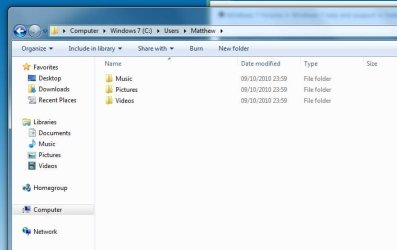
Heres a snip of my users, and below is a snip of when you go into the undeleted user folder

By the way: 'Matthew' was the original admin account that i created during W7 install. IcarusII is the new admin user account i created in order to delete Matthew.
 

Attachments

  • Users top lvl.JPG
    Users top lvl.JPG
    36 KB · Views: 17
  • Users drill.JPG
    Users drill.JPG
    34.9 KB · Views: 12

My Computer

Computer Manufacturer/Model Number
Manufacturer: Me
OS
W7 Home Prem, Vista home Prem
CPU
Intel E8600 3.3GHz dual core
Motherboard
Asus (need to find model)
Memory
4 Gb
Graphics Card(s)
Nvidia - GForce GTX 280 - 1Gb
Sound Card
Xonar Dx 5.1
Monitor(s) Displays
Hazro flatscreen
Screen Resolution
1920 x 1200
Hard Drives
1 x Samsung Spinpoint F1 300 gb
1 x Samsung Spinpoint F1 1 Tb
1 x Samsung Spinpoint F3 1 Tb
PSU
Later
Case
Infiniti Midi tower
Cooling
later
Keyboard
Logitech G11
Mouse
Logitech G9 Laser
Internet Speed
3mb/s - awful
Other Info
I built this three years ago. It was very fast at the time. Now it's about average but still runs any game I throw at it at max detail.

Currently
If Matthew is no longer listed at User Accounts>Manage Another Account,

and there is nothing in Matthew User folder and sub-folders,

then rightclick>Delete Matthew User folder with Admin permission or from Admin account.
 
I was just about to delete the folder as you suggested Greg, but I happened to be reading something online about user account issues and they spoke of looking at the event log.

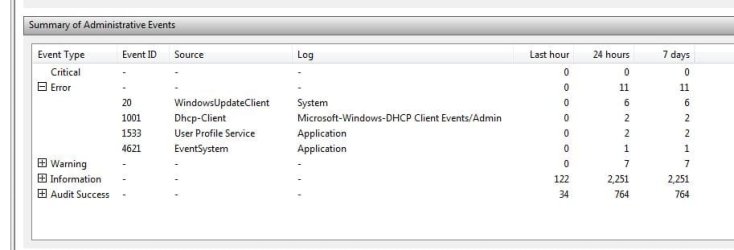
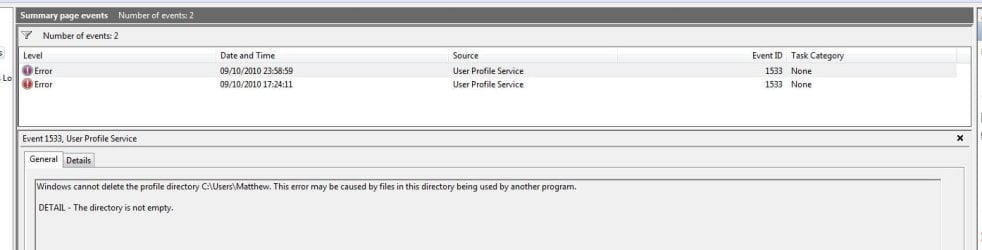
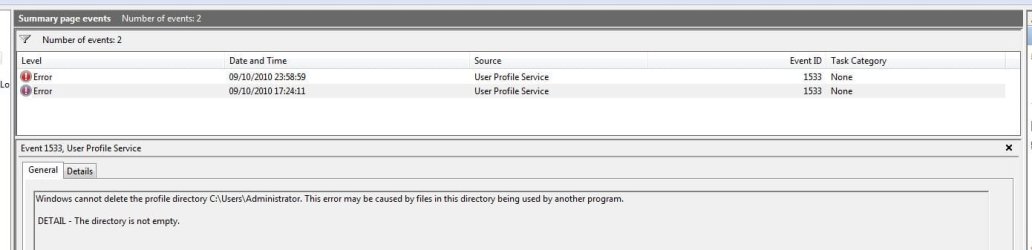
I checked my event log and saw the following 'errors'. Ive included 3 snips:
The error identification itself:
Event log error users.JPG

the error specifically relating to the deletion of user 'Matthew':
Event Log error Matthew snip.JPG

and the error relating to the deletion of 'Administrator':
Event log error administrator snip.JPG

Ok...so it cant delete matthew becasue the directory isnt empty. But it is. Or at least I cant see anything in the three subfolders of the user Matthew.

More concerning is the fact there is an error for the deletion of the Administrator account. I havent ever tried to delete the administrator account. If you look earlier in the thread I only started with two users: Matthew and the unactivated guest account.

Also If you look carefully at the event error log, the times are very different.

The attempt to delete the User Matthew took place late at night when I tried to delete it just before I hit sack.

however the attempt to delete administrator happened at 5pm ish, this was literally just after W7 finished installing.

Whats going on here? This is taking up more of my time investigating than a format, wipe and clean install would!

I ran into these kinds of user account issues with Vista and really dont want to end up in the tangle all over again.

Any help much appreciated
 
Last edited:

My Computer

Computer Manufacturer/Model Number
Manufacturer: Me
OS
W7 Home Prem, Vista home Prem
CPU
Intel E8600 3.3GHz dual core
Motherboard
Asus (need to find model)
Memory
4 Gb
Graphics Card(s)
Nvidia - GForce GTX 280 - 1Gb
Sound Card
Xonar Dx 5.1
Monitor(s) Displays
Hazro flatscreen
Screen Resolution
1920 x 1200
Hard Drives
1 x Samsung Spinpoint F1 300 gb
1 x Samsung Spinpoint F1 1 Tb
1 x Samsung Spinpoint F3 1 Tb
PSU
Later
Case
Infiniti Midi tower
Cooling
later
Keyboard
Logitech G11
Mouse
Logitech G9 Laser
Internet Speed
3mb/s - awful
Other Info
I built this three years ago. It was very fast at the time. Now it's about average but still runs any game I throw at it at max detail.

Currently
If you would rather do another clean install I'll help you with how to do it and it won't entail redoing the current partition structure.
 

My Computer

Computer Manufacturer/Model Number
* BFK Customs *
OS
W 7 64-bit Ultimate
CPU
Intel Q9550 Yorkfield
Motherboard
ASUS P5Q Pro
Memory
8GB Dominator 8500C5D
Graphics Card(s)
ATI : XFX 5870
Sound Card
Realtek HD Audio 7-1
Monitor(s) Displays
1x 47" LCD HDMI & 3x 26" LCD HDMI
Screen Resolution
1920x1080P & 1920x1200
Hard Drives
1x 80GB Intel X25-M G2 SSD : 1x 500GB & 1x 640GB WD Caviar Black(s)
PSU
Corsair 620HX
Case
Cooler Master RC-690
Cooling
Tuniq Tower 120, 2x 140mm and 3x 120mm case fans
Keyboard
Microsoft 500
Mouse
Razer Diamondback 3G
Internet Speed
14 Mb/s
Other Info
1x Koutech 3Gb/s SATA HDD Hot Swap Rack
I'm tempted barefoot kid. Just past hassles with user accounts has caused so much heartache.

However Ivanhoe understand why ms write os's which leave the files in place after you delete a user

I'm having some work done on the house today which I'm helping with so I don't have time right now. I'll be free in about 3 or 4 hours I think

Until then maybee someone might know an answer which is simple and dosnt need a reinstall

Unless I can understand why those errors occurred and know for sure just deleting the user folders is all that needs doing I will feel uneasy. I'm sure there will be other hidden files that won't have gone either!

Speak later
Matt
 

My Computer

Computer Manufacturer/Model Number
Manufacturer: Me
OS
W7 Home Prem, Vista home Prem
CPU
Intel E8600 3.3GHz dual core
Motherboard
Asus (need to find model)
Memory
4 Gb
Graphics Card(s)
Nvidia - GForce GTX 280 - 1Gb
Sound Card
Xonar Dx 5.1
Monitor(s) Displays
Hazro flatscreen
Screen Resolution
1920 x 1200
Hard Drives
1 x Samsung Spinpoint F1 300 gb
1 x Samsung Spinpoint F1 1 Tb
1 x Samsung Spinpoint F3 1 Tb
PSU
Later
Case
Infiniti Midi tower
Cooling
later
Keyboard
Logitech G11
Mouse
Logitech G9 Laser
Internet Speed
3mb/s - awful
Other Info
I built this three years ago. It was very fast at the time. Now it's about average but still runs any game I throw at it at max detail.

Currently
OK Matt, I'll be around later.
 

My Computer

Computer Manufacturer/Model Number
* BFK Customs *
OS
W 7 64-bit Ultimate
CPU
Intel Q9550 Yorkfield
Motherboard
ASUS P5Q Pro
Memory
8GB Dominator 8500C5D
Graphics Card(s)
ATI : XFX 5870
Sound Card
Realtek HD Audio 7-1
Monitor(s) Displays
1x 47" LCD HDMI & 3x 26" LCD HDMI
Screen Resolution
1920x1080P & 1920x1200
Hard Drives
1x 80GB Intel X25-M G2 SSD : 1x 500GB & 1x 640GB WD Caviar Black(s)
PSU
Corsair 620HX
Case
Cooler Master RC-690
Cooling
Tuniq Tower 120, 2x 140mm and 3x 120mm case fans
Keyboard
Microsoft 500
Mouse
Razer Diamondback 3G
Internet Speed
14 Mb/s
Other Info
1x Koutech 3Gb/s SATA HDD Hot Swap Rack

My Computer

Computer Manufacturer/Model Number
HP dv6519tx
OS
Windows 7 Ultimate x64
CPU
1.80 GHz Intel Core 2 Duo processor T7100
Memory
3 gig ddr2
Graphics Card(s)
NVIDIA GeForce 8400M GS
Sound Card
Realtek High Definition Audio
Monitor(s) Displays
15.4” WXGA High Definition BrightView Widescreen
Screen Resolution
1280 x 800
Hard Drives
Hitachi 320 GB (5400 rpm)
PSU
90 W AC Power Adapter
Cooling
Kitchen plate under the lappy
Keyboard
101 key compatible
Mouse
Touch Pad with On/Off button and dedicated vertical Scroll
Internet Speed
Three Wireless internet prepaid using E160G USB dongle
the padlock just means the folder isnt being shared, have you tried deleting the folder in safe mode?

EDIT:http://www.sevenforums.com/general-discussion/6929-build-7077-padlocked-folder.html#post66349

Almost ;)

The padlock infact means that the 'owner' of the file/folder is 'SYSTEM' and not the user. This can be changed by taking ownership of the files/folders in the security tab of the properties box.

The following tutorial can help too.. http://www.sevenforums.com/tutorials/1911-take-ownership-shortcut.html


OS
 

My Computer

Computer Manufacturer/Model Number
Compaq Desktop
OS
Windows 7 Ultimate x64
CPU
AMD Sempron Dual Core
Memory
3GB
Graphics Card(s)
NVIDIA GeForce 6150SE nForce 430
Screen Resolution
1024x768
Hard Drives
150GB Sata
Hi guys,

I dont need to go into safe mode to delete it...i can just delete it as a normal admin.

my account Icarus II (see snips above) is an admin account. I just now deleted the folder and subfolders in c:/users/Matthew with no problems at all.

my query is more about:
a) why when I removed 'Matthew' in user management and said to delete the files did it leave them?
b) when i went into even viewer there were two errors (see above snips) - one saying it failed to delete folders in matthew as they werent empty (surely this is the purpose of saying 'yes' to delete files when you remove the user!)
c) the other error message was the same as b) but for the administrator account (which im guessing is the high lvl administrator account that I havent activated). Not only havent I activated it but I didnt try to delete it either becasue its not in user management (becasue its not activated).

Matt
 

My Computer

Computer Manufacturer/Model Number
Manufacturer: Me
OS
W7 Home Prem, Vista home Prem
CPU
Intel E8600 3.3GHz dual core
Motherboard
Asus (need to find model)
Memory
4 Gb
Graphics Card(s)
Nvidia - GForce GTX 280 - 1Gb
Sound Card
Xonar Dx 5.1
Monitor(s) Displays
Hazro flatscreen
Screen Resolution
1920 x 1200
Hard Drives
1 x Samsung Spinpoint F1 300 gb
1 x Samsung Spinpoint F1 1 Tb
1 x Samsung Spinpoint F3 1 Tb
PSU
Later
Case
Infiniti Midi tower
Cooling
later
Keyboard
Logitech G11
Mouse
Logitech G9 Laser
Internet Speed
3mb/s - awful
Other Info
I built this three years ago. It was very fast at the time. Now it's about average but still runs any game I throw at it at max detail.

Currently
Failure to delete the actual folders when deleting a User Account happens all the time. It may even be a built-in failsafe.

If you decided to delete a quasi-Admin account (why?) to replace it with a standard User Account for owner then you did in fact delete an Admin account, which is likely why it errored and kept your files - as a fail safe for someone who might not know what they're doing or defense against trojan attack.
 
If you decided to delete a quasi-Admin account (why?) to replace it with a standard User Account for owner then you did in fact delete an Admin account, which is likely why it errored and kept your files

Hi Greg, My understanding of w7 install is that during install you are asked to create an account which is infact an admin account. I mistakenly thought I was creating a standard user account rather than an admin and gave it a name I intended for my standard user account

Before anything was deleted, in c:/users there was :
Matthew - admin account
Administrator - admin account
Guest - guest account

However only 'Matthew' was showing in user management as 'guest' had not actually been activated and I believe 'administrator' is the built in admin account that i also haven't activated

I then created Icarus II - admin account and used this account to delete 'Matthew'. So i have never attempted to delete the account named 'administrator' as it had not been activated and was not an option to delete in user account control panel.

I may have misunderstood your above quote, sovim sorry if I have. I wasn't recklessly deleting accounts - I did so after seeking guidance here first
 

My Computer

Computer Manufacturer/Model Number
Manufacturer: Me
OS
W7 Home Prem, Vista home Prem
CPU
Intel E8600 3.3GHz dual core
Motherboard
Asus (need to find model)
Memory
4 Gb
Graphics Card(s)
Nvidia - GForce GTX 280 - 1Gb
Sound Card
Xonar Dx 5.1
Monitor(s) Displays
Hazro flatscreen
Screen Resolution
1920 x 1200
Hard Drives
1 x Samsung Spinpoint F1 300 gb
1 x Samsung Spinpoint F1 1 Tb
1 x Samsung Spinpoint F3 1 Tb
PSU
Later
Case
Infiniti Midi tower
Cooling
later
Keyboard
Logitech G11
Mouse
Logitech G9 Laser
Internet Speed
3mb/s - awful
Other Info
I built this three years ago. It was very fast at the time. Now it's about average but still runs any game I throw at it at max detail.

Currently
Hi,

You may find that the files that were referenced when deleting the account through the 'User Accounts' in control panel were that of personal files, e.g. Documents/Music/Videos/Pictures if any. There may have been several hidden/system files that would need to be manually deleted :)
 

My Computer

Computer Manufacturer/Model Number
Compaq Desktop
OS
Windows 7 Ultimate x64
CPU
AMD Sempron Dual Core
Memory
3GB
Graphics Card(s)
NVIDIA GeForce 6150SE nForce 430
Screen Resolution
1024x768
Hard Drives
150GB Sata
Back
Top