Solved User Accounts?

ChuckinSC

New member
Local time
2:02 AM
Messages
11
I had to do a reinstall of Win7-64 OS and think I set up User Accounts incorrectly. In my previous install I had "USER" as well as "Users". USER didn't contain too much, and my name, plus that of my wife were in Users. That's where our individual files stayed. In my reinstall I only have Users, and the only entry there is USER and within that lies my data. My user name shows on a payne, but it doesn't contain anything unique. I'm not sure this makes any sense, but my question is whether I have to start over to get a directory like I had. I'm not sure what I have is correct????
 

My Computer

OS
Windows 7, 64-bit
During install it will ask you for your Account name, which will be a quasi-Administrator account since it's assumed this is the owner.

Add additional User Accounts in Control Panel>User Accounts.

You can also change any User account name there.
 
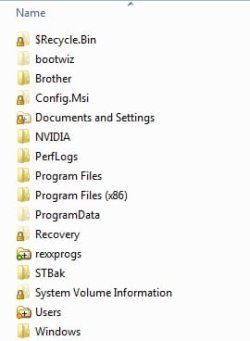
This is what my boot drive looks like.

Win7BootDrive.jpg

Has Users, no User.
 

My Computer

Computer type
PC/Desktop
Computer Manufacturer/Model Number
Lenovo IdeaCenter 450
OS
Windows 10 Pro X64
CPU
Intel Quad Core i7-4770 @ 3.4Ghz
Memory
16.0GB PC3-12800 DDR3 SDRAM 1600 MHz
Graphics Card(s)
Intel Integrated HD Graphics
Sound Card
Realtek HD Audio
Monitor(s) Displays
HP 22" LCD
Screen Resolution
1680 x 1050
Hard Drives
250GB Samsung EVO SATA-3 SSD
2TB Seagate ST2000DM001 SATA-2
1.5TB Seagate ST3150041AS SATA
Keyboard
Dell USB
Mouse
Lenovo USB
Internet Speed
Cable via Road Runner 3MB Upload, 30MB Download
Antivirus
Windows Defender, MBAM Pro, MBAE
Browser
Seamonkey
Other Info
UEFI/GPT
PLDS DVD-RW DH16AERSH
To get what I wanted, I once again reinstalled. The computer shop had done the original reinstall - and they set it up differently that what I wanted. Now I'm "good to go". Thanks for the help.
 

My Computer

OS
Windows 7, 64-bit
Back
Top