User changes password

rkeilty

New member
Member
Local time
6:20 PM
Messages
52
I have an admin account and a user account for the kids. How do I stop them changing the password for their user account. They just go into user accounts and change the password and can lock me out of their account.

Cheers Ray;)
 

My Computer

Computer type
Laptop
Computer Manufacturer/Model Number
PC Specialist
OS
windows 7 64 bit
CPU
i5 4200M @ 2.50 Ghz
Motherboard
?
Memory
4Gb DDR2 SDRAM
Graphics Card(s)
GeForce GTX
Sound Card
onboard
Monitor(s) Displays
laptop
Screen Resolution
1920 x 1080
Hard Drives
500 GB
Keyboard
laptop
Mouse
Polaroid
Internet Speed
70 mb
Antivirus
AVG Free
Browser
Chrome
Currently, I am at work, and cannot view this page, but it might help you!

Again, if it's nowhere near relevant, I aplogize hah
 

My Computer

Computer Manufacturer/Model Number
Custom Built
OS
Windows 7 Ultimate
CPU
AMD Athlon II X2 245 2.90Ghz
Motherboard
Some Gigabyte one, dont remember model
Memory
3.00 GB
Graphics Card(s)
8800GTS 512MB
Sound Card
Sound Blaster X-Fi Titanium Fatal1ty
Monitor(s) Displays
Dual 22" widescreen
Hard Drives
250GB internal, 500GB internal
PSU
CORSAIR CMPSU-850TX 850W Power Supply
Case
Thermalkake Tsunami Dream
Cooling
Thermaltake Golden Orb II
Keyboard
Saitek Eclipse 2
Mouse
Logitech MX518
Hi Ray :)

From an Administrator account do this:

Password - Prevent or Allow to Change - Vista Forums

Right Click Computer and click Manage
CLick Local Users and Groups
Click Users
Go to the account you want to lock and right click>properties
Check User cannot change password

This will only work on limited accounts, Admins can still change their password (or at least they can get into Local Policy to unlock it again if they know what they are doing)
 
Last edited by a moderator:

My Computer

Computer type
PC/Desktop
Computer Manufacturer/Model Number
Medion Erazer (note to self: insert model number) - with custom additions
OS
Windows 10 Pro x64
CPU
Intel Core i5 7400 @ 3.00GHz
Motherboard
OEM supllied with PC
Memory
8GB 2133Mhz DDR4 (OEM supplied)
Graphics Card(s)
Gygabyte Windforce GTX 1050Ti (Factory Overclocked)
Sound Card
Realtek
Monitor(s) Displays
Acer Al1980 + HKC
Screen Resolution
1360*768(HKC) / 1280*1024(Acer)
Hard Drives
1TB Toshiba
1TB WD Caviar Green
120GB Samsung Evo 840
PSU
OEM supplied (no power rating on case)
Case
OEM Supplied
Cooling
Stock
Keyboard
Logitech Wireless
Mouse
Logitect Wireless
Internet Speed
40Mb/s Down 10Mb/s Up
Antivirus
Defender
Browser
Firefox
  • Like
Reactions: JMH
Hi Ray :)

From an Administrator account do this:

Right Click Computer and click Manage
CLick Local Users and Groups
Click Users
Go to the account you want to lock and right click>properties
Check User cannot change password

This will only work on limited accounts, Admins can still change their password (or at least they can get into Local Policy to unlock it again if they know what they are doing)

Or:
click "Start"
click "Run"
then type "lusrmgr.msc"
click "users"
then right click their account
select "properties"
then check "User cannot change password".

Voila! :geek:
 

My Computer

Computer Manufacturer/Model Number
Custom
OS
Windows 8 Professional 64-bit
CPU
Intel Core i3-2100
Motherboard
ASRock Intel Z68M/USB3
Memory
4GB
Graphics Card(s)
GeForece GTX 550 Ti
Screen Resolution
1680 x 1050
PSU
750w
Prevent kids changing password

Are you guys quoting for Vista cos the lusrmgr doesn't work for me. It says, "This computer is using Windows 7 Home Premium this snapin may not be used with this version of Windows." Neither when I right click computer and click manage do I get anything resembling what is suggested. I'm still in the dark, here!

Cheers

ray:sarc:
 

My Computer

Computer type
Laptop
Computer Manufacturer/Model Number
PC Specialist
OS
windows 7 64 bit
CPU
i5 4200M @ 2.50 Ghz
Motherboard
?
Memory
4Gb DDR2 SDRAM
Graphics Card(s)
GeForce GTX
Sound Card
onboard
Monitor(s) Displays
laptop
Screen Resolution
1920 x 1080
Hard Drives
500 GB
Keyboard
laptop
Mouse
Polaroid
Internet Speed
70 mb
Antivirus
AVG Free
Browser
Chrome
(Thanks for adding the Link Brink I should have done that)

I could be wrong, but I am fairly certain it can only be done in Windows 7 Professional and up.

I know the method I posted works, because I did it on my own machine. However I am running Windows 7 Ultimate
 

My Computer

Computer type
PC/Desktop
Computer Manufacturer/Model Number
Medion Erazer (note to self: insert model number) - with custom additions
OS
Windows 10 Pro x64
CPU
Intel Core i5 7400 @ 3.00GHz
Motherboard
OEM supllied with PC
Memory
8GB 2133Mhz DDR4 (OEM supplied)
Graphics Card(s)
Gygabyte Windforce GTX 1050Ti (Factory Overclocked)
Sound Card
Realtek
Monitor(s) Displays
Acer Al1980 + HKC
Screen Resolution
1360*768(HKC) / 1280*1024(Acer)
Hard Drives
1TB Toshiba
1TB WD Caviar Green
120GB Samsung Evo 840
PSU
OEM supplied (no power rating on case)
Case
OEM Supplied
Cooling
Stock
Keyboard
Logitech Wireless
Mouse
Logitect Wireless
Internet Speed
40Mb/s Down 10Mb/s Up
Antivirus
Defender
Browser
Firefox
Prevent password change by kids

;)
Currently, I am at work, and cannot view this page, but it might help you!

Again, if it's nowhere near relevant, I aplogize hah

It says it is for Vista.
 

My Computer

Computer type
Laptop
Computer Manufacturer/Model Number
PC Specialist
OS
windows 7 64 bit
CPU
i5 4200M @ 2.50 Ghz
Motherboard
?
Memory
4Gb DDR2 SDRAM
Graphics Card(s)
GeForce GTX
Sound Card
onboard
Monitor(s) Displays
laptop
Screen Resolution
1920 x 1080
Hard Drives
500 GB
Keyboard
laptop
Mouse
Polaroid
Internet Speed
70 mb
Antivirus
AVG Free
Browser
Chrome
Hi Ray :)

Right Click Computer and click Manage
CLick Local Users and Groups
Click Users
Go to the account you want to lock and right click>properties
Check User cannot change password

You should have no problem doing this, logged in as the Admin on the Win 7 machine.
 

My Computer

OS
XP / Win7 x64 Pro
CPU
Intel Quad-Core Q9450 @ 3.2GHz
Motherboard
Asus P5-E
Memory
2x2GB GSkill DDR2
Graphics Card(s)
NVIDIA GeForce 8600 GTS (EVGA)
Monitor(s) Displays
Dell 2408WFP
Screen Resolution
1920x1200
;)
Currently, I am at work, and cannot view this page, but it might help you!

Again, if it's nowhere near relevant, I aplogize hah

It says it is for Vista.

I would just like to point out to you, that Windows 7 is basically Vista, at least on the surface, Almost anything that works for Vista works for Windows 7. So criticising us for linking Vista stuff, is actually a bit silly.

As I said above, I suspect your issue is that your copy of Windows is Home Premium. I don't think it can be done. (there was a similar issue on another thread today, I will link when I find it)

I actually did this to my own machine, before posting. Thats how I know it works. If it isn't working for you, then It's definitely Home Premiums fault (even Windows told you that, why would they include a Vista snapin in Windows 7 if it doesnt work?)
 

My Computer

Computer type
PC/Desktop
Computer Manufacturer/Model Number
Medion Erazer (note to self: insert model number) - with custom additions
OS
Windows 10 Pro x64
CPU
Intel Core i5 7400 @ 3.00GHz
Motherboard
OEM supllied with PC
Memory
8GB 2133Mhz DDR4 (OEM supplied)
Graphics Card(s)
Gygabyte Windforce GTX 1050Ti (Factory Overclocked)
Sound Card
Realtek
Monitor(s) Displays
Acer Al1980 + HKC
Screen Resolution
1360*768(HKC) / 1280*1024(Acer)
Hard Drives
1TB Toshiba
1TB WD Caviar Green
120GB Samsung Evo 840
PSU
OEM supplied (no power rating on case)
Case
OEM Supplied
Cooling
Stock
Keyboard
Logitech Wireless
Mouse
Logitect Wireless
Internet Speed
40Mb/s Down 10Mb/s Up
Antivirus
Defender
Browser
Firefox
Are you guys quoting for Vista cos the lusrmgr doesn't work for me. It says, "This computer is using Windows 7 Home Premium this snapin may not be used with this version of Windows." Neither when I right click computer and click manage do I get anything resembling what is suggested. I'm still in the dark, here!

Cheers

ray:sarc:


Hello Ray,

The tutorial link above works for both Windows 7 and Vista. You can use METHOD TWO in the tutorial to do this as well since you have Windows 7 Home Premium. :)
 

My Computer

Computer type
PC/Desktop
Computer Manufacturer/Model Number
Self built custom
OS
64-bit Windows 11 Pro for Workstations
CPU
Intel i7-8700K OC'd to 5 GHz
Motherboard
ASUS ROG Maximus XI Formula Z390
Memory
64 GB (4x16GB) G.SKILL TridentZ RGB DDR4 3600 MHz
Graphics Card(s)
ASUS ROG-STRIX-GTX1080TI-O11G-GAMING
Sound Card
Integrated
Monitor(s) Displays
2 x Samsung Odyssey G7 27"
Screen Resolution
2560x1440
Hard Drives
1TB Samsung 990 PRO M.2,
4TB Samsung 990 PRO PRO M.2,
TerraMaster F8 SSD Plus NAS
PSU
Seasonic Prime Titanium 850W
Case
Thermaltake Core P3
Cooling
Corsair Hydro H115i
Keyboard
Logitech wireless K800
Mouse
Logitech MX Master 4
Internet Speed
2 Gb/s Download and 100 Mb/s Upload
Antivirus
Malwarebyte Anti-Malware Premium
Browser
Google Chrome
Other Info
Logitech Z625 speaker system,
Logitech BRIO 4K Pro webcam,
HP Color LaserJet Pro MFP M477fdn,
APC SMART-UPS RT 1000 XL - SURT1000XLI,
Galaxy S23 Plus phone
Stop kids changing password

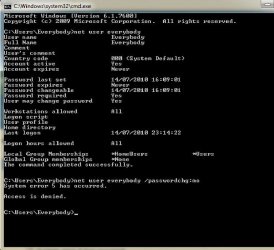
Hi and thanks. My user account is called "Everybody" so I have got the command prompt running
C:\Users\Everybody>net user everybody /passwordchg:no
System error 5 has occurred.
Access is denied.

Screenshot attached.

Any ideas, guys?

Thanks

ray
 

Attachments

  • cmd.jpg
    cmd.jpg
    39.7 KB · Views: 13

My Computer

Computer type
Laptop
Computer Manufacturer/Model Number
PC Specialist
OS
windows 7 64 bit
CPU
i5 4200M @ 2.50 Ghz
Motherboard
?
Memory
4Gb DDR2 SDRAM
Graphics Card(s)
GeForce GTX
Sound Card
onboard
Monitor(s) Displays
laptop
Screen Resolution
1920 x 1080
Hard Drives
500 GB
Keyboard
laptop
Mouse
Polaroid
Internet Speed
70 mb
Antivirus
AVG Free
Browser
Chrome
Did you run this in an elevated command prompt?
 

My Computer

Computer Manufacturer/Model Number
Home built
OS
Windows 7 Ultimate 32 bit
CPU
Intel(R) Pentium(R) 4 CPU 3.00GHz
Motherboard
ASUS P4P800-VM Motherboard Chipset: Intel 865G + ICH5
Memory
2.50 GB RAM
Graphics Card(s)
NVIDIA GeForce 7600 GS
Sound Card
SoundMax Integrated Digital Audio (Chip)
Monitor(s) Displays
ViewSonic VX 1962 wm
Screen Resolution
1680 X 1050
Hard Drives
Seagate Barracuda 7200.10 80 GB
ST380215A ATA Device 18.6 GB
Western Digital "My Book" external hard drive 750 GB
Cooling
Fan based
Keyboard
Microsoft Comfort Curve Keyboard 2000 v10 USB
Mouse
Logitec optic USB
Internet Speed
3.01 Mb/s download 0.64 Mb/s upload
Run Command Prompt as Administrator (right click it then click "Run as Administrator"
 

My Computer

Computer type
PC/Desktop
Computer Manufacturer/Model Number
Medion Erazer (note to self: insert model number) - with custom additions
OS
Windows 10 Pro x64
CPU
Intel Core i5 7400 @ 3.00GHz
Motherboard
OEM supllied with PC
Memory
8GB 2133Mhz DDR4 (OEM supplied)
Graphics Card(s)
Gygabyte Windforce GTX 1050Ti (Factory Overclocked)
Sound Card
Realtek
Monitor(s) Displays
Acer Al1980 + HKC
Screen Resolution
1360*768(HKC) / 1280*1024(Acer)
Hard Drives
1TB Toshiba
1TB WD Caviar Green
120GB Samsung Evo 840
PSU
OEM supplied (no power rating on case)
Case
OEM Supplied
Cooling
Stock
Keyboard
Logitech Wireless
Mouse
Logitect Wireless
Internet Speed
40Mb/s Down 10Mb/s Up
Antivirus
Defender
Browser
Firefox
Kids reset password

Thanks Martin and co for all your help. Finally the dream box is coming up
"Windows cannot change password.":D

Cheers

Ray

God bless
 

My Computer

Computer type
Laptop
Computer Manufacturer/Model Number
PC Specialist
OS
windows 7 64 bit
CPU
i5 4200M @ 2.50 Ghz
Motherboard
?
Memory
4Gb DDR2 SDRAM
Graphics Card(s)
GeForce GTX
Sound Card
onboard
Monitor(s) Displays
laptop
Screen Resolution
1920 x 1080
Hard Drives
500 GB
Keyboard
laptop
Mouse
Polaroid
Internet Speed
70 mb
Antivirus
AVG Free
Browser
Chrome
Not a problem :) Glad you got it working. Shame Windows made you jump through so many hoops to get there, when it is so simple for Ultimate.

Anyway glad we could help
 

My Computer

Computer type
PC/Desktop
Computer Manufacturer/Model Number
Medion Erazer (note to self: insert model number) - with custom additions
OS
Windows 10 Pro x64
CPU
Intel Core i5 7400 @ 3.00GHz
Motherboard
OEM supllied with PC
Memory
8GB 2133Mhz DDR4 (OEM supplied)
Graphics Card(s)
Gygabyte Windforce GTX 1050Ti (Factory Overclocked)
Sound Card
Realtek
Monitor(s) Displays
Acer Al1980 + HKC
Screen Resolution
1360*768(HKC) / 1280*1024(Acer)
Hard Drives
1TB Toshiba
1TB WD Caviar Green
120GB Samsung Evo 840
PSU
OEM supplied (no power rating on case)
Case
OEM Supplied
Cooling
Stock
Keyboard
Logitech Wireless
Mouse
Logitect Wireless
Internet Speed
40Mb/s Down 10Mb/s Up
Antivirus
Defender
Browser
Firefox
Congratulations. Thanks for letting us know the problem is solved. :)
 

My Computer

Computer Manufacturer/Model Number
Home built
OS
Windows 7 Ultimate 32 bit
CPU
Intel(R) Pentium(R) 4 CPU 3.00GHz
Motherboard
ASUS P4P800-VM Motherboard Chipset: Intel 865G + ICH5
Memory
2.50 GB RAM
Graphics Card(s)
NVIDIA GeForce 7600 GS
Sound Card
SoundMax Integrated Digital Audio (Chip)
Monitor(s) Displays
ViewSonic VX 1962 wm
Screen Resolution
1680 X 1050
Hard Drives
Seagate Barracuda 7200.10 80 GB
ST380215A ATA Device 18.6 GB
Western Digital "My Book" external hard drive 750 GB
Cooling
Fan based
Keyboard
Microsoft Comfort Curve Keyboard 2000 v10 USB
Mouse
Logitec optic USB
Internet Speed
3.01 Mb/s download 0.64 Mb/s upload
Thanks Martin and co for all your help. Finally the dream box is coming up
"Windows cannot change password.":D

Cheers

Ray

God bless

That's great news Ray. :)
 

My Computer

Computer type
PC/Desktop
Computer Manufacturer/Model Number
Self built custom
OS
64-bit Windows 11 Pro for Workstations
CPU
Intel i7-8700K OC'd to 5 GHz
Motherboard
ASUS ROG Maximus XI Formula Z390
Memory
64 GB (4x16GB) G.SKILL TridentZ RGB DDR4 3600 MHz
Graphics Card(s)
ASUS ROG-STRIX-GTX1080TI-O11G-GAMING
Sound Card
Integrated
Monitor(s) Displays
2 x Samsung Odyssey G7 27"
Screen Resolution
2560x1440
Hard Drives
1TB Samsung 990 PRO M.2,
4TB Samsung 990 PRO PRO M.2,
TerraMaster F8 SSD Plus NAS
PSU
Seasonic Prime Titanium 850W
Case
Thermaltake Core P3
Cooling
Corsair Hydro H115i
Keyboard
Logitech wireless K800
Mouse
Logitech MX Master 4
Internet Speed
2 Gb/s Download and 100 Mb/s Upload
Antivirus
Malwarebyte Anti-Malware Premium
Browser
Google Chrome
Other Info
Logitech Z625 speaker system,
Logitech BRIO 4K Pro webcam,
HP Color LaserJet Pro MFP M477fdn,
APC SMART-UPS RT 1000 XL - SURT1000XLI,
Galaxy S23 Plus phone
Solved!

Thanks again guys. Keep up the great work you are all doing. Where would we be without your help?

Cheers
Ray

God bless:D
 

My Computer

Computer type
Laptop
Computer Manufacturer/Model Number
PC Specialist
OS
windows 7 64 bit
CPU
i5 4200M @ 2.50 Ghz
Motherboard
?
Memory
4Gb DDR2 SDRAM
Graphics Card(s)
GeForce GTX
Sound Card
onboard
Monitor(s) Displays
laptop
Screen Resolution
1920 x 1080
Hard Drives
500 GB
Keyboard
laptop
Mouse
Polaroid
Internet Speed
70 mb
Antivirus
AVG Free
Browser
Chrome
Back
Top