

Hi there
I have a problem which has troubled me for a week now.
I work in an organization, and have got a laptop in because the time it took to logon, due to HP protect tools trying to run a biometric can everytime you logged on. However after alot of effort and time i managed to correct the problem.
BUT since it has been fixed the user logon icons now appear twice on the logon screen
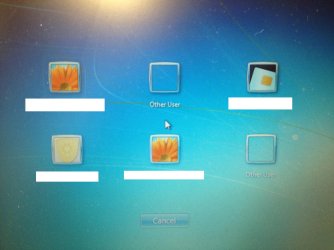
Now for the confusing part: as you can see in the picture there are 2 rows of icons. If you try logging in using a icon from the top row the hp protect tools runs the biometric scan...... but if you log in using one of the bottom row it doesnt and logs in perfectly fine.
All i would like to do is remove the top row of icons, so it is less confusing for the laptops user.
Thanks in advance
Toby
I have a problem which has troubled me for a week now.
I work in an organization, and have got a laptop in because the time it took to logon, due to HP protect tools trying to run a biometric can everytime you logged on. However after alot of effort and time i managed to correct the problem.
BUT since it has been fixed the user logon icons now appear twice on the logon screen
Now for the confusing part: as you can see in the picture there are 2 rows of icons. If you try logging in using a icon from the top row the hp protect tools runs the biometric scan...... but if you log in using one of the bottom row it doesnt and logs in perfectly fine.
All i would like to do is remove the top row of icons, so it is less confusing for the laptops user.
Thanks in advance
Toby
Last edited:
My Computer
- Computer type
- PC/Desktop
- Computer Manufacturer/Model Number
- Custom Build
- OS
- Windows 7 Home Premium 64Bit (Service Pack 1)
- CPU
- Intel i5 3570k @ 3.4Ghz - Cooler: Corsair H80i
- Motherboard
- Asus P8Z77-V
- Memory
- Crucial Ballistix Tactical 8gb 1866Mhz
- Graphics Card(s)
- XFX HD 7950 3Gb
- Sound Card
- On Board
- Monitor(s) Displays
- 2 X Acer G225HQVbd 21.5"
- Screen Resolution
- 1920 x 1080
- Hard Drives
- 1 x 128Gb Corsair Force
1 x 2Tb Seagate Barracuda
1 x 3Tb Toshiba External (Everything Else)
- PSU
- Corsair AX860 Fully Modular
- Case
- CM Haf XB
- Cooling
- 2 x Corsair AF120 2 x BeQuiet Silent wings 80mm
- Keyboard
- Saitek Cyborg V5
- Mouse
- Saitek Cyborg R.A.T 3
- Internet Speed
- 50 mb/s Dl 15mb/s UL
- Antivirus
- MSE
- Browser
- Firefox
- Other Info
- Samsung 22xDVD RW
160Gb Hitachi Portable
500Gb Seagate Portable

 so now back to square one