
User Profile Folder - Change User Account Folder Name

How to Change the User Folder Name of a User Profile in Windows 7


   Information
Normally, you could change your account name in User Accounts from the Control Panel (icons view), but that still would not change your accoun's user profile folder name in C:\Users.

This will show you how to change your account name and change the user profile folder name of any user account, including the built-in Administrator account (if enabled), in Windows 7 without losing anything in that user account. This will affect the user account's name for the C:\Users\(user-name) folder, Start Menu, Log on screen, Welcome screen, security permissions, etc......

You must be logged in as an administrator, and is a different account than the account you are changing the name of to be able to do this tutorial.

   Warning
Since editing a user profile and the registry can mess up Windows 7 if a mistake is made, it is highly advisable to create a restore point before doing this tutorial. This way if you make a mistake, you will be able to simply do a system restore to select and go back to this restore point to undo the mistake.


Here's How:

1. Log on to the user account (ex: Old Name) that you want to change the name of.

2. Save the current theme (ex: Old Name) for this user account. (see screenshot below)
NOTE: This is so that you will be able to change the theme back to this current theme in step 21 below later if you like.
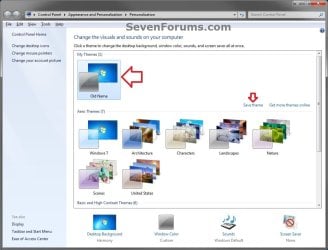
Save_Theme.jpg
3. If you have any files or folders in your C:\Users\(user-name) profile folder that are set to be shared, then you will need to temporarily set them to not be shared for now. After you finish renaming the user profile folder name, you could set them to be shared again in step 23 below.

4. Log off the user account that you want to change the name of. (see screenshot below)
NOTE: If you do not have another administrator account to use, then create a new administrator account first, then log off. When finished with the tutorial, you can delete this newly created account.
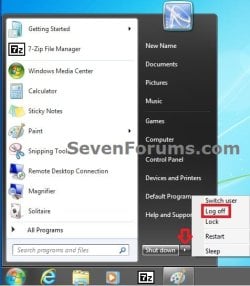
Log_Off.jpg
5. Log on to an administrator account that is not the user account that you want to change the name of.

6. Open Windows Explorer, navigate to C:\Users, open the Users folder, right click on the user profile folder (ex: Old Name) that you want to change the name of, and click on Rename. (see screenshot below)
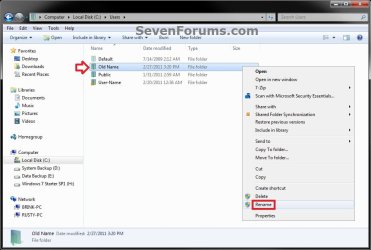
Step1.jpg
7. Type in the name (ex: New Name) that you want this user account's folder to have now and press Enter. Close the Windows Explorer window. (see screenshot below)
NOTE: If you are not able to rename the user folder for some reason (ex: in use), then boot into Safe Mode and try again.
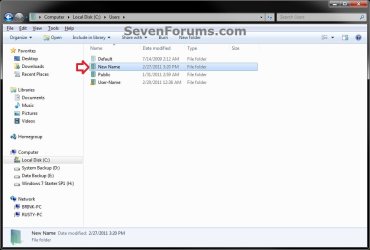
Step2.jpg
8. If prompted, click on Continue and Yes (UAC) to approve renaming the user folder.

9. Open the Start Menu, and type regedit in the search box and press Enter.

10. If prompted by UAC, then click on Yes.

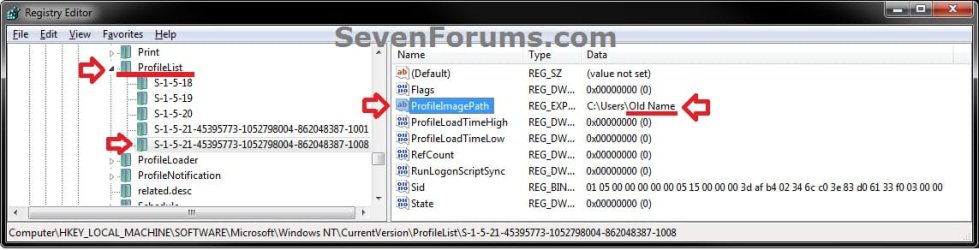
11. In regedit, navigate to the location below. (see screenshot below)

Code:
HKEY_LOCAL_MACHINE\SOFTWARE\Microsoft\Windows NT\CurrentVersion\ProfileList
Step3.jpg
12. In the left pane of regedit, expand Profilelist, and select each long number S-1-5-.... key one by one until your see the user account name (ex: Old Name) that you want to change the name of included in the Data column of ProfileImagePath in the right pane. (see screenshot above)

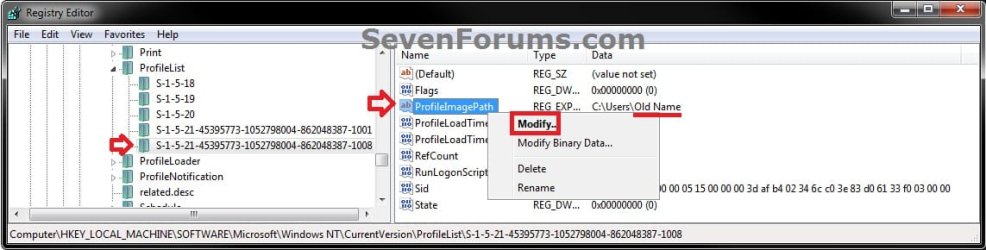
13. In the right pane of the long number S-1-5-.... key for the user account (ex: Old Name) that you want to change the name of, right click on ProfileImagePath, and click on Modify. (see screenshot below.
Step6.jpg
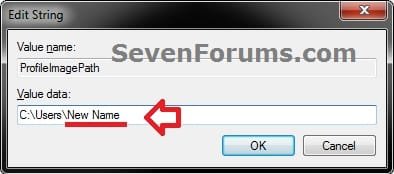
14. Change only the name (ex: Old Name) in the full path to the name (ex: New Name) that you want for the user account, and click on OK. (see screenshot below)
Step5.jpg
15. Close regedit.

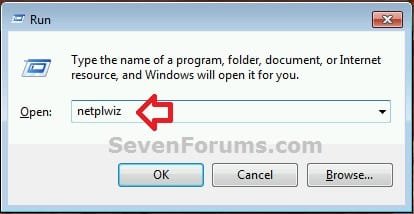
16. Press the Windows + R keys to open the Run dialog, type netplwiz, and click on OK. (see screenshot below)
netplwiz-1.jpg
17. Check the Users must enter a user name and password to use this computer box, select the user account's old name (ex: Old Name), and click on the Properties button. (see screenshot below)
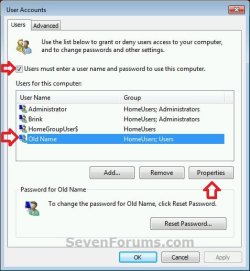
netplwiz-2.jpg
18. Change both the User name and Full name to the same new name (ex: New Name) from step 7 above, and click on OK. (see screenshot below)
netplwiz-3.jpg
19. Click on OK, and Restart the computer to apply. (see screenshot below step 17)

20. Log on to the now completely renamed user account (ex: New Name) from step 1 above.

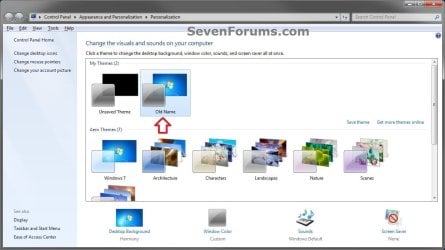
21. When you log on to the renamed user account (ex: New Name) for the first time, you will notice that the desktop background wallpaper is now solid black. This is normal. Change the theme from the black Unsaved Theme to the theme (ex: Old Name) that you saved in step 2 above to restore the saved theme. (see screenshot below)
Theme-2.jpg
22. If you had to create a new administrator account at step 4 above to do this tutorial with, then you can now delete this newly created account if you like. This is not the New Name account.

23. If you had to set files to not be shared in step 3 above, then you can set them to be shared again if you like.

24. If you had Windows set to automatically log on to a user account at startup, then you can set that while logged on to an administrator account again if you like.


That's it,
Shawn


Last edited:
  • Like
Reactions: Arc
Hello g48dd, and welcome to Seven Forums. :)

If you mean in netplwiz, then yeah that would be a good idea.
 

My Computer

Computer type
PC/Desktop
Computer Manufacturer/Model Number
Self built custom
OS
64-bit Windows 11 Pro for Workstations
CPU
Intel i7-8700K OC'd to 5 GHz
Motherboard
ASUS ROG Maximus XI Formula Z390
Memory
64 GB (4x16GB) G.SKILL TridentZ RGB DDR4 3600 MHz
Graphics Card(s)
ASUS ROG-STRIX-GTX1080TI-O11G-GAMING
Sound Card
Integrated
Monitor(s) Displays
2 x Samsung Odyssey G7 27"
Screen Resolution
2560x1440
Hard Drives
1TB Samsung 990 PRO M.2,
4TB Samsung 990 PRO PRO M.2,
TerraMaster F8 SSD Plus NAS
PSU
Seasonic Prime Titanium 850W
Case
Thermaltake Core P3
Cooling
Corsair Hydro H115i
Keyboard
Logitech wireless K800
Mouse
Logitech MX Master 4
Internet Speed
2 Gb/s Download and 100 Mb/s Upload
Antivirus
Malwarebyte Anti-Malware Premium
Browser
Google Chrome
Other Info
Logitech Z625 speaker system,
Logitech BRIO 4K Pro webcam,
HP Color LaserJet Pro MFP M477fdn,
APC SMART-UPS RT 1000 XL - SURT1000XLI,
Galaxy S23 Plus phone
i can not change name folder ether as normal or safe mode?What i can do?
 

My Computer

Computer type
PC/Desktop
OS
Windows 7 Ultimate x64
Hello Sakios, and welcome to Seven Forums. :)

The best way to change the name of a user profile folder is to create a new account with the name you want to use, and use that account instead.
 

My Computer

Computer type
PC/Desktop
Computer Manufacturer/Model Number
Self built custom
OS
64-bit Windows 11 Pro for Workstations
CPU
Intel i7-8700K OC'd to 5 GHz
Motherboard
ASUS ROG Maximus XI Formula Z390
Memory
64 GB (4x16GB) G.SKILL TridentZ RGB DDR4 3600 MHz
Graphics Card(s)
ASUS ROG-STRIX-GTX1080TI-O11G-GAMING
Sound Card
Integrated
Monitor(s) Displays
2 x Samsung Odyssey G7 27"
Screen Resolution
2560x1440
Hard Drives
1TB Samsung 990 PRO M.2,
4TB Samsung 990 PRO PRO M.2,
TerraMaster F8 SSD Plus NAS
PSU
Seasonic Prime Titanium 850W
Case
Thermaltake Core P3
Cooling
Corsair Hydro H115i
Keyboard
Logitech wireless K800
Mouse
Logitech MX Master 4
Internet Speed
2 Gb/s Download and 100 Mb/s Upload
Antivirus
Malwarebyte Anti-Malware Premium
Browser
Google Chrome
Other Info
Logitech Z625 speaker system,
Logitech BRIO 4K Pro webcam,
HP Color LaserJet Pro MFP M477fdn,
APC SMART-UPS RT 1000 XL - SURT1000XLI,
Galaxy S23 Plus phone
Hello Roger, and welcome to Seven Forums.

Yeah, you will need to temporarily set any files/folders in the user profile folder that you have set to share to not be shared for now. After renaming the user profile folder name, you could set them to be shared again.

I am preparing a Windows 7 computer for disposal and have set the folders and files to share with `Nobody'. I was still prevented from renaming the User's personal profile folder. Most of the folders are now empty with the deletion of personal files. The `videos' folder `. . . is notaccessilble. Access is denied.' I have turned off `File and printer sharing' for no progress.

Any helpful suggestion on how to proceed would be appreciated.

Please note that the age of this thread indicated that I perhaps should have started a New Topic. If I have transgressed protocol my sincere apologies in advance.
 

My Computer

Computer type
PC/Desktop
Computer Manufacturer/Model Number
Medion Akoya P5204 D (MD7659)pl
OS
Windows 7 Home Premium SP1
Monitor(s) Displays
Asus
Cooling
As fitted
Keyboard
Medion GB KB-0837
Mouse
MSU0718T
Internet Speed
24Mbps
Antivirus
F-Prot 6 for Windows
Browser
Firefox 21; IE10
Hello Malcolm, :)

Since you're disposing of the PC, you could yank the hard drive out of the PC first. This way you could use the hard drive in another PC as a data or backup drive after formatting it.
 

My Computer

Computer type
PC/Desktop
Computer Manufacturer/Model Number
Self built custom
OS
64-bit Windows 11 Pro for Workstations
CPU
Intel i7-8700K OC'd to 5 GHz
Motherboard
ASUS ROG Maximus XI Formula Z390
Memory
64 GB (4x16GB) G.SKILL TridentZ RGB DDR4 3600 MHz
Graphics Card(s)
ASUS ROG-STRIX-GTX1080TI-O11G-GAMING
Sound Card
Integrated
Monitor(s) Displays
2 x Samsung Odyssey G7 27"
Screen Resolution
2560x1440
Hard Drives
1TB Samsung 990 PRO M.2,
4TB Samsung 990 PRO PRO M.2,
TerraMaster F8 SSD Plus NAS
PSU
Seasonic Prime Titanium 850W
Case
Thermaltake Core P3
Cooling
Corsair Hydro H115i
Keyboard
Logitech wireless K800
Mouse
Logitech MX Master 4
Internet Speed
2 Gb/s Download and 100 Mb/s Upload
Antivirus
Malwarebyte Anti-Malware Premium
Browser
Google Chrome
Other Info
Logitech Z625 speaker system,
Logitech BRIO 4K Pro webcam,
HP Color LaserJet Pro MFP M477fdn,
APC SMART-UPS RT 1000 XL - SURT1000XLI,
Galaxy S23 Plus phone
Enable the Administrator login, create a new User then delete your account. Make sure to have it delete the user's files. That won't get rid of files and folders outside of the user folder.
 

My Computer

Computer type
Laptop
Computer Manufacturer/Model Number
Dell Inspiron E1505
OS
Win7 Ultimate 64bit
CPU
T5600
Memory
4gig
Hard Drives
500 gig
Thank You

This article really help about fix corrupted account that has been reinstalling for my windows x64 that has been used for now to x32 bit thats why i was integrated all the graphics to work along for x32 for clocking and also all the ram speed memory enhanced to get performance with Intel Integrated chipset but also i there was along within build in in chip 10 for OS to has support connection with my home provider and BIOS without reooting only basic replaced drivers ;) i assume now that build in 10 OS works too in system with Intel Technology.


with regards, AWN7F
 

My Computer

Computer type
PC/Desktop
Computer Manufacturer/Model Number
ACER / MS-7512 MICRO-STAR INTERNATIONAL.CO.LTD
OS
Microsoft Windows 7 Ultimate OS Version 6.1.7601 Service Pac
CPU
Intel(R) Core(TM)2 Quad CPU [email protected]
Motherboard
x64 Family 6 Model 15 Stepping 11 P45 Platinum (MS-7512)
Memory
Total Memory 3.0 GB
Graphics Card(s)
AMD Radeon HD 6570
Sound Card
AMD High Definition Audio Device
Monitor(s) Displays
SM215 / AMD Radeon HD6570
Screen Resolution
1366 x 768 x 75 hertz
Hard Drives
Name ST3250310AS ATA Device
Media Type Fixed hard disk media
Capability 232.9 GB
Interface Type IDE
Partitions 3
Total Cylinders
Keyboard
Standard PS2/ Keyboard
Mouse
Microsoft PS/2 Mouse
Internet Speed
100Mbps
Antivirus
360 Total Security
Browser
Firefox Developer Edition
This article really help about fix corrupted account that has been reinstalling for my windows x64 that has been used for now to x32 bit thats why i was integrated all the graphics to work along for x32 for clocking and also all the ram speed memory enhanced to get performance with Intel Integrated chipset but also i there was along within build in in chip 10 for OS to has support connection with my home provider and BIOS without reooting only basic replaced drivers ;) i assume now that build in 10 OS works too in system with Intel Technology.


with regards, AWN7F

I'm happy to hear it helped AWN7F, and welcome to Seven Forums. :-)

The steps are basically the same in Windows 10 as well, but I do have an updated tutorial below specifically for Windows 10.

Change Name of User Profile Folder in Windows 10 | Tutorials
 

My Computer

Computer type
PC/Desktop
Computer Manufacturer/Model Number
Self built custom
OS
64-bit Windows 11 Pro for Workstations
CPU
Intel i7-8700K OC'd to 5 GHz
Motherboard
ASUS ROG Maximus XI Formula Z390
Memory
64 GB (4x16GB) G.SKILL TridentZ RGB DDR4 3600 MHz
Graphics Card(s)
ASUS ROG-STRIX-GTX1080TI-O11G-GAMING
Sound Card
Integrated
Monitor(s) Displays
2 x Samsung Odyssey G7 27"
Screen Resolution
2560x1440
Hard Drives
1TB Samsung 990 PRO M.2,
4TB Samsung 990 PRO PRO M.2,
TerraMaster F8 SSD Plus NAS
PSU
Seasonic Prime Titanium 850W
Case
Thermaltake Core P3
Cooling
Corsair Hydro H115i
Keyboard
Logitech wireless K800
Mouse
Logitech MX Master 4
Internet Speed
2 Gb/s Download and 100 Mb/s Upload
Antivirus
Malwarebyte Anti-Malware Premium
Browser
Google Chrome
Other Info
Logitech Z625 speaker system,
Logitech BRIO 4K Pro webcam,
HP Color LaserJet Pro MFP M477fdn,
APC SMART-UPS RT 1000 XL - SURT1000XLI,
Galaxy S23 Plus phone
Back
Top